Fundamentals of Image, Audio, and Video Processing Using MATLAB®
eBook - ePub

Fundamentals of Image, Audio, and Video Processing Using MATLAB®

With Applications to Pattern Recognition

  1. 388 pages
  2. English
  3. ePUB (mobile friendly)
  4. Available on iOS & Android
eBook - ePub

Fundamentals of Image, Audio, and Video Processing Using MATLAB®

With Applications to Pattern Recognition

About this book

Fundamentals of Image, Audio, and Video Processing Using MATLAB® introduces the concepts and principles of media processing and its applications in pattern recognition by adopting a hands-on approach using program implementations. The book covers the tools and techniques for reading, modifying, and writing image, audio, and video files using the data analysis and visualization tool MATLAB®.

Key Features:

  • Covers fundamental concepts of image, audio, and video processing
  • Demonstrates the use of MATLAB® on solving problems on media processing
  • Discusses important features of Image Processing Toolbox, Audio System Toolbox, and Computer Vision Toolbox
  • MATLAB® codes are provided as answers to specific problems
  • Illustrates the use of Simulink for audio and video processing
  • Handles processing techniques in both the Spatio-Temporal domain and Frequency domain

This is a perfect companion for graduate and post-graduate students studying courses on image processing, speech and language processing, signal processing, video object detection and tracking, and related multimedia technologies, with a focus on practical implementations using programming constructs and skill developments. It will also appeal to researchers in the field of pattern recognition, computer vision and content-based retrieval, and for students of MATLAB® courses dealing with media processing, statistical analysis, and data visualization.

Dr. Ranjan Parekh, PhD (Engineering), is Professor at the School of Education Technology, Jadavpur University, Calcutta, India, and is involved with teaching subjects related to Graphics and Multimedia at the post-graduate level. His research interest includes multimedia information processing, pattern recognition, and computer vision.
Frequently asked questions

Yes, you can cancel anytime from the Subscription tab in your account settings on the Perlego website. Your subscription will stay active until the end of your current billing period. Learn how to cancel your subscription.
No, books cannot be downloaded as external files, such as PDFs, for use outside of Perlego. However, you can download books within the Perlego app for offline reading on mobile or tablet. Learn more here.
Perlego offers two plans: Essential and Complete
  • Essential is ideal for learners and professionals who enjoy exploring a wide range of subjects. Access the Essential Library with 800,000+ trusted titles and best-sellers across business, personal growth, and the humanities. Includes unlimited reading time and Standard Read Aloud voice.
  • Complete: Perfect for advanced learners and researchers needing full, unrestricted access. Unlock 1.4M+ books across hundreds of subjects, including academic and specialized titles. The Complete Plan also includes advanced features like Premium Read Aloud and Research Assistant.
Both plans are available with monthly, semester, or annual billing cycles.
We are an online textbook subscription service, where you can get access to an entire online library for less than the price of a single book per month. With over 1 million books across 1000+ topics, we’ve got you covered! Learn more here.
Look out for the read-aloud symbol on your next book to see if you can listen to it. The read-aloud tool reads text aloud for you, highlighting the text as it is being read. You can pause it, speed it up and slow it down. Learn more here.
Yes! You can use the Perlego app on both iOS or Android devices to read anytime, anywhere — even offline. Perfect for commutes or when you’re on the go.
Please note we cannot support devices running on iOS 13 and Android 7 or earlier. Learn more about using the app.
Yes, you can access Fundamentals of Image, Audio, and Video Processing Using MATLAB® by Ranjan Parekh in PDF and/or ePUB format, as well as other popular books in Mathematics & Computer Graphics. We have over one million books available in our catalogue for you to explore.

Information

1

Image Processing

1.1 Introduction

An image is a snapshot of the real world taken by a camera. The real world being analog (i.e. continuous) in nature the photograph by a conventional camera is also analog. The process of converting it to digital (i.e. discrete) form is called digitization. The process of digitization is usually defined with respect to electrical signals, which are also analog in property. The digitization of any electrical signal consists of three steps: sampling, quantization, and code-word generation. Sampling consists of examining the value of the signal at equal intervals of time or space and storing these values only while discarding the rest of the values, which essentially discretizes the time or space axis of the signal. Quantization involves specifying how many levels or values of the discrete signal amplitude to consider for further processing while discarding the remaining values, which essentially discretizes the amplitude axis of the signal. Code-word generation involves assigning binary values called code-words to each of the retained levels occurring at the specific sampling points considered. The number of sampling points per unit time or length is called the sampling rate, while the number of amplitude levels retained is called quantization levels. The total number of quantization levels determines the number of bits in the binary code-word that would be used to represent them, which is called the bit-depth of the digital signal. An n-bit code-word can represent a total of 2n levels. For example, a 3-bit code-word can represent a total of eight values: 000, 001, 010, 011, 100, 101, 110, 111. Each of the discrete values making up the digital signal is called a sample.
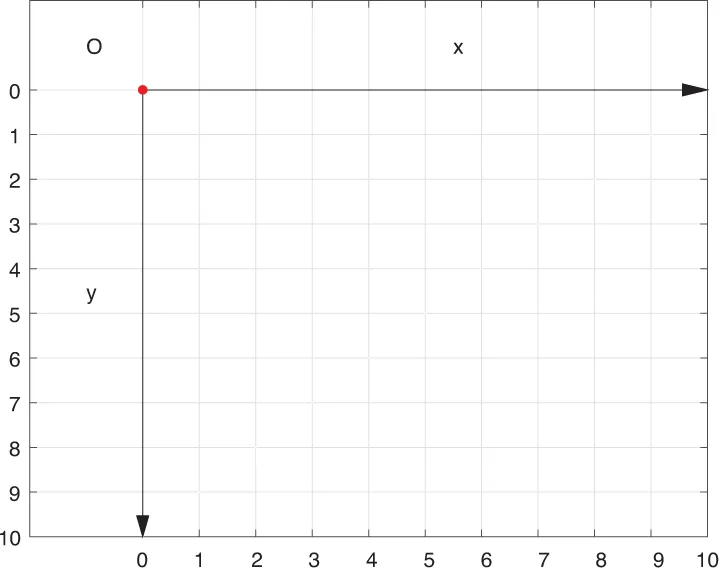
A digital image is a two-dimensional signal where the samples are spread across the width and height of the image. These samples are called pixels, short for picture elements. Pixels are the structural units of a digital image similar to molecules making up real-world objects. Pixels are visualized as rectangular units arranged side by side over the area of the image. Each pixel is identified with two parameters: its location and value. The location of a pixel is measured with respect to a coordinate system. A 2-D Cartesian coordinate system, named after the French mathematician Rene Descartes, is used to measure the location of a point with respect to a reference point known as the origin. The location is represented as a pair of offsets measured along two orthogonal directions, the x-axis or the horizontal direction and the y-axis or the vertical direction. The distances from the two axes, known as the primary axes, are written as an ordered pair of numbers within parenthesis as (x,y) coordinates. The numbers denote how many pixels along the horizontal and vertical directions the current pixel is offset from the origin O and hence they are integers as number of pixels cannot be fractions. For image processing applications, the origin O is usually located at the top-left corner, the x-values increase from left to right, and y-values increase from top to bottom (Figure 1.1). Obviously, the origin itself denoted as O has coordinates (0,0).
images
FIGURE 1.1
Image as collection of pixels.
The value of a pixel represents the intensity or color of the image at that point. Depending on the value, images can be categorized into three broad types: binary, grayscale, and color. A binary image is a digital image, where the pixel values are represented as binary digits, i.e. either 0 or 1. Such images typically contain two types of regions, those containing value 0 appear as black and those containing value 1 appear as white. Since a single bit can be used to denote the pixel values, such images are also called 1-bit images. The second category is called grayscale image, where the information is represented using various shades of gray. Although any number of gray shades or levels is possible, the standard number used is 256 because the typical human eye can discern so many shades and this can be represented using 8-bit binary numbers. Star...

Table of contents

  1. Cover
  2. Half Title
  3. Title Page
  4. Copyright Page
  5. Table of Contents
  6. Preface
  7. Author
  8. Abbreviations
  9. 1 Image Processing
  10. 2 Audio Processing
  11. 3 Video Processing
  12. 4 Pattern Recognition
  13. Function Summary
  14. References
  15. Index