Research Software Engineering with Python
Building software that makes research possible
- 532 pages
- English
- ePUB (mobile friendly)
- Available on iOS & Android
Research Software Engineering with Python
Building software that makes research possible
About this book
Writing and running software is now as much a part of science as telescopes and test tubes, but most researchers are never taught how to do either well. As a result, it takes them longer to accomplish simple tasks than it should, and it is harder for them to share their work with others than it needs to be.
This book introduces the concepts, tools, and skills that researchers need to get more done in less time and with less pain. Based on the practical experiences of its authors, who collectively have spent several decades teaching software skills to scientists, it covers everything graduate-level researchers need to automate their workflows, collaborate with colleagues, ensure that their results are trustworthy, and publish what they have built so that others can build on it. The book assumes only a basic knowledge of Python as a starting point, and shows readers how it, the Unix shell, Git, Make, and related tools can give them more time to focus on the research they actually want to do.
Research Software Engineering with Python can be used as the main text in a one-semester course or for self-guided study. A running example shows how to organize a small research project step by step; over a hundred exercises give readers a chance to practice these skills themselves, while a glossary defining over two hundred terms will help readers find their way through the terminology. All of the material can be re-used under a Creative Commons license, and all royalties from sales of the book will be donated to The Carpentries, an organization that teaches foundational coding and data science skills to researchers worldwide.
Frequently asked questions
- Essential is ideal for learners and professionals who enjoy exploring a wide range of subjects. Access the Essential Library with 800,000+ trusted titles and best-sellers across business, personal growth, and the humanities. Includes unlimited reading time and Standard Read Aloud voice.
- Complete: Perfect for advanced learners and researchers needing full, unrestricted access. Unlock 1.4M+ books across hundreds of subjects, including academic and specialized titles. The Complete Plan also includes advanced features like Premium Read Aloud and Research Assistant.
Please note we cannot support devices running on iOS 13 and Android 7 or earlier. Learn more about using the app.
Information
1
Getting Started
1.1 Project Structure

1.1.1 Standard information
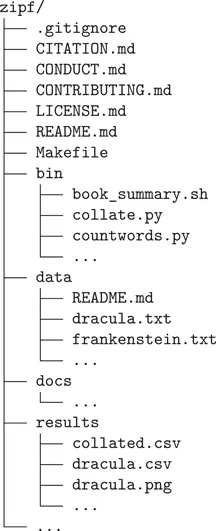
- README includes basic information on our project. We’ll create it in Chapter 7, and extend it in Chapter 14.
- LICENSE is the project’s license. We’ll add it in Section 8.4.
- CONTRIBUTING explains how to contribute to the project. We’ll add it in Section 8.11.
- CONDUCT is the project’s Code of Conduct. We’ll add it in Section 8.3.
- CITATION explains how to cite the software. We’ll add it in Section 14.7.
1.1.2 Organizing project content
- Runnable programs go in bin/ (an old Unix abbreviation for “binary,” meaning “not text”). This will include both shell scripts, e.g., book_summary.sh developed in Chapter 4, and Python programs, e.g., countwords.py, developed in Chapter 5.
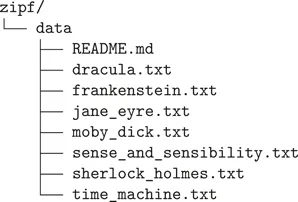
- Raw data goes in data/ and is never modified after being stored. You’ll set up this directory and its contents in Section 1.2.
- Results are put in results/. This includes cleaned-up data, figures, and everything else created using what’s in bin and data. In this project, we’ll describe exactly how bin and data are used with Makefile created in Chapter 9.
- Finally, documentation and manuscripts go in docs/. In this project, docs will contain automatically generated documentation for the Python package, created in Section 14.6.2.
1.2 Downloading the Data


1.3 Installing the Software
- A Bash shell
- Git version control
- A text editor
- Python 32 (v...
Table of contents
- Cover
- Title Page
- Copyright Page
- Dedication
- Contents
- Welcome
- 1 Getting Started
- 2 The Basics of the Unix Shell
- 3 Building Tools with the Unix Shell
- 4 Going Further with the Unix Shell
- 5 Building Command-Line Tools with Python
- 6 Using Git at the Command Line
- 7 Going Further with Git
- 8 Working in Teams
- 9 Automating Analyses with Make
- 10 Configuring Programs
- 11 Testing Software
- 12 Handling Errors
- 13 Tracking Provenance
- 14 Creating Packages with Python
- 15 Finale
- Appendix
- Index