The days of wading through thousands of function modules are over. Whether you need more information about a particular function module or just want to see what's out there, you've come to the right place. This book is packed with only the most-used function modules in the SAP system. Make your coding easier and view logic in a whole new way! 1. Most-Used Function Modules Find only what you need. After exhaustive research of where-used lists and Google hits, thousands of function modules have been narrowed down to hundreds of the most important and commonly used. 2. Topic Groupings Don't know what you're looking for? No problem. Function modules are grouped into different parts, based on usage and topics like authorizations, IDocs, and BAPIs. 3. User-Friendly Layout Information at a glance: Each function module contains a description, example, and list of parameters and their description for optimal use. 4. Extensive Index Looking for something specific? Search the index not only by function module name, but also by key word, functionality, related SAP program, and more. 5. Transaction Codes Make connections. Search for common transaction codes in the index to link your functional knowledge with insider programming know-how.
Highlights include:
Basis systems
ABAP Data Dictionary
Data conversion
Transport Management System
ABAP List Viewer
Form printing
ALE, EDI, and IDocs
Authorizations
Spools and jobs
BAPIs
Application logs
Microsoft Office
Messages and popups
Frequently asked questions
Yes, you can cancel anytime from the Subscription tab in your account settings on the Perlego website. Your subscription will stay active until the end of your current billing period. Learn how to cancel your subscription.
No, books cannot be downloaded as external files, such as PDFs, for use outside of Perlego. However, you can download books within the Perlego app for offline reading on mobile or tablet. Learn more here.
Perlego offers two plans: Essential and Complete
Essential is ideal for learners and professionals who enjoy exploring a wide range of subjects. Access the Essential Library with 800,000+ trusted titles and best-sellers across business, personal growth, and the humanities. Includes unlimited reading time and Standard Read Aloud voice.
Complete: Perfect for advanced learners and researchers needing full, unrestricted access. Unlock 1.4M+ books across hundreds of subjects, including academic and specialized titles. The Complete Plan also includes advanced features like Premium Read Aloud and Research Assistant.
Both plans are available with monthly, semester, or annual billing cycles.
We are an online textbook subscription service, where you can get access to an entire online library for less than the price of a single book per month. With over 1 million books across 1000+ topics, we’ve got you covered! Learn more here.
Look out for the read-aloud symbol on your next book to see if you can listen to it. The read-aloud tool reads text aloud for you, highlighting the text as it is being read. You can pause it, speed it up and slow it down. Learn more here.
Yes! You can use the Perlego app on both iOS or Android devices to read anytime, anywhere — even offline. Perfect for commutes or when you’re on the go. Please note we cannot support devices running on iOS 13 and Android 7 or earlier. Learn more about using the app.
Yes, you can access Function Modules in ABAP by Tanmaya Gupta in PDF and/or ePUB format, as well as other popular books in Computer Science & Computer Science General. We have over one million books available in our catalogue for you to explore.
In this part of the book, we refer to system as the SAP ERP or SAP NetWeaver system. This part deals with more of the Basis-related operations that can include calling a new transaction, calling SAP NetWeaver from legacy systems such as Java or Visual Basic, or from an FTP server or a remote location.
Function modules (FMs) are important when working with the system because it helps get the system information—such as the IP address, user authorizations, user login and logoff—by calling a transaction in another window without interrupting the execution of the current window. In this part, we’ve included the important FMs that are commonly used and interact in some way with SAP systems and Basis operations.
1 ABAP4_CALL_TRANSACTION
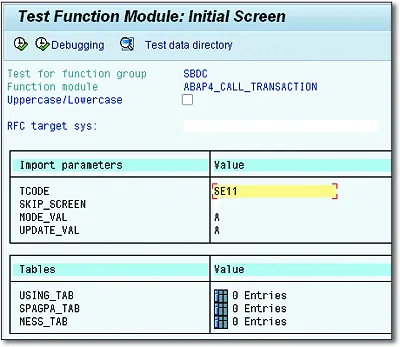
This FM is used to call a transaction code in the same task or a separate task (i.e., in the same session or window). If you want to call the transaction in a new task, you need to call the FM with Starting New Task. This is an RFC-enabled FM, so it can be called from non-SAP systems as well. Authorization rules of the calling transaction apply.
Example: You have an ALV output with the list of materials. Clicking on the material, you want to open the details of that material (i.e., opening Transaction MM03) in a separate window.
Import
TCODE
Specifies the transaction code you want to call. This is a mandatory parameter. Type: SY-TCODE.
SKIP_SCREEN
If this parameter is set as X, it skips the initial screen of the transaction. The default value is
. Type: SY-FTYPE.
MODE_VAL
Defines how the transaction should be displayed. It can have the following values:
A(default): Display the screen.
E: Display only if an error occurs.
N: Do not display, for background mode.
Type: SY-FTYPE.
UPDATE_VAL
Defines how the update will occur. It can have the following values.
A: Asynchronous update.
S: Synchronous update.
L: Local updates.
Type: SY-FTYPE.
Export
SUBRC
This is a SY-SUBRC check. It returns the value as 0 if the FM is executed successfully. Type: SY-SUBRC.
Table
USING_TAB
Contains the BDC data for the transaction; that is, if some BDC recording is sent to call the transaction. Type: BDCDATA.
SPAGPA_TAB
Holds SPA\GPA, that is, SAP memory parameters to fill input fields. Type: RFC_SPAGPA.
MESS_TAB
Contains any error messages from the transaction. Type: BDCMSGCOLL.
Exceptions
CALL_TRANSACTION_DENIED
No authorization to call the transaction.
TCODE_INVALID
Transaction code entered is invalid.
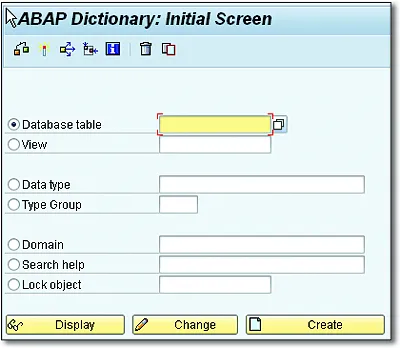
Calling Transaction SE11 from Function Module
Output of the Function...
Table of contents
Notes on Usage and on the Screen Presentation
Dear Reader
Table Of Contents
Acknowledgments
Introduction
Part I: System
Part II: ABAP Data Dictionary
Part III: Conversions
Part IV: BDC, ALV, Report, and Screens
Part V: Scripts and Forms
Part VI: Archive, Number Ranges, Strings, and Text
Part VII: Frontend Services and Microsoft Office Integration