Clear and comprehensive business requirements lead to a better designed business intelligence solution. In this chapter, we present a basic sales process scenario for an example company, which will then be referred to in subsequent chapters.
1The Business Scenario: ABCD Corp.
A good business intelligence (BI) solution improves the efficiency and transparency of operations, offers better control over the outcomes of decisions, and allows better exploration of all the options that are at a company’s disposal. Business managers always prefer making informed decisions, which is a process that BI solutions enable. Further, it can also assist in the automation of managerial processes.
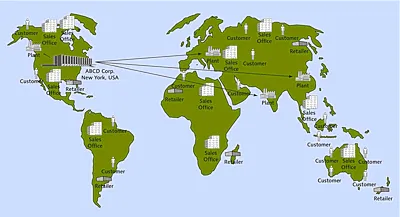
Sales analytics is the process of making decisions for sales growth based on quantitative information, which forms one of the most common requirements for BI solutions across different companies worldwide. For this reason, we’ve chosen to build a simple sales analytics example for a typical company, called ABCD Corp. ABCD Corp. is a company located in North America with headquarters in New York City. It sells different electronics and electrical appliances to customers spread all over the world (Figure 1.1).
In the process of building sales analytics for ABCD Corp., we explain all aspects of designing a BI solution based on SAP Business Warehouse (SAP BW) 7.4. This chapter first describes ABCD Corp. and then describes the entities involved in the typical selling processes. Each entity and the process will be referred to throughout the book as we build different components of an analytics solution using SAP BW 7.4.
Note
Data files for the ABCD Corp. example scenario are available on the book’s website at www.sap-press.com/3733.
Figure 1.1Overview of ABCD Corp.
1.1Marketing Network
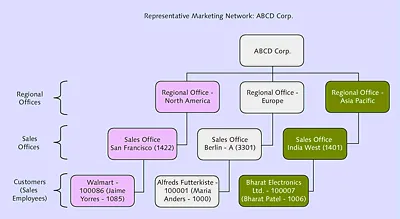
ABCD Corp. has more than 90 worldwide customers, which are either retail chains or independent stores (see Table A.3 in Appendix A). The company has three main markets—North America, Europe, and Asia-Pacific—and each market has one or more regional marketing offices. Within the United States, the customers are grouped by states; outside the United States, they are grouped under their respective country or city (e.g., London). ABCD Corp. has sales offices in most cities where customers are located, and the sales offices report to their corresponding regional marketing office. Figure 1.2 shows a hierarchy of the marketing network.
Each sales office has one or more salespeople, and a specific salesperson services each customer to maintain regular contact with his customers mainly for the purpose of taking sales orders from them. Whenever an order is placed, a sales transaction is created in the SAP system located at the sales office. The salesperson then contacts his sales office with the details of the order. If the regular sales office is closed, the salesman contacts a sales office in a nearby country to ensure on-time delivery to the customer. Salespeople are rotated from customer to customer after a certain period of time or after the achievement of set target sales.
Figure 1.2Overview of ABCD Corp. Marketing Network
ABCD Corp. has more than 30 products, which are logically grouped into three portfolios: consumer electronics, domestic appliances, and consumer lifestyle (see Table A.5 in Appendix A). The company has four manufacturing plants to supply these products (see Table A.2).
1.2The Sales and Billing Process
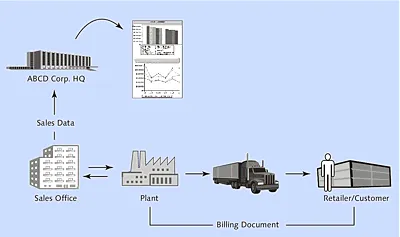
ABCD Corp. sells its products through two different selling channels: either directly or through the Internet. Product sales happen via a billing document; a typical flow of information generated by the creation of a billing document is illustrated in Figure 1.3.
Each billing document is represented by a unique number. Within the billing document, one or more products is listed, each of which is identified with an item number. In addition to the item numbers, the billing document also lists the quantity sold and a selling price for each product. In most cases, ABCD Corp. receives payment for products sold when they are delivered to the customer; in some cases, larger customers are permitted to make delayed payments.
Figure 1.3Overview of ABCD Corp. Selling Process
The terms of payment and type of billing document for transactions differ, based on the method by which the transaction has taken place. For example, a specific type of billing document is generated if the customer makes the payment using a credit card or any other mode of delayed payment, and a different type of billing document is generated for immediate payments (see Table A.9 in Appendix A).
If the product is sold to a customer outside the United States, the corresponding billing document is identified as an export; within the United States, it’s treated as a domestic sale (see Table A.10).
Whenever the value of a record in the billing document is more than $10,000, the transaction is identified as a high-value transaction, and the billing document is marked with an indicator to differentiate it from those with lower transaction values.
Similarly, if the cost of any item in the bill is listed without a value (i.e., is a free item), the system is designed to identify such a record separately (see Table A.11 in Appendix A). Usually, most items require payment; however, for special occasions (the holiday season, clearing sales, etc.), some low-value products (e.g., cords or batteries) are provided free with a bigger purchase. Such items are listed with an item category of DC, whereas normal items are identified with an item category of NOR. The cost of items under item category DC is recorded on the billing document, but taxes or other costs aren’t recorded.
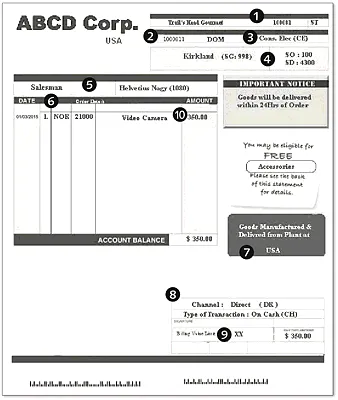
Figure 1.4 shows a sample billing document for ABCD Corp.
Figure 1.4ABCD Corp. Sample Billing Document
The sample billing document shows how the business entities and processes are presented as shown in Figure 1.4 and listed here: