Part I
Integrated Planning
Integrated planning begins during the
budget preparation for future fiscal periods or years. Sales mangers
enter planning data into either Profitability Analysis (CO-PA),
sales and operations planning (S&OP), or some other planning
component or system. This initial sales planning data is transferred
seamlessly to other components such as long-term planning, material
requirements planning (MRP), and cost center planning, where detailed
procurement and operations plans are derived from the sales plan.
Planning information is generated from
projected sales plans over the next one to three years or longer.
Sales information entered into CO-PA can provide a basis for planning
future purchasing and production requirements in other components.
Standard cost estimates are created from the detailed production
plan information. They can then be returned to CO-PA to allow margin
analysis based on budget sales and cost information provided by
standard cost estimates.
After integrated planning is completed,
we’ll examine the Product Cost Planning process in Part II, followed
by the Cost Object Controlling process in Part III, and finally
the information system and trends in Part IV.
Let’s get started with Part I by looking
at the integrated planning process.
Integrated planning allows you to plan production and procurement costs based on planned sales quantities.
1Integrated Planning
Integrated planning allows you to take advantage of a fully integrated system such as an SAP system. You can enter a sales plan to determine a production plan and manufacturing costs. Together with cost center plan costs, this allows you to calculate planned activity rates and standard cost estimates, which plan the cost of manufacture for each product. This process, also known as driver-based planning, allows you to plan costs based on sales quantities, which is a best practice in the manufacturing industry.
One of the main advantages of using the integrated planning functionality is that you can compare planned costs with actual costs, and you can determine the reason for the difference between them, which forms the basis for variance analysis. You can then use this as an iterative process to improve your period-by-period and year-by-year sales and production planning.
Many alternatives for entering and processing plan data are available in SAP systems. In this chapter, we’ll examine entering sales data in Profitability Analysis (CO-PA) and then follow a typical flow from sales and operations planning (S&OP) to long-term planning to Cost Center Accounting (CCA). A sales manager typically enters a sales plan into either CO-PA or S&OP and analyzes multiple sales scenarios. You can then convert a preferred sales plan into a production plan, which you can then transfer to long-term planning.
Long-term planning then accesses the bill of materials (BOM) and routingto determine component procurement and cost center capacity requirements. A BOM is a hierarchical structure of components and subassemblies, whereas a routing lists operations and standard values required to manufacture a finished product.
Activity-scheduled quantities are then transferred from long-term planning to CCA, where, together with cost center planning data, activity and overhead rates are calculated. We'll start initial planning by entering a sales plan in CO-PA.
1.1Profitability Analysis
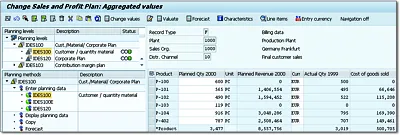
Sales managers can enter the quantity of finished products they expect to sell in future budget periods with Transaction KEPM or by following the menu path Accounting • Controlling • Profitability Analysis • Planning • Edit Planning Data. Enter the operating concern and press (Enter) to display the Planning levels section of the screen shown in Figure 1.1.
Figure 1.1Planning Package for CO-PA Planning
Expand Planning levels IDES100 and double-click planning package IDES100 to display Planning methods in the lower left of the screen. Expand the Enter planning data node and then double-click IDES100 to enter planning data on the right side of the screen.
After you have entered sales planning data in CO-PA, you can do one of the following:
-
Transfer quantities to S&OP (or other components) by following the menu path Accounting • Controlling • Profitability Analysis • Planning • Integrated Planning.
-
Create a planning scenario with Transaction MS31 and access the CO-PA data directly with long-term planning, which we'll discuss further in Section 1.4.
We'll follow an example of transferring CO-PA data to S&OP so you can see this functionality.
1.2Sales and Operations Planning
You can enter a sales plan for future periods and fiscal years directly into the standard S&OP component, or you can transfer the data from other components such as CO-PA. You can enter the sales plan for a product group, which you can disaggregate to lower members or enter directly for individual materials. The production plan is determined from the sales plan and then transferred from S&OP to long-term planning. If the production plan is determined from the sales plan on a spreadsheet, you can enter it manually into planned independent requirements in demand management.
Flexible planning with advanced functionality is also available, although this requires configuration and advanced settings. You should first see if the standard, preconfigured S&OP meets your busines...