Pixologic ZBrush 4R8: A Comprehensive Guide, 4th Edition
eBook - ePub

Pixologic ZBrush 4R8: A Comprehensive Guide, 4th Edition

  1. English
  2. ePUB (mobile friendly)
  3. Available on iOS & Android
eBook - ePub

Pixologic ZBrush 4R8: A Comprehensive Guide, 4th Edition

About this book

Pixologic ZBrush 4R8 is a powerful modeling and sculpting software developed by Pixologic Inc. This software is used for developing highly detailed characters for movies, games, and digital design projects.
Pixologic ZBrush 4R8: A Comprehensive Guide textbook covers all features of ZBrush 4R8 in a simple, lucid, and comprehensive manner. It gives in-depth details of the concepts and explains the usage and functions of ZBrush such as DynaMesh, NanoMesh, ZRemesher, ZModeler, NanoMesh, and KeyShot renderer. In this edition, new features such as Gizmo 3D and the Live Boolean mode, which is used to generate boolean results, have been explained. This textbook will unleash your creativity and transform your imagination into reality, thus helping you create realistic 3D models. This textbook caters to the needs of both the novice and advanced users of ZBrush 4R8 and is ideally suited for learning at your convenience and at your pace.

Following are the additional features of this book:

  • Consists of 12 chapters and 1 project that are organized in a pedagogical sequence covering various aspects of modeling, texturing, lighting, and animation.
  • The author has followed the tutorial approach to explain various concepts of modeling, texturing, lighting, and animation.
  • The first page of every chapter summarizes the topics that will be covered in it.
  • Step-by-step instructions that guide the users through the learning process.
  • Additional information is provided throughout the book in the form of notes and tips.
  • Self-Evaluation test and Review Questions are given at the end of each chapter so that the users can assess their knowledge.
  • Technical support by contacting [email protected].

Brief Table of Contents

Chapter 1: Exploring ZBrush Interface
Chapter 2: Sculpting Brushes
Chapter 3: Introduction to Digital Sculpting
Chapter 4: SubTools and FiberMesh
Chapter 5: ZSpheres
Chapter 6: DynaMesh, NanoMesh, and ZRemesher
Chapter 7: ShadowBox
Chapter 8: Materials in ZBrush
Chapter 9: Texturing in ZBrush
Chapter 10: UV Master
Chapter 11: Lighting
Chapter 12: Rendering
Project 1: Cartoon Character Modeling
Index
Frequently asked questions

Yes, you can cancel anytime from the Subscription tab in your account settings on the Perlego website. Your subscription will stay active until the end of your current billing period. Learn how to cancel your subscription.
No, books cannot be downloaded as external files, such as PDFs, for use outside of Perlego. However, you can download books within the Perlego app for offline reading on mobile or tablet. Learn more here.
Perlego offers two plans: Essential and Complete
  • Essential is ideal for learners and professionals who enjoy exploring a wide range of subjects. Access the Essential Library with 800,000+ trusted titles and best-sellers across business, personal growth, and the humanities. Includes unlimited reading time and Standard Read Aloud voice.
  • Complete: Perfect for advanced learners and researchers needing full, unrestricted access. Unlock 1.4M+ books across hundreds of subjects, including academic and specialized titles. The Complete Plan also includes advanced features like Premium Read Aloud and Research Assistant.
Both plans are available with monthly, semester, or annual billing cycles.
We are an online textbook subscription service, where you can get access to an entire online library for less than the price of a single book per month. With over 1 million books across 1000+ topics, we’ve got you covered! Learn more here.
Look out for the read-aloud symbol on your next book to see if you can listen to it. The read-aloud tool reads text aloud for you, highlighting the text as it is being read. You can pause it, speed it up and slow it down. Learn more here.
Yes! You can use the Perlego app on both iOS or Android devices to read anytime, anywhere — even offline. Perfect for commutes or when you’re on the go.
Please note we cannot support devices running on iOS 13 and Android 7 or earlier. Learn more about using the app.
Yes, you can access Pixologic ZBrush 4R8: A Comprehensive Guide, 4th Edition by Prof. Sham Tickoo in PDF and/or ePUB format, as well as other popular books in Technology & Engineering & Electrical Engineering & Telecommunications. We have over one million books available in our catalogue for you to explore.
Chapter 6
DynaMesh, NanoMesh, and ZRemesher
Learning Objectives
After completing this chapter, you will be able to:
• Work with DynaMesh
• Work with ZRemesher
• Create different models using the DynaMesh tool
INtroduction
In ZBrush, you can create various types of models using different techniques. The models created in ZBrush have extremely high level of details that cannot be achieved in other modeling software applications. ZBrush uses brush based approach to add details to a model. Different studios such as Luma Pictures, Id Software, and Meteor Studio have used ZBrush for character creation. For instance, the characters Davy Jones in the movie Pirates of the Caribbean and Na'vi in the movie Avatar were created with ZBrush. In this chapter, you will learn about Dynamesh and ZRemesher that help you in creating high detail models.

DynaMesh
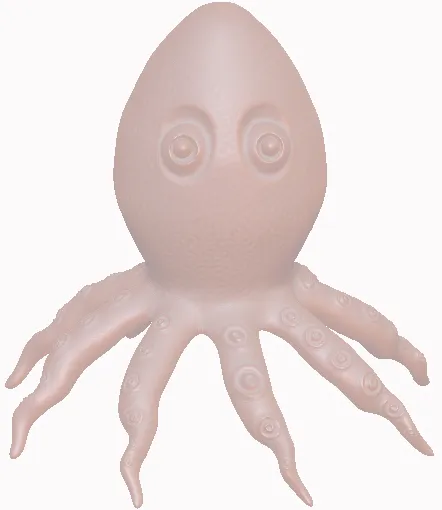
DynaMesh modeling is similar to clay modeling. In clay modeling, you can expand the existing lump of clay by either stretching it or by adding new lumps to it. After stretching the clay, the actual consistency of the clay remains the same. DynaMesh uses the same approach for modeling. After converting any mesh into DynaMesh, the uniform polygon distribution of the mesh is maintained, irrespective of the stretching and deformation done in the mesh. You can convert any of the ZBrush primitives into DynaMesh. Besides this, you can also convert any existing geometry into DynaMesh. However, it is recommended to convert a mesh into DynaMesh during the initial stage of sculpting. DynaMesh is used to create a base mesh in ZBrush. It enables you to freely pull or push the polygons in the mesh without creating distortions in the geometry. It is very useful for creating the base mesh before adding details to it. On converting a distorted mesh into DynaMesh, you will notice that the polygons are distributed uniformly.

DynaMesh AREA
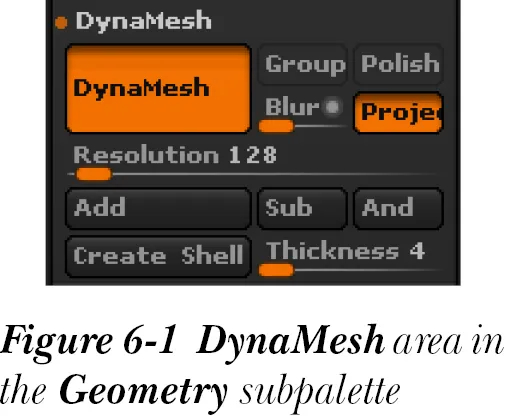
The DynaMesh area is displayed only when an object is created in the
canvas a
znd is converted into a polymesh. The different buttons and sliders of the DynaMesh tool can be accessed by expanding the DynaMesh area in the Geometry subpalette of the Tool palette, refer to Figure 6-1. The different buttons and sliders in this area are discussed next.
DynaMesh
The DynaMesh button is used to make the distribution of polygons in a mesh uniform. To uniformly distribute polygon in a mesh, consider in a sphere in the canvas and then choose the Edit button from the top shelf. Also, conv...

Table of contents

  1. preface_zbrush4r8
  2. c01_ZBrush_4R8
  3. c02_ZBrush_v8
  4. c03_ZBrush_r8
  5. c04_ZBrush_r8
  6. c05_ZBrush_r8_black_final
  7. c06_ZBrush_black_r8
  8. c07_ZBrush_r8
  9. c08_ZBrush_r8
  10. c09_ZBrush_r8
  11. c10_ZBrushR8
  12. c11_ZBrushr8
  13. c12_ZBrush_v8
  14. Project1_r8_black
  15. Last Pages