Fifty Excel tricks that no one has ever seen before.
Cool Excel Sh*t is designed with the Excel guru in mind, introducing advanced, creative solutions and hacks for the software's most challenging problems. Through a series of more than 50 techniques, formulas, dynamic arrays, and VBA macros, this guide details processes that may be used in any application and across all disciplines. Includes a section on techniques using Dynamic Arrays in Excel.

- 95 pages
- English
- ePUB (mobile friendly)
- Available on iOS & Android
eBook - ePub
Cool Excel Sh*t
About this book
Information
Subtopic
Business SkillsIndex
Computer ScienceMISCELLANEOUS
Returning from clicking on a hyperlink
Once you click a hyperlink, you can return to the source by pressing Alt/Left arrow!
You can type R1C1 notation into the Name box:
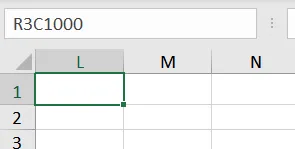
and when I hit enter:
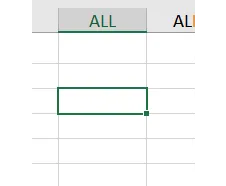
I guess column ALL is column 1000!
Play a trick on your coworkers by hiding even row numbers
What happened to the even row numbers?
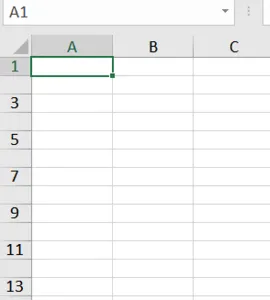
How to do this is select a cell in row 2 and give it a font of 120-pt size. Say that was B2. Select B1:B2 and use the fill handle to drag down 50 rows or so.
It’ll look like this:
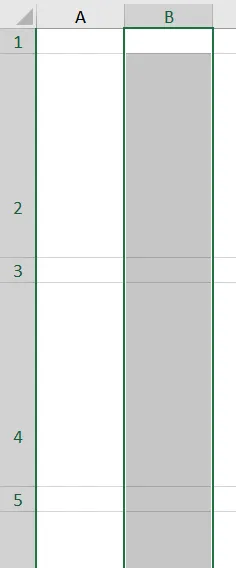
Now select everything (click on the triangle above row 1 and to the left of column A), and change the row height to 20 or so. That’s all there is to it!
Another one: Go to your coworker’s computer, select all cells and format them as ;;;
Now, whatever is typed will disappear!
Print Area manipulation
To clear the Print Area you can either set the Print Area when all cells are selected, or choose the Clear Print Area command.
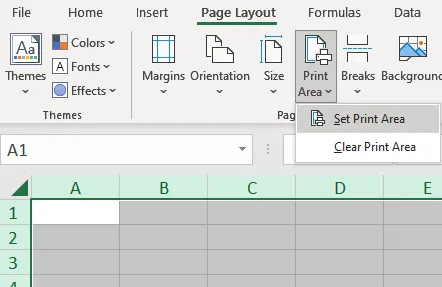
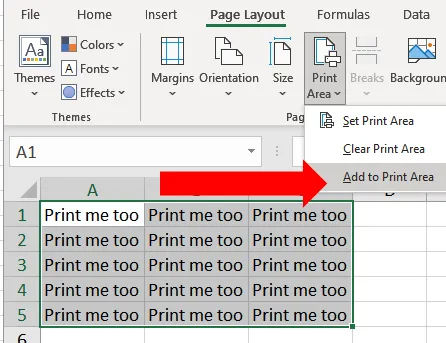
Did you know that if you already have a print area and want to add another range to it, another choice shows up?:
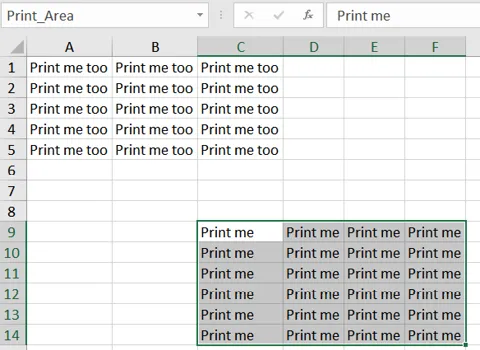
Here. C9:F14 is the print area. If you select A1:C5, you can see a new command:
Change Rows to Repeat at Top On All Worksheets
Even if you open the Page Setup dialog while in group mode, you can not change the Rows to Repeat at Top on multiple worksheets at one time.
This macro will set the rows to repeat to rows 1 & 2 for all sheets in the active workbook:
Sub ChangeRowsToRepeatAtTop()
Dim WS As Worksheet
For Each WS In ActiveWorkbook.Worksheets
WS.PageSetup.PrintTitleRows = "$1:$2"
Next WS
End Sub
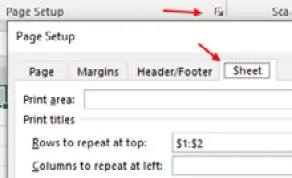
To change Columns to Repeat at Left, use .PrintTitleColumns = “$A:$B”.
A few miscellaneous tips & tricks
- If you often enter large numbers, like a million or a bil...
Table of contents
- Foreword
- FORMULAS
- FORMATTING
- MISCELLANEOUS
- DYNAMIC ARRAYS
- VBA
- Index
Trusted by 375,005 students
Access to over 1.5 million titles for a fair monthly price.
Study more efficiently using our study tools.
Frequently asked questions
Yes, you can cancel anytime from the Subscription tab in your account settings on the Perlego website. Your subscription will stay active until the end of your current billing period. Learn how to cancel your subscription
No, books cannot be downloaded as external files, such as PDFs, for use outside of Perlego. However, you can download books within the Perlego app for offline reading on mobile or tablet. Learn how to download books offline
We are an online textbook subscription service, where you can get access to an entire online library for less than the price of a single book per month. With over 1.5 million books across 990+ topics, we’ve got you covered! Learn about our mission
Look out for the read-aloud symbol on your next book to see if you can listen to it. The read-aloud tool reads text aloud for you, highlighting the text as it is being read. You can pause it, speed it up and slow it down. Learn more about Read Aloud
Yes! You can use the Perlego app on both iOS and Android devices to read anytime, anywhere — even offline. Perfect for commutes or when you’re on the go.
Please note we cannot support devices running on iOS 13 and Android 7 or earlier. Learn more about using the app
Please note we cannot support devices running on iOS 13 and Android 7 or earlier. Learn more about using the app
Yes, you can access Cool Excel Sh*t by Bob Umlas in PDF and/or ePUB format, as well as other popular books in Computer Science & Business Skills. We have over 1.5 million books available in our catalogue for you to explore.