Hundreds of tips, tricks and shortcuts to help you get the most out of Adobe's Photoshop CC. Achieve expertly produced images, and learn shortcuts to save time! Covers all versions of Photoshop CC. Ifyou've been using Photoshop for a while, but you've only been using a few basic features to get by and want to know all those clever tricks of the trade, thenPhotoshopTips, Tricks & Shortcutsin easy stepsis for you! Learn about all the exciting features to achieve expertly produced images, and shortcuts to save time. Photoshop Tips, Tricks & Shortcuts in easy stepswill enable anyone to create, edit and produce professional looking images – allin easy stepswith little time and effort required for learning. Ideal for: anyone who needs to produce professional-looking images, brochures or marketing material, without needing to pay a premium for designers; students who want to add stunning images to their school and college projects; anyone wanting to produce stunning images and with limited time and/or budget for training courses; designers who may need to update their skills with Photoshop CC. Covers all versions of Adobe's Photoshop CC
- English
- ePUB (mobile friendly)
- Available on iOS & Android
eBook - ePub
Photoshop Tips, Tricks & Shortcuts in easy steps
About this book
Trusted by 375,005 students
Access to over 1.5 million titles for a fair monthly price.
Study more efficiently using our study tools.
Information
1
Go Faster
This chapter introduces a set of tips and tricks that you really should be using to work quickly, effectively, and with control and precision, to produce beautiful, crafted, inspiring, Photoshop images and compositions.
Zooming in and out
Content-Aware crop
Perspective crop
Reset Preference Settings
Controlling brushes
Pixel Grid
Recent Files panel
Notes
New Guide – precision placement
New Guide Layout – precision grids
Artboard documents
Create and manage Artboards
Custom keyboard shortcuts
Auto-Select
Zooming in and out
Work for a day in Photoshop and you’ll find yourself zooming in and out on your images constantly. As with all design tasks, to become faster and to be efficient you should look to identify those tasks that you perform on a regular basis and find the quickest, most efficient and effective way to perform them. Zooming in and out provides one of these opportunities.

Don’t use this keyboard shortcut if you have the Text Insertion Point flashing in text as there is a danger, when using the Spacebar as part of the shortcut, that you will accidentally introduce unwanted spaces in the text.
Instead of moving your cursor to the Zoom tool, clicking on it to select it, then moving your cursor back into the image to perform the zoom in/zoom out, and then going back to the Tool panel to either re-select the tool you were previously working with or select a different tool – try using the keyboard/mouse shortcut below.


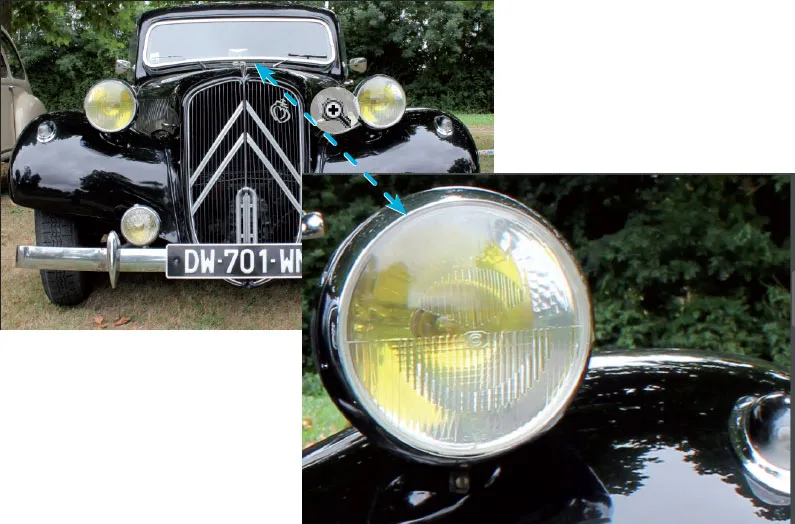

Another good reason for learning this shortcut is that you can use the same technique in Adobe InDesign and Illustrator.

If you are working on a Mac, make sure you hold down Spacebar slightly before the cmd key. If you hold down cmd first, the Spotlight Search entry field appears; although the zoom technique still works:

Content-Aware crop
Content-Aware crop is useful when you want to retain as much image detail along the corner edges of an image when you need to rotate and straighten it and/or expand the Photoshop canvas area beyond its initial size. The Content-Aware technology fills areas that would otherwise be lost, to create a seamless result based on existing pixel data in the image.


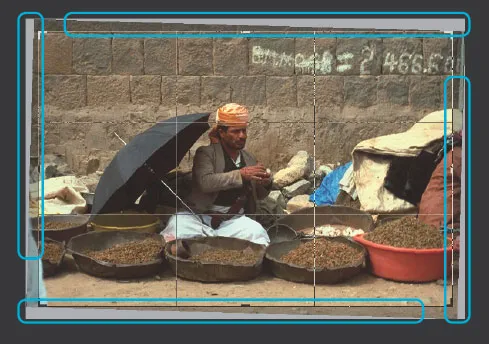
Table of contents
- Cover
- Title
- Copyright
- Contents
- 1 Go Faster
- 2 Selections
- 3 Layers and Masks
- 4 Layer Blend Modes
- 5 Type
- 6 Transform, Reflect, Shadow and Light
- 7 Path Power
- 8 Cloud Power
- 9 Actions and Output
- Back Cover
Frequently asked questions
Yes, you can cancel anytime from the Subscription tab in your account settings on the Perlego website. Your subscription will stay active until the end of your current billing period. Learn how to cancel your subscription
No, books cannot be downloaded as external files, such as PDFs, for use outside of Perlego. However, you can download books within the Perlego app for offline reading on mobile or tablet. Learn how to download books offline
Perlego offers two plans: Essential and Complete
- Essential is ideal for learners and professionals who enjoy exploring a wide range of subjects. Access the Essential Library with 800,000+ trusted titles and best-sellers across business, personal growth, and the humanities. Includes unlimited reading time and Standard Read Aloud voice.
- Complete: Perfect for advanced learners and researchers needing full, unrestricted access. Unlock 1.5M+ books across hundreds of subjects, including academic and specialized titles. The Complete Plan also includes advanced features like Premium Read Aloud and Research Assistant.
We are an online textbook subscription service, where you can get access to an entire online library for less than the price of a single book per month. With over 1.5 million books across 990+ topics, we’ve got you covered! Learn about our mission
Look out for the read-aloud symbol on your next book to see if you can listen to it. The read-aloud tool reads text aloud for you, highlighting the text as it is being read. You can pause it, speed it up and slow it down. Learn more about Read Aloud
Yes! You can use the Perlego app on both iOS and Android devices to read anytime, anywhere — even offline. Perfect for commutes or when you’re on the go.
Please note we cannot support devices running on iOS 13 and Android 7 or earlier. Learn more about using the app
Please note we cannot support devices running on iOS 13 and Android 7 or earlier. Learn more about using the app
Yes, you can access Photoshop Tips, Tricks & Shortcuts in easy steps by Robert Shufflebotham in PDF and/or ePUB format, as well as other popular books in Computer Science & Desktop Applications. We have over 1.5 million books available in our catalogue for you to explore.