Expert solutions to automate routine IT tasks using Ansible.
Key Features ? Single handy guide for all IT teams to bring automation throughout the enterprise. ? In-depth practical demonstration of various automation use-cases on the IT infrastructure. ? Expert-led guidelines and best practices to write Ansible playbooks without any errors.
Description This book deals with all aspects of Ansible IT infrastructure automation. While reading this book, you should look for automation opportunities in your current role and automate time-consuming and repetitive tasks using Ansible.This book contains Ansible fundamentals assuming you are totally new to Ansible. Proper instructions for setting up the laboratory environment to implement each concept are explained and covered in detail. This book is equipped with practical examples, use-cases and modules on the network. The system and cloud management are practically demonstrated in the book. You will learn to automate all the common administrative tasks throughout the entire IT infrastructure. This book will help establish and build the proficiency of your automation skills, and you can start making the best use of Ansible in enterprise automation.
What you will learn ? Install Ansible and learn the fundamentals. ? Use practical examples and learn about the loop, conditional statements, and variables. ? Understand the Ansible network modules and how to apply them in our day-to-day network management. ? Learn to automate the Windows and Linux infrastructure using Ansible. ? Automate routine administrative tasks for AWS, Azure, Google Cloud. ? Explore how to use Ansible for Docker and Kubernetes.
Who this book is for This book is for all IT students and professionals who want to manage or plan to administer the IT infrastructure. Knowing the basic Linux command-line would be good although not mandatory.
Table of Contents 1. Up and Running with Ansible 2. Ansible Basics 3. Ansible Advance Concepts 4. Ansible for Network Administration 5. Ansible for System Administration 6. Ansible for Cloud Administration 7. Ansible Tips and Tricks
Ansible is a simple open-source engine which automates the application deployment, infrastructure service orchestration, cloud provisioning, and many other IT tools. Ansible is completely agentless, which means that it works by connecting your nodes through SSH. Most of the current technologies use SSH as a default administration tool, whether it is a public or a private cloud platform, networking equipment, or a locally hosted ESX, Windows, or Linux servers. Henceforth, Ansible has a diverse scope.
Moreover, if you want the other methods for a remote connection like Kerberos, those options are also available. So, let’s begin our journey and start exploring what to expect from this chapter.
Structure
In this chapter, we will cover the following topics:
Introduction to Ansible
Lab setup
Important concepts about Ansible
Basic understanding of YAML
Objective
After studying this chapter, you should be able to do the following:
Understand why Ansible is popular.
Install Ansible and set up your environment.
Understand the Ansible components.
Understand the YAML syntax.
Introduction to Ansible
If you are a Systems Administrator, Network Administrator, or just anybody working in the IT, you were probably involved in doing a lot of repetitive tasks in your environment, whether it was to configure thousands of routers and switches, create new virtual machines, apply configurations, patch bulk of servers, migrations, deploy applications, or even perform security and compliance audits.
All of these repetitive tasks involve execution of similar commands on thousands of different devices, while maintaining the right sequence of events. Smart people develop scripts to automate these tasks, but it requires coding skills; regular IT administrators don’t have the professional coding skills, and an IT developer with good coding skills don’t have the strong infrastructure knowledge. Hence, there is a gap which Ansible leverages.
Ansible is a powerful IT automation tool that you can quickly learn. It's simple enough for everyone in IT, yet powerful enough to automate even the most complex deployments.
The following are some products related to Ansible:
Ansible Core: An open-source automation platform.
Ansible Galaxy: A website with a large catalogue of community created roles.
Ansible Tower: A web application and REST API solution for Ansible.
The main focus of the book is the Ansible core. The following are some of the Ansible use cases:
Configuration management
Deployment
Orchestration
Provisioning
Let's explore the use cases with examples. Imagine you have a number of servers in your environment that you would like to patch and restart in a particular order. Some of them are application servers and the others are database servers. So, first you would patch the servers, and power down the application servers, followed by the database servers, then power up the database servers, and once the database is online, then power up the application servers. You could write an Ansible playbook to get this done in a matter of minutes and simply invoke the Ansible playbook every time you wish to perform this patching activity.
Similarly, if you have to enable the port security on all the switches in the network, which is a repetitive work across the network, and if this needs to be performed on thousands of switches, a simple Ansible playbook can achieve this task.
Let's take a look at a complex example. Let’s suppose, we are setting up a complex infrastructure that spans across public and private cloud and hundreds of VMs. With Ansible, you could provision the hosts on public clouds like Azure or AWS and provision private cloud like OpenStack or in VMware based infrastructure and move onto configuring the applications on those systems and set up communications between them. There are a lot of built-in modules available in Ansible that supports these kinds of operations and many more. We will be exploring them in the following chapters.
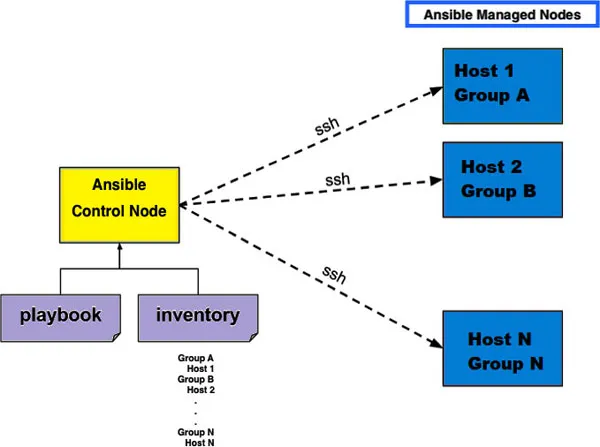
The following block diagram will clarify the Ansible key components:
Figure 1.1: Ansible key components
To understand better, the following is the definition of each Ansible component:
Ansible Control Node: Ansible Control Node is any machine which has Ansible installed. It must be a Linux machine; it can’t be any Windows machine. This is the one machine where the installation is required.
Ansible Managed Nodes: Ansible Managed Nodes are servers or any IT devices, which we want to manage through Ansible. Ansible Managed Nodes are also called hosts. Ansible installation is not required on hosts.
Inventory: Inventory is a list of hosts. We can organize the hosts by nesting, and creating groups for scaling. Static and dynamic inventories are available, which we will discuss later.
Playbooks: A Playbook is an ordered list of saved tasks, which can run repeatedly. Playbooks gives a programmable flavor to Ansible by allowing variable, loops, and conditional statements. Playbooks are written in YAML format.
Lab setup
Ansible installation is extremely simple; just a couple of commands and you have a fully functional Ansible control node. However, our goal is not just to install Ansible, but to understand the infrastructure requirement and have a fully functional lab to follow along the practical examples. Let’s prepare the lab by following these processes.
Infrastructure preparation for Ansible
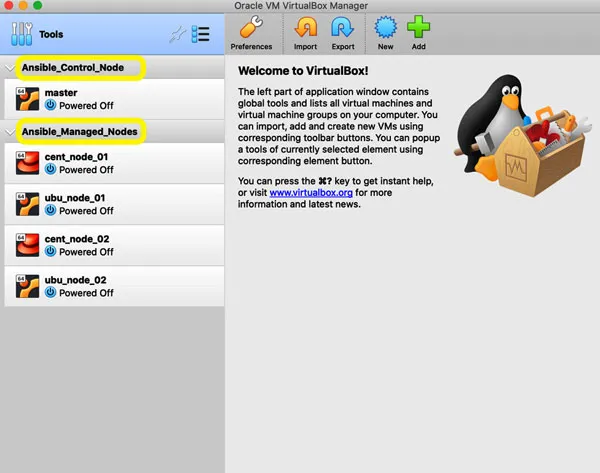
We will be setting up an entire lab environment on our laptop from scratch. For this, we will use a virtualization tool called Oracle VirtualBox, since it is open source and works with all the flavors of operating systems like Windows, Linux, and OSX. We will first install the Oracle VirtualBox on our laptop and then install the CentOS or Ubuntu operating systems; I have created one Ansible control node on Ubuntu and four managed nodes, two on CentOS and two on Ubuntu. The following screenshot shows the VMs on VirtualBox:
Figure 1.2: VMs on VirtualBox
Having four managed nodes is not required if you have a low specification laptop, a single Linux host can also be used as both the control node and the managed nodes.
We will not cover the CentOS/Ubuntu installation, since it is out of our scope and a lot of YouTube videos are available to achieve it. We will cover the Ansible installation after the operating system installation.
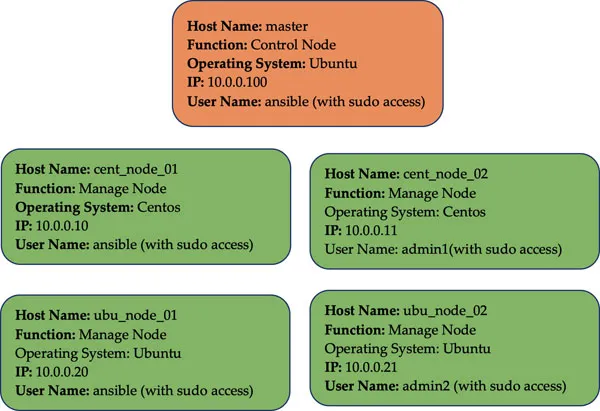
The following is the basic configuration on all the hosts before starting the Ansible installation:
Figure 1.3: Basic configuration
Ansible works fine with IP address but it doesn’t look professional. Therefore, we will resolve the IP address to host name, which is not compulsory. We can copy the following cont...
Table of contents
Cover Page
Title Page
Copyright Page
Dedication Page
About the Author
About the Reviewer
Acknowledgement
Preface
Errata
Table of Contents
1. Up and Running with Ansible
2. Ansible Basics
3. Ansible Advance Concepts
4. Ansible for Network Administration
5. Ansible for System Administration
6. Ansible for Cloud Administration
7. Ansible Tips and Tricks
Index
Trusted by 375,005 students
Access to over 1.5 million titles for a fair monthly price.
Study more efficiently using our study tools.
Frequently asked questions
Yes, you can cancel anytime from the Subscription tab in your account settings on the Perlego website. Your subscription will stay active until the end of your current billing period. Learn how to cancel your subscription
No, books cannot be downloaded as external files, such as PDFs, for use outside of Perlego. However, you can download books within the Perlego app for offline reading on mobile or tablet. Learn how to download books offline
Perlego offers two plans: Essential and Complete
Essential is ideal for learners and professionals who enjoy exploring a wide range of subjects. Access the Essential Library with 800,000+ trusted titles and best-sellers across business, personal growth, and the humanities. Includes unlimited reading time and Standard Read Aloud voice.
Complete: Perfect for advanced learners and researchers needing full, unrestricted access. Unlock 1.5M+ books across hundreds of subjects, including academic and specialized titles. The Complete Plan also includes advanced features like Premium Read Aloud and Research Assistant.
Both plans are available with monthly, semester, or annual billing cycles.
We are an online textbook subscription service, where you can get access to an entire online library for less than the price of a single book per month. With over 1.5 million books across 990+ topics, we’ve got you covered! Learn about our mission
Look out for the read-aloud symbol on your next book to see if you can listen to it. The read-aloud tool reads text aloud for you, highlighting the text as it is being read. You can pause it, speed it up and slow it down. Learn more about Read Aloud
Yes! You can use the Perlego app on both iOS and Android devices to read anytime, anywhere — even offline. Perfect for commutes or when you’re on the go. Please note we cannot support devices running on iOS 13 and Android 7 or earlier. Learn more about using the app
Yes, you can access IT Infrastructure Automation Using Ansible by Waqas Irtaza in PDF and/or ePUB format, as well as other popular books in Computer Science & System Administration. We have over 1.5 million books available in our catalogue for you to explore.