In today's working environment, which is changing faster than ever, e-commerce is more than a buzzword. It is a vital skill to help you survive and get ahead in your career. Digital marketing consultant Nick Smith has been there and done it, and in this short, accessible book he shares a lifetime of hard-earned wisdom and practical advice.Sunday: Getting ready to start your store
Monday: Basic e-commerce setup
Tuesday: Social marketing for e-commerce
Wednesday: Pay-per-click (PPC) marketing for e-commerce
Thursday: Search engine optimization (SEO) for e-commerce
Friday: Customer service for e-commerce
Saturday: Bringing it all together into the ultimate e-commerce marketing system
- 160 pages
- English
- ePUB (mobile friendly)
- Available on iOS & Android
eBook - ePub
About this book
Information
TUESDAY
Setting up your ecommerce store: part
Yesterday we covered the first part of getting the tech side of things set up for your ecommerce store.
Today we’re going to go over how to secure your ecommerce store quickly and safely (if you intend to build and host it yourself) as well as the easiest way to set up automatic back-ups of your site, so should the worst case scenario happen, you’ll be able to get it back up and running ASAP.
We’ll discuss the pros and cons of building everything yourself or using a fully managed ecommerce solution.
We’ll talk a little more about the options you have available whether you decide to build a ‘traditional’ ecommerce store or one of the newer ‘sales funnel’ type set-ups.
We’ll also talk about how to define your shipping and taxes policies and I’ll give some examples of how I’ve done it in the past without the need for additional premium add-ons.
I’ll go over some of the basic design and layout elements you need to have in place on a product sales page – get this wrong and it’ll be digital tumbleweed!
I’ll give my thoughts about choosing your payment provider (so you can be paid for the goods you sell) and lastly, a couple of links to places where you can get up to speed with ecommerce jargon.
PHEW! Alright, once more into the breach …
Website security
Regardless of whether you’re using WordPress, Magento or any other type of self-hosted system to power your ecommerce website, it is extremely important you keep the core system and any additional plugins or theme files up to date to prevent hackers exploiting any bugs or security holes in the software.
I know through bitter experience that it is possible to gain access to an entire server via software exploits.
Here are some tips to help mitigate any future security issues:
• Make sure you regularly log into your website’s admin centre to check there are no required updates for the core system, plugins or design themes.
• De-activate and delete any extensions, plugins or themes you are not using to cut down the number of possible hackable ‘entry points’ to your website (and reduce the loading time of your site)
• Use different randomly generated strings of characters and numbers for both your admin username and password. Ideally use long, random strings of lowercase, UPPERCASE, numbers and symbols. Something like:
Username: ^ErRdCqRfYh#6
Password: !iRM$4@2V9yZm
• You won’t need to remember these, you can use a Password Manager to store all your usernames and passwords, so you only need to remember one password to access the manager. Try the following:
– Roboform (https://www.roboform.com)
– Lastpass (http://www.lastpass.com)
– Keeper Security (https://www.keepersecurity.com)
• When installing either WordPress, Magento or whatever system you choose, use similarly jumbled characters and numbers for your database username and password. If you’re hiring someone to do the installation for you, tell them this.
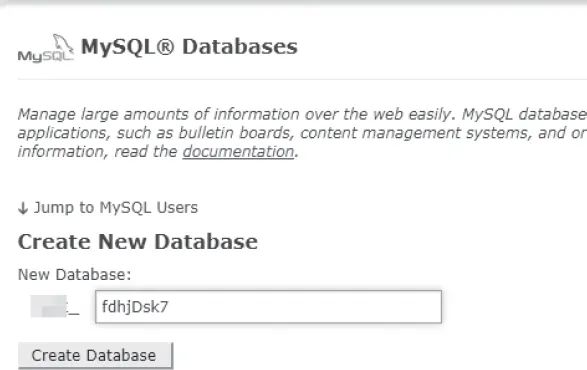
• If selectable during the installation process, add a random string of letters and numbers as the database table prefix (see the WordPress example below).
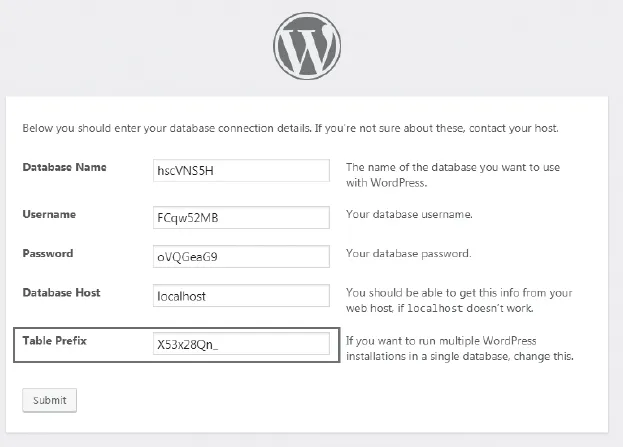
• For WordPress, install Wordfence: (https://wordfence.com). This gives enterprise-level security for your website to help protect it against hacks and malware attacks. The basic plugin is free and initially is more than good enough while your project is getting off the ground.
• Wordfence monitors all your WordPress system files and notifies you when it finds a virus or malware on your website. It also protects against repeated attempts to log in to your website, blocking the attacker’s IP address after a certain number of attempts. It is advisable, as soon as you are able, to upgrade to the Premium version which gives you access to its Defense Feed, giving you up to the second protection in real-time. This is another part of your business you shouldn’t penny pinch on.
Note: This is not a comprehensive list, nor will these tips guarantee 100 per cent protection – you need to be vigilant and have contingency plans in case bad things happen. This is potentially going to be your future livelihood – treat it accordingly.
Risk management: automating website backups
It’s good practice (not to mention common sense) to make sure comprehensive backups are regularly made of your website, especially if you are constantly adding new items and content to it.
If you are using a dynamic system (such as WordPress, Magento, WooCommerce etc.) that has a related database that holds all the website’s actual data (i.e. images, text, order information etc.) you need to make sure that is regularly backed up too.

It’s also good practice to back up your website and related database before you...
Table of contents
- Cover
- Title
- About the Author
- Contents
- Introduction
- Sunday: Research and prep
- Monday: Setting up your ecommerce store: part
- Tuesday: Setting up your ecommerce store: part
- Wednesday: Pay-per-click (PPC) marketing
- Thursday: Social media marketing
- Friday: Search engine optimization
- Saturday: Marketing and promoting your store
- 7 × 7
- Answers
- Copyright
Trusted by 375,005 students
Access to over 1.5 million titles for a fair monthly price.
Study more efficiently using our study tools.
Frequently asked questions
Yes, you can cancel anytime from the Subscription tab in your account settings on the Perlego website. Your subscription will stay active until the end of your current billing period. Learn how to cancel your subscription
No, books cannot be downloaded as external files, such as PDFs, for use outside of Perlego. However, you can download books within the Perlego app for offline reading on mobile or tablet. Learn how to download books offline
Perlego offers two plans: Essential and Complete
- Essential is ideal for learners and professionals who enjoy exploring a wide range of subjects. Access the Essential Library with 800,000+ trusted titles and best-sellers across business, personal growth, and the humanities. Includes unlimited reading time and Standard Read Aloud voice.
- Complete: Perfect for advanced learners and researchers needing full, unrestricted access. Unlock 1.5M+ books across hundreds of subjects, including academic and specialized titles. The Complete Plan also includes advanced features like Premium Read Aloud and Research Assistant.
We are an online textbook subscription service, where you can get access to an entire online library for less than the price of a single book per month. With over 1.5 million books across 990+ topics, we’ve got you covered! Learn about our mission
Look out for the read-aloud symbol on your next book to see if you can listen to it. The read-aloud tool reads text aloud for you, highlighting the text as it is being read. You can pause it, speed it up and slow it down. Learn more about Read Aloud
Yes! You can use the Perlego app on both iOS and Android devices to read anytime, anywhere — even offline. Perfect for commutes or when you’re on the go.
Please note we cannot support devices running on iOS 13 and Android 7 or earlier. Learn more about using the app
Please note we cannot support devices running on iOS 13 and Android 7 or earlier. Learn more about using the app
Yes, you can access eCommerce In A Week by Nick Smith in PDF and/or ePUB format, as well as other popular books in Business & Digital Marketing. We have over 1.5 million books available in our catalogue for you to explore.