An end-to-end guide for IBM implementation partners and solution providers.
Key Features ? Detailed step-by-step IBM Software installation and configuration that saves time for installing and configuring computers. ? Designed for students, IT consultants, systems and solution architects, data analysts, and developers. ? Unique solution documentation for running Cognos configuration designed for banks, financial services, and insurance companies.
Description This book shows how to install IBM Cognos Analytics software and related systems on RedHat Enterprise Linux 8.0, IBM Cloud, IBM Cloud Private (Community Edition), and Windows 10. It includes step-by-step instructions for downloading and installing IBM Cognos Analytics. It also includes numerous examples of setups and updates to analyze the OLAP database utilized by the IBM Case Manager.The initial chapters discuss the installation of IBM Information Management Products. The reader will know the URLs of the downloading sites, the product codes, descriptions, sizes, and the names of each software downloaded to the gzip tar file. It includes setting up RHEL 8.0 Linux OS and using the Docker system for installation on IBM Cloud PAK servers, RedHat Openshift clusters, and IBM Cloud Private. The IBM Cognos installation contains versions 11.1.1 through 11.4.0 on RedHat Linux 8.0 and Windows 10. The book includes the usage of the IBM Cognos Analytics 11.1 R4 Dynamic Cube Datastore and the 11.1 R4 Cube Designer for the report and dashboard. Additionally, the book includes constructing the essential Zlib library from the C language source download, its compilation, and linking.
What you will learn ? Detailed step-by-step instructions for installing IBM Cognos Analytics. ? Installation on Windows 10, RedHat Enterprise Linux 8.0, IBM Cloud, and IBM Cloud Private (CE). ? Downloading, compiling, and linking the necessary zlib library on Linux. ? Connecting to the CASTORE database using an example of Cognos Analytics configuration. ? Creating OLAP Cubes for IBM Case Manager dashboard reports.
Who this book is for This book is for IT consultants, architects for systems and solutions, data analysts, and data analytics solution developers. All the examples in the book are based on Unix/Windows and web-based tool basic knowledge.
Table of Contents 1. Getting Started with IBM Resources for Cognos 2. IBM Cloud PAK Systems 3. RedHat OpenShift 4.x Installations 4. IBM Cloud Private Cluster systems 5. IBM Cognos Analytics 11. On RHEL 8.0 6. IBM Cognos Analytics 11. On Windows 10.0 7. IBM Cognos Analytics 11 on RHEL 8.0 Linux Fix for Zlib
This chapter covers the "Bill of Materials" for the IBM Information Management Products to be installed along with the download site URLs, product codes, descriptions, size, and the name of the download files for each software download.
It also describes the summary contents of each available IBM Redbook publications which supports the use of the listed IBM software products.
The technical references to the related configuration and preparation of the systems used (such as DNS server set-up, Linux Security, Network configuration, etc.), the URLs and descriptions of the Interpretation of the Product and Fix Pack online generation tools, and the downloadable Excel spreadsheets and their usage are described.
The RedHat 8.0.iso disk image installation procedure on the VMware Workstation Pro 15.5, disk resource and sizing requirements, network card(s) and mapping, yum, dnf, pip, and conda installations, and firewall port set-up for the IBM Software Product prerequisites of the products listed are referenced to the DOI listings in Section 1.22, ASB Software Development Ltd publication references, with the pages which cover these.
The prerequisites for the installation procedure on Windows 10, Disk resource, and sizing requirements are outlined.
The prerequisites for the RedHat Linux RHCOS (Red Hat Enterprise Linux CoreOS) server cluster machine requirements for the OpenShift 4 on-premises cloud installation support for Kubernetes controlled containers are outlined.
(Every Red Hat Linux server in an OpenShift Container Platform 4 cluster must use RHCOS, including the first-boot provisioning program called Ignition. Ignition enables the cluster of servers to be configured. The operating system updates are then delivered as an Atomic OSTree repository, embedded in a container image that is deployed to the cluster servers by an Operator).
The references to the installation of the Docker Container system are described, with the use and function of the main docker commands.
Structure
In this chapter, we will discuss the following topics:
RedHat Linux RHEL 8.0
IBM Cloud
RedHat OpenShift 4.5
IBM Cognos Analytics 11.1.0 -> 11.1.4 -> 11.1.6 -> 11.2.0
Compatibility Matrix URLs
IBM Cognos Analytics 11.1.x - Linux
IBM Cognos Analytics 11.2.x - Linux
IBM download procedures
RedHat and CentOS Linux download
On-premises server configurations and prerequisites
IBM Cognos Analytics 11.2.x - Windows
Red Hat OpenShift server cluster requirements
Installing the other components
Default login credentials
IBM fix packs
IBM Cognos Analytics 11.1.x
IBM Cognos Analytics 11.2.x
IBM publication references
RedHat publication references
ASB software development Ltd publication references
End-of-life support
Objectives
After studying this chapter, you will be able to identify the prerequisite system versions required for each of the system components which will be required to support the IBM Cognos Analytics software versions targeted for installation. You will understand the prerequisite disk, memory, and network requirements for the target software components to be installed and know how to configure them. You will also learn how to search, identify, and download the latest supported versions, and configure the security required to maintain a secure and robust system.
1.1 RedHat Linux RHEL 8.0
Download RHEL 8.0, the ISO image from the following URL:
The following URL specifies the detailed download and configuration requirements for IBM Cognos Analytics 11.x on RedHat Linux RHEL 8.0:
https://doi.org/10.13140/RG.2.2.21708.16001 titled: "Case Manager 5.3.3 Installation on RHEL 8.0 with Content Navigator 3.0.6 ".
The preceding link (https://doi.org/10.13140/RG.2.2.21708.16001) describes the installation of the base RHEL 8.0 Linux system from page 7 to 38 of the downloaded document,CaseManagerInstallationonRHEL8.0_V3.docx.
1.1.1 Download location, estimated download time, and version
Currently, only the most recent release of Red Hat Enterprise Linux is available from the preceding link for the developers. You can find all the releases of Red Hat Enterprise Linux on the Red Hat Customer Portal, https://access.redhat.com/downloads/content/479/ver=/rhel---8/8.4/x86_64/product-software.
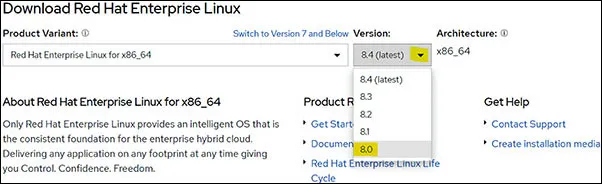
Download the selected version using the dropdown, as shown in Figure 1.1, and then choose the Red Hat Enterprise Linux 8.0 Binary DVD:
Figure 1.1: The Required RedHat Linux version is selected from the drop-down
RHEL 8.0 Size: 6,936,576 KB (6.62 GB)
Estimated download time at 40 MBits/second = 1 hour 15 minutes
(On my Fiber Network, the download took around 17 minutes for 7.9 GB of the RHEL 8.2 version.)
1.1.2 License Requirements – User Value Unit (UVU) and Processor Value Unit (PVU)
The Red Hat Linux RHEL 8.0 system can be loaded using a Developer License (free) for non-production purposes. This gives access to all the currently supported versions of Red Hat Linux (including versions 5 and 6).
1.1.3 Fix pack location and versions
As shown in Figure 1.1, the version updates can be selected. For Red Hat Linux RHEL 8.x, the subscription manager can be used together with the yum installer to upgrade the packages.
1.2 IBM Cloud
The full details for this Section 1.2 for IBM Cloud access are covered in the BPB Book, Installation and Configuration of IBM Watson Analytics and StoredIQ in Chapter 1, Section 1.2: IBM Cloud (BPB Publications, ISBN 9390684498, 9789390684496). See the following URL link: https://www.ibm.com/cloud
1.2.1 Download location, estimated download time, and version
The main download, initially required for using an IBM Cloud based system, is to install the IBM Cloud CLI client on an RHEL 8.0 server, when you log into the installed IBM Cloud CLI using the following:
ibmcloud login -a cloud.ibm.com -sso
1.2.2 License requirements UVU PVU
The license agreement and the IBM Cloud Catalog can be found in the following URLs:
(IBM Cloud fix packs are automatically applied by IBM.)
1.3 Red Hat OpenShift 4.5
The full details for this Section 1.3 for Red Hat OpenShift 4.5 access are covered in the BPB Book, Installation and Configuration of IBM Watson Analytics and StoredIQ in Chapter 1, Section 1.3: Red Hat OpenShift 4.5 (BPB Publications, ISBN 9390684498, 9789390684496).
1.3.1 Download location, estimated download time, and version
The link, https://cloud.redhat.com/openshift displays the first page with the Create Cluster command button using The Red Hat OpenShift Cluster Manager web-based tool. Also, visit the following link:
https://access.redhat.com/articles/4207611
This link describes the procedure for deploying ...
Table of contents
Cover Page
Title Page
Copyright Page
Dedication Page
About the Author
About the Reviewer
Acknowledgement
Preface
Errata
Table of Contents
1. Getting Started with IBM Resources for Cognos
2 IBM Cloud PAK Systems
3. RedHat OpenShift 4.x Installations
4. IBM Cloud Private Cluster Systems
5. IBM Cognos Analytics 11.x On RHEL 8.0
6. IBM Cognos Analytics 11 on Windows 10.0
7. IBM Cognos Analytics 11 on RHEL 8.0 Linux Fix for Zlib
Index
Trusted by 375,005 students
Access to over 1.5 million titles for a fair monthly price.
Study more efficiently using our study tools.
Frequently asked questions
Yes, you can cancel anytime from the Subscription tab in your account settings on the Perlego website. Your subscription will stay active until the end of your current billing period. Learn how to cancel your subscription
No, books cannot be downloaded as external files, such as PDFs, for use outside of Perlego. However, you can download books within the Perlego app for offline reading on mobile or tablet. Learn how to download books offline
Perlego offers two plans: Essential and Complete
Essential is ideal for learners and professionals who enjoy exploring a wide range of subjects. Access the Essential Library with 800,000+ trusted titles and best-sellers across business, personal growth, and the humanities. Includes unlimited reading time and Standard Read Aloud voice.
Complete: Perfect for advanced learners and researchers needing full, unrestricted access. Unlock 1.5M+ books across hundreds of subjects, including academic and specialized titles. The Complete Plan also includes advanced features like Premium Read Aloud and Research Assistant.
Both plans are available with monthly, semester, or annual billing cycles.
We are an online textbook subscription service, where you can get access to an entire online library for less than the price of a single book per month. With over 1.5 million books across 990+ topics, we’ve got you covered! Learn about our mission
Look out for the read-aloud symbol on your next book to see if you can listen to it. The read-aloud tool reads text aloud for you, highlighting the text as it is being read. You can pause it, speed it up and slow it down. Learn more about Read Aloud
Yes! You can use the Perlego app on both iOS and Android devices to read anytime, anywhere — even offline. Perfect for commutes or when you’re on the go. Please note we cannot support devices running on iOS 13 and Android 7 or earlier. Learn more about using the app
Yes, you can access Installation, Upgrade, and Configuration of IBM Cognos Analytics by Alan Bluck in PDF and/or ePUB format, as well as other popular books in Business & Business Intelligence. We have over 1.5 million books available in our catalogue for you to explore.