Practical Full Stack Machine Learning
A Guide to Build Reliable, Reusable, and Production-Ready Full Stack ML Solutions
- English
- ePUB (mobile friendly)
- Available on iOS & Android
Practical Full Stack Machine Learning
A Guide to Build Reliable, Reusable, and Production-Ready Full Stack ML Solutions
About this book
Master the ML process, from pipeline development to model deployment in production.
Key Features
? Prime focus on feature-engineering, model-exploration & optimization, dataops, ML pipeline, and scaling ML API.
? A step-by-step approach to cover every data science task with utmost efficiency and highest performance.
? Access to advanced data engineering and ML tools like AirFlow, MLflow, and ensemble techniques.
Description
'Practical Full-Stack Machine Learning' introduces data professionals to a set of powerful, open-source tools and concepts required to build a complete data science project. This book is written in Python, and the ML solutions are language-neutral and can be applied to various software languages and concepts.The book covers data pre-processing, feature management, selecting the best algorithm, model performance optimization, exposing ML models as API endpoints, and scaling ML API. It helps you learn how to use cookiecutter to create reusable project structures and templates. It explains DVC so that you can implement it and reap the same benefits in ML projects.It also covers DASK and how to use it to create scalable solutions for pre-processing data tasks. KerasTuner, an easy-to-use, scalable hyperparameter optimization framework that solves the pain points of hyperparameter search will be covered in this book. It explains ensemble techniques such as bagging, stacking, and boosting methods and the ML-ensemble framework to easily and effectively implement ensemble learning. The book also covers how to use Airflow to automate your ETL tasks for data preparation. It explores MLflow, which allows you to train, reuse, and deploy models created with any library. It teaches how to use fastAPI to expose and scale ML models as API endpoints.
What you will learn
? Learn how to create reusable machine learning pipelines that are ready for production.
? Implement scalable solutions for pre-processing data tasks using DASK.
? Experiment with ensembling techniques like Bagging, Stacking, and Boosting methods.
? Learn how to use Airflow to automate your ETL tasks for data preparation.
? Learn MLflow for training, reprocessing, and deployment of models created with any library.
? Workaround cookiecutter, KerasTuner, DVC, fastAPI, and a lot more.
Who this book is for
This book is geared toward data scientists who want to become more proficient in the entire process of developing ML applications from start to finish. Knowing the fundamentals of machine learning and Keras programming would be an essential requirement.
Table of Contents
1. Organizing Your Data Science Project
2. Preparing Your Data Structure
3. Building Your ML Architecture
4. Bye-Bye Scheduler, Welcome Airflow
5. Organizing Your Data Science Project Structure
6. Feature Store for ML
7. Serving ML as API
Frequently asked questions
- Essential is ideal for learners and professionals who enjoy exploring a wide range of subjects. Access the Essential Library with 800,000+ trusted titles and best-sellers across business, personal growth, and the humanities. Includes unlimited reading time and Standard Read Aloud voice.
- Complete: Perfect for advanced learners and researchers needing full, unrestricted access. Unlock 1.4M+ books across hundreds of subjects, including academic and specialized titles. The Complete Plan also includes advanced features like Premium Read Aloud and Research Assistant.
Please note we cannot support devices running on iOS 13 and Android 7 or earlier. Learn more about using the app.
Information
CHAPTER 1
Organizing Your Data Science Project
- You are the only person working on the project.
- Your first trained model meets the project requirements.
- Your data does not require pre-processing at all.
Structure
- Project folder and code organization
- GPU 101
- On-premises vs. cloud
- Deciding your framework
- Deciding your targets
- Baseline preparation
- Managing workflow
Objective
- Set up the project code base effectively. We will explore a library called
cookiecutterthat simplifies and standardizes the process a lot. - Apprehend the best practices of selecting GPU. The options in the market are overwhelming and also quite confusing.
- Learn the best practices to decide infrastructure – cloud or on-premises.
- Select the framework (Think of TensorFlow, PyTorch, etc.) and hardware.
- Apply the tools for workflow management setup. We will explore sacred and
omniboardprojects to keep track of experiments. - Decide on the target and define the metrics around it.
- Define your baseline.
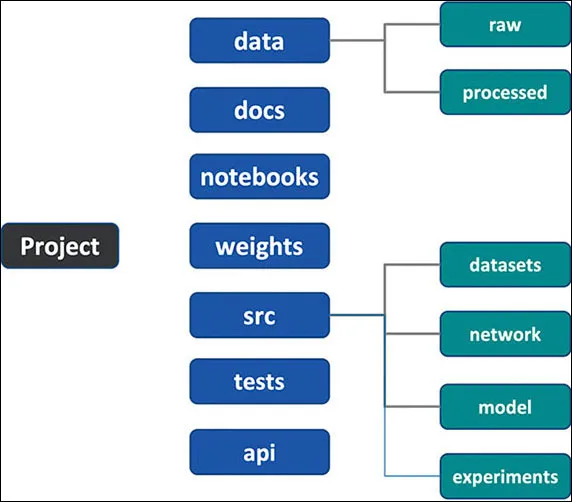
1.1 Project folder and code organization

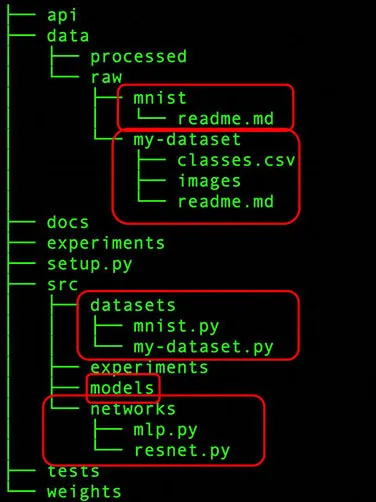
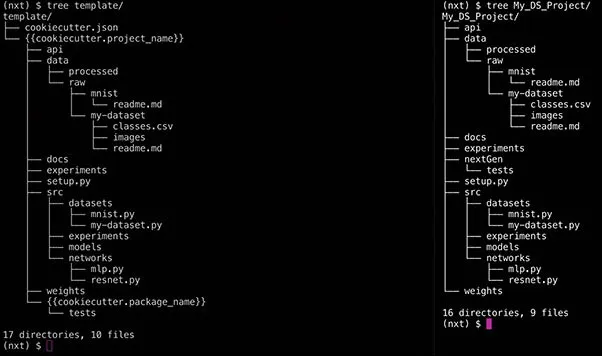
data: The purpose of data folders is to organize the data sources. This one has two folders which are as follows:raw– This is the original, immutable data dump. This data should never be modified and should be the single source of truth.processed– These are the final, canonical data sets for modelling or training. This will be the data that is cleaned, transformed, and extended to make it amenable for training.
With this organization, you can immediately see some benefits such as:- Data becomes immutable via the
rawfolder. - We don't need to prepare the data every time due to the
processedfolder.
docs: This contains project documentation. We don't need to convince you about the value of project documentation. We recommend using sphinx (https://www.sphinx-doc.org/en/master/) for documentation.weights: The weights folder stores the trained, serialized models, model predictions, or model summaries.src:This contains all the Python scripts required for your project. We recommend splitting it across 3 folders.datasets:This folder contains Python scripts to process the data.network:This folder has scripts to define the architectures. Only the computational graph is defined.model:This folder has the script to handle everything else needed in addition to the network.experiments:This folder contains the parameter/hyperparameters combinations that you would like to try.api:This folder exposes the model through a rest end point.

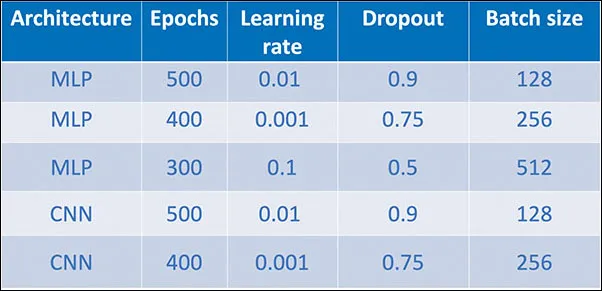
data/raw folder has a folder for MNIST (handwritten digit dataset) and some proprietary dataset. Let's call it "my-dataset." Essentially, each different dataset is maintained in its own respective folder.image class names mentioned in a csv but the actual images are dumped in a single folder. Maybe the second dataset that you collected from somewhere else has the image class name mentioned in the file name itself. It is worth reiterating that this data should never be changed.data/processed folder should maintain the processed data. In this case, it could be normalized data ready for training. The models' folder, as the name suggests, would contain the trained models.network folder defines the network architectures used. Think of it as a block which only defines the computational graph without caring about the input and output shapes, model losses, and training methodology. The loss function and the optimization function can be managed by the model. However, how does this help?
Python try-experiment '{network : MLP, Epochs : 500, learning_rate : 0.01, Droput:0.9, Batch_size : 128}'
- Create a folder that contains th...
Table of contents
- Cover Page
- Title Page
- Copyright Page
- About the Author
- About the Reviewer
- Acknowledgements
- Preface
- Errata
- Table of Contents
- 1. Organizing Your Data Science Project
- 2. Preparing Your Data
- 3. Building Your ML Architecture
- 4. Bye-Bye Scheduler, Welcome Airflow
- 5. Organizing Your Data Science Project Structure
- 6. Feature Store for ML
- 7. Serving ML as API
- Index