AutoCAD LT 2020 for Designers, 13th Edition
eBook - ePub

AutoCAD LT 2020 for Designers, 13th Edition

  1. English
  2. ePUB (mobile friendly)
  3. Available on iOS & Android
eBook - ePub

AutoCAD LT 2020 for Designers, 13th Edition

About this book

The AutoCAD LT 2020 for Designers, 13th Edition book explains commands, tools and their applications to solve drafting and design problems. In this textbook, every AutoCAD LT command is thoroughly explained with the help of examples and illustrations. This makes it easy for the users to understand the functions of the tools and their applications in the drawing. After reading this AutoCAD LT book, the user will be able to use AutoCAD LT commands to make a drawing, dimension a drawing, apply constraints to sketches, insert symbols as well as create text, blocks and dynamic blocks.This AutoCAD LT book also covers basic drafting and design concepts such as dimensioning principles and assembly drawings that equip the users with the essential drafting skills to solve the drawing problems in AutoCAD LT. While reading this textbook, you will learn about Blocks palette, Save to Web & Mobile, and Shared Views that will enhance the usability of the software.

Salient Features of AutoCAD LT 2020 for Designers book:

  • Comprehensive book with chapters organized in a pedagogical sequence
  • Detailed explanation of all commands and tools
  • Summarized content on the first page of the topics that are covered in the chapter
  • Hundreds of illustrations for easy understanding of concepts
  • Step-by-step instructions to guide the users through the learning process
  • More than 30 real-world mechanical engineering designs as examples
  • Additional information throughout the book in the form of notes and tips
  • Self-Evaluation Tests and Review Questions at the end of each chapter to help the users assess their knowledge
  • Additional learning resources at https://allaboutcadcam.blogspot.com

Table of Contents

Chapter 1: Introduction to AutoCAD LT
Chapter 2: Getting Started with AutoCAD LT
Chapter 3: Getting started with Advanced Sketching
Chapter 4: Working with Drawing Aids
Chapter 5: Editing Sketched Objects-I
Chapter 6: Editing Sketched Objects-II
Chapter 7: Creating Texts and Tables
Chapter 8: Basic Dimensioning, Geometric Dimensioning, and Tolerancing
Chapter 9: Editing Dimensions
Chapter 10: Dimension Styles, Multileader Styles, and System Variables
Chapter 11: Hatching Drawings
Chapter 12: Model Space Viewports, Paper Space Viewports, and Layouts
Chapter 13: Plotting Drawings
Chapter 14: Template Drawings
Chapter 15: Working with Blocks
Chapter 16: Defining Block Attributes
Chapter 17: Understanding External References
Chapter 18: Working with Advanced Drawing Options*
Chapter 19: Grouping and Advanced Editing of Sketched Objects*
Chapter 20: Working with Data Exchange & Object Linking and Embedding*
Chapter 21: Conventional Dimensioning and Projection Theory using AutoCAD LT*
Chapter 22: Concepts of Geometric Dimensioning and Tolerancing*
Chapter 23: Isometric Drawings*
Index
(* For free download from www.cadcim.com)

Frequently asked questions

Yes, you can cancel anytime from the Subscription tab in your account settings on the Perlego website. Your subscription will stay active until the end of your current billing period. Learn how to cancel your subscription.
No, books cannot be downloaded as external files, such as PDFs, for use outside of Perlego. However, you can download books within the Perlego app for offline reading on mobile or tablet. Learn more here.
Perlego offers two plans: Essential and Complete
  • Essential is ideal for learners and professionals who enjoy exploring a wide range of subjects. Access the Essential Library with 800,000+ trusted titles and best-sellers across business, personal growth, and the humanities. Includes unlimited reading time and Standard Read Aloud voice.
  • Complete: Perfect for advanced learners and researchers needing full, unrestricted access. Unlock 1.4M+ books across hundreds of subjects, including academic and specialized titles. The Complete Plan also includes advanced features like Premium Read Aloud and Research Assistant.
Both plans are available with monthly, semester, or annual billing cycles.
We are an online textbook subscription service, where you can get access to an entire online library for less than the price of a single book per month. With over 1 million books across 1000+ topics, we’ve got you covered! Learn more here.
Look out for the read-aloud symbol on your next book to see if you can listen to it. The read-aloud tool reads text aloud for you, highlighting the text as it is being read. You can pause it, speed it up and slow it down. Learn more here.
Yes! You can use the Perlego app on both iOS or Android devices to read anytime, anywhere — even offline. Perfect for commutes or when you’re on the go.
Please note we cannot support devices running on iOS 13 and Android 7 or earlier. Learn more about using the app.
Yes, you can access AutoCAD LT 2020 for Designers, 13th Edition by Prof. Sham Tickoo in PDF and/or ePUB format, as well as other popular books in Technology & Engineering & Mechanical Engineering. We have over one million books available in our catalogue for you to explore.
Chapter 5
Editing Sketched
Objects-I

Learning Objectives
After completing this chapter, you will be able to:
• Create selection sets using various object selection options
• Use the Move and Copy tools
• Copy objects using the Array tool
• Understand various editing and measuring tools
Key Terms
4081.png
Move
Copy
Break
Offset
Chamfer
Trim
Extend
Stretch
Array
Rotate
Mirror
Scale
Lengthen
Measure
Divide
Blend

Creating a Selection Set
For most of the tools, the default object selection method is to use the pick box (cursor) and select one entity at a time. You can also click in blank area and select objects by using the Window option or the Crossing option. In Chapter 2, these two options were discussed. The other options used for selection are listed below and are discussed in this chapter.
Last CPolygon Add Undo Previous Fence Box SIngle ALL Group AUto Remove
WPolygon Multiple
Last
This option is used to select the last drawn object, which is partially or fully visible in the current display. This is the most suitable option to select the last drawn object while editing it. Keep in mind that if the last drawn object is not in the current display, the last drawn object in the current display will be selected. Although a selection can be formed using the Last option, only one object is selected at a time. However, you can use the Last option a number of times but it will require you to start the command again. You can use the Last selection option with any tool that requires the selection of multiple objects (for example, Copy, Move, and Erase). To select the last drawn object by using this option, invoke a particular tool, and then enter LAST or L at the Select objects prompt to use this object selection method. we need to write to the point.
Exercise 1 Erase
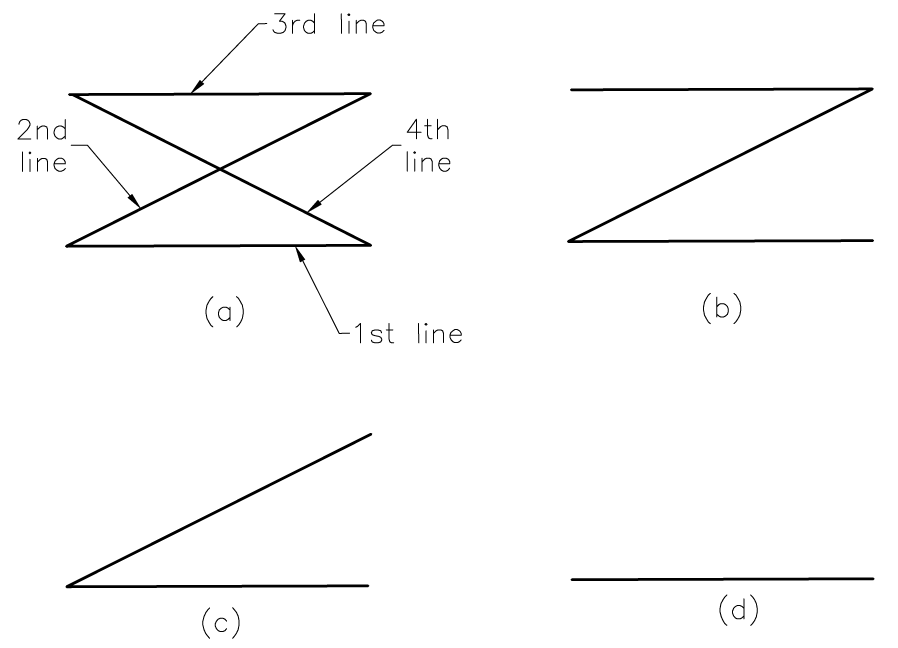
Draw the profile shown in Figure 5-1(a) by using the Line tool. Then, use the Last option of the Erase tool to erase the three most recently drawn lines to obtain Figure 5-1(d).

2343.png

Figure 5-1 The initial and final profiles for Exercise 1
Previous
The Previous option is used to select the objects that were selected in the previous selection set. Generally, AutoCAD LT saves the previous selection set; therefore, you can select those objects again by using the Previous option, instea...

Table of contents

  1. CoverImage
  2. Front Matter AutoCAD LT 2020.indd epub
  3. AutoCAD LT ch epub
  4. c02_acadlt2020.indd EPUB
  5. AutoCAD_LT_2020_ch_03 epub
  6. AutoCAD_LT_2020_ch_04 epub
  7. AutoCAD_LT_2020_ch_05_epub
  8. c06_acadlt_2020.indd EPUB
  9. c07_acadlt_2020.indd EPUB
  10. AutoCAD_LT_2020_ch_08.indd epub
  11. c09_acadlt 2020.indd EPUB
  12. c10_acadLT_2020.indd EPUB
  13. c11_acadlt_2020.indd EPUB
  14. c12_acadlt2020.indd EPUB
  15. c13_acadlt_2020.indd EPUB
  16. c14_acad_LT 2020.indd EPUB
  17. c15_acad_LT 2020.indd EPUB
  18. c16_acad_LT 2020.indd EPUB
  19. c17_acad_LT 2020.indd EPUB
  20. AutoCAD LT 2020 last page.indd epub