Go from no-code to low-code and translate your business requirements into full-fledged enterprise-ready applicationsKey Features• Digitize and automate your business processes quickly using Appian's powerful low-code functionalities• Understand enterprise data models and turn them into actionable Appian Records• Use declarative code-style UI building to design intuitive UIs and reusable components in AppianBook DescriptionThis book is an exhaustive overview of how the Appian Low-Code BPM Suite enables tech-savvy professionals to rapidly automate business processes across their organization, integrating people, software bots, and data. This is crucial as 80% of all software development is expected to be carried out in low code by 2024. This practical guide helps you master business application development with Appian as a beginner low-code developer. You'll learn to automate business processes using Appian low-code, records, processes, and expressions quickly and on an enterprise scale. In a fictional development project, guided by step-by-step explanations of the concepts and practical examples, this book will empower you to transform complex business processes into software. At first, you'll learn the power of no-code with Appian Quick Apps to solve some of your most crucial business challenges. You'll then get to grips with the building blocks of an Appian, starting with no-code and advancing to low-code, eventually transforming complex business requirements into a working enterprise-ready application. By the end of this book, you'll be able to deploy Appian Quick Apps in minutes and successfully transform a complex business process into low-code process models, data, and UIs to deploy full-featured, enterprise-ready, process-driven, mobile-enabled apps.What you will learn• Use Appian Quick Apps to solve the most urgent business challenges• Leverage Appian's low-code functionalities to enable faster digital innovation in your organization• Model business data, Appian records, and processes• Perform UX discovery and UI building in Appian• Connect to other systems with Appian Integrations and Web APIs• Work with Appian expressions, data querying, and constantsWho this book is forThis book empowers software developers and tech-savvy business users with a new tool that'll help them increase efficiency by a huge margin and speed up the delivery of new features to meet the demands of business departments. Business users with a maker's attitude finally have the chance to develop their own business applications, as low-code drastically reduces the complexity of traditional software development. Prior experience with automation solutions and low-code programming is needed to help you get the most out of this book.
- 462 pages
- English
- ePUB (mobile friendly)
- Available on iOS & Android
eBook - ePub
Low-Code Application Development with Appian
About this book
Information
Section 1: No-Code with Appian Quick Apps
The classic program in software development is "Hello World". Its purpose is to get in touch with the tools required to write and run a program. You will need to download and install software packages, restart your computer, and go through a complex process. In the end, you will have written a program that prints "Hello World" in a console window.
Creating an Appian Quick App is a great way of getting in touch with the Appian environment. No download or installation is required. Open your browser, log in, and get familiar with the different parts of the environment. You'll get your first application up and running in no time.
You will learn how to build an application without any coding, in less than 30 minutes, and it will add real business value and not just print "Hello World" to the screen.
This section contains the following chapters:
- Chapter 1, Create an Appian Quick App
- Chapter 2, Features and Limitations of Appian Quick Apps
- Chapter 3, Building Blocks of Appian Quick Apps
- Chapter 4, The Use Cases for Appian Quick Apps
Chapter 1: Creating an Appian Quick App
In this chapter, you will have your first contact with the Appian platform and create your first app. Creating an app will give you an impression of how the Appian user interface (UI) looks. You will define the data fields of a case as the foundation of that app. Appian will then automatically generate a framework of ready-made functionality around case management, task assignment, document management, and reporting.
The use case for this Quick App is the management of improvement requests by the quality assurance (QA) department. Typically, you will receive improvement requests by email, a phone call, or in a nice chat at the coffee machine. You enter and manage them in the Quick App to improve collaboration and transparency in your team.
We'll be covering the following topics in this chapter:
- Login and first contact with Appian
- Naming your Quick App
- Defining case data
- Setting permissions and generating an app
- Testing your app
Getting your own Appian Community Edition is simple. Create an account at community.appian.com, go to your profile page, and request and manage your own Appian environment.
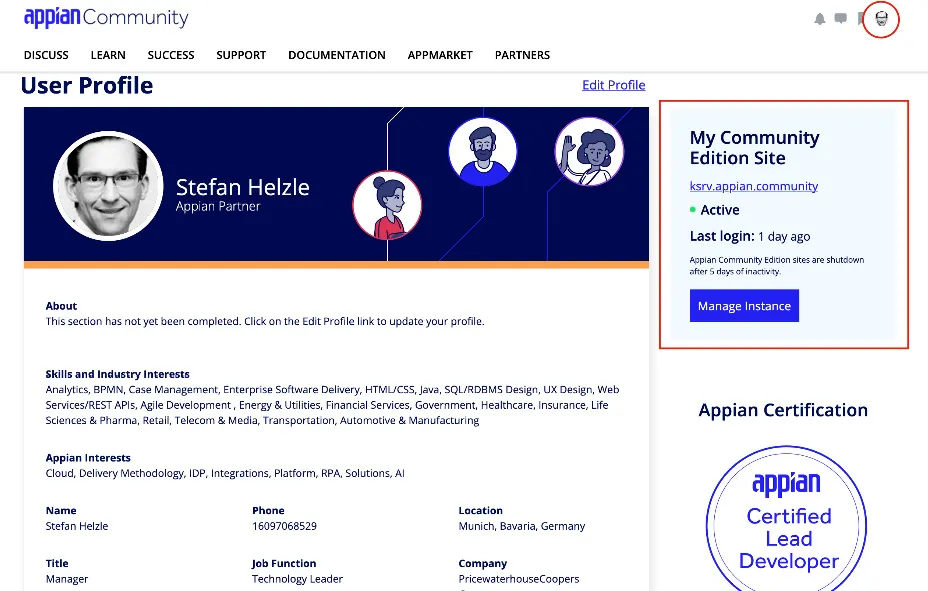
Figure 1.1 – Appian Community profile
Login and first contact with Appian
To get started, you will need to log in to your Appian environment (the Community Edition or a corporate one). If your company enabled single sign-on (SSO), you do not need to enter a username and password and you can skip step 3. The following steps will guide you to the Quick Apps Designer:
- Enter the web address of your Appian environment. If you use the Community Edition, you will need to accept the license agreement.
- Once you are done with that, you will get the login screen. There, you will need to enter your credentials and click Sign In.
- Appian Community Edition greets you with a nice screen with information on how to learn more about the Appian platform, as illustrated in the following screenshot:

Figure 1.2 – Appian Community Edition after login
- From the waffle menu at the top right of the screen, select Quick Apps Designer, as illustrated in...
Table of contents
- Low-Code Application Development with Appian
- Contributors
- Preface
- Section 1: No-Code with Appian Quick Apps
- Chapter 1: Creating an Appian Quick App
- Chapter 2: Features and Limitations of Appian Quick Apps
- Chapter 3: Building Blocks of Appian Quick Apps
- Chapter 4: The Use Cases for Appian Quick Apps
- Section 2: A Software Project with Appian
- Chapter 5: Understanding the Business Context
- Chapter 6: Understanding Business Data in Appian Projects
- Chapter 7: Understanding Business Processes in Appian Projects
- Chapter 8: Understanding UX Discovery and the UI in Appian Projects
- Section 3: Implementing Software
- Chapter 9: Modeling Business Data with Appian Records
- Chapter 10: Modeling Business Processes in Appian
- Chapter 11: Creating User Interfaces in Appian
- Chapter 12: Task Management with Appian
- Chapter 13: Reporting and Monitoring with Appian
- Section 4: The Code in Appian Low-Code
- Chapter 14: Expressing Logic with Appian
- Chapter 15: Using Web Services with Appian Integrations
- Chapter 16: Useful Implementation Patterns in Appian
- Other Books You May Enjoy
Trusted by 375,005 students
Access to over 1.5 million titles for a fair monthly price.
Study more efficiently using our study tools.
Frequently asked questions
Yes, you can cancel anytime from the Subscription tab in your account settings on the Perlego website. Your subscription will stay active until the end of your current billing period. Learn how to cancel your subscription
No, books cannot be downloaded as external files, such as PDFs, for use outside of Perlego. However, you can download books within the Perlego app for offline reading on mobile or tablet. Learn how to download books offline
Perlego offers two plans: Essential and Complete
- Essential is ideal for learners and professionals who enjoy exploring a wide range of subjects. Access the Essential Library with 800,000+ trusted titles and best-sellers across business, personal growth, and the humanities. Includes unlimited reading time and Standard Read Aloud voice.
- Complete: Perfect for advanced learners and researchers needing full, unrestricted access. Unlock 1.5M+ books across hundreds of subjects, including academic and specialized titles. The Complete Plan also includes advanced features like Premium Read Aloud and Research Assistant.
We are an online textbook subscription service, where you can get access to an entire online library for less than the price of a single book per month. With over 1.5 million books across 990+ topics, we’ve got you covered! Learn about our mission
Look out for the read-aloud symbol on your next book to see if you can listen to it. The read-aloud tool reads text aloud for you, highlighting the text as it is being read. You can pause it, speed it up and slow it down. Learn more about Read Aloud
Yes! You can use the Perlego app on both iOS and Android devices to read anytime, anywhere — even offline. Perfect for commutes or when you’re on the go.
Please note we cannot support devices running on iOS 13 and Android 7 or earlier. Learn more about using the app
Please note we cannot support devices running on iOS 13 and Android 7 or earlier. Learn more about using the app
Yes, you can access Low-Code Application Development with Appian by Stefan Helzle in PDF and/or ePUB format, as well as other popular books in Computer Science & Entreprise Applications. We have over 1.5 million books available in our catalogue for you to explore.