Autodesk 3ds Max 2020 for Beginners: A Tutorial Approach, 20th Edition
eBook - ePub

Autodesk 3ds Max 2020 for Beginners: A Tutorial Approach, 20th Edition

  1. English
  2. ePUB (mobile friendly)
  3. Available on iOS & Android
eBook - ePub

Autodesk 3ds Max 2020 for Beginners: A Tutorial Approach, 20th Edition

About this book

Autodesk 3ds Max 2020 for Beginners: A Tutorial Approach is a tutorial-based textbook that introduces the readers to the features of 3ds Max 2020 such as modeling, texturing, lighting, animation, and rendering in an effective and simple manner. In this edition, the readers will also learn about arnold materials, lights, and rendering. Also, some new and enhanced features of 3ds Max 2020 such as Chamfer Modifier and OSL map are covered in this edition.

Salient Features of Autodesk 3ds Max 2020 for Beginners textbook:

  • Consists of 17 chapters and 5 real world projects that are organized in a pedagogical sequence covering various aspects of modeling, texturing, lighting, rendering, and animation.
  • The author has followed the tutorial approach to explain various concepts of modeling, texturing, lighting, rendering, and animation.
  • Self-Evaluation test, Review Questions, and exercises are given at the end of each chapter so that the users can assess their knowledge.
  • Student project has been given at the end of this book to test and enhance the skills of students.

Table of Contents

Chapter 1: Introduction to Autodesk 3ds Max 2020
Chapter 2: Primitive Objects – I (Enhanced)
Chapter 3: Primitive Objects – II(Enhanced)
Chapter 4: Working with Splines – I (Enhanced)
Chapter 5: Working with Splines - II
Chapter 6: Lofting, Twisting, and Deforming Objects
Chapter 7: Material Editor: Creating Materials
Chapter 8: Material Editor - Texture Maps - I
Chapter 9: Material Editor - Texture Maps - II
Chapter 10: Material Editor: Controlling Texture Maps
Chapter 11: Material Editor: Miscellaneous Materials (Enhanced)
Chapter 12: Interior Lighting - I
Chapter 13: Interior Lighting - II
Chapter 14: Animation Basics (Enhanced)
Chapter 15: Complex Animation (Enhanced)
Chapter 16: Arnold Materials, Lights, and Rendering (New)
Chapter 17: Creating Walkthrough
Project 1: Creating a Windmill
Project 2: Creating a Diner
Project 3: Architectural Project
Project 4: Corporate Design Project
Project 5: Creating a Computer Center
Index

Free Teaching and Learning Resources:

CADCIM Technologies provides the following free teaching and learning resources with this textbook:

  • Technical support by contacting [email protected]
  • Max files used in tutorials
  • Instructor Guide with solution to all review questions and instructions to create the models for exercises (For faculty only)
  • Additional learning resources at https://3dsmaxexperts.blogspot.com and youtube.com/cadcimtech

We also provide video courses on Autodesk 3ds Max. To enroll, please visit the CADCIM website using the following link: https://www.cadcim.com/video-courses

About the Authors:

CADCIM Technologies, Prof. Sham Tickoo of Purdue University Northwest, and the team of dedicated contributing authors at CADCIM Technologies are committed to bring you the best textbooks and free teaching and learning resources on CAD/CAM/CAE, GIS, Civil, Animation and VFX, and related technologies. We strive to be the first and the best. That is our promise and our goal.
Our team of authors consists of highly qualified and experienced animation and visual effects artists who have a strong academic and industrial background. They understand the needs of the students, the faculty, and the challenges the students face when they start working in industry. All our books have been structured in a way that facilitates teaching and learning, and also exposes students to real-world applications. The textbooks, apart from providing comprehensive study material, are well appreciated for the simplicity of content, clarity of style, and the in-depth coverage of the subject.
Frequently asked questions

Yes, you can cancel anytime from the Subscription tab in your account settings on the Perlego website. Your subscription will stay active until the end of your current billing period. Learn how to cancel your subscription.
At the moment all of our mobile-responsive ePub books are available to download via the app. Most of our PDFs are also available to download and we're working on making the final remaining ones downloadable now. Learn more here.
Perlego offers two plans: Essential and Complete
  • Essential is ideal for learners and professionals who enjoy exploring a wide range of subjects. Access the Essential Library with 800,000+ trusted titles and best-sellers across business, personal growth, and the humanities. Includes unlimited reading time and Standard Read Aloud voice.
  • Complete: Perfect for advanced learners and researchers needing full, unrestricted access. Unlock 1.4M+ books across hundreds of subjects, including academic and specialized titles. The Complete Plan also includes advanced features like Premium Read Aloud and Research Assistant.
Both plans are available with monthly, semester, or annual billing cycles.
We are an online textbook subscription service, where you can get access to an entire online library for less than the price of a single book per month. With over 1 million books across 1000+ topics, we’ve got you covered! Learn more here.
Look out for the read-aloud symbol on your next book to see if you can listen to it. The read-aloud tool reads text aloud for you, highlighting the text as it is being read. You can pause it, speed it up and slow it down. Learn more here.
Yes! You can use the Perlego app on both iOS or Android devices to read anytime, anywhere — even offline. Perfect for commutes or when you’re on the go.
Please note we cannot support devices running on iOS 13 and Android 7 or earlier. Learn more about using the app.
Yes, you can access Autodesk 3ds Max 2020 for Beginners: A Tutorial Approach, 20th Edition by Prof. Sham Tickoo in PDF and/or ePUB format, as well as other popular books in Technology & Engineering & Electrical Engineering & Telecommunications. We have over one million books available in our catalogue for you to explore.
Project 1
Creating a Windmill

project Description
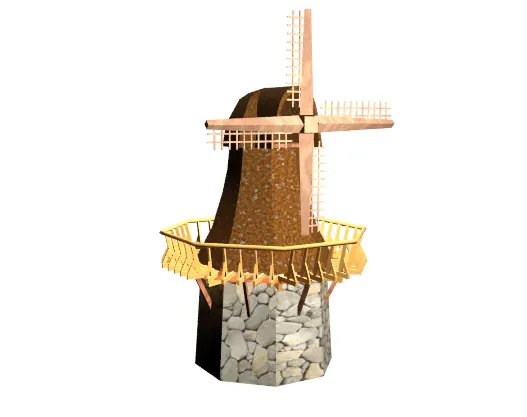
In this project, you will create the structure of a windmill, as shown in Figure P1-1. You will create the base structure, middle structure, and top structure of the windmill. Next, you will create the deck, deck rails, handrails, and blades of the windmill. You will apply materials to all objects of the windmill, animate the blades of the windmill, and then render the scene for the final output.
p01sc042.tif
Figure P1-1 The model of the windmill
Creating the Project Folder
Create a new project folder with the name Prj_1 at \Documents\3dsmax 2020 and then save the file with the name Prj1, as discussed in Tutorial 1 of Chapter 2.
Downloading the Files
Before starting the project, you need to download the prj1_3dsmax_2020.zip file from www.cadcim.com. The path of the file is given next: Textbooks > Animation and Visual Effects > 3ds Max > Autodesk 3ds Max 2020 for Beginners: A Tutorial Approach
Extract the contents of the zip file to Documents. Next, open Windows Explorer and then browse to \Documents\prj1_3dsmax_2020 and then copy all files to \Documents\3dsmax 2020\Prj1\sceneassets\images.
Creating the Base of the Windmill
In this section, you will create the base structure of the windmill by using the NGon tool.
1. Make sure the Wireframe option is chosen in the Shad...

Table of contents

  1. Front_matter_3dsmax_2020
  2. c01_3dsmax_begg_2020
  3. c02_3dsmax_begg_2020
  4. c03_3dsmax_begg_2020
  5. c04_3dsmax_begg_2020
  6. c05_3dsmax_begg_2020
  7. c06_3dsmax_begg_2020
  8. c07_3dsmax_begg_2020
  9. c08_3dsmax_begg_2020
  10. c09_3dsmax_begg_2020
  11. c10_3dsmax_begg_2020
  12. c11_3dsmax_begg_2020
  13. c12_3dsmax_begg_2020
  14. c13_3dsmax_begg_2020
  15. c14_3dsmax_begg_2020
  16. c15_3dsmax_begg_2020
  17. c16_3dsmax_begg_2020
  18. c17_3dsmax_begg_2020
  19. Project01_2020_beginners
  20. Project02_2020_beginners
  21. Project03_2020_beginners
  22. Project04_2020_beginners
  23. Project05_2020_beginners
  24. Student_Project_2020_beginners