Master the art of detecting and averting advanced network security attacks and techniquesAbout This Book• Deep dive into the advanced network security attacks and techniques by leveraging tools such as Kali Linux 2, MetaSploit, Nmap, and Wireshark• Become an expert in cracking WiFi passwords, penetrating anti-virus networks, sniffing the network, and USB hacks• This step-by-step guide shows you how to confidently and quickly detect vulnerabilities for your network before the hacker doesWho This Book Is ForThis book is for network security professionals, cyber security professionals, and Pentesters who are well versed with fundamentals of network security and now want to master it. So whether you're a cyber security professional, hobbyist, business manager, or student aspiring to becoming an ethical hacker or just want to learn more about the cyber security aspect of the IT industry, then this book is definitely for you.What You Will Learn• Use SET to clone webpages including the login page• Understand the concept of Wi-Fi cracking and use PCAP file to obtain passwords• Attack using a USB as payload injector• Familiarize yourself with the process of trojan attacks• Use Shodan to identify honeypots, rogue access points, vulnerable webcams, and other exploits found in the database• Explore various tools for wireless penetration testing and auditing• Create an evil twin to intercept network traffic• Identify human patterns in networks attacksIn DetailComputer networks are increasing at an exponential rate and the most challenging factor organisations are currently facing is network security. Breaching a network is not considered an ingenious effort anymore, so it is very important to gain expertise in securing your network.The book begins by showing you how to identify malicious network behaviour and improve your wireless security. We will teach you what network sniffing is, the various tools associated with it, and how to scan for vulnerable wireless networks. Then we'll show you how attackers hide the payloads and bypass the victim's antivirus.Furthermore, we'll teach you how to spoof IP / MAC address and perform an SQL injection attack and prevent it on your website. We will create an evil twin and demonstrate how to intercept network traffic. Later, you will get familiar with Shodan and Intrusion Detection and will explore the features and tools associated with it. Toward the end, we cover tools such as Yardstick, Ubertooth, Wifi Pineapple, and Alfa used for wireless penetration testing and auditing.This book will show the tools and platform to ethically hack your own network whether it is for your business or for your personal home Wi-Fi.Style and approachThis mastering-level guide is for all the security professionals who are eagerly waiting to master network security skills and protecting their organization with ease. It contains practical scenarios on various network security attacks and will teach you how to avert these attacks.
- 350 pages
- English
- ePUB (mobile friendly)
- Available on iOS & Android
eBook - ePub
Applied Network Security
About this book
Information
Sniffing the Network
In this chapter, we will focus on the various tools and methods used to monitor network traffic. The objective for this chapter is to help the reader gain an understanding of Nmap, Wireshark, and the importance of monitoring a network for potential attacks. This chapter will provide the most common commands used in Nmap. We will provide screenshots and demonstrate how to use the syntax. In this chapter, we will mostly focus on two main network monitoring tools. We will discuss Nmap first because it is a command-line-based tool. Nmap also has a GUI-based version, known as Zenmap. There are advantages to developing your skill with command-line-based tools. They will allow you to gain a better understanding of how the tools function and allow you more flexibility, dependability, and control. GUI-based monitoring tools such as Wireshark also have advantages; we will discuss this in this chapter. As mentioned before, Wireshark is a GUI-based network analysis/monitoring tool. Wireshark is one of the best network sniffers available to the public. It has many packet filter options to choose from. This chapter will explain how these filter commands work. Screenshots of Wireshark will also be provided so that the reader can see what its GUI interface looks like. After reading this chapter, the user will have a solid understanding of Nmap commands and how to operate the basics of Wireshark. A person who can use these tools effectively will make themselves highly sought after in the network security field.
What is network sniffing?
Network sniffing is a collection of packet data that is transmitted throughout the network. Network sniffing is also known as packet analysis. There are different types of network sniffers. Two of the most common are Ethernet sniffers and wireless sniffers. A network sniffer is a piece of software or hardware that can capture and log network traffic.
Nmap is a popular network sniffing tool used by many cyber security professionals. Before using this tool, you must learn how to install it. You also need to be able to check the version and locate the user manual. It is recommended that you use Kali Linux as the operating system when using Nmap. Kali Linux comes with many pre-installed tools such as Nmap and Wireshark. If you are using a version of Linux without pre-installed tools, you must perform a fresh install. The best and most efficient way to install Nmap is to clone the repository location directly from GitHub. First, open Firefox in Kali Linux and navigate to a search engine such as Google. In the search bar, type Nmap github. The link you want will be https://github.com/nmap/nmap. You can also type the link into the URL address bar instead of using a search engine. On the GitHub page, click on the green button that says Clone or download. This button is located on the right side, towards the top of the page. The following screenshot displays where the Clone or download button is located:
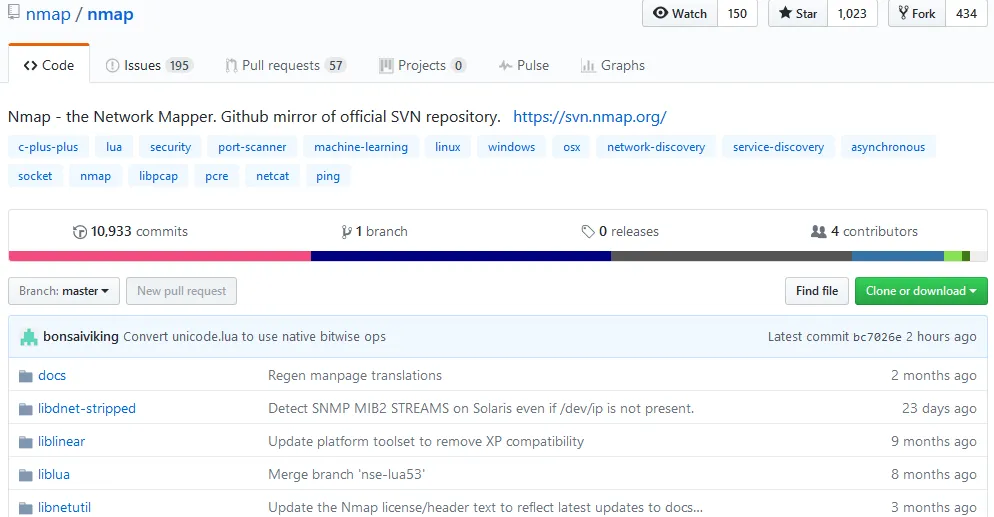
When you click on the green Clone or download button, a text box will appear with a URL, namely https://github.com/nmap/nmap.git. This is the location of the repository, which also includes the branches and tags. The cloning install method automates the file compilation process, saving time, and making sure everything is in place. Open a terminal in Kali Linux and type, git clone https://github.com/nmap/nmap.git to begin the cloning process. After this command is entered, the tool will be downloaded and installed automatically.
After the install is complete, you will need to confirm that you are using the latest version of Nmap. To check which version of Nmap you have type, nmap -V. If you want to see a list of Nmap commands, type -h to bring up the help menu. According to www.namp.org, the primary documentation for using Nmap is the Nmap reference guide. It is also the basis for the Nmap manual page. The manual page can be found using the URL https://nmap.org/book/man.html. If you want to install Nmap from the source code using Linux, you will need to download it from https://nmap.org/download.html. The files will be compressed and offered in two formats. The first format will be .tar.bz2 and the second format will be .tgz. The compressed files are also known as tarballs. A tarball or TAR file is used to combine lots of files into a single archive. This is similar to the .zip files found in Windows. After the Nmap tarball is downloaded, you will need to decompress it by typing the command bzip -cd nmap-<VERSION>.tar.bz2 | tar xvf -. Next, you will need to change into the recently created directory by typing cd nmap-<VERSION>. Now you need to configure the build system by typing ./configure while still in the nmap directory. Next, you will build Nmap by typing make. If the make command doesn't work type gmake. The next step is making sure you have the correct user privileges for a system-wide install by typing su root. The final step is installing the support files for Nmap by typing make install. Both install methods can be applied to other tools ...
Table of contents
- Title Page
- Copyright
- Credits
- About the Authors
- About the Reviewer
- www.PacktPub.com
- Customer Feedback
- Preface
- Introduction to Network Security
- Sniffing the Network
- How to Crack Wi-Fi Passwords
- Creating a RAT Using Msfvenom
- Veil Framework
- Social Engineering Toolkit and Browser Exploitation
- Advanced Network Attacks
- Passing and Cracking the Hash
- SQL Injection
- Scapy
- Web Application Exploits
- Evil Twins and Spoofing
- Injectable Devices
- The Internet of Things
- Detection Systems
- Advance Wireless Security Lab Using the Wi-Fi Pineapple Nano/Tetra
- Offensive Security and Threat Hunting
Trusted by 375,005 students
Access to over 1.5 million titles for a fair monthly price.
Study more efficiently using our study tools.
Frequently asked questions
Yes, you can cancel anytime from the Subscription tab in your account settings on the Perlego website. Your subscription will stay active until the end of your current billing period. Learn how to cancel your subscription
No, books cannot be downloaded as external files, such as PDFs, for use outside of Perlego. However, you can download books within the Perlego app for offline reading on mobile or tablet. Learn how to download books offline
Perlego offers two plans: Essential and Complete
- Essential is ideal for learners and professionals who enjoy exploring a wide range of subjects. Access the Essential Library with 800,000+ trusted titles and best-sellers across business, personal growth, and the humanities. Includes unlimited reading time and Standard Read Aloud voice.
- Complete: Perfect for advanced learners and researchers needing full, unrestricted access. Unlock 1.5M+ books across hundreds of subjects, including academic and specialized titles. The Complete Plan also includes advanced features like Premium Read Aloud and Research Assistant.
We are an online textbook subscription service, where you can get access to an entire online library for less than the price of a single book per month. With over 1.5 million books across 990+ topics, we’ve got you covered! Learn about our mission
Look out for the read-aloud symbol on your next book to see if you can listen to it. The read-aloud tool reads text aloud for you, highlighting the text as it is being read. You can pause it, speed it up and slow it down. Learn more about Read Aloud
Yes! You can use the Perlego app on both iOS and Android devices to read anytime, anywhere — even offline. Perfect for commutes or when you’re on the go.
Please note we cannot support devices running on iOS 13 and Android 7 or earlier. Learn more about using the app
Please note we cannot support devices running on iOS 13 and Android 7 or earlier. Learn more about using the app
Yes, you can access Applied Network Security by Arthur Salmon, Warun Levesque, Michael McLafferty in PDF and/or ePUB format, as well as other popular books in Computer Science & Computer Networking. We have over 1.5 million books available in our catalogue for you to explore.