Master over 80 object-oriented recipes to create amazing GUIs in Python and revolutionize your applications todayAbout This Book• Use object-oriented programming to develop amazing GUIs in Python• Create a working GUI project as a central resource for developing your Python GUIs• Easy-to-follow recipes to help you develop code using the latest released version of PythonWho This Book Is ForThis book is for intermediate Python programmers who wish to enhance their Python skills by writing powerful GUIs in Python. As Python is such a great and easy to learn language, this book is also ideal for any developer with experience of other languages and enthusiasm to expand their horizon.What You Will Learn• Create the GUI Form and add widgets• Arrange the widgets using layout managers• Use object-oriented programming to create GUIs• Create Matplotlib charts• Use threads and talking to networks• Talk to a MySQL database via the GUI• Perform unit-testing and internationalizing the GUI• Extend the GUI with third-party graphical libraries• Get to know the best practices to create GUIsIn DetailPython is a multi-domain, interpreted programming language. It is a widely used general-purpose, high-level programming language. It is often used as a scripting language because of its forgiving syntax and compatibility with a wide variety of different eco-systems. Python GUI Programming Cookbook follows a task-based approach to help you create beautiful and very effective GUIs with the least amount of code necessary.This book will guide you through the very basics of creating a fully functional GUI in Python with only a few lines of code. Each and every recipe adds more widgets to the GUIs we are creating. While the cookbook recipes all stand on their own, there is a common theme running through all of them. As our GUIs keep expanding, using more and more widgets, we start to talk to networks, databases, and graphical libraries that greatly enhance our GUI's functionality. This book is what you need to expand your knowledge on the subject of GUIs, and make sure you're not missing out in the long run.Style and approachThis programming cookbook consists of standalone recipes, and this approach makes it unique.. While each recipe explains a certain concept, throughout the book you'll build a more and more advanced GUI, recipe after recipe. In some of the advanced topics, we simply create a new GUI in order to explore these topics in depth.
- 422 pages
- English
- ePUB (mobile friendly)
- Available on iOS & Android
eBook - ePub
Python GUI Programming Cookbook - Second Edition
About this book
Information
Internationalization and Testing
In this chapter, we will internationalize and test our Python GUI, covering the following recipes:
- Displaying widget text in different languages
- Changing the entire GUI language all at once
- Localizing the GUI
- Preparing the GUI for internationalization
- How to design a GUI in an agile fashion
- Do we need to test the GUI code?
- Setting debug watches
- Configuring different debug output levels
- Creating self-testing code using Python's __main__ section
- Creating robust GUIs using unit tests
- How to write unit tests using the Eclipse PyDev IDE
Introduction
In this chapter, we will internationalize our GUI by displaying text on labels, buttons, tabs, and other widgets, in different languages. We will start simply and then explore how we can prepare our GUI for internationalization at the design level.
We will also localize the GUI, which is slightly different from internationalization.
As these words are long, they have been abbreviated to use the first character of the word, followed by the total number of characters in between the first and last character, followed by the last character of the word. So, internationalization becomes I18N and localization becomes L10N.
We will also test our GUI code, write unit tests, and explore the value unit tests can provide in our development efforts, which will lead us to the best practice of refactoring our code.
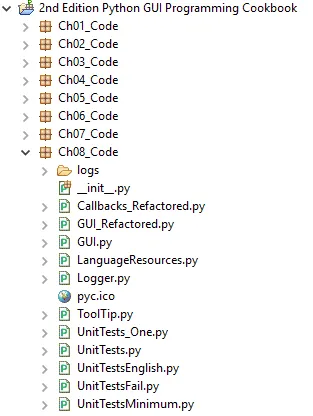
Here is the overview of Python modules for this chapter:
Displaying widget text in different languages
The easiest way to internationalize text strings in Python is by moving them into a separate Python module and then selecting the language to be displayed in our GUI by passing in a parameter to this module.
While this approach is not highly recommended, according to online search results, depending on the specific requirements of the application you are developing, this approach might still be the most pragmatic and fastest to implement.
Getting ready
We will reuse the Python GUI we created earlier. We have commented out one line of Python code that creates the MySQL tab because we do not talk to a MySQL database in this chapter.
How to do it...
In this recipe, we will start the I18N of our GUI by changing the Windows title from English to another language.
As the name GUI is the same in other languages, we will first expand the name which enables us to see the visual effects of our changes.
The following was our previous line of code:
self.win.title("Python GUI") Let's change this to the following:
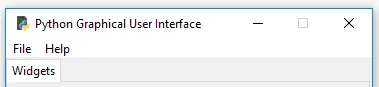
self.win.title("Python Graphical User Interface") The preceding code change results in the following title for our GUI program:
GUI_Refactored.py
In this chapter, we will use English and German to exemplify the principle of internationalizing our Python GUI.
Hardcoding strings into code is never too good an idea, so the first thing we can do to improve our code is to separate all the strings that are visible in our GUI into a Python module of their own. This is the beginning of internationalizing the visible aspects of our GUI.
While we are into I18N, we will do this very positive refactoring and language translation, all in one step.
Let's create a new Python module and name it LanguageResources.py. Let's next move the English string of our GUI title into this module and then import this module into our GUI code.
We are separating the GUI from the languages it displays, which is an OOP design principle.
Our new Python module, containing internationalized strings, now looks as follows:
 class I18N():
 '''Internationalization'''
 def __init__(self, language):
 if language == 'en': self.resourceLanguageEnglish()
 elif language == 'de': self.resourceLanguageGerman()
 else: raise NotImplementedError('Unsupported language.')

 def resourceLanguageEnglish(self):
 self.title = "Python Graphical User Interface"

 def resourceLanguageGerman(self):
 self.title = 'Python Grafische Benutzeroberflaeche'
We import this new Python module into our main Python GUI code, and then use it:
 from Ch08_Code.LanguageResources import I18N
class OOP():
 def __init__(self):
 self.win = tk.Tk() # Create instance
 self.i18n = I18N('de') # Select language
 self.win.title(self.i18n.title) # Add a title
Depending on which language we pass into the I18N class, our GUI will be displayed in that language.
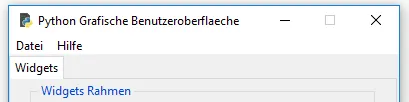
Running the above code, we now get the following internationalized result:
GUI.py
How it works...
We break out the hardcoded strings that are part of our GUI into their own separate modules. We do this by creating a class, and within the class's __init__() method, we select which language our GUI will display, depending on the passed-in language argument.
This works.
We can further modularize our code by separating the internationalized strings into separate files, potentially in XML or another format. We could also read them from a MySQL database.
This is a Separation of Concerns coding approach, which is at the heart of OOP programming.
Changing the entire GUI language, all at once
In this recipe, we will change all of the GUI display names, all at once, by refactoring all the previously hardcoded English strings into a se...
Table of contents
- Title Page
- Copyright
- Credits
- About the Author
- About the Reviewer
- www.PacktPub.com
- Customer Feedback
- Preface
- Creating the GUI Form and Adding Widgets
- Layout Management
- Look and Feel Customization
- Data and Classes
- Matplotlib Charts
- Threads and Networking
- Storing Data in our MySQL Database via our GUI
- Internationalization and Testing
- Extending Our GUI with the wxPython Library
- Creating Amazing 3D GUIs with PyOpenGL and PyGLet
- Best Practices
Trusted by 375,005 students
Access to over 1.5 million titles for a fair monthly price.
Study more efficiently using our study tools.
Frequently asked questions
Yes, you can cancel anytime from the Subscription tab in your account settings on the Perlego website. Your subscription will stay active until the end of your current billing period. Learn how to cancel your subscription
No, books cannot be downloaded as external files, such as PDFs, for use outside of Perlego. However, you can download books within the Perlego app for offline reading on mobile or tablet. Learn how to download books offline
Perlego offers two plans: Essential and Complete
- Essential is ideal for learners and professionals who enjoy exploring a wide range of subjects. Access the Essential Library with 800,000+ trusted titles and best-sellers across business, personal growth, and the humanities. Includes unlimited reading time and Standard Read Aloud voice.
- Complete: Perfect for advanced learners and researchers needing full, unrestricted access. Unlock 1.5M+ books across hundreds of subjects, including academic and specialized titles. The Complete Plan also includes advanced features like Premium Read Aloud and Research Assistant.
We are an online textbook subscription service, where you can get access to an entire online library for less than the price of a single book per month. With over 1.5 million books across 990+ topics, we’ve got you covered! Learn about our mission
Look out for the read-aloud symbol on your next book to see if you can listen to it. The read-aloud tool reads text aloud for you, highlighting the text as it is being read. You can pause it, speed it up and slow it down. Learn more about Read Aloud
Yes! You can use the Perlego app on both iOS and Android devices to read anytime, anywhere — even offline. Perfect for commutes or when you’re on the go.
Please note we cannot support devices running on iOS 13 and Android 7 or earlier. Learn more about using the app
Please note we cannot support devices running on iOS 13 and Android 7 or earlier. Learn more about using the app
Yes, you can access Python GUI Programming Cookbook - Second Edition by Burkhard A. Meier in PDF and/or ePUB format, as well as other popular books in Computer Science & Programming. We have over 1.5 million books available in our catalogue for you to explore.