Your one stop solution to create highly scalable enterprise grade Java applications with WildFly.About This Book• Master Java EE development with the latest WildFly 10 application server.• Integrate with JSF and JMS and use efficient load balancing techniques to create real-time apps• Integrate your backend JavaScript code seamlessly into Java applications Who This Book Is ForIf you are a Java developer with at least basic knowledge of Java EE, then this book is for you. No previous knowledge of WildFly is required.What You Will Learn• Configure the development environment along with native and cloud installation of WildFly• Write a DB schema and the relative entities and how to use the relationships between the entities• Analyze with examples all the java annotations to manage the EJB and the configuration to get better performances• Write different REST services through the EJB• Implement Web sockets 1.0 and know why and when use the web sockets• Work with Active MQ and write JMS clients to manage the authentication and authorization in the clients• Configure the mail server through the wildfly console• Learn how and when to use a new feature JAX-RS 2.0, which is the asynchronous call through REST• Use the new JSF features of Wildfly 10 such as Mojarra 2.2, JSF 2.2, Richfaces 4.5In DetailPacked with rich assets and APIs, Wildfly 10 allows you to create state-of-the-art Java applications. This book will help you take your understanding of Java EE to the next level by creating distributed Java applications using Wildfly.The book begins by showing how to get started with a native installation of WildFly and it ends with a cloud installation. After setting up the development environment, you will implement and work with different WildFly features, such as implementing JavaServer Pages. You will also learn how you can use clustering so that your apps can handle a high volume of data traffic. You will also work with enterprise JavaBeans, solve issues related to failover, and implement Java Message Service integration. Moving ahead, you will be working with Java Naming and Directory Interface, Java Transaction API, and use ActiveMQ for message relay and message querying. This book will also show you how you can use your existing backend JavaScript code in your application.By the end of the book, you'll have gained the knowledge to implement the latest Wildfly features in your Java applications.Style and approachEach part of this book shows you how to use different features of WildFly 10 to create enterprise grade Java applications as easily as possible.
- 468 pages
- English
- ePUB (mobile friendly)
- Available on iOS & Android
eBook - ePub
Mastering Java EE Development with WildFly
About this book
Information
Batches and Workflows
One good feature that started in Java EE7 is batch management. WildFly supports the implementation of this specification, the JSR 352 batch applications for the Java platform started in the 2011 and now finally integrated into the Java EE specifications.
A batch is a group of records processed as a single unit, usually without input from a user. Batches are important things for the applications because customers need the option to execute scheduled asynchronous operations for example massive data to update automatically for a date in the night.
Batches can be compared to the scheduled singletons seen in Chapter 11, Asynchronous EJB but they are organized with one scope in mind, guaranteeing the process of a large quantity of data. So the batches work in a domain different to the EJB because they don't need to be called upon by an external component. They don't need a strong security management because the batches can be used only inside the administration domain. Using the batches you have:
- No deployment descriptors
- Portability
- Reusable interfaces
- Used by multiple users
- Runtime API
- Powerful expression language
- Parallel processing
An extension of the batch is the workflow. A workflow is a set of batches that work according to a flow. The programmer is able to design a flow, deciding all the batches that the workflow must execute either on a timer decision than a process decision.
A workflow is composed by steps and jobs:
- A job represents a single process of a workflow. It is represented by a Job Specification Language (JSL) usually by an XML file. A job (with JSR 352) is a container for steps.
- A step is a domain object represented by a sequential phase of the job. A step contains all the logic and data to perform the processing. The batch specifications deliberately leave the definition of a step vague because the content depends on the application and can be defined as the developer wishes.
JBeret 1.2.1.Final is an opensource product developed by the JBoss community implementing the JSR 352. It is integrated into WildFly 10.1.0.Final.
In this chapter we will analyze, with samples, all features available in WildFly to start batches and workflows according to the following points:
- Differences between workflows and Business Process Model (BPM)
- Batch types and models
- Jobs, steps and all workflow components provided by WildFly
- Metrics of the jobs and the steps
- Batch listeners and exceptions
- Monitoring of the batches
- Deployment of the batches
Workflows and BPM
Workflows have existed for many years. Different protocols have been defined during these years. The BPM eventually became Business Process Model and Notation (BPMN).
BPMN usually provides a web console where the analyst designs the flow. The flow can then be exported and directly deployed in a application server, so it's ready to be executed. Different good open source implementations exist, such as Bonita, Activiti, and JBPM. Let's look at a sample of Activiti designed flow:
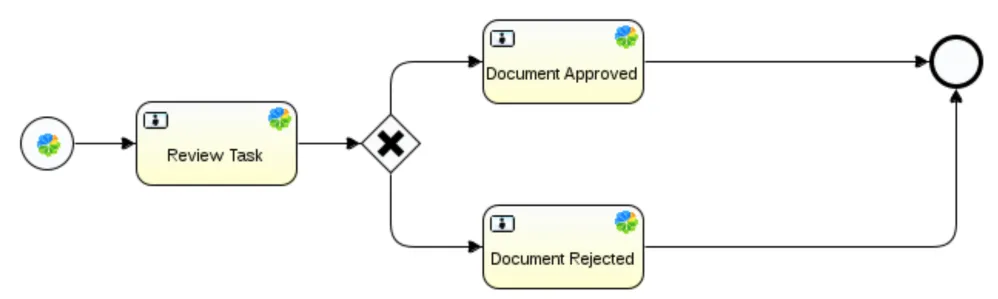
This simple flow is composed of three steps: Review Task, Document Approved, and Document Rejected. Each step executes an operation. The X (cross mark) is a decision. The process will calculate based on the direction the road will take (in this case, left or right).
The same thing can be done in WildFly now. So, what is the difference introdu...
Table of contents
- Title Page
- Copyright
- Credits
- About the Author
- About the Reviewers
- www.PacktPub.com
- Customer Feedback
- Preface
- Introducing Java EE and Configuring the Development Environment
- Working with Dependency Injection
- Persistence
- Implementing Business Logic
- Working with Distributed Transactions
- Creating REST Services
- Implementing WebSockets
- Working with Messaging
- Implementing a Mail Client
- Asynchronous REST
- Asynchronous EJB
- Batches and Workflows
- Working with Servlets and JSP
- Writing a JSF Application
- Sharing the Web Sessions
- WildFly in Cloud
- Share your Data
- Deployment
- Working with OSGi
Trusted by 375,005 students
Access to over 1.5 million titles for a fair monthly price.
Study more efficiently using our study tools.
Frequently asked questions
Yes, you can cancel anytime from the Subscription tab in your account settings on the Perlego website. Your subscription will stay active until the end of your current billing period. Learn how to cancel your subscription
No, books cannot be downloaded as external files, such as PDFs, for use outside of Perlego. However, you can download books within the Perlego app for offline reading on mobile or tablet. Learn how to download books offline
Perlego offers two plans: Essential and Complete
- Essential is ideal for learners and professionals who enjoy exploring a wide range of subjects. Access the Essential Library with 800,000+ trusted titles and best-sellers across business, personal growth, and the humanities. Includes unlimited reading time and Standard Read Aloud voice.
- Complete: Perfect for advanced learners and researchers needing full, unrestricted access. Unlock 1.5M+ books across hundreds of subjects, including academic and specialized titles. The Complete Plan also includes advanced features like Premium Read Aloud and Research Assistant.
We are an online textbook subscription service, where you can get access to an entire online library for less than the price of a single book per month. With over 1.5 million books across 990+ topics, we’ve got you covered! Learn about our mission
Look out for the read-aloud symbol on your next book to see if you can listen to it. The read-aloud tool reads text aloud for you, highlighting the text as it is being read. You can pause it, speed it up and slow it down. Learn more about Read Aloud
Yes! You can use the Perlego app on both iOS and Android devices to read anytime, anywhere — even offline. Perfect for commutes or when you’re on the go.
Please note we cannot support devices running on iOS 13 and Android 7 or earlier. Learn more about using the app
Please note we cannot support devices running on iOS 13 and Android 7 or earlier. Learn more about using the app
Yes, you can access Mastering Java EE Development with WildFly by Luca Stancapiano in PDF and/or ePUB format, as well as other popular books in Computer Science & Open Source Programming. We have over 1.5 million books available in our catalogue for you to explore.