Exciting new capabilities to enable even easier DIY robotics with BeagleBone BlueAbout This Book• Build powerful robots with the all new BeagleBone Blue• Communicate with your robot and teach it to detect and respond to its environment• Control walking, rolling, swimming, and flying robots with your iOS and Android mobile devicesWho This Book Is ForThis book is for anyone who is curious about using new, low-cost hardware to create robotic projects and have previously been the domain of research labs, major universities, or defence departments. Some programming experience would be useful, but if you know how to use a personal computer, you can use this book to construct far more complex systems than you would have thought possible.What You Will Learn• Power on and configure the BeagleBone Blue• Get to know Simple programming techniques to enable the unique hardware capabilities of the BeagleBone Blue.• Connect standard hardware to enable your projects to see, speak, hear, and move• Build advanced capabilities into your projects, such as GPS and sonar sensors• Build complex projects that can fly, or go under or on the waterIn DetailBeagleBone Blue is effectively a small, light, cheap computer in a similar vein to Raspberry Pi and Arduino. It has all of the extensibility of today's desktop machines, but without the bulk, expense, or noise. This project guide provides step-by-step instructions that enable anyone to use this new, low-cost platform in some fascinating robotics projects. By the time you are finished, your projects will be able to see, speak, listen, detect their surroundings, and move in a variety of amazing ways.The book begins with unpacking and powering up the components. This includes guidance on what to purchase and how to connect it all successfully, and a primer on programming the BeagleBone Blue. You will add additional software functionality available from the open source community, including making the system see using a webcam, hear using a microphone, and speak using a speaker.You will then learn to use the new hardware capability of the BeagleBone Blue to make your robots move, as well as discover how to add sonar sensors to avoid or find objects. Later, you will learn to remotely control your robot through iOS and Android devices. At the end of this book, you will see how to integrate all of these functionalities to work together, before developing the most impressive robotics projects: Drone and Submarine.Style and approachDevelop practical example projects with detailed explanations, combine the projects in a vast number of ways to create different robot designs, or work through them in sequence to discover the full capability of the BeagleBone Blue.
- 230 pages
- English
- ePUB (mobile friendly)
- Available on iOS & Android
eBook - ePub
BeagleBone Robotic Projects - Second Edition
About this book
Information
Programming the BeagleBone Blue
Before you get started with building your robotic projects, let's take a bit of time to either introduce or review how to program the BeagleBone Blue.
In this chapter, you will:
- Learn some of the basic Linux commands and get to know how to navigate around the filesystem on the BeagleBone Blue
- Learn how to create, edit, and save files on the BeagleBone Blue
- Learn how to create and run Python programs on the BeagleBone Blue
- Learn how the C programming language is both similar and different from Python so you can both create and edit C code files
Now that things are up and running, you'll want your BeagleBone Blue to start doing something. Almost always, this requires you to either create your own programs or edit someone else's programs. This chapter will provide a brief introduction to basic Linux commands and Python and C programming.
While it is fun to build hardware, and you'll spend a good deal of time actually designing and building your robots; without programming, your robots won't get very far. This chapter will introduce you to some important tasks such as file creation and editing as well as some Python and C programming concepts so you'll feel comfortable creating some of the fairly simple programs that you'll learn about throughout the book. You'll also learn how to change programs that are already available, making your robot do even more amazing things.
You're going to use the basic configuration that you created in Chapter 1, Getting Started with the BeagleBone Blue. You can accomplish the tasks in this chapter either by remotely logging into the BeagleBone Blue using VNC server or remotely logging using SSH.
Basic Linux commands showing how to navigate around the filesystem on the BeagleBone Blue
After completing Chapter 1, Getting Started with the BeagleBone Blue , you should have a working BeagleBone Blue running a version of Linux called Ubuntu. We selected this one because it is the most popular and thus has the largest set of supported hardware and software. The commands I am going to review should also work with other versions of Linux, but I'll be showing examples using Ubuntu.
So, power up your BeagleBone Blue, connect via Wi-Fi, and log in to user SSH with the proper username and password. Now you are ready for a quick tour of Linux. This will not be extensive, but you will learn some of the basic commands and how to access some fundamental functionality.
Once you have logged in, you should have an active Terminal window. It should look something like this:
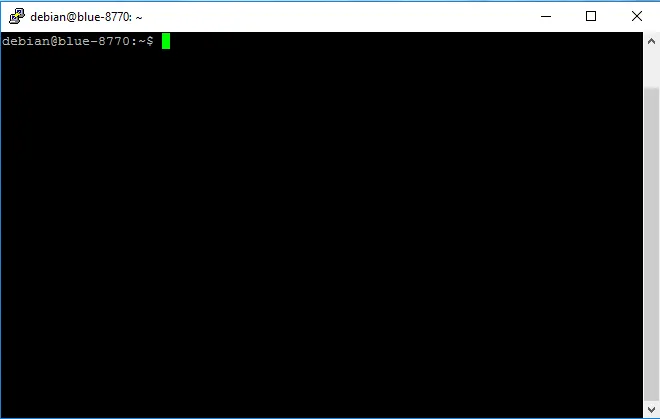
Your cursor is at Command Prompt. Unlike Microsoft Windows or Apple's OS, most of our work will be done by actually typing commands into the command line. So, let's try a few. First, type ls, and you should see something like this:

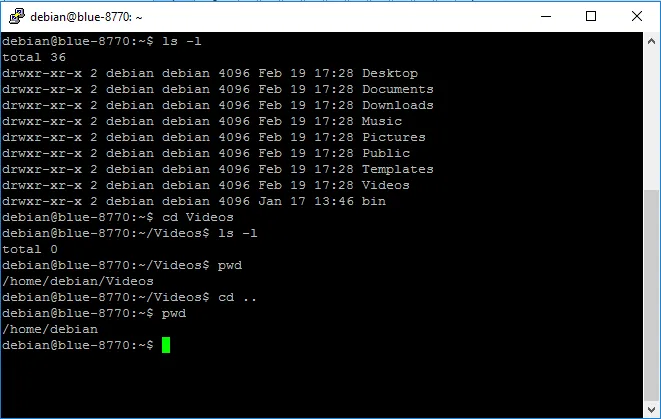
The ls command in Linux is the list command, and it lists all the files and directories in the current directory. If you'd like more information on your files, you can type ls -l. This should display the following screenshot:

This command provides information about who owns the files, the time they were created, and the various permissions on the files. The files are listed by their names, you can tell the directories because they are normally in a different color, and the letter d proceeds the lines for those listing. In this case, Videos is a directory. The default installation of debian has only a single bin directory, and installing the Xfce windows manager creates the Desktop, Documents, Downloads, Music, Pictures, Public, Templates, and Videos directories.
You can move around the directory structure by issuing the cd (change-directory) command. For example, if you want to see what is in the Videos directory, type cd Videos. Now if you issue the ls -l command, you should see something like this:

This directory is empty. Now, I should point out that you used a shortcut when you typed cd Videos. This command assumed that you wanted to start from the current directory. You can always find the full directory name of your current directory by typing pwd (print working directory). If you do that, here is what you should get:

To get to this same directory, you could also have typed cd /home/debian/Videos and gotten the exact same result, because you started in the /home/debian directory, which is the directory where you always start when you first log into the system.
Now, you can use two different shortcuts to move back to the default directory. The first is to type cd ..; this will take you to the directory just above this one in the hierarchy. Do this and then type pwd, and you should see the following:
The other way to get back to the home directory is to type cd ~ as this will always return you to the home directory. You can use these shortcuts, or you can use the entire path name. In this case, if you want to go to the /home/ubuntu/Video directory from anywhere in the file system, simply type cd /home/ubuntu/Video and you will go to that directory.
There are a number of other Linux commands that you might find useful as you program your robot. Here is a table with some of the more useful commands:
| Linux command: | What it does: |
| ls -l | List-long: Lists all the files and directories in the current directory. This includes lots of extra information about the file, including the time at which it was created, permissions, owners, and so on. |
| ls | List-short: Lists all the files and directories in the current directory by just their names. |
| rm filename | Remove: Removes whichever file is specified by the filename. |
| mv filename1 filename2 | Move: Renames filename1 to filename2. |
| cp filename1 filename2 | Copy: Copies filename1 to filename2. |
| mkdir directoryname | Make directory: Makes a directory with the name directoryname; this will be made in the current directory unless otherwise specified. |
| clear | Clear: Clears the current Terminal window. |
| sudo | Super user: If you type the sudo command in front of any command, it will execute that command as the super user. This can be required if the command or program you are trying to execute needs super user permissions. If, at any point in this book, you type a command or the name of program you want to run and it seems to suggest that the command does not exist, or permission is denied, try it again with sudo in front of the command or the name of the program. |
Now you can play around and look at your system and the files that are available to you. Be a bit careful! Linux is not like Windows; it will not warn you if you try to delete a file or copy over a current file. And if you delete the wrong file, your system may no longer be usable and you'll need to reinstall the Debian operating system.
If you need to reinstall the operating system, go to beagleboard.org, select your board, and go to the getting started tab. It will give you instructions on how to download and install the latest operating systems.
Creating, editing, and saving files on the BeagleBone Blue
Now that you can log in and move easily between directories and see which files are in your directories, you'll want to be able to edit those files. To do this, you'll need a program that allows you to edit the characters in a file. If you have worked in Microsoft Windows, you probably have used a program such as Microsoft Notepad, WordPad, or Word to do this. As you might imagine...
Table of contents
- Title Page
- Copyright
- Credits
- Foreword
- About the Author
- About the Reviewers
- www.PacktPub.com
- Customer Feedback
- Preface
- Getting Started with the BeagleBone Blue
- Programming the BeagleBone Blue
- Making the Unit Mobile - Controlling Wheeled Movement
- Avoiding Obstacles Using Sensors
- Allowing Our BeagleBone Blue to See
- Providing Speech Input and Output
- Making the Unit Very Mobile - Controlling Legged Movement
- Using a GPS Receiver to Locate Your Robot
- By Land, By Sea, By Air
- System Dynamics
Trusted by 375,005 students
Access to over 1.5 million titles for a fair monthly price.
Study more efficiently using our study tools.
Frequently asked questions
Yes, you can cancel anytime from the Subscription tab in your account settings on the Perlego website. Your subscription will stay active until the end of your current billing period. Learn how to cancel your subscription
No, books cannot be downloaded as external files, such as PDFs, for use outside of Perlego. However, you can download books within the Perlego app for offline reading on mobile or tablet. Learn how to download books offline
Perlego offers two plans: Essential and Complete
- Essential is ideal for learners and professionals who enjoy exploring a wide range of subjects. Access the Essential Library with 800,000+ trusted titles and best-sellers across business, personal growth, and the humanities. Includes unlimited reading time and Standard Read Aloud voice.
- Complete: Perfect for advanced learners and researchers needing full, unrestricted access. Unlock 1.5M+ books across hundreds of subjects, including academic and specialized titles. The Complete Plan also includes advanced features like Premium Read Aloud and Research Assistant.
We are an online textbook subscription service, where you can get access to an entire online library for less than the price of a single book per month. With over 1.5 million books across 990+ topics, we’ve got you covered! Learn about our mission
Look out for the read-aloud symbol on your next book to see if you can listen to it. The read-aloud tool reads text aloud for you, highlighting the text as it is being read. You can pause it, speed it up and slow it down. Learn more about Read Aloud
Yes! You can use the Perlego app on both iOS and Android devices to read anytime, anywhere — even offline. Perfect for commutes or when you’re on the go.
Please note we cannot support devices running on iOS 13 and Android 7 or earlier. Learn more about using the app
Please note we cannot support devices running on iOS 13 and Android 7 or earlier. Learn more about using the app
Yes, you can access BeagleBone Robotic Projects - Second Edition by Dr. Richard Grimmett in PDF and/or ePUB format, as well as other popular books in Computer Science & Hardware. We have over 1.5 million books available in our catalogue for you to explore.