Explore the Java Virtual Machine with modern programming languagesAbout This Book• This guide provides in-depth coverage of the Java Virtual Machine and its features• Filled with practical examples, this book will help you understand the core concepts of Java, Scala, Clojure, Kotlin, and Groovy• Work with various programming paradigms and gain knowledge about imperative, object-oriented and functional programmingWho This Book Is ForThis book is meant for programmers who are interested in the Java Virtual Machine (JVM) and want to learn more about the most popular programming languages that can be used for JVM development. Basic practical knowledge of a modern programming language that supports object-oriented programming (JavaScript, Python, C#, VB.NET, and C++) is assumed.What You Will Learn• Gain practical information about the Java Virtual Machine• Understand the popular JVM languages and the Java Class Library• Get to know about various programming paradigms such as imperative, object-oriented, and functional• Work with common JVM tools such as Eclipse IDE, Gradle, and Maven• Explore frameworks such as SparkJava, Vert.x, Akka and JavaFX• Boost your knowledge about dialects of other well-known programming languages that run on the JVM, including JavaScript, Python, and RubyIn DetailAnyone who knows software development knows about the Java Virtual Machine. The Java Virtual Machine is responsible for interpreting Java byte code and translating it into actions. In the beginning, Java was the only programming language used for the JVM. But increasing complexity of the language and the remarkable performance of the JVM created an opening for a new generation of programming languages. If you want to build a strong foundation with the Java Virtual Machine and get started with popular modern programming languages, then this book is for you.The book will begin with a general introduction of the JVM and its features, which are common to the JVM languages, helping you get abreast with its concepts. It will then dive into explaining languages such as Java, Scala, Clojure, Kotlin, and Groovy and will show how to work with each language, their features, use cases, and pros and cons. By writing example projects in those languages and focusing on each language's strong points, it will help you find the programming language that is most appropriate for your particular needs.By the end of the book, you will have written multiple programs that run on the Java Virtual Machine and know about the differences between the various languages.Style and approachThis practical, example-filled guide will help you get started with the JVM and some of its most popular languages.
- 450 pages
- English
- ePUB (mobile friendly)
- Available on iOS & Android
eBook - ePub
Introduction to JVM Languages
About this book
Information
Topic
InformatikSubtopic
ProgrammierungDeveloping on the Java Virtual Machine
In this chapter, we will take an in-depth look at a Java Virtual Machine (JVM). We will focus on concepts that every JVM developer should know, regardless of the chosen programming language. This is what we will cover in this chapter:
- Java Development Kit (JDK)
- Class organization with packages
- Java Class Library
- Running JVM applications on the command line
- Installing the Eclipse Integrated Development Environment (Eclipse IDE)
While this book covers Windows, macOS, and Linux (Ubuntu) operating systems, paths will often be shown in Windows style only. When using macOS and Linux systems, be sure to rewrite the paths using the rules of your operating system.
JDK
Developers who want to develop on a JVM should always install JDK. It bundles the Java Runtime Environment (JRE), the Java compiler, and various development tools, some of which we will explore in this chapter. Even if you are planning to do most of your JVM development in a language other than Java, it is strongly advised that you still install the complete JDK. Many prominent development tools require a fully installed JDK to run. Also, sooner or later, you'll probably want to use some of the tools that are only included in JDK.
The recent version of the Linux distribution of the Raspberry Pi installs the Java SE Embedded 8 JDK automatically when using the default Raspian installation options. Be aware though that, often, the supplied version is not up-to-date. We are not aware of other major operating systems that bundle JDK with their default installation. We will cover the following JDK-related topics:
- Installing JDK (Windows, macOS, and Linux)
- Exploring JDK
- JRE
Installing JDK
We will cover the installation procedure of Oracle's implementation of JDK 8 only. If you have already installed a JDK implementation that is fully compatible with the Java SE 8 platform, including the open source OpenJDK 8 or IBM's J9 JDK 8, then generally, it should work fine and you can skip this section.
Not all features discussed in this book are available in non-Oracle JDK implementations. When applicable, we will mention exceptions.
On each operating system, an environmental variable, namely JAVA_HOME, must be created that points to the installation directory of JDK (or JRE on non-development computers). For the operating systems covered in this book, (Windows, macOS, and Linux) instructions are provided on how to do this. Many important JVM tools require this variable. Applications that require this include build tools and application servers. We will provide instructions for the following topics:
- Downloading JDK
- Installing JDK on Windows
- Installing JDK on macOS
- Installing JDK on Linux
- Downloading the Javadoc API documentation
Downloading JDK
Oracle's implementation of the Windows, macOS, and Linux versions of JDK can be downloaded from Oracle's website. For some platforms, JDK is only available in a 64-bit edition, while other platforms have both a 32-bit and 64-bit edition.
Using your favorite browser, visit Oracle's Java main page (http://www.oracle.com/java):
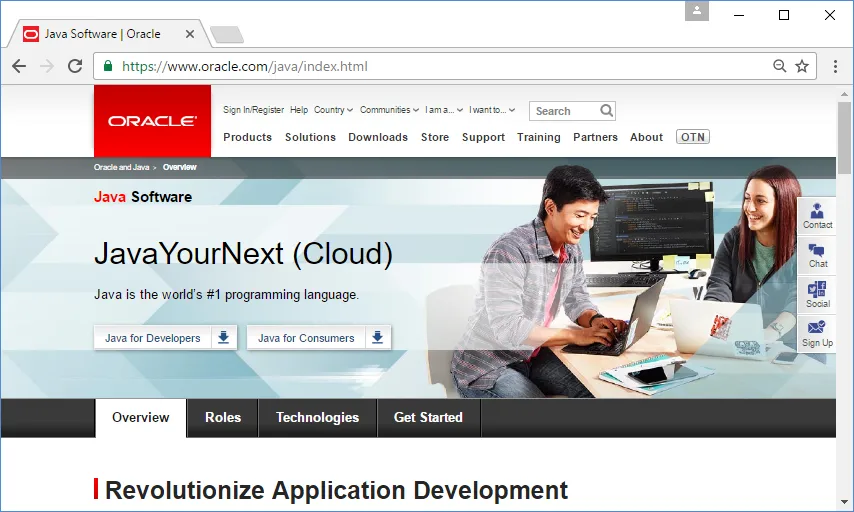
To download JDK, follow this procedure:
- At the time of writing this book, this page contained a Java for Developers button. Once you click on it, you will be redirected to the Software Downloads section.
- Find Java SE (includes JavaFX) in the list and click on it (be careful not to click on the Early Access link that is placed next to it, if still applicable).
- You will now have access to the Java SE Downloads page. Click on the Download button below JDK.
- Find the version specific to your operating system platform and architecture.
- If you agree with the license terms, download your copy.
Installing JDK on Windows
For Windows, JDK is available in both 32-bit and 64-bit versions. Simply run the downloaded executable file and follow the prompts. Copy and paste the path where you'll install JDK; you'll need the path after installing it.
Using the default settings, install JRE, which is part of the installation of JDK. It is strongly recommended that you keep the JRE and JDK versions in sync, so it's always best to install JRE directly from the JDK installer. Oracle states that JDK is always installed at the system-wide level; therefore, it will be available to all users.
After the installation, you'll need to add or alter some environment variables. We will show how to do this for Windows 10. For other recent versions of Windows, it should be a familiar procedure:
- Right-click on your Windows Start menu and select System. On the left-hand side of the window that appears, click on Advanced system settings.
- The System Properties window appears. Click on the Environment Variables... button. The Environment Variables window appears:
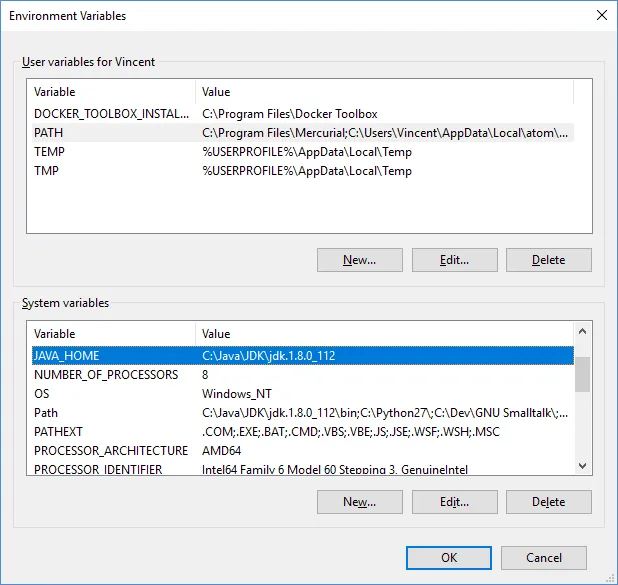
- Look at the System variables section at the bottom of the window. Check whether you see the JAVA_HOME variable. If not, click on the New... button; otherwise, edit the existing JAVA_HOME entry.
- Enter JAVA_HOME as the variable name and the full path to the root of JDK's installation directory as the value. Then click on OK to close the window.
- Now find the existing Path variable and add the full path to the bin subdirectory of the JDK installation directory. Keep in mind that the directories are separated by the ; character.
To verify the installation, do the following:
- Open a new Command Prompt (for example, by clicking on the Start menu, typing cmd, and pressing Enter)
- Enter javac -version and press Enter
You should see the version number that matches the downloaded JDK. If not, double-check whether you altered the environment variables correctly and make sure you opened a new Command Prompt window instead of using a previously opened one.
Installing JDK on macOS
Note that JDK requires a recent version of macOS. At the time of writing this, JDK 8 requires at least version 10.8 (Mountain Lion).
The installation of macOS is quite straightforward. Simply double-click on the downloaded image (the .dmg file), and in the Finder window that appears, double-click on the package icon. Follow the prompts. Like the Windows version, the macOS version is installed on a system-level basis and is therefore available to all users.
After the installation, you need to ensure the new JDK is the default one. macOS supports the installation of multiple JDK versions at the same time, and you can always switch to any one of them; however, only one version will be active at a time. The easiest way to do this is to open the .bash_profile file (note that the filename starts with a dot) in your user's Home folder and add the following line to it:
export JAVA_HOME="$(/usr/libexec/java_home -v 1.8)"
To validate the installation:
- Open a new Terminal window
- Type javac -version and press Enter
You should see the version number that matches the downloaded JDK version.
Installing JDK on Linux
Both 32-bit and 64-bit versions of the Linux JDK versions are available. They can be downloaded in the following formats:
- As a compressed .tar....
Table of contents
- Title Page
- Copyright
- Credits
- About the Author
- About the Reviewer
- www.PacktPub.com
- Customer Feedback
- Preface
- Java Virtual Machine
- Developing on the Java Virtual Machine
- Java
- Java Programming
- Scala
- Scala Programming
- Clojure
- Clojure Programming
- Kotlin
- Kotlin Programming
- Groovy
- Groovy Programming
- Other JVM languages
- Quiz Answers
Trusted by 375,005 students
Access to over 1.5 million titles for a fair monthly price.
Study more efficiently using our study tools.
Frequently asked questions
Yes, you can cancel anytime from the Subscription tab in your account settings on the Perlego website. Your subscription will stay active until the end of your current billing period. Learn how to cancel your subscription
No, books cannot be downloaded as external files, such as PDFs, for use outside of Perlego. However, you can download books within the Perlego app for offline reading on mobile or tablet. Learn how to download books offline
Perlego offers two plans: Essential and Complete
- Essential is ideal for learners and professionals who enjoy exploring a wide range of subjects. Access the Essential Library with 800,000+ trusted titles and best-sellers across business, personal growth, and the humanities. Includes unlimited reading time and Standard Read Aloud voice.
- Complete: Perfect for advanced learners and researchers needing full, unrestricted access. Unlock 1.5M+ books across hundreds of subjects, including academic and specialized titles. The Complete Plan also includes advanced features like Premium Read Aloud and Research Assistant.
We are an online textbook subscription service, where you can get access to an entire online library for less than the price of a single book per month. With over 1.5 million books across 990+ topics, we’ve got you covered! Learn about our mission
Look out for the read-aloud symbol on your next book to see if you can listen to it. The read-aloud tool reads text aloud for you, highlighting the text as it is being read. You can pause it, speed it up and slow it down. Learn more about Read Aloud
Yes! You can use the Perlego app on both iOS and Android devices to read anytime, anywhere — even offline. Perfect for commutes or when you’re on the go.
Please note we cannot support devices running on iOS 13 and Android 7 or earlier. Learn more about using the app
Please note we cannot support devices running on iOS 13 and Android 7 or earlier. Learn more about using the app
Yes, you can access Introduction to JVM Languages by Vincent van der Leun in PDF and/or ePUB format, as well as other popular books in Informatik & Programmierung. We have over 1.5 million books available in our catalogue for you to explore.