A practical guide to help you undertand the ability of Apache jMeter to load and performance test various server types in a more efficient way.About This Book• Use jMeter to create and run tests to improve the performance of your webpages and applications• Learn to build a test plan for your websites and analyze the results• Unleash the power of various features and changes introduced in Apache jMeter 3.0Who This Book Is ForThis book is for software professionals who want to understand and improve the performance of their applications with Apache jMeter.What You Will Learn• See why performance testing is necessary and learn how to set up JMeter• Record and test with JMeter• Handle various form inputs in JMeter and parse results during testing• Manage user sessions in web applications in the context of a JMeter test• Monitor JMeter results in real time• Perform distributed testing with JMeter• Get acquainted with helpful tips and best practices for working with JMeterIn DetailJMeter is a Java application designed to load and test performance for web application. JMeter extends to improve the functioning of various other static and dynamic resources. This book is a great starting point to learn about JMeter. It covers the new features introduced with JMeter 3 and enables you to dive deep into the new techniques needed for measuring your website performance.The book starts with the basics of performance testing and guides you through recording your first test scenario, before diving deeper into JMeter. You will also learn how to configure JMeter and browsers to help record test plans.Moving on, you will learn how to capture form submission in JMeter, dive into managing sessions with JMeter and see how to leverage some of the components provided by JMeter to handle web application HTTP sessions. You will also learn how JMeter can help monitor tests in real-time.Further, you will go in depth into distributed testing and see how to leverage the capabilities of JMeter to accomplish this. You will get acquainted with some tips and best practices with regard to performance testing. By the end of the book, you will have learned how to take full advantage of the real power behind Apache JMeter.Style and approachThe book is a practical guide starting with introducing the readers to the importance of automated testing. It will then be a beginner's journey from getting introduced to Apache jMeter to an in-detail discussion of more advanced features and possibilities with it.
- 166 pages
- English
- ePUB (mobile friendly)
- Available on iOS & Android
eBook - ePub
Performance Testing with JMeter 3 - Third Edition
About this book
Information
Topic
InformatiqueSubtopic
Assurance qualité et testsHelpful Tips - Part 1
At this point, you have hopefully become familiar with the inner workings of JMeter and are comfortable with using it to achieve most of your testing needs. However, before we wrap up the book, there are some helpful tips worth mentioning that will make working with JMeter more pleasant and perhaps save you time in the process. These are some techniques we have learned over the years, and they have proven to be useful in almost every environment we've found ourselves in.
Dummy Sampler
Though not part of the built-in JMeter samplers, this sampler can be added to your JMeter toolkit via the JMeter extensions project. Refer to https://jmeter-plugins.org/install/Install/ to grab the latest plugin extension and install it in your copy of JMeter. The new Plugins Manager makes it easier than ever to install different plugins without having to copy and move JARs around. This sampler generates samples with just the values that are defined for it. It comes in extremely handy when debugging post processors, without having to repeat the entire execution of the test plan or waiting for the exact condition in the application under testing.
This component allows you to determine whether the response should be marked as a successful sample, what response code to return, the response message, the latency, and response times. In addition, it allows you to specify a request and a response, which can be anything you choose; for example, HTML, XML, or JSON.
To install the Dummy Sampler, after the plugin manager has been installed, do the following:
- Open JMeter.
- From the menu bar, click on Options | Plugin Manager.
- Click the Available Plugins tab from the JMeter Plugins Manager pop-up window.
- Check the Dummy Sampler checkbox.
- Click the Apply Changes and Restart JMeter button at the bottom right corner.
Once the plugins have been properly installed in your JMeter instance, you should see additional samplers available to pick from:
- Add a Thread Group element to the test plan by right-clicking on Test Plan and navigating to Threads | Thread Group.
- Add a Dummy Sampler element by right-clicking on Thread Group and navigating to Add | Sampler | jp@gc - Dummy Sampler. For the contents of the Response Data, add the following HTML snippet:
<html> <head> <title>Welcome to Debug Sampler</title> </head> <body> This is a test </body> </html>
- Add a View Results Tree listener by right-clicking on Thread Group and navigating to Add | Listener | View Results Tree.
- Save the test plan.
- Execute the test:

The Dummy Sampler
See the bundled dummy-sampler.jmx file for the full example.
Debug Sampler
Debug Sampler generates a sample containing all the values of JMeter variables and/or properties. A View Results Tree listener must be present in the test plan to view its results. This nifty component helps you debug your test plans appropriately, providing you with the tools to analyze the runtime-assigned values of various variables during test execution.
In our aforementioned example, suppose we add a Regular Expression Extractor post processor to the /itunes/charts sampler and store it in a variable; we will be able to view the value assigned to the variable, and more importantly, how to get to the different values if there is more than one match. To add a Debug Sampler, right-click on Thread Group and navigate to Add | Sampler | Debug Sampler, as follows:
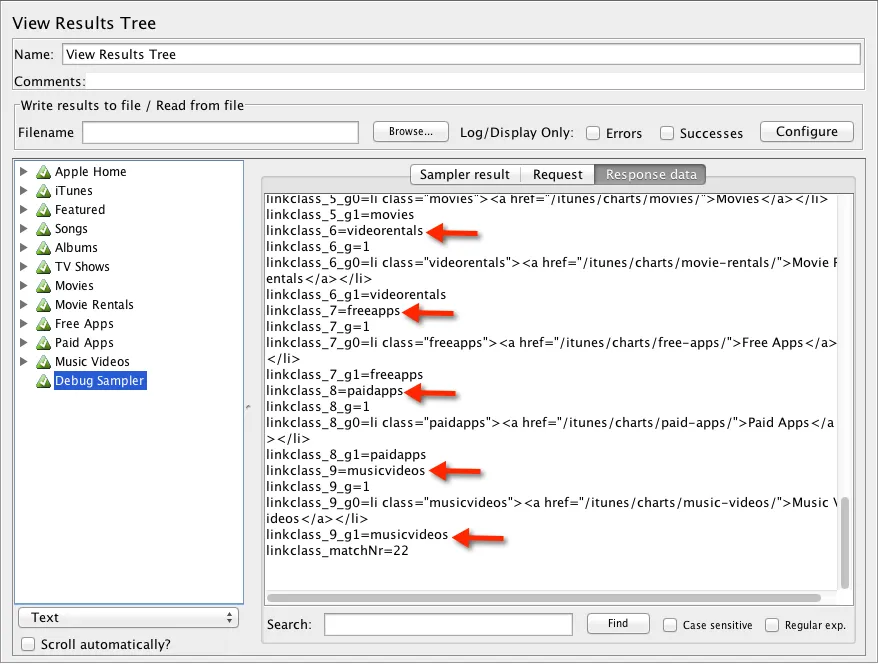
The Debug Sampler via the View Result Listener
As you can see from the preceding screenshot, the multiple matches are stored under linkclass_n (where n is a match position), followed by the variable name declared in our Regular Expression Extractor post processor. Thus, we can get hold of the first match as linkclass_1, the second as linkclass_2, and so on. As you record more and more complex scripts, you will find the Debug Sampler to be an invaluable component which is worth keeping handy.
JDBC Request Sampler
Sometimes, it's necessary to test durability and I/O operations against the database directly. How fast are insert, update, and select queries on the tables in question? For such tests, JMeter provides a JDBC Request Sampler to help issue SQL queries against the database. However, to use it, we need to set up a JDBC Connection Configuration component. Setting up this component requires us to point to a database. Therefore, let's go ahead and set up the database. Normally, this will already be set up for you to test against, but for illustrative purposes, we will assume that none has been set up. We will be using H2, an open source, pure Java SQL database. It is lightweight and relatively easy to set up. You can find more details about H2 at http://www.h2database.com/html/main.html.
Setting up the H2 database
To set up the H2 database, execute the following steps:
- Download a distribution from http://www.h2database.com/html/download.html.
- Extract the archive to a location of your choice. We will refer to this as H2_HOME.
- From the command line, go to the H2_HOME/bin folder.
- Start the H2 database server by issuing either of these commands:
-
- On Unix, issue the following:
./h2.sh
-
- On Windows, issue th...
Table of contents
- Title Page
- Copyright
- Credits
- About the Author
- Acknowledgments
- About the Reviewers
- www.PacktPub.com
- Customer Feedback
- Preface
- Performance Testing Fundamentals
- Recording Your First Test
- Submitting Forms
- Managing Sessions
- Monitoring Tests in Real-Time
- Distributed Testing
- Helpful Tips - Part 1
- Helpful Tips - Part 2
Trusted by 375,005 students
Access to over 1.5 million titles for a fair monthly price.
Study more efficiently using our study tools.
Frequently asked questions
Yes, you can cancel anytime from the Subscription tab in your account settings on the Perlego website. Your subscription will stay active until the end of your current billing period. Learn how to cancel your subscription
No, books cannot be downloaded as external files, such as PDFs, for use outside of Perlego. However, you can download books within the Perlego app for offline reading on mobile or tablet. Learn how to download books offline
Perlego offers two plans: Essential and Complete
- Essential is ideal for learners and professionals who enjoy exploring a wide range of subjects. Access the Essential Library with 800,000+ trusted titles and best-sellers across business, personal growth, and the humanities. Includes unlimited reading time and Standard Read Aloud voice.
- Complete: Perfect for advanced learners and researchers needing full, unrestricted access. Unlock 1.5M+ books across hundreds of subjects, including academic and specialized titles. The Complete Plan also includes advanced features like Premium Read Aloud and Research Assistant.
We are an online textbook subscription service, where you can get access to an entire online library for less than the price of a single book per month. With over 1.5 million books across 990+ topics, we’ve got you covered! Learn about our mission
Look out for the read-aloud symbol on your next book to see if you can listen to it. The read-aloud tool reads text aloud for you, highlighting the text as it is being read. You can pause it, speed it up and slow it down. Learn more about Read Aloud
Yes! You can use the Perlego app on both iOS and Android devices to read anytime, anywhere — even offline. Perfect for commutes or when you’re on the go.
Please note we cannot support devices running on iOS 13 and Android 7 or earlier. Learn more about using the app
Please note we cannot support devices running on iOS 13 and Android 7 or earlier. Learn more about using the app
Yes, you can access Performance Testing with JMeter 3 - Third Edition by Bayo Erinle in PDF and/or ePUB format, as well as other popular books in Informatique & Assurance qualité et tests. We have over 1.5 million books available in our catalogue for you to explore.