Implement your Business Intelligence solutions without any coding - by leveraging the power of the Alteryx platformAbout This Book• Experience the power of codeless analytics using Alteryx, a leading Business Intelligence tool• Uncover hidden trends and valuable insights from your data across different sources and make accurate predictions• Includes real-world examples to put your understanding of the features in Alteryx to practical useWho This Book Is ForThis book is for aspiring data professionals who want to learn and implement self-service analytics from scratch, without any coding. Those who have some experience with Alteryx and want to gain more proficiency will also find this book to be useful. A basic understanding of the data science concepts is all you need to get started with this book.What You Will Learn• Create efficient workflows with Alteryx to answer complex business questions • Learn how to speed up the cleansing, data preparing, and shaping process• Blend and join data into a single dataset for self-service analysis• Write advanced expressions in Alteryx leading to an optimal workflow for efficient processing of huge data• Develop high-quality, data-driven reports to improve consistency in reporting and analysis• Explore the flexibility of macros by automating analytic processes • Apply predictive analytics from spatial, demographic, and behavioral analysis and quickly publish, schedule• Share your workflows and insights with relevant stakeholdersIn DetailAlteryx, as a leading data blending and advanced data analytics platform, has taken self-service data analytics to the next level. Companies worldwide often find themselves struggling to prepare and blend massive datasets that are time-consuming for analysts. Alteryx solves these problems with a repeatable workflow designed to quickly clean, prepare, blend, and join your data in a seamless manner.This book will set you on a self-service data analytics journey that will help you create efficient workflows using Alteryx, without any coding involved. It will empower you and your organization to take well-informed decisions with the help of deeper business insights from the data.Starting with the fundamentals of using Alteryx such as data preparation and blending, you will delve into the more advanced concepts such as performing predictive analytics. You will also learn how to use Alteryx's features to share the insights gained with the relevant decision makers. To ensure consistency, we will be using data from the Healthcare domain throughout this book.The knowledge you gain from this book will guide you to solve real-life problems related to Business Intelligence confidently. Whether you are a novice with Alteryx or an experienced data analyst keen to explore Alteryx's self-service analytics features, this book will be the perfect companion for you.Style and approachComprehensive, step by step guide filled with real-world examples to step through the complex business questions using one of the leading data analytics platform.
- 228 pages
- English
- ePUB (mobile friendly)
- Available on iOS & Android
eBook - ePub
Learning Alteryx
About this book
Trusted by 375,005 students
Access to over 1.5 million titles for a fair monthly price.
Study more efficiently using our study tools.
Information
Writing Fast and Accurate Expressions
There are various tools in Alteryx that allow for a broad variety of calculations. You will utilize multiple expressions to create new data columns, update existing columns, and reference data to qualifying rows. You will use more rigorous expressions to maximize the potential of the Formula, Multi-Row Formula, and Multi-Field Formula tools. The goal is to gain a solid foundation in the different types of Formula tools so you can write powerful expressions.
This chapter will cover the following topics:
- Formula
- Multi-Row Formula
- Multi-Field Formula
Formula
The Formula tool is where you can write a variety of calculations and operations. The ability to perform calculations, such as if/else conditional formulas, can be quickly used to create a new column or modify an existing column. More than one calculation can be written within the Formula tool rather than creating a formula for each tool. This is quite helpful when creating a calculation for a new column and finding out you want to modify the new column immediately after creating it. The best part of it all is that after writing the expressions they can be saved!
This is great when the same calculation, or one similar to it, needs to be written in the same workflow downstream, or in a different workflow. Alteryx will save the expression, saving you time from writing it out again, and providing a reminding thought on how it was created. We will go through 15 expressions that will provide you with a solid foundation in writing expressions all in one tool, the Formula tool.
In this section, we will use the U.S. Chronic Disease Indicators workflow, along with the resources located in the data folder. Let's begin by building out a workflow with some popular expressions within the Formula tool.
Expression #1: Create a data source field to indicate the source where data is coming from.
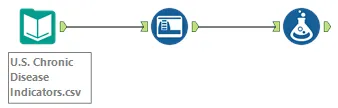
Step 1: Using an Input Data tool, connect to the file U.S. Chronic Disease Indicators.csv located in the \Learn Alteryx\Chapter directory.
Step 2: Select the Auto Field tool from the Preparation tool palette and drag it onto the canvas. Connect the Auto Field tool to the Input Data tool. Each string field has now been automatically updated to the smallest field type and size.
Step 3: Select the Formula tool from the Preparation tool palette and drag it onto the canvas. Connect the Formula tool to the Auto Field tool:
Before writing valuable expressions, let's review the options available within the Formula configuration:
- Output Column: + Add Column to create a new column, or select an existing column to modify the column
- Data Preview: This provides a preview of what the output of the expression will be
- Date type: Select a data type
- Size: Change the size of the data
- Functions: Search a variety of functions

- Columns & Constants: Search existing columns or newly created columns

- Recent & Saved Expressions: Search recently created and saved expressions

- Save Expression: Save an expression so that it can be used later

- Add Expression: Add an expression

- Expand or Collapse Expression: Select this option to expand an expression to view the written expression, or collapse an expression to hide the written expression

- Delete Expression: Select this to delete an expression

Step 4: Select the Select Column option under Output Column. Select + Add Column.
Step 5: Enter Data Source in the Expression window.
Step 6: Write th...
Table of contents
- Title Page
- Copyright
- Credits
- About the Author
- About the Reviewer
- www.PacktPub.com
- Customer Feedback
- Preface
- Getting Started with Alteryx
- Workflow Optimization
- Data Preparation and Blending
- Writing Fast and Accurate Expressions
- Transforming Data
- Data Parsing Techniques
- Creating Data-Driven Custom Reports
- Using Macros in Workflows
- Sharing Your Insights
- Best Practices
Frequently asked questions
Yes, you can cancel anytime from the Subscription tab in your account settings on the Perlego website. Your subscription will stay active until the end of your current billing period. Learn how to cancel your subscription
No, books cannot be downloaded as external files, such as PDFs, for use outside of Perlego. However, you can download books within the Perlego app for offline reading on mobile or tablet. Learn how to download books offline
Perlego offers two plans: Essential and Complete
- Essential is ideal for learners and professionals who enjoy exploring a wide range of subjects. Access the Essential Library with 800,000+ trusted titles and best-sellers across business, personal growth, and the humanities. Includes unlimited reading time and Standard Read Aloud voice.
- Complete: Perfect for advanced learners and researchers needing full, unrestricted access. Unlock 1.5M+ books across hundreds of subjects, including academic and specialized titles. The Complete Plan also includes advanced features like Premium Read Aloud and Research Assistant.
We are an online textbook subscription service, where you can get access to an entire online library for less than the price of a single book per month. With over 1.5 million books across 990+ topics, we’ve got you covered! Learn about our mission
Look out for the read-aloud symbol on your next book to see if you can listen to it. The read-aloud tool reads text aloud for you, highlighting the text as it is being read. You can pause it, speed it up and slow it down. Learn more about Read Aloud
Yes! You can use the Perlego app on both iOS and Android devices to read anytime, anywhere — even offline. Perfect for commutes or when you’re on the go.
Please note we cannot support devices running on iOS 13 and Android 7 or earlier. Learn more about using the app
Please note we cannot support devices running on iOS 13 and Android 7 or earlier. Learn more about using the app
Yes, you can access Learning Alteryx by Renato Baruti, Alok Khobragade, Mayur Ravindra Narkhede in PDF and/or ePUB format, as well as other popular books in Computer Science & Business Intelligence. We have over 1.5 million books available in our catalogue for you to explore.