Use Unity 2017 to create fun and unbelievable AI entities in your games with A*, Fuzzy logic and NavMeshAbout This Book• Explore the brand-new Unity 2017 features that makes implementing Artificial Intelligence in your game easier than ever• Use fuzzy logic concepts in your AI decision-making to make your characters more engaging• Build exciting and richer games by mastering advanced Artificial Intelligence concepts such as Neural NetworksWho This Book Is ForThis book is intended for Unity developers with a basic understanding of C# and the Unity editor. Whether you're looking to build your first game or are looking to expand your knowledge as a game programmer, you will find plenty of exciting information and examples of game AI in terms of concepts and implementation.What You Will Learn• Understand the basic terminology and concepts in game AI• Explore advanced AI Concepts such as Neural Networks• Implement a basic finite state machine using state machine behaviors in Unity 2017• Create sensory systems for your AI and couple it with a Finite State Machine• Wok with Unity 2017's built-in NavMesh features in your game• Build believable and highly-efficient artificial flocks and crowds• Create a basic behavior tree to drive a character's actionsIn DetailUnity 2017 provides game and app developers with a variety of tools to implement Artificial Intelligence. Leveraging these tools via Unity's API or built-in features allows limitless possibilities when it comes to creating your game's worlds and characters. This third edition with Unity will help you break down Artificial Intelligence into simple concepts to give you a fundamental understanding of the topic to build upon. Using a variety of examples, the book then takes those concepts and walks you through actual implementations designed to highlight key concepts, and features related to game AI in Unity 5. Further on you will learn to distinguish the state machine pattern and implement one of your own. This is followed by learning how to implement a basic sensory system for your AI agent and coupling it with a Finite State Machine (FSM).Next you'll learn how to use Unity's built-in NavMesh feature and implement your own A* pathfinding system. You will then learn how to implement simple flocks and crowd's dynamics, key AI concepts. Moving on, you will learn how to implement a behavior tree through a game-focused example. Lastly, you'll combine fuzzy logic concepts with state machines and apply all the concepts in the book to build a simple tank game.Style and approachA self-explanatory practical guide with a series of tips and tricks on creating AI games with ease.
eBook - ePub
Unity 2017 Game AI Programming - Third Edition
- 250 pages
- English
- ePUB (mobile friendly)
- Available on iOS & Android
eBook - ePub
Unity 2017 Game AI Programming - Third Edition
About this book
Trusted by 375,005 students
Access to over 1 million titles for a fair monthly price.
Study more efficiently using our study tools.
Information
Finding Your Way
Obstacle avoidance is a simple behavior that allows AI entities to reach a target point. It's important to note that the specific behavior implemented in this chapter is meant to be used for behaviors such as crowd simulation, where the main objective of each agent entity is just to avoid the other agents and reach the target. There's no consideration of what would be the most efficient and shortest path. We'll learn about the A* Pathfinding algorithm in the next section.
In this chapter, we will cover the following topics:
- Path following and steering
- A custom A* Pathfinding implementation
- Unity's built-in NavMesh
Technical Requirements
You will be required to have Unity 2017 installed on a system that has either Windows 7 SP1+, 8, 10, 64-bit versions or Mac OS X 10.9+. The code in this book will not run on Windows XP and Vista, and server versions of Windows and OS X are not tested.
The code files of this chapter can be found on GitHub:
https://github.com/PacktPublishing/Unity-2017-Game-AI-Programming-Third-Edition/tree/master/Chapter04
https://github.com/PacktPublishing/Unity-2017-Game-AI-Programming-Third-Edition/tree/master/Chapter04
Check out the following video to see the code in action:
https://goo.gl/Eoxby1
https://goo.gl/Eoxby1
Following a path
Before diving into A*, which is a procedural approach to pathfinding, we'll implement a more rudimentary waypoint-based system. While more advanced techniques, such as the aforementioned A* method or Unity's NavMesh, will often be the preferred method for pathfinding, looking at a simpler, more pure version will help set the foundation for understanding more complex pathfinding approaches. Not only that, but there are many scenarios in which a waypoint-based system will be more than enough, and will allow more fine-tuned control over your AI agent's behavior.
In this example, we'll create a path, which is made up of individual waypoints. For our purposes, a waypoint is simply a point in space with an X, Y, and Z value; we can simply use a Vector3 to represent this data. By making a serialized array of Vector3 in our script, we'll be able to edit the points in the inspector without much fuss. If you want to challenge yourself and tweak this system to be a bit more user-friendly, you may want to consider using an array of game objects instead, and using their position (a Vector3 ) instead. For demonstration purposes, the example provided will stick to the Vector3 array. After setting up some points in our array, we want to end up with a path that looks like the following screenshot:

An object path
In the preceding screenshot, we use some debug lines to draw the connections between waypoints. Don't worry, there isn't any magic happening here. By using Unity's debug features, we can visualize the path we'll be having our agent traverse. Let's deconstruct our Path.cs script to see how we achieve this.
The path script
Here is our Path.cs script, which is responsible for managing our waypoints:
using UnityEngine;

public class Path: MonoBehaviour
{
 [SerializeField]
 private Vector3[] waypoints;

 public bool isDebug = true;
 public float radius = 2.0f;

 public float PathLength {
 get { return waypoints.Length; }
 }

 public Vector3 GetPoint(int index)
 {
 return waypoints[index];
 }

 private void OnDrawGizmos()
 {
 if (!isDebug) {
 return;
 }

 for (int i = 0; i < waypoints.Length; i++)
 {
 if (i + 1 < waypoints.Length)
 {
 Debug.DrawLine(waypoints[i], waypoints[i + 1], Color.red);
 }
 }
 }
}
The SerializeField property can be used to force Unity to serialize a private field, and display it in the inspector.
Our waypoints' Vector3 array is the collection of waypoints in the path mentioned earlier. To initialize the waypoints, we must add the script to a game object in our scene. In the sample scene, we simply create an empty game object and attach the Path.cs script to it. For the sake of clarity, we've also renamed our game object to Path. With the Path game object ready to go, we can assign the path values in the inspector. The sample values look like this:
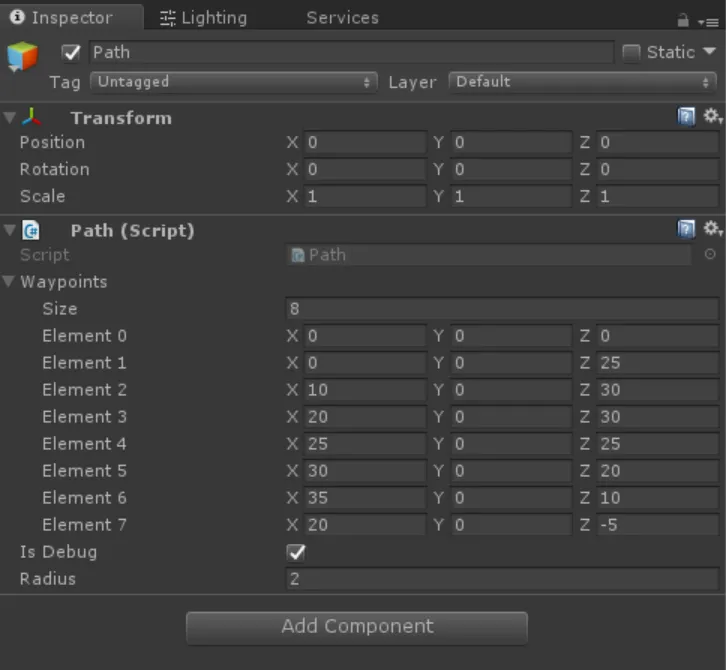
Path values provided in the sample project
The values in the screenshot here are arbitrary, and can be tweaked to your liking. You just need to make sure you have at least two waypoints along your path.
The PathLength property simply returns the length of our waypoint array. It provides a public getter for our private field, and is later used by another script. The radius variable allows us to define the tolerance for our pathfinding. Rather than expecting our agent to be at the precise location of our waypoint, we'll use a radius to determine when the agent is close enough to consider the waypoint visited. The GetPoint method is a simple helper to get a waypoint from the array at a given index.
It is common and proper practice to make fields private by default, especially when the data contained is integral to the functionality of the class. In our case, the waypoint order, array size, and more should not be modified at runtime, so we ensure that external classes can only get data from them by using helper methods and properties, and protect them from external changes by making them private.
Finally, we use OnDrawGizmos, which is a MonoBehaviour method that Unity automatically calls for us, to draw debug information in the scene view in the editor. We can toggle this functionality on and off by setting the value of isDebug to true or false, respectively.
Using the path follower
Next, we'll set up our agent to follow the path defined in the previous section. We'll use a simple cube in the example, but feel free to use any art you want. Let's take a closer look at the Pathing.cs script provided in the sample code:
public class Pathing : MonoBehaviour
{
 [SerializeField]
 private Path path;
 [SerializeField]
 private float speed = 20.0f;
 [SerializeField]
 private float mass = 5.0f;
 [SerializeField]
 private bool isLooping = true;

 private float currentSpeed;
 private int currentPathIndex = 0;
 private Vector3 targetPoint;
 private Vector3 direction;
 private Vector3 targetDirection;
The first group of fields are variables we want serialized so that they can be set via the inspector. path is a reference to the Path object we created earlier; we can simply drag and drop the component from the path game object into this field. speed and mass are used to calculate the movement of the agent along the path. isLooping is used to determine whether or not we should loop around the path. When true, the agent will reach the last waypoint, then go to the first waypoint on the path and start over. Once the values are all assigned, the inspector should look something like this:
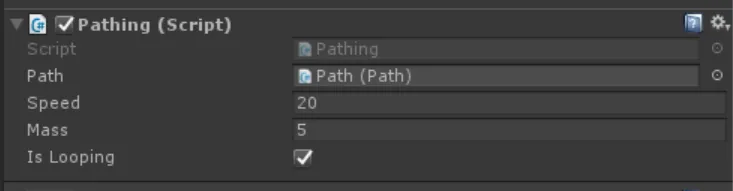
The pathfinding script inspector with its default values
Our Start method handles the initialization for some of the remaining private fields—direction and...
Table of contents
- Title Page
- Copyright and Credits
- Packt Upsell
- Contributors
- Preface
- The Basics of AI in Games
- Finite State Machines and You
- Implementing Sensors
- Finding Your Way
- Flocks and Crowds
- Behavior Trees
- Using Fuzzy Logic to Make Your AI Seem Alive
- How It All Comes Together
- Other Books You May Enjoy
Frequently asked questions
Yes, you can cancel anytime from the Subscription tab in your account settings on the Perlego website. Your subscription will stay active until the end of your current billing period. Learn how to cancel your subscription
No, books cannot be downloaded as external files, such as PDFs, for use outside of Perlego. However, you can download books within the Perlego app for offline reading on mobile or tablet. Learn how to download books offline
Perlego offers two plans: Essential and Complete
- Essential is ideal for learners and professionals who enjoy exploring a wide range of subjects. Access the Essential Library with 800,000+ trusted titles and best-sellers across business, personal growth, and the humanities. Includes unlimited reading time and Standard Read Aloud voice.
- Complete: Perfect for advanced learners and researchers needing full, unrestricted access. Unlock 1.4M+ books across hundreds of subjects, including academic and specialized titles. The Complete Plan also includes advanced features like Premium Read Aloud and Research Assistant.
We are an online textbook subscription service, where you can get access to an entire online library for less than the price of a single book per month. With over 1 million books across 990+ topics, we’ve got you covered! Learn about our mission
Look out for the read-aloud symbol on your next book to see if you can listen to it. The read-aloud tool reads text aloud for you, highlighting the text as it is being read. You can pause it, speed it up and slow it down. Learn more about Read Aloud
Yes! You can use the Perlego app on both iOS and Android devices to read anytime, anywhere — even offline. Perfect for commutes or when you’re on the go.
Please note we cannot support devices running on iOS 13 and Android 7 or earlier. Learn more about using the app
Please note we cannot support devices running on iOS 13 and Android 7 or earlier. Learn more about using the app
Yes, you can access Unity 2017 Game AI Programming - Third Edition by Ray Barrera, Aung Sithu Kyaw, Thet Naing Swe, Davide Aversa in PDF and/or ePUB format, as well as other popular books in Computer Science & Computer Graphics. We have over one million books available in our catalogue for you to explore.