Learn to confidently setup and create app, lenses, dashboards using Salesforce Einstein Analytics.About This Book• Explore Einstein analytics on desktop as well as mobile platforms• Turn data into smarter sales with Einstein Analytics for Sales• Visualize your data with preloaded as well as customized dashboardsWho This Book Is ForThis book is for data scientists, business users, developers who want to explore business data using the Salesforce Einstein Analytics. Knowledge of the Salesforce platform is required. What You Will Learn• Create app, lenses, and dashboards using Einstein.• Visualize data utilizing all the widgets available with Einstein.• Understand Einstein for Sales, Service, and Marketing separately.• Use Data monitoring tools to monitor data flow and system jobs.• Abstract machine learning constructs and make predictions on eventsIn DetailSalesforce Einstein analytics aka Wave Analytics is a cloud-based platform which connects data from the multiple sources and explores it to uncover insights. It empowers sales reps, marketers, and analysts with the insights to make customer interactions smarter, without building mathematical models. You will learn to create app, lenses, dashboards and share dashboards with other users.This book starts off with explaining you fundamental concepts like lenses, step, measures and sets you up with Einstein Analytics platform. We then move on to creating an app and here you will learn to create datasets, dashboards and different ways to import data into Analytics. Moving on we look at Einstein for sales, services, and marketing individually. Here you will learn to manage your pipeline, understand important business drivers and visualize trends. You will also learn features related to data monitoring tools and embedding dashboards with lightning, visualforce page and mobile devices. Further, you will learn advanced features pertaining to recent advancements in Einstein which include machine learning constructs and getting predictions for events. By the end of this book, you will become proficient in the Einstein analytics, getting insights faster and understanding your customer in a better way.Style and approachThe book takes a pragmatic approach showing you installation of Salesforce Einstein Analytics, predictive analysis and applications of AI.
- 242 pages
- English
- ePUB (mobile friendly)
- Available on iOS & Android
eBook - ePub
Learning Einstein Analytics
About this book
Information
Diving Deep into Einstein Analytics
In the previous chapter, we created our first dataset and dashboard. We also created our first lens, called Hello Lens, and we started building dashboards. In Hello Dashboard, we added a horizontal bar chart, and a donut chart using chart widgets. Now we understand the components in the widget area and adding lenses to charts. In this chapter, we are going to build a simple summary dashboard, and we will cover the following topics:
- Quota
- Dataflow and dataflow scheduling
- Data manager and setting
- Types of dashboard
- Declarative binding and faceting
Quota, dataflow, and data manager
A quota is the sales goal assigned to a user/rep (a business user ) on a monthly or quarterly basis. It is important for representatives to achieve their quota on their own. It affects performance and hence it is important to understand quota attainment. The formula for quota attainment is as follows:
Quota Attainment = (Sales/quota)*100;
Which means if representatives/sales teams hit their goal by 60% then sales persons/users/representatives have a 40% quota attainment.
Creating a quota dataset
In order to create a CSV file for quotas, you need the following fields:
- StartDate (in yyyy-mm-dd format)
- QuotaAmount
- OwnerName
- Username
Let's take a look at the following code snippet, which depicts the preceding fields:
 StartDate,QuotaAmount,OwnerName,Username
 2017-01-07,5818,Julie Mcknight,santosh chitalkar
 2017-01-07,5818,Brandon Hough,santosh chitalkar
 2017-01-07,5818,Stephanie Alexander,santosh chitalkar
 2017-01-03,4200,Robin Vachhani,santosh chitalkar
 2017-01-03,4200,Paul Speisman,santosh chitalkar
 2017-01-03,4200,Jennifer Sampson,santosh chitalkar
 2017-01-03,4200,Janice Parsons,santosh chitalkar
 2017-01-03,4200,Shane Paquette,santosh chitalkar
 2017-01-03,4200,Ashleigh Farrell,santosh chitalkar
 2017-01-02,5818,Rachel Walton,santosh chitalkar
 2017-01-02,5818,Chris Thomas,santosh chitalkar
 2017-01-02,5818,Renee Rountree,santosh chitalkar
 2017-01-02,5818,Glenn Nakamura,santosh chitalkar
 2017-01-02,5818,Nate Fletcher,santosh chitalkar
 2017-01-01,2909,Jackson Morgan,santosh chitalkar
 2017-01-01,5818,Renae Dotson,santosh chitalkar
 2017-01-01,7350,Kim Thomas,santosh chitalkar
 2017-01-01,7350,Mary Obot,santosh chitalkar
 2017-01-01,7350,Jay Lyonett,santosh chitalkar
 2017-01-07,7350,Jane LaBonte,santosh chitalkar
 2017-01-06,7350,George Benson,santosh chitalkar
The quota field names should be exactly the same as they are case-sensitive.
Let's take a look at the following steps for creating a quota dataset:
- Navigate to Create | Dataset.
- In the New Dataset window, enter First_Quota under Dataset Name and select Hello App in the App field.
- Click on Next as shown in the following screenshot:
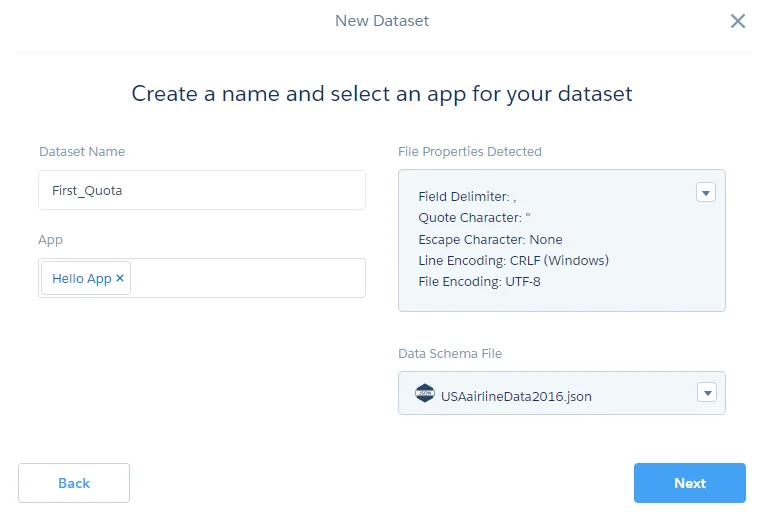
- After you click on the Next button, Einstein uses the dataflow to create a dataset.
- Navigate to Hello App and select the DATASETS tab. You should see that the First_Quota dataset has been created
Table of contents
- Title Page
- Copyright and Credits
- Dedication
- Packt Upsell
- Contributors
- Preface
- Getting Started with Einstein Analytics
- Setting Up Einstein Analytics
- Say Hello to Einstein
- Diving Deep into Einstein Analytics
- Einstein for Sales
- Einstein at Your Service
- Security and Sharing in Einstein Analytics
- Recipe in Einstein
- Embedding Einstein Dashboards
- Advanced Technologies in Einstein Analytics
- Machine Learning and Deep Learning
- Other Books You May Enjoy
Trusted by 375,005 students
Access to over 1.5 million titles for a fair monthly price.
Study more efficiently using our study tools.
Frequently asked questions
Yes, you can cancel anytime from the Subscription tab in your account settings on the Perlego website. Your subscription will stay active until the end of your current billing period. Learn how to cancel your subscription
No, books cannot be downloaded as external files, such as PDFs, for use outside of Perlego. However, you can download books within the Perlego app for offline reading on mobile or tablet. Learn how to download books offline
Perlego offers two plans: Essential and Complete
- Essential is ideal for learners and professionals who enjoy exploring a wide range of subjects. Access the Essential Library with 800,000+ trusted titles and best-sellers across business, personal growth, and the humanities. Includes unlimited reading time and Standard Read Aloud voice.
- Complete: Perfect for advanced learners and researchers needing full, unrestricted access. Unlock 1.5M+ books across hundreds of subjects, including academic and specialized titles. The Complete Plan also includes advanced features like Premium Read Aloud and Research Assistant.
We are an online textbook subscription service, where you can get access to an entire online library for less than the price of a single book per month. With over 1.5 million books across 990+ topics, we’ve got you covered! Learn about our mission
Look out for the read-aloud symbol on your next book to see if you can listen to it. The read-aloud tool reads text aloud for you, highlighting the text as it is being read. You can pause it, speed it up and slow it down. Learn more about Read Aloud
Yes! You can use the Perlego app on both iOS and Android devices to read anytime, anywhere — even offline. Perfect for commutes or when you’re on the go.
Please note we cannot support devices running on iOS 13 and Android 7 or earlier. Learn more about using the app
Please note we cannot support devices running on iOS 13 and Android 7 or earlier. Learn more about using the app
Yes, you can access Learning Einstein Analytics by Santosh Tukaram Chitalkar in PDF and/or ePUB format, as well as other popular books in Computer Science & Business Intelligence. We have over 1.5 million books available in our catalogue for you to explore.