![]()
CHAPTER 1: THE SURFACE WEB
The Surface Web is the most open and permissive of the three layers of cyberspace. Easily reachable via the most basic computer or mobile phone hardware, the Surface Web is something that almost everyone in the Western world and growing numbers in the developing world are becoming intimately familiar with. The Surface Web is the backbone for everyday business services such as email, web browsing, entertainment and commerce of all descriptions. With such a broad set of online resources available and the ease of access, the Surface Web is almost always the starting point of any OSINT project. Despite its ubiquity, the Surface Web does contain huge pools of data that are valuable to the investigator and often the central challenge to effectively using the Surface Web is locating the important pieces of information within the forest of irrelevant babble.
The core challenge of developing a practitioner’s skill with regard to the Surface Web lies not in showing the usefulness of using this layer of cyberspace (that is innately obvious) but in highlighting to the investigator new possibilities for using the Surface Web.
Exercise: conduct a search Before you continue further, conduct a short piece of research into the Nigerian terrorist group Boko Haram. Spend five minutes researching the group using the Internet in any way that you see fit.
Having run the preceding exercise several hundred times, I would hazard a guess that you did the following: used your computer’s default web browser (Internet Explorer for Windows, Safari for Mac users), used the Google of your home web domain (.co.uk, .ca, etc.) as your search engine, entered a couple of search phrases, read mostly articles from Wikipedia and mainstream news sites, and made no attempts to hide your identity while on the Internet.
Although these steps are all logical and where most OSINT investigations start, this is also where most OSINT investigations stop. Too often the OSINT part of an investigation is declared ‘complete’ after the preceding steps are taken. The remainder of this chapter is about expanding your investigative repertoire and imparting an understanding of why you need to do so.
Does the Internet look the same from every angle? In other words, are people in Russia looking at the same Internet as people in the UK? The answer to this point is explored in more depth later in this chapter in the Cyber Geography section.
Web browsers – the first steps
A web browser is the generic term for the class of software that is used in conjunction with a search engine to browse the Internet. The importance of web browsers as both a starting point for the practical section of this book and to OSINT professional practice in general, is that web browsers are the ‘nuts and bolts’ foundations that support the remainder of this book.
Typically, operating systems10 such as the Microsoft Windows family and those loaded onto Macs come bundled with web browsers such as Internet Explorer and Safari. Although these web browsers are perfectly serviceable for the needs of an everyday web user, they are inadequate for the OSINT practitioner due to their lack of functionally and extendibility.
For the OSINT professional, having knowledge of just two non-standard web browsers can vastly expand investigative possibilities. This is due to the fact that certain pieces of software, called plugins, can be added to web browsers and make a huge difference to the insight that can be derived from a website as well as adding to the speed, efficiency and robustness of the results of an investigation.
Although new web browsers are coming onto the market almost every day, the author recommends to the reader that they use Google Chrome and Mozilla Firefox. Both products can be downloaded for free, and installing them involves a few clicks on the relevant pop-up boxes.
Be very careful when installing any kind of software sourced from the Internet onto your computer as many apparently legitimate downloads are in fact just malicious malware delivery vehicles. If you are unsure how to differentiate legitimate from malicious software then consult your IT department or consult a knowledgeable colleague.
The reasons for choosing these two web browsers are as follows:
Flexibility
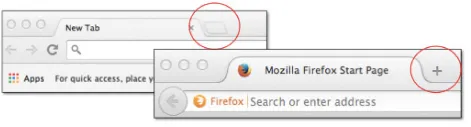
‘Tabbed browsing’ is the term used to describe the functionality within web browsers that allows multiple pages to be open within one web browsing window (or ‘pane’ to use the correct term). New sub-windows are opened by clicking on the areas shown in Figure 1.
Figure 1: Tabbed browsing in Chrome and Firefox
Although tabbed browsing is not unique to Firefox or Chrome, this functionality allows the investigator to have multiple windows open at any one time. This may seem a relatively trivial addition to an individual’s OSINT skill set, but tabbed browsing is sometimes a departure from the way many older Internet users are accustomed to browsing the web. The benefit of mastering tabbed browsing across two separate web browsers is that multiple investigative threads can be followed and cross-referenced by the investigator at any one moment. In the highly visual environment of the Internet this approach can prove invaluable, especially if combined with a duel monitor display.
Extendibility with Add-Ons
Chrome and especially Firefox can have their functionality hugely extended by the addition of small pieces of software called add-ons.
Installing add-ons is easy: simply load the web browser you wish to install an add-on into, and then navigate to the online resource for that particular browser:
• Chrome: https://chrome.google.com/webstore/category/extensions
• Firefox: https://addons.mozilla.org/
Once an appropriate online resource for the browser has loaded you can then add new add-ons directly from there11.
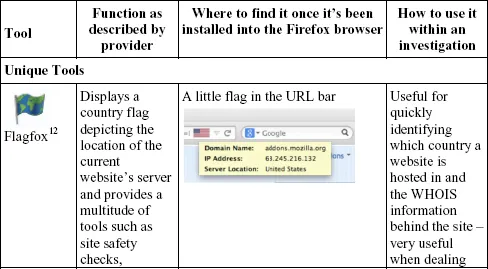
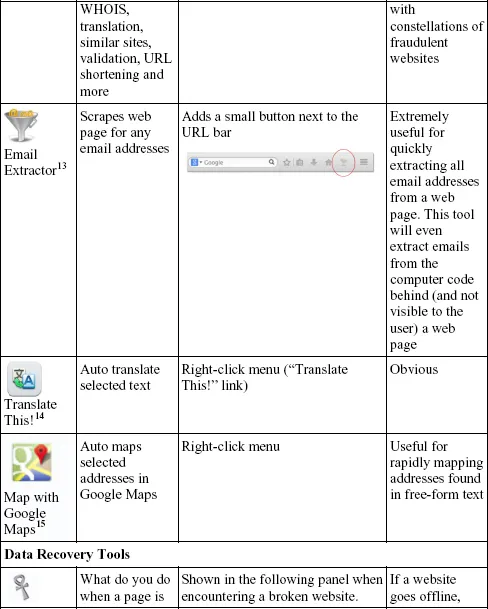
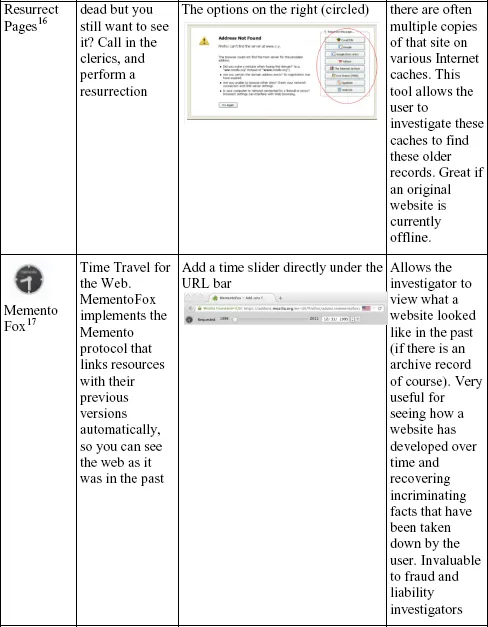
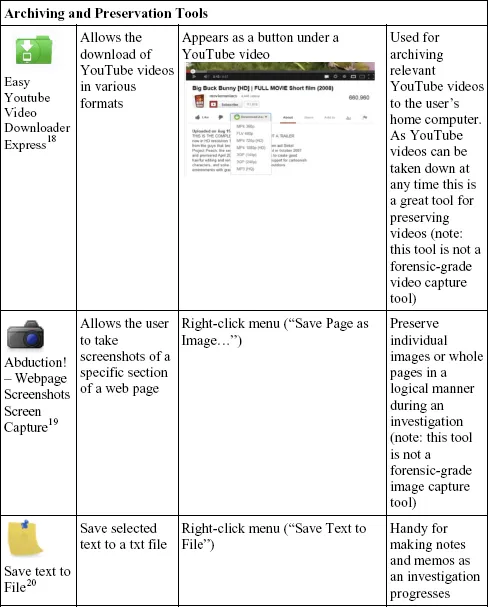
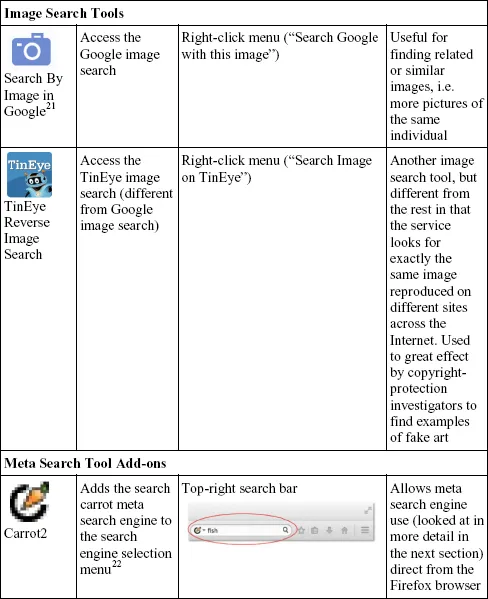
There are thousands of available add-ons for both Firefox and Chrome and although most are irrelevant to OSINT professional practice, a few can make a difference within an investigation. As Firefox has been around far longer than Chrome, there are more useful add-ons for the OSINT practitioner for this platform. Some useful add-ons are listed next (all add-ons can be found by Googling the term ‘Firefox add-on’ plus the name of the add-on):
Table 1: Firefox plugins quick reference table
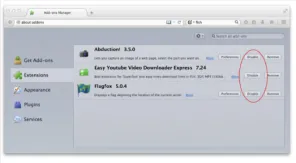
One point of caution to make regarding add-ons is that the more that are added to a web browser, the slower the browser will run. With a handful of add-ons the slowdown in browser performance is negligible; however, with ten or more add-ons running the debilitating effects on browser speed become obvious. The solution to this issue is to toggle individual add-ons on and off depending on the needs of the investigator. This can be done via the “Tools – Add-ons” menu that brings up the control panel shown in Figure 2 in the Firefox browser.
Figure 2: Extension (add-ons) control panel in Firefox
Clicking the Disable button will temporarily remove that add-on from the system-processing load of the Firefox browser. Obviously the add-on can be easily reactivated by clicking the Enable button when the user wishes to use that specific software tool again.
By their very nature add-ons are not mainstream pieces of software. Lone, mostly unpaid software developers are often the authors and many have limited time and resources to support their products. This means that add-ons periodically break, as web technologies change and add-ons become outdated as the developers fail to keep pace with these new developments. As such, close management of these pieces of software (installing updates, removing hopelessly broken add-ons) is just an unfortunate part of using add-ons. However, the benefit of add-ons outweighs the management overhead.
Speed
If Google’s Chrome browser excels at one thing, it’s speed. Chrome has been designed for the modern generation ...