ArcGIS Pro 2.x Cookbook
eBook - ePub

ArcGIS Pro 2.x Cookbook

  1. English
  2. ePUB (mobile friendly)
  3. Available on iOS & Android
eBook - ePub

ArcGIS Pro 2.x Cookbook

About this book

Creating and Sharing Maps and Data using ArcGIS Pro

Key Features

  • Leverage the power of ArcGIS to build beautiful 2D and 3D maps.
  • Work with ArcGIS to analyze and process data.
  • Extend the power of ArcGIS to ArcGIS Online to create and edit content.

Book Description

ArcGIS is Esri's catalog of GIS applications with powerful tools for visualizing, maintaining, and analyzing data. ArcGIS makes use of the modern ribbon interface and 64-bit processing to increase the speed and efficiency of using GIS. It allows users to create amazing maps in both 2D and 3D quickly and easily.

If you want to gain a thorough understanding of the various data formats that can be used in ArcGIS Pro and shared via ArcGIS Online, then this book is for you.

Beginning with a refresher on ArcGIS Pro and how to work with projects, this book will quickly take you through recipes about using various data formats supported by the tool. You will learn the limits of each format, such as Shapefiles, Geodatabase, and CAD files, and learn how to link tables from outside sources to existing GIS data to expand the amount of data that can be used in ArcGIS. You'll learn methods for editing 2D and 3D data using ArcGIS Pro and how topology can be used to ensure data integrity. Lastly the book will show you how data and maps can be shared via ArcGIS Online and used with web and mobile applications.

What you will learn

  • Edit data using standard tools and topology
  • Convert and link data together using joins and relates
  • Create and share data using Projections and Coordinate Systems
  • Access and collect data in the field using ArcGIS Collector
  • Perform proximity analysis and map clusters with hotspot analysis
  • Use the 3D Analyst Extension and perform advanced 3D analysis
  • Share maps and data using ArcGIS Online via web and mobile apps

Who this book is for

GIS developers who are comfortable using ArcGIS, and are looking to increase their capabilities and skills, will find this book useful.
Frequently asked questions

Yes, you can cancel anytime from the Subscription tab in your account settings on the Perlego website. Your subscription will stay active until the end of your current billing period. Learn how to cancel your subscription.
No, books cannot be downloaded as external files, such as PDFs, for use outside of Perlego. However, you can download books within the Perlego app for offline reading on mobile or tablet. Learn more here.
Perlego offers two plans: Essential and Complete
  • Essential is ideal for learners and professionals who enjoy exploring a wide range of subjects. Access the Essential Library with 800,000+ trusted titles and best-sellers across business, personal growth, and the humanities. Includes unlimited reading time and Standard Read Aloud voice.
  • Complete: Perfect for advanced learners and researchers needing full, unrestricted access. Unlock 1.4M+ books across hundreds of subjects, including academic and specialized titles. The Complete Plan also includes advanced features like Premium Read Aloud and Research Assistant.
Both plans are available with monthly, semester, or annual billing cycles.
We are an online textbook subscription service, where you can get access to an entire online library for less than the price of a single book per month. With over 1 million books across 1000+ topics, we’ve got you covered! Learn more here.
Look out for the read-aloud symbol on your next book to see if you can listen to it. The read-aloud tool reads text aloud for you, highlighting the text as it is being read. You can pause it, speed it up and slow it down. Learn more here.
Yes! You can use the Perlego app on both iOS or Android devices to read anytime, anywhere — even offline. Perfect for commutes or when you’re on the go.
Please note we cannot support devices running on iOS 13 and Android 7 or earlier. Learn more about using the app.
Yes, you can access ArcGIS Pro 2.x Cookbook by Tripp Corbin in PDF and/or ePUB format, as well as other popular books in Computer Science & Cloud Computing. We have over one million books available in our catalogue for you to explore.

Information

Editing Spatial and Tabular Data

In this chapter, we will cover the following recipes:
  • Configuring editing options
  • Reshaping an existing feature
  • Splitting a line feature
  • Merging features
  • Aligning features
  • Creating new point features
  • Creating new line features
  • Creating new polygon features
  • Creating a new polygon feature using autocomplete
  • Editing attributes using the Attribute Pane
  • Editing attributes in the table view

Introduction

We live in an ever-changing world. New infrastructure is added, old infrastructure is removed, regulations change, new needs are discovered, and so on. Our GIS must be able to keep up with these changes so that it accurately reflects the world we live in as closely as possible. This means we must be able to quickly and easily make changes to our GIS data, both spatial and tabular.
ArcGIS Pro provides a wealth of tools and methods you can use to make updates to your data. The tools available to you and the types of data you can edit or update will largely depend on the license level you have. For example, if you only have a Basic license, you are not able to edit data in an SDE geodatabase. However, you can edit a shapefile or feature classes in a file geodatabase. Here is a quick list of the data formats you can edit and at which license level:
Basic
Standard or Advanced
Personal Geodatabase
No
No
File Geodatabase
Yes, as long as not in Topology or Geometric Network
Yes
SDE/Enterprise Geodatabase
No (View Only with Basic)
Yes
Shapefile
Yes
Yes
DBF file
Yes
Yes
CAD Files (DWG, DXF, DGN)
No
No
Spreadsheets
No
No
ArcGIS Pro does not support the personal geodatabase at all and most likely never will. Esri has decided to replace the personal geodatabase with the file geodatabase because it provides much better performance. ArcGIS Pro Basic will allow you to edit data stored in a file geodatabase as long as it is not part of a topology or geometric network.
ArcGIS Pro cannot edit any data that is included in a Geometric Network. However, ArcGIS Pro 2.1 does support the newer Utility Network which was just released in its initial version in December 2017. The Utility Network provides similar functionality to the Geometric Network but is designed to be used in conjunction with the Utility Network Management extension for ArcGIS Enterprise. So it appears that the Utility Network will completely replace the older Geometric Network model. You can learn more about the Utility Network and the Management extension by going to https://www.esri.com/en-us/arcgis/products/arcgis-utility-network-management/overview.
An ArcGIS Pro Basic license will not allow you to edit data stored in an SDE Geodatabase either. SDE stands for Spatial Database Engine and provides multiple user capability for a Geodatabase. SDE Geodatabases require you to have ArcGIS Enterprise (formerly known as ArcGIS Server). With a Basic license, you can only view data in an SDE Geodatabase but not edit it. For more information about the different types of geodatabases, go to http://desktop.arcgis.com/en/arcmap/latest/manage-data/geodatabases/types-of-geodatabases.htm.
Shapefiles and DBF tables can be edited without any restrictions at all license levels. CAD files and spreadsheets can only be viewed in ArcGIS Pro and cannot be edited without converting them to a different format.
In this chapter, you will learn how to configure various editing options and use multiple tools. You will get to experience workflows for editing existing features as well as creating new features. Lastly, you will learn different methods for editing attributes and tables.

Configuring editing options

Before you start trying to edit data in ArcGIS Pro, there are several options you need to configure and verify. This will help ensure your edits are done smoothly and saved correctly. This will include setting your units, verifying tolerances, and more.
In this recipe, you will configure and verify several editing options, including how and when to save, setting your units of measure, making newly added layers editable by default, and configuring snapping.

Getting ready

For this recipe, you will need to ensure you have installed the book data and have ArcGIS Pro installed. The ArcGIS Pro Basic license level will be sufficient for this recipe.

How to do it...

  1. To get started, launch ArcGIS Pro.
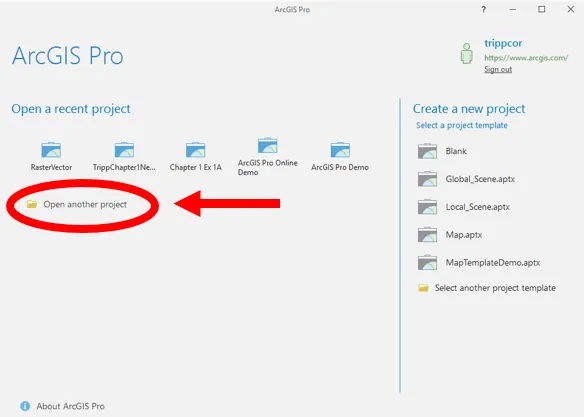
  2. In the ArcGIS Pro start window, click on Open another project.
  1. Select Computer from the Open window and then click Browse in the area on the right.
  2. Navigate to C:\Student\ArcGISProCookbook\Chapter4\Editing by clicking on C:\ in the area on the left of the Open Project window. Then double-click on Student, ArcGISProCookbook, Chapter4, and Editing folders.
  1. Select the Editing.aprx project file and click OK.
The project will open with a single map named City of Trippville. The map contains three layers, City Limits, Parcels, and Railroads plus the Topographic basemap. Now that you have a project open, you will begin setting various options that can impact how you edit data. You will start with the Application and Project options:
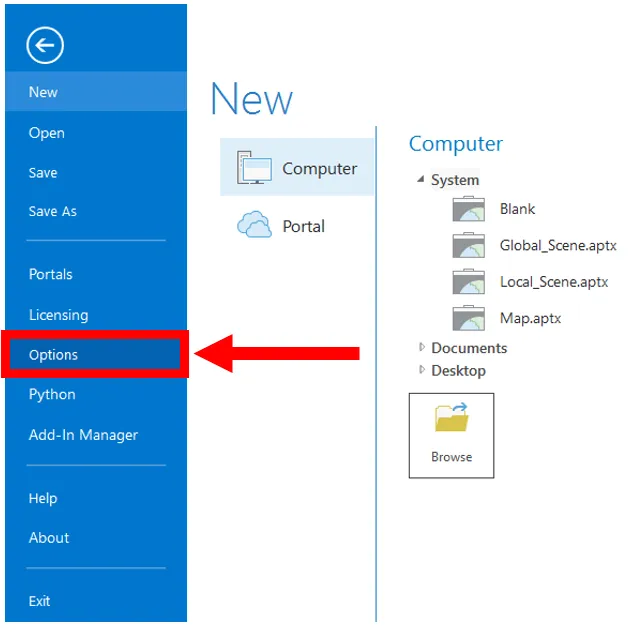
  1. Click on the Project tab in the ribbon
  2. Select Options from the panel on the left side of the Project pane, as shown:
  1. Select Units loc...

Table of contents

  1. Title Page
  2. Copyright and Credits
  3. Dedication
  4. Packt Upsell
  5. Contributors
  6. Preface
  7. ArcGIS Pro Capabilities and Terminology
  8. Creating and Storing Data
  9. Linking Data together
  10. Editing Spatial and Tabular Data
  11. Validating and Editing Data with Topologies
  12. Projections and Coordinate System Basics
  13. Converting Data
  14. Proximity Analysis
  15. Spatial Statistics and Hot Spots
  16. 3D Maps and 3D Analyst
  17. Introducing Arcade
  18. Introducing ArcGIS Online
  19. Publishing Your Own Content to ArcGIS Online
  20. Creating Web Apps Using ArcGIS Online
  21. Other Books You May Enjoy