Practical recipes to implement cost-effective and scalable cloud solutions for your organizationAbout This Book• Implement Google Cloud services in your organization• Leverage Google Cloud components to secure your organization's data• A recipe-based guide that promises hands-on experience in deploying a highly scalable and available environmentWho This Book Is ForThis book is for IT professionals, engineers, and developers looking at implementing Google Cloud in their organizations. Administrators and architects planning to make their organization more efficient with Google Cloud will also find this book useful. Basic understanding of Cloud services and the Google Cloud platform is necessary.What You Will Learn• Host a Python application on Google Compute Engine• Host an application using Google Cloud Functions• Migrate a MySQL DB to Cloud Spanner• Configure a network for a highly available application on GCP• Learn simple image processing using Storage and Cloud Functions• Automate security checks using Policy Scanner• Understand tools for monitoring a production environment in GCP• Learn to manage multiple projects using service accountsIn DetailGoogle Cloud Platform is a cloud computing platform that offers products and services to host applications using state-of-the art infrastructure and technology. You can build and host applications and websites, store data, and analyze data on Google's scalable infrastructure. This book follows a recipe-based approach, giving you hands-on experience to make the most of Google Cloud services.This book starts with practical recipes that explain how to utilize Google Cloud's common services. Then, you'll see how to make full use of Google Cloud components such as networking, security, management, and developer tools. Next, we'll deep dive into implementing core Google Cloud services into your organization, with practical recipes on App Engine, Compute Engine microservices with Cloud Functions, virtual networks, and Cloud Storage. Later, we'll provide recipes on implementing authentication and security, Cloud APIs, command-line management, deployment management, and the Cloud SDK. Finally, we'll cover administration troubleshooting tasks with the Compute and Container Engines and we'll show how to monitor your organization's efficiency with best practices.By the end of this book, you'll have a complete understanding of how to implement Google Cloud services in your organization with ease.Style and approachThis book will quickly get you started with using Google Cloud Services.
- 280 pages
- English
- ePUB (mobile friendly)
- Available on iOS & Android
eBook - ePub
Google Cloud Platform Cookbook
About this book
Information
Networking
In this chapter, we will cover:
- Network management using a data network and a management network
- Content-based load balancing
- VPC network peering between two networks
- VPN connection between two networks
- CDN setup for a static website
Introduction
In this chapter, we'll discover some networking features of Google Cloud Platform (GCP). Google uses a state-of-the-art software-defined network to provide the networking feature for its customers. The networking unit of encapsulation for a set of IP ranges, firewall configurations,and VPN and routing configurations is the Virtual Private Cloud (VPC). VPCs can be scoped globally or regionally and are designed for high levels of security isolation and scalability. It is also possible to share the VPCs among projects.
In this chapter, we'll perform some recipes using multiple network interface cards (NICs), discover advanced features of load balancing and connect two VPCs using peering and a VPN connection.
In addition to its various VPC features, GCP also offers dedicated network services for DNS and CDN. We'll create a static website using Google Storage and put it behind Google CDN and measure its performance from varied locations.
Network management using a data and a management network
It is a common scenario in large servers to have more than one NIC for purposes demanded by the software to function properly, or for networking reasons. GCP allows a maximum of eight NICs (depending on the instance type) to be attached to an instance with nic0 being the default NIC to which GCP's DHCP server sends a default route and nic1 to nic7 being optional.
In this recipe, we'll create an instance with two NICs with each of the NICs attached to a different network. One network would be a management network to manage the instance and another network, a data network, used to serve data to the public domain.
Getting ready
The following are the initial setup verifications and network creation to be carried out before the recipe can be executed:
- Create or select a GCP project.
- Enable billing and enable the default APIs (some APIs such as BigQuery, storage, monitoring, and a few others are enabled automatically).
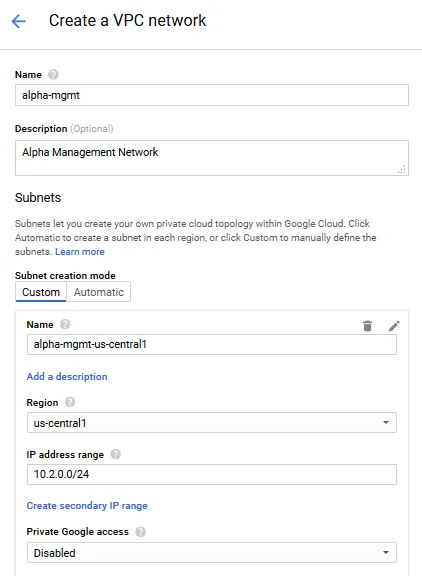
- We'll create the management network called alpha-mgmt. Choose, the Custom option for the Subnet creation mode and create a single subnet called alpha-mgmt-us-central1 with an IP range of 10.2.0.0/24. Leave the default value in the other fields:
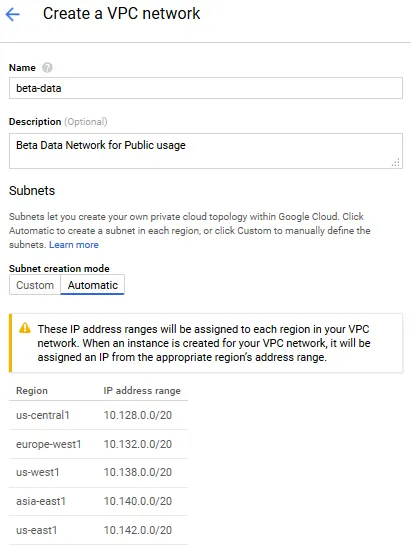
- Next, we'll create our data network called beta-data. Choose the Automatic option under Subnet creation mode:
- Let's not select any of the firewall rules for the moment. Click the Create button to provision the beta-data network.
How to do it...
We'll create a web server whose public web traffic (data) will be served by the beta-data network and the SSH into the web server would be via the alpha-mgmt network:
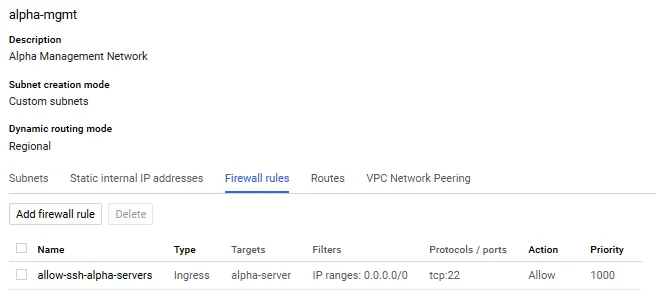
- Firstly, we'll set up some firewall rules to the alpha and beta networks. In the alpha-mgmt network, open the SSH port 22 to all servers with the network tag alpha-server:
gcloud compute --project=<project id> firewall-rules create
allow-ssh-alpha-servers
--description="Allow ssh access to all servers with network tag alpha-server"
--direction=INGRESS --priority=1000 --network=alpha-mgmt
--action=ALLOW --rules=tcp:22 --source-ranges=0.0.0.0/0
--target-tags=alpha-server
The created rule on the Console will be similar to the following screenshot:
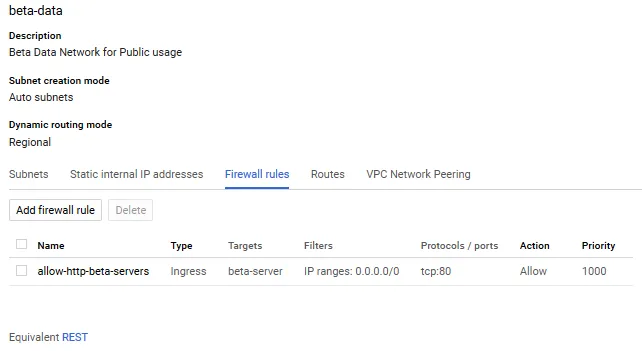
- In the beta network, open access to the HTTP port 80 for all the servers tagged beta-server and http-server. This will allow the web traffic to flow to the web server:
gcloud compute --project=<project id> firewall-rules
create allow-http-beta-servers --description="allow http port 80"
--direction=INGRESS --priority=1000 --network=beta-data
--action=ALLOW --rules=tcp:80 --source-ranges=0.0.0.0/0
--target-tags=beta-server,http-server
The created firewall wall rule is shown in the following screenshot:
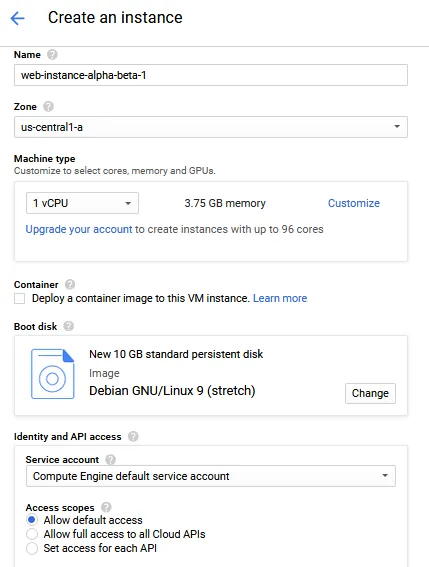
- Next, we'll create our web instance which will have two NICs, one attached to the alpha network and the other to the beta network:
- Next, click on the hyperlink Management, disks, networking, SSH keys to open the subtabs.
- In the Management subtab, enter the following start up script:
#! /bin/bash
apt-get update
apt-get install -y apache2
cat <<EOF > /var/www/html/index.html
<html><body><h1>Hello World</h1>
<p>Web server...
Table of contents
- Title Page
- Copyright and Credits
- Dedication
- Packt Upsell
- Contributors
- Preface
- Compute
- Storage and Databases
- Networking
- Security
- Machine Learning and Big Data
- Management Tools
- Best Practices
- Other Books You May Enjoy
Trusted by 375,005 students
Access to over 1.5 million titles for a fair monthly price.
Study more efficiently using our study tools.
Frequently asked questions
Yes, you can cancel anytime from the Subscription tab in your account settings on the Perlego website. Your subscription will stay active until the end of your current billing period. Learn how to cancel your subscription
No, books cannot be downloaded as external files, such as PDFs, for use outside of Perlego. However, you can download books within the Perlego app for offline reading on mobile or tablet. Learn how to download books offline
Perlego offers two plans: Essential and Complete
- Essential is ideal for learners and professionals who enjoy exploring a wide range of subjects. Access the Essential Library with 800,000+ trusted titles and best-sellers across business, personal growth, and the humanities. Includes unlimited reading time and Standard Read Aloud voice.
- Complete: Perfect for advanced learners and researchers needing full, unrestricted access. Unlock 1.5M+ books across hundreds of subjects, including academic and specialized titles. The Complete Plan also includes advanced features like Premium Read Aloud and Research Assistant.
We are an online textbook subscription service, where you can get access to an entire online library for less than the price of a single book per month. With over 1.5 million books across 990+ topics, we’ve got you covered! Learn about our mission
Look out for the read-aloud symbol on your next book to see if you can listen to it. The read-aloud tool reads text aloud for you, highlighting the text as it is being read. You can pause it, speed it up and slow it down. Learn more about Read Aloud
Yes! You can use the Perlego app on both iOS and Android devices to read anytime, anywhere — even offline. Perfect for commutes or when you’re on the go.
Please note we cannot support devices running on iOS 13 and Android 7 or earlier. Learn more about using the app
Please note we cannot support devices running on iOS 13 and Android 7 or earlier. Learn more about using the app
Yes, you can access Google Cloud Platform Cookbook by Legorie Rajan PS in PDF and/or ePUB format, as well as other popular books in Computer Science & Cloud Computing. We have over 1.5 million books available in our catalogue for you to explore.