Solve all your Ionic-related issues through dedicated recipes that will help you get the best out of Ionic. Working with Ionic components to find out the best way to share data between them effectively.About This Book• Leverage Ionic 3.9 and its exciting new features to create cutting-edge, real-time apps• Work through simple recipes to address your problems directly and solve them effectively • Get examples at each step to guide you on your learning curve with AngularWho This Book Is ForThis book targets JavaScript developers. No previous knowledge of Ionic is necessary, but prior knowledge of web development techniques would be useful.What You Will Learn• Help readers to jump-start Ionic apps• Explore essential features of Ionic with examples• Learn how to use native device functionalities• Make the best use of the REST API to handle back-end services • Work with Cordova to support native functionalities on both iOS and Android.• Master advanced topics in app development such as deep linking and lazy loadingIn DetailIonic is the preferred choice for JavaScript developers to develop real-time hybrid applications. This book will get you started with Ionic 3.9 and help you create Angular 5 components that interact with templates. You will work with Ionic components and find out how to share data efficiently between them. You'll discover how to make the best use of the REST API to handle back-end services and then move on to animating your application to make it look pretty. You then learn to add in a local push notification in order to test the app. Then you'll work with Cordova to support native functionalities on both iOS and Android. From there, you'll get to grips with using the default themes for each platform and customizing your own. We then take you through the advanced Ionic features like lazy loading, deep linking, localizing ionic apps etc. Finally, you'll see how best to deploy your app to different platforms. This book will solve all your Ionic-related issues through dedicated recipes that will help you get the best out of Ionic.Style and approachThe book's recipe-based approach will help you get the best out of Ionic 3.9
- 390 pages
- English
- ePUB (mobile friendly)
- Available on iOS & Android
eBook - ePub
Ionic Cookbook
About this book
Information
User Authentication and Push Notifications
In this chapter, we will cover the following tasks related to authenticating users, and register and receiving push notification messages:
- Registering and authenticating users using Auth0
- Building an iOS app to receive push notifications
- Building an Android app to receive push notifications
Introduction
Tracking and engaging users are key features necessary for your app to grow. That means you should be able to register and authenticate users. Once the users start using the app, you also need to segment the users so that you can customize their interactions. Then, you can send push notifications to encourage users to revisit the app.
There are two components that you need to use for your project, as follows:
- Auth0: Auth0 is a cloud-based authentication service. The whole idea is that you delegate authentication of your application to Auth0. Auth0 supports many frameworks, including Ionic2+, and also supports many social providers for authentication such as Google and Facebook. On the top of that, they have excellent documentation.
- OneSignal: OneSignal is a service that allows us to send the push notification to both iOS and Android. As a matter of fact, it supports other platforms such as Windows, Web Push Notifications, Amazon Fire, and so on. The best part is, in general, we need different code for adding push notifications. But because of Cordova and OneSignal's abstract API, we only need to write push notification code once for both platforms.
Registering and authenticating users using Auth0
Auth0 can provide all of the user management and authentication capabilities out of the box. There are lots of providers supported by Auth0. Following are some famous providers that are supported by Auth0:
- Email/password
- GitHub
Depending on the app, you may not need to use all of these authentication methods. For example, it would make more sense to use a LinkedIn authentication for an app focusing on a working professional to narrow down the audiences who fit the user profile of the app.
In this chapter, we will try to simplify the authentication concept as much as possible. You will learn how to do the following things:
- Registering a new user
- Logging in and logging out a user
- Showing a user's profile information
Getting ready
You need the device to test the app because we are using Cordova plugins for authentication, which requires either device or simulator to run the app.
How to do it...
We will do it in two ways:
- Creating an app in the Auth0 dashboard
- Coding our Ionic app
Creating our app in the Auth0 dashboard
In this section, we are going to learn how we can create an app in the Auth0 dashboard. Do the following steps:
- Go to https://auth0.com and create an account there.
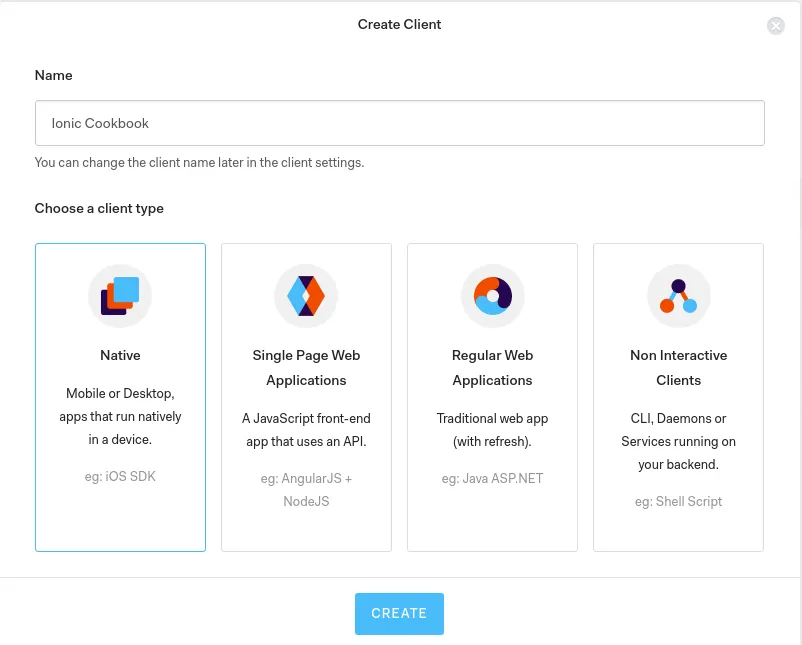
- After creating an account, it will open Auth0 dashboard. There is a New Application button. Click on it, and it will open the following dialog: Choose a Name for your client and select the client type as Native.
- Now, in the side menu Dashboard, click on Applications and select the Application that you created. You will see the following page:We need Domain and Client ID late...

Table of contents
- Title Page
- Copyright and Credits
- Packt Upsell
- Contributors
- Preface
- Creating Our First App with Ionic
- Adding Ionic Components
- Extending Ionic with Angular Building Blocks
- Validating Forms and Making HTTP Requests
- Adding Animation
- User Authentication and Push Notifications
- Supporting Device Functionalities Using Ionic Native
- Theming the App
- Advanced Topics
- Publishing the App for Different Platforms
- Other Books You May Enjoy
Trusted by 375,005 students
Access to over 1.5 million titles for a fair monthly price.
Study more efficiently using our study tools.
Frequently asked questions
Yes, you can cancel anytime from the Subscription tab in your account settings on the Perlego website. Your subscription will stay active until the end of your current billing period. Learn how to cancel your subscription
No, books cannot be downloaded as external files, such as PDFs, for use outside of Perlego. However, you can download books within the Perlego app for offline reading on mobile or tablet. Learn how to download books offline
Perlego offers two plans: Essential and Complete
- Essential is ideal for learners and professionals who enjoy exploring a wide range of subjects. Access the Essential Library with 800,000+ trusted titles and best-sellers across business, personal growth, and the humanities. Includes unlimited reading time and Standard Read Aloud voice.
- Complete: Perfect for advanced learners and researchers needing full, unrestricted access. Unlock 1.5M+ books across hundreds of subjects, including academic and specialized titles. The Complete Plan also includes advanced features like Premium Read Aloud and Research Assistant.
We are an online textbook subscription service, where you can get access to an entire online library for less than the price of a single book per month. With over 1.5 million books across 990+ topics, we’ve got you covered! Learn about our mission
Look out for the read-aloud symbol on your next book to see if you can listen to it. The read-aloud tool reads text aloud for you, highlighting the text as it is being read. You can pause it, speed it up and slow it down. Learn more about Read Aloud
Yes! You can use the Perlego app on both iOS and Android devices to read anytime, anywhere — even offline. Perfect for commutes or when you’re on the go.
Please note we cannot support devices running on iOS 13 and Android 7 or earlier. Learn more about using the app
Please note we cannot support devices running on iOS 13 and Android 7 or earlier. Learn more about using the app
Yes, you can access Ionic Cookbook by Indermohan Singh, Hoc Phan in PDF and/or ePUB format, as well as other popular books in Computer Science & Open Source Programming. We have over 1.5 million books available in our catalogue for you to explore.