Get the most out of.NET framework using standard libraries and create a.NET Standard 2.0 library from scratchAbout This Book• Write code once and share within.NET ecosystem in Windows, Linux and macOS• Give your.NET Libraries a common framework in cloud and on premise with the latest.NET Standard 2.0• Build a wide range of applications from Mobile with Xamarin to Web with ASP.NETWho This Book Is ForThis book is for.NET developers who are looking to build dynamic applications with the latest.NET Standard. C# knowledge is required.What You Will Learn• Create a.NET Standard 2.0 library• Use System.IO within the.NET Standard 2.0• Make use of your legacy.NET libraries with the new.NET Core standard• Explore the thread support to create a multithreaded.NET Standard 2.0 library• Create a.NET Standard 2.0 library and use it with an Android and iOS application• Implement various Visual Studio 2017 diagnostics and debugging tools• Create a NuGet Package and submit the package to the NuGet Package Manager • Use Visual Studio 2017 azure tools to deploy the application to Azure• Test and deliver a.NET Standard 2.0 libraryIn DetailThe.NET Standard is a standard that represents a set of APIs that all.NET platforms have to implement, making it easy for developers to access and use one common library for their development needs. This book begins with a quick refresher, helping you understand the mechanics of the new standard and offering insight into how it works. You'll explore the core library concepts, such as working with collections, configurations, I/O, security, and multithreading. You'll explore the iOS and Android libraries of Xamarin and we'll guide you through creating a.NET Standard 2.0 library, which you'll use with both Android and iOS applications. In the final chapters, you'll learn the various debugging and diagnostics tools to deliver quality libraries and create a NuGet package of the.NET Standard 2.0 library. By the end of this book, you'll be able to expand your current workflow to various.NET flavors and have the essential skills to create a.NET Standard 2.0 library from scratch to package and deliver it to the world.Style and approachA recipe-based approach to help you get the most out of the.NET Standard 2.0 Library that can be implemented to all the.NET Platforms
eBook - ePub
.NET Standard 2.0 Cookbook
Develop high quality, fast and portable applications by leveraging the power of .NET Standard Library
- 394 pages
- English
- ePUB (mobile friendly)
- Available on iOS & Android
eBook - ePub
.NET Standard 2.0 Cookbook
Develop high quality, fast and portable applications by leveraging the power of .NET Standard Library
About this book
Information
Topic
InformatikSubtopic
Open-Source-ProgrammierungWorking with Files
In this chapter, we will be looking at these recipes:
- Setting up .NET Core in Ubuntu
- Creating a log as text
- Creating an ASP.NET Core application in Ubuntu to use the library
- Setting up .NET Core in macOS
- Reading from a comma separated (CSV) text file
- Creating a .NET Core console application in macOS to use the library
- Compressing? Why not?
- Creating a classic Windows application to use the library
- Encrypting and Decrypting content in a text file
- Creating a classic Windows application to use the library
Technical requirements
Readers should have a basic knowledge of C#. They should also have a basic knowledge of using Visual Studio, installing packages using NuGet, and referencing libraries within projects from other projects.
The code files for this chapter can be found on GitHub:
https://github.com/PacktPublishing/DotNET-Standard-2-Cookbook/tree/master/Chapter03
https://github.com/PacktPublishing/DotNET-Standard-2-Cookbook/tree/master/Chapter03
Check out the following video to see the code in action:
https://goo.gl/82FCEP
https://goo.gl/82FCEP
Introduction
As a developer, at some point, we will have to write some data to the disk or read data from the disk. This may be a simple text file, or may be a log file in a system you have written. .NET Framework offers great support for working with files. Mainly, we will be looking at the System.IO namespace and its usage of it.
In this chapter, we will be looking at some cross-platform applications as well. Each recipe will go through setting up new environments, such as Ubuntu and macOS, as well as building a .NET Standard 2.0 library and an accompanying application that uses the library.
Setting up .NET Core in Ubuntu
In this recipe, we will be going through how to set up .NET Core 2.x in an Ubuntu system. Ubuntu is a widely used Debian-based Linux environment. By visiting https://www.ubuntu.com/desktop, you can easily download and install Ubuntu on your system. You may have to use a virtual PC to do this. There are two great free tools that you can use:
- VMWare Workstation Player for Windows: https://www.vmware.com/products/workstation-player.html
- Oracle Virtual Box for Windows, Linux, and macOS: https://www.virtualbox.org/wiki/Downloads
This chapter assumes you have already set up and installed the required operating systems.
Getting ready
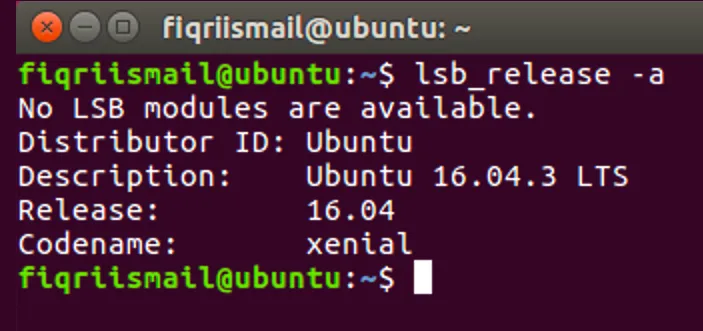
You will have to download a virtual PC and install the latest version of Ubuntu. If you haven't got a virtual PC that runs Ubuntu, make sure you have before continuing this recipe done it yet. I am using Ubuntu version 16.04 here. To find out which version you have, simply type the following command in the terminal:
$ lsb_release -a
You should get the following output:
How to do it...
- Open your favorite browser, type the following URL, and press Enter:
https://www.microsoft.com/net/download/linux
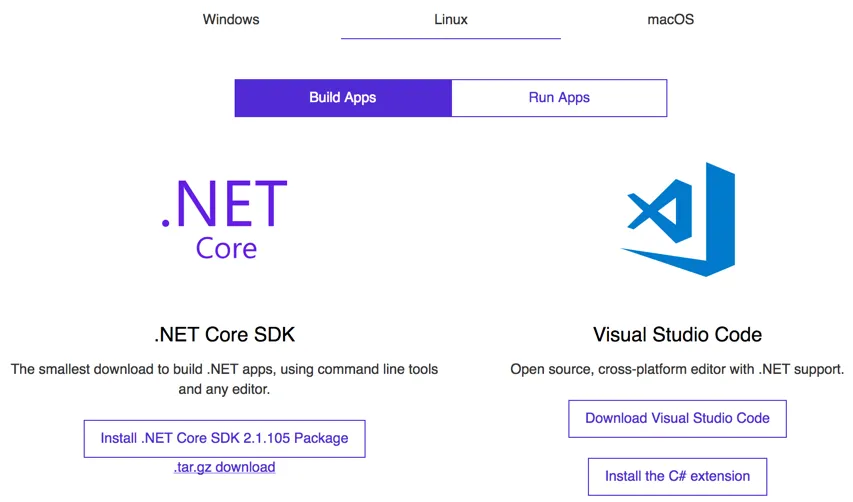
- Select the Install .NET Core SDK 2.x Package button.
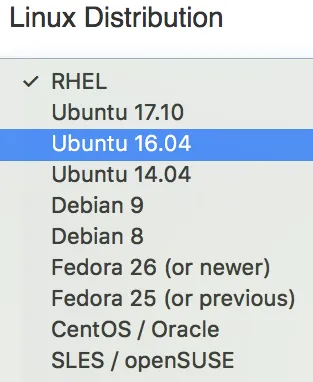
- From the Linux Distribution drop-down list, select Ubuntu 16.04.
- Follow the instructions on the page to install the current SDK or perform the following steps to install.
- Now open the terminal, type the following command, and press Enter:
 $ curl https://packages.microsoft.com/keys/microsoft.asc |
 gpg --dearmor > microsoft.gpg
- If you have a fresh installation of Ubuntu you might not have curl installed. If not use the following command to install curl:
$ sudo apt-get install curl - Now, again in the terminal type the following command and press Enter to get the list of files:
$ sudo mv microsoft.gpg /etc/apt/trusted.gpg.d/microsoft.gpg - Type the following command and press Enter in the terminal:
 $ sudo sh -c 'echo "deb [arch=amd64]
 https://packages.microsoft.com/repos/
 micro...
Table of contents
- Title Page
- Copyright and Credits
- Packt Upsell
- Contributors
- Preface
- Back to Basics
- Primitives, Collections, LINQ, and More
- Working with Files
- Functional Programming
- XML and Data
- Exploring Threading
- Networking
- To iOS with Xamarin
- To Android with Xamarin
- Let’s Fine-Tune Our Library
- Packaging and Delivery
- Deploying
Trusted by 375,005 students
Access to over 1.5 million titles for a fair monthly price.
Study more efficiently using our study tools.
Frequently asked questions
Yes, you can cancel anytime from the Subscription tab in your account settings on the Perlego website. Your subscription will stay active until the end of your current billing period. Learn how to cancel your subscription
No, books cannot be downloaded as external files, such as PDFs, for use outside of Perlego. However, you can download books within the Perlego app for offline reading on mobile or tablet. Learn how to download books offline
Perlego offers two plans: Essential and Complete
- Essential is ideal for learners and professionals who enjoy exploring a wide range of subjects. Access the Essential Library with 800,000+ trusted titles and best-sellers across business, personal growth, and the humanities. Includes unlimited reading time and Standard Read Aloud voice.
- Complete: Perfect for advanced learners and researchers needing full, unrestricted access. Unlock 1.5M+ books across hundreds of subjects, including academic and specialized titles. The Complete Plan also includes advanced features like Premium Read Aloud and Research Assistant.
We are an online textbook subscription service, where you can get access to an entire online library for less than the price of a single book per month. With over 1.5 million books across 990+ topics, we’ve got you covered! Learn about our mission
Look out for the read-aloud symbol on your next book to see if you can listen to it. The read-aloud tool reads text aloud for you, highlighting the text as it is being read. You can pause it, speed it up and slow it down. Learn more about Read Aloud
Yes! You can use the Perlego app on both iOS and Android devices to read anytime, anywhere — even offline. Perfect for commutes or when you’re on the go.
Please note we cannot support devices running on iOS 13 and Android 7 or earlier. Learn more about using the app
Please note we cannot support devices running on iOS 13 and Android 7 or earlier. Learn more about using the app
Yes, you can access .NET Standard 2.0 Cookbook by Fiqri Ismail in PDF and/or ePUB format, as well as other popular books in Informatik & Open-Source-Programmierung. We have over 1.5 million books available in our catalogue for you to explore.