Get acquainted with GCP and manage robust, highly available, and dynamic solutions to drive business objectiveAbout This Book• Identify the strengths, weaknesses and ideal use-cases for individual services offered on the Google Cloud Platform• Make intelligent choices about which cloud technology works best for your use-case• Leverage Google Cloud Platform to analyze and optimize technical and business processesWho This Book Is ForIf you are a Cloud architect who is responsible to design and manage robust cloud solutions with Google Cloud Platform, then this book is for you. System engineers and Enterprise architects will also find this book useful. A basic understanding of distributed applications would be helpful, although not strictly necessary. Some working experience on other public cloud platforms would help too.What You Will Learn• Set up GCP account and utilize GCP services using the cloud shell, web console, and client APIs• Harness the power of App Engine, Compute Engine, Containers on the Kubernetes Engine, and Cloud Functions• Pick the right managed service for your data needs, choosing intelligently between Datastore, BigTable, and BigQuery• Migrate existing Hadoop, Spark, and Pig workloads with minimal disruption to your existing data infrastructure, by using Dataproc intelligently• Derive insights about the health, performance, and availability of cloud-powered applications with the help of monitoring, logging, and diagnostic tools in StackdriverIn DetailUsing a public cloud platform was considered risky a decade ago, and unconventional even just a few years ago. Today, however, use of the public cloud is completely mainstream - the norm, rather than the exception. Several leading technology firms, including Google, have built sophisticated cloud platforms, and are locked in a fierce competition for market share.The main goal of this book is to enable you to get the best out of the GCP, and to use it with confidence and competence. You will learn why cloud architectures take the forms that they do, and this will help you become a skilled high-level cloud architect. You will also learn how individual cloud services are configured and used, so that you are never intimidated at having to build it yourself. You will also learn the right way and the right situation in which to use the important GCP services.By the end of this book, you will be able to make the most out of Google Cloud Platform design.Style and approachA clear, concise, and straightforward book which will enable to develop and manage optimum solutions for your infrastructure
eBook - ePub
Google Cloud Platform for Architects
Design and manage powerful cloud solutions
- 372 pages
- English
- ePUB (mobile friendly)
- Available on iOS & Android
eBook - ePub
Google Cloud Platform for Architects
Design and manage powerful cloud solutions
About this book
Information
Topic
InformaticaSubtopic
Elaborazione di dati su cloudCompute Choices – VMs and the Google Compute Engine
In the cloud world, the most hands-on of these approaches is not really an option—you are not going to actually own the machines, and physically maintain them. That is the whole point of switching to the cloud—that the cloud provider manages scaling for you and allows you to pay as you go. But a cloud equivalent of this approach still exists—you could provision a large number of virtual machines (again, these machines are virtual, not physical), and run your app on all of these. You'd be able to log in to these machines, and you'd have to manage scaling up or down (by provisioning more or less VMs). The cloud provider is still providing you with very valuable services—you can autoscale your groups of VMs, you can have your VMs stay live during system maintenance, and so on. These services are collectively called Infrastructure-as-a-Service (IaaS).
In this chapter we will:
- Explore Google Compute Engine (GCE) which serves as Infrastructure as a Service provision of GCP.
- Learn how to create and manage GCE VMs along with its various aspects like disk type and machine types.
- Demonstrate using GCE VMs via running a webserver on it.
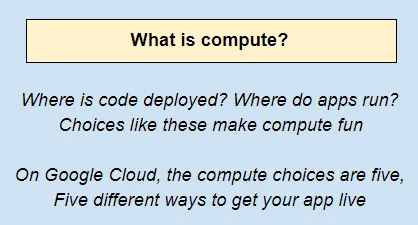
You could also easily go further. You might decide that you just want to write code—not deal with any provisioning of machines or networking or Ops. The cloud provider will allow you to write your code and deploy it without worrying about the underlying systems—virtual or physical. All that you know is that your app is available as a service—most likely as an HTTP endpoint that clients can hit using RESTful API calls. The cloud provides complete isolation from the infrastructure autoscaling, load-balancing, traffic-splitting—all of this is managed for you. Such a service is basically a platform on which you write your code, and forget about the rest. These services are collectively called Platform-as-a-Service (PaaS).

Let's draw a line with IaaS at one end, and PaaS at the other. The leading cloud providers—Amazon AWS, Microsoft Azure, and Google Cloud Platform—all offer the entire range of compute options, from IaaS to PaaS.
In addition to these, there are a couple of other approaches worth discussing—containers and SaaS:
- Containers lie somewhere in between IaaS and PaaS and involves the use of portable, lightweight images of your app—these lightweight images are called containers. Docker is a pretty common container format, and the GCP has a great orchestration framework called Google Kubernetes Engine (GKE) to run app containers on managed clusters. But that will be dealt in more detail in the later chapter.
- Another approach, further to the right of PaaS, would be Software-as-a-Service (SaaS). In our preceding web app example, Heroku acted as an example of a PaaS offering, while Shopify was an SaaS offering. It probably is fair to say that Microsoft Azure is currently far ahead of the other two in SaaS, because it makes very powerful software such as Office 365 available to users. IaaS reduces the burden of DevOps, PaaS virtually eliminates it, and SaaS reduces the burden of development.

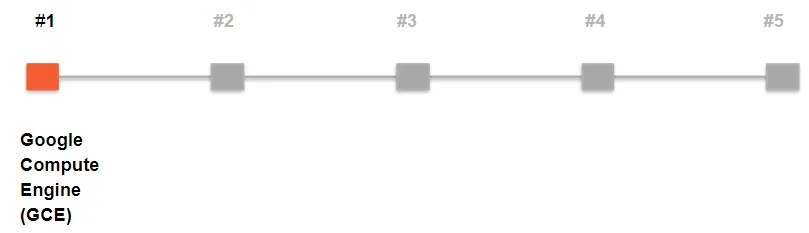
The preceding line is a general representation of the compute choices out there, but on the GCP, there actually are five specific options. None of these really involve SaaS, except for very limited use cases, so let's leave that out for now. The offerings on the GCP are shown as follows:
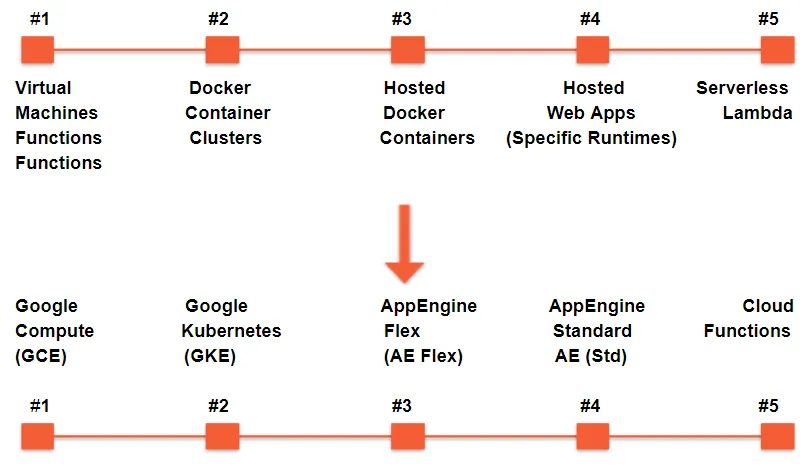
If you have an infra background, these five choices might make perfect sense to you, but even if you do not, never fear, we'll talk about each of them. Throughout the course of this chapter and the next, we will describe each of these five compute options. This chapter focuses on the first—Google Compute Engine (GCE), which is basically a service to provision and work with virtual machines on the cloud.
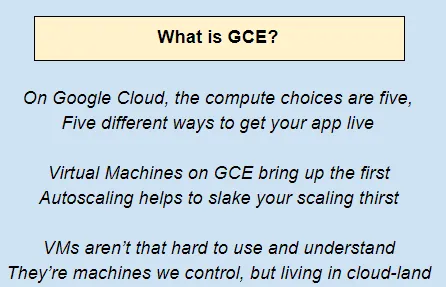
GCE is a prototypical IaaS use case. What you need is a set of machines, placed at your disposal to set up in exactly the way you want. Configuration, administration, and management would all then be your responsibility. While this might sound like an on-premise data center, there are two crucial differences:
- The VMs are not running on hardware bought by you—rather, you just provision them whenever you need them and delete them when you're done.
- Several powerful infra services—autoscaling groups of VMs, load-balancing, the importing of external images, and so on—are provided by the cloud platform. This is why GCE is an IaaS solution.
In this chapter, we will get you familiar with GCE by covering the following topics:
- Creating, customizing, and modifying VM instances
- Block-based storage (local SSDs and persistent storage), which can be attached to your VMs
- Load balancing, start up scripts, and disk images that allow you to make optimal use of your VM instances
Google Compute Engine – GCE
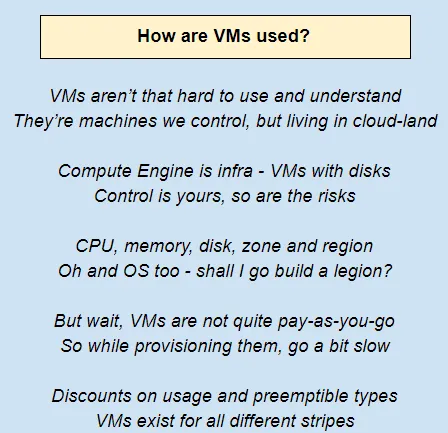
Google Compute Engine is the IaaS component of the GCP that lets you create and run VM on Google infrastructure. Each VM is called a Compute Engine instance. A Compute Engine instance can run Linux and Windows server images provided by Google or any customized versions of these images. You can also build and run images of other operating systems.
You can choose the machine properties of your instances, such as the number of virtual CPUs and the amount of memory, by using a set of predefined machine types or by creating your own custom machine types.
Creating VMs
This section will walk you through creating a VM instance. There are several ways to create a VM instance in GCE:
- Through the web console
- The gcloud command-line tool from Cloud Shell
- Using API calls
There actually is a fourth way as well—that's an Infrastructure as Code (IaC) approach relying on the Deployment Manager. Infrastructure automation is a big deal these days, and we'll get to this approach—but in a later chapter.
Creating a VM instance using the web console
The web console will allow you to view all the available options when configuring a VM. This is probably the best way to get started with provisioning VMs on GCP:
- Start with the hamburger (three horizontal bars on the top left).
- Click on Compute, and then on VM instance...
Table of contents
- Title Page
- Copyright and Credits
- Packt Upsell
- Contributors
- Preface
- The Case for Cloud Computing
- Introduction to Google Cloud Platform
- Compute Choices – VMs and the Google Compute Engine
- GKE, App Engine, and Cloud Functions
- Google Cloud Storage – Fishing in a Bucket
- Relational Databases
- NoSQL Databases
- BigQuery
- Identity and Access Management
- Managing Hadoop with Dataproc
- Load Balancing
- Networking in GCP
- Logging and Monitoring
- Infrastructure Automation
- Security on the GCP
- Pricing Considerations
- Effective Use of the GCP
- Other Books You May Enjoy
Trusted by 375,005 students
Access to over 1.5 million titles for a fair monthly price.
Study more efficiently using our study tools.
Frequently asked questions
Yes, you can cancel anytime from the Subscription tab in your account settings on the Perlego website. Your subscription will stay active until the end of your current billing period. Learn how to cancel your subscription
No, books cannot be downloaded as external files, such as PDFs, for use outside of Perlego. However, you can download books within the Perlego app for offline reading on mobile or tablet. Learn how to download books offline
We are an online textbook subscription service, where you can get access to an entire online library for less than the price of a single book per month. With over 1.5 million books across 990+ topics, we’ve got you covered! Learn about our mission
Look out for the read-aloud symbol on your next book to see if you can listen to it. The read-aloud tool reads text aloud for you, highlighting the text as it is being read. You can pause it, speed it up and slow it down. Learn more about Read Aloud
Yes! You can use the Perlego app on both iOS and Android devices to read anytime, anywhere — even offline. Perfect for commutes or when you’re on the go.
Please note we cannot support devices running on iOS 13 and Android 7 or earlier. Learn more about using the app
Please note we cannot support devices running on iOS 13 and Android 7 or earlier. Learn more about using the app
Yes, you can access Google Cloud Platform for Architects by Vitthal Srinivasan, Janani Ravi, Judy Raj in PDF and/or ePUB format, as well as other popular books in Informatica & Elaborazione di dati su cloud. We have over 1.5 million books available in our catalogue for you to explore.