Discover techniques and tools for building serverless applications with AWS LambdaAbout This Book• Learn to write, run, and deploy Lambda functions in the AWS cloud• Make the most of AWS Lambda functions to build scalable and cost-efficient systems• A practical guide to developing serverless services and applications in Node.js, Java, Python, and C#Who This Book Is ForThis book is primarily for IT architects and developers who want to build scalable systems and deploy serverless applications with AWS Lambda. No prior knowledge of AWS is necessary. What You Will Learn• Understand the fundamental concepts of AWS Lambda• Get to grips with the Serverless Framework and how to create a serverless project• Testing and debugging Lambda functions• Create a stateful, serverless backend with DynamoDB• Program AWS Lambda with Java, Python, and C#• Program a lambda function with Node.jsIn DetailAWS Lambda is a part of AWS that lets you run your code without provisioning or managing servers. This enables you to deploy applications and backend services that operate with no upfront cost. This book gets you up to speed on how to build scalable systems and deploy serverless applications with AWS Lambda.The book starts with the fundamental concepts of AWS Lambda, and then teaches you how to combine your applications with other AWS services, such as AmazonAPI Gateway and DynamoDB. This book will also give a quick walk through on how to use the Serverless Framework to build larger applications that can structure code or autogenerate boilerplate code that can be used to get started quickly for increased productivity.Toward the end of the book, you will learn how to write, run, and test Lambda functions using Node.js, Java, Python, and C#.Style and approachThis book will provide clear instructions that introduce the viewer to programming AWS Lambda with Node.js, Java, Python, and C#. Moreover, readers will learn how to deploy and test Lambda functions, and how to set up and use the serverless framework.
eBook - ePub
AWS Lambda Quick Start Guide
Learn how to build and deploy serverless applications on AWS
- 184 pages
- English
- ePUB (mobile friendly)
- Available on iOS & Android
eBook - ePub
AWS Lambda Quick Start Guide
Learn how to build and deploy serverless applications on AWS
About this book
Information
Programming AWS Lambda with Java
Welcome to Chapter 4, Programming AWS Lambda with Java. In this section, we are going to take a look at using Eclipse and the AWS Eclipse plugin. Then we will program our first Lambda functions with Java. And, last but not least, we will build a simple serverless application using Java. Now let's move on to the first video where we get started with Eclipse and the AWS Eclipse plugin.
In this chapter, we are going to take a look at the following:
- Using Eclipse and the AWS Eclipse plugin
- Programming Lambda functions with Java
- A simple application with Java Lambda functions
So let's dive in!
Getting started with Eclipse and the AWS Eclipse plugin
From this section, you will learn how to install the AWS Eclipse plugin, and also try out some of its features. You will also use the plugin to create our first Java Lambda function.
To find more information about the AWS Toolkit for Eclipse, go to the site of the AWS documentation, which is the open source plugin for the Eclipse IDE. Once you open the site, go over to the left and click on Getting Started and Set up the Toolkit.
There, you will find more information, including that you need an AWS account, you need to install Java, and so on. But if you have already installed Java and if you're already using Eclipse, then all you need to do is copy the link https://aws.amazon.com/eclipse.
Open your Eclipse IDE. If you have never installed an Eclipse plugin before, there should be a menu action in the menu bar that says Install New Software. For macOS, it's under Help, but, depending on the operating system, it could be somewhere else. So, find the Install New Software menu item and then enter the URL that was copied previously, as shown here:
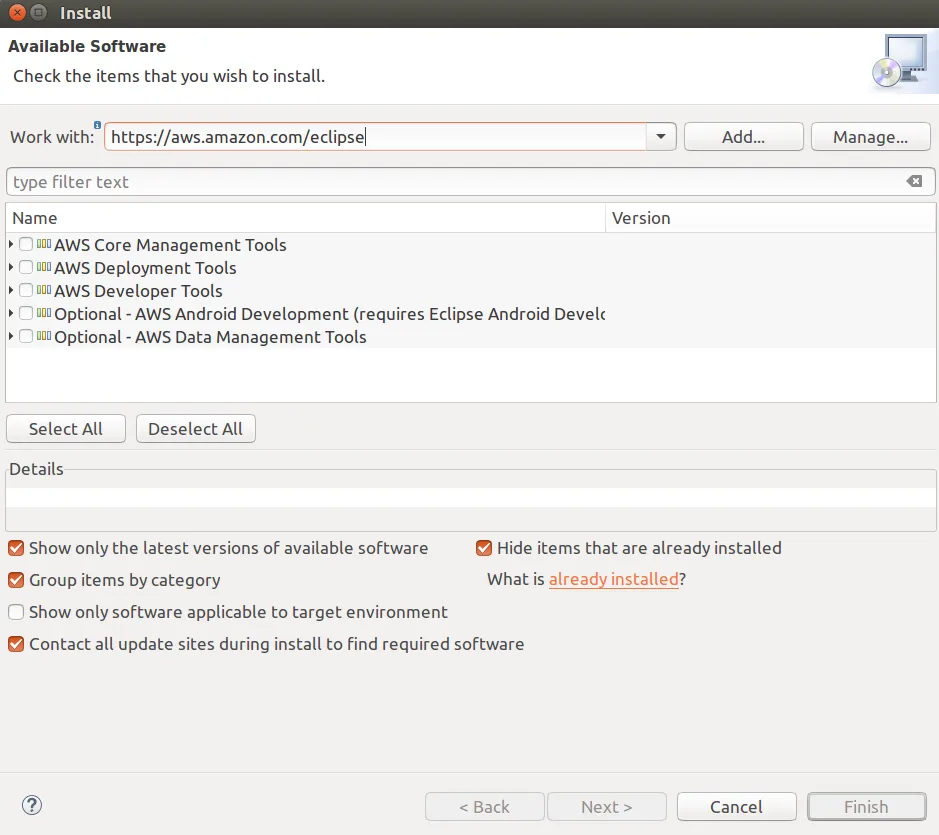
From the previous screenshot, you will find that the AWS Toolkit for Eclipse consists of a bunch of plugins for different AWS services. What we need in this case is the Core plugin, so select the AWS Toolkit for Eclipse Core under the AWS Core Management Tools. We also need to use the AWS deployment tool for Lambda, so select AWS Lambda Plugin under the AWS Deployment Tools.
For now, the other plugins are not really needed. Once selected, click on Next. This will calculate the dependencies, which should be fine to install. Currently, we am using the Eclipse for Java EE Neon 2 version of Eclipse, but it should work similarly on all major new versions of Eclipse. So, click on Next, accept the license agreement, and click on Finish. After the software has been installed, we just need to restart Eclipse. Once the Eclipse IDE has restarted, you should see a little orange box, as shown here:
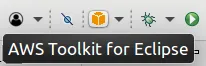
This box will give you more information on how to use the AWS Toolkit for Eclipse if you click on it.
Click on the little drop-down arrow and create a new AWS Lambda Java project:
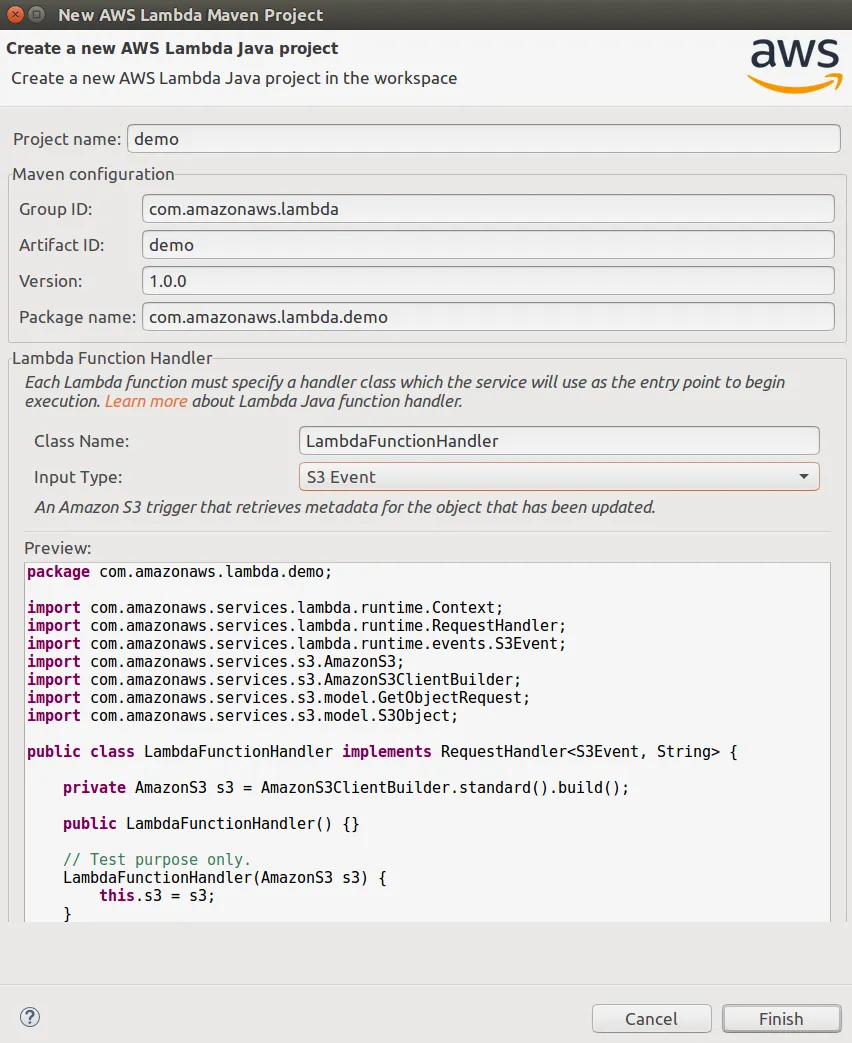
For now, set the Project Name as demo. You can also see that we have a group ID and artifact ID, which is used for Maven. And then, at the bottom, you can see that the wizard helps us to generate some boilerplate code.
Let's change the default configuration a little bit. You can choose a different handler type if you want to operate on a stream, but for now let's leave it with a request handler. We could choose a different input type. For a first simple example application, let's use the custom input type. You can see that the code shown in the preview that is generated from our configurations changes. As input type, we could use a plain old Java object, but we could also use something such as a string or an integer. So, let's use Input Type and Output Type as String, so we can build a really simple hello-world application. Let's click on Finish.
When we have created our AWS Lambda Java project, there will be more information on how to get started. But, in our example IDE configuration, there are a couple of problems that are pointed out, as follows:

These errors might not even happen in your case, but, in case they appear, let's see on how to fix them.
In the preceding screenshot, the problem is that the build path was not configured correctly. The reason is because of using the outdated Java version 1.5. We need to change that. So, go to the project explorer tab, click on demo, and go to demo | Build Path | Confi...
Table of contents
- Title Page
- Copyright and Credits
- Packt Upsell
- Contributors
- Preface
- Getting Started with AWS
- Exploring the Serverless Framework
- Building a Serverless Application
- Programming AWS Lambda with Java
- Programming AWS Lambda with Python
- Programming AWS Lambda with C#
- Other Books You May Enjoy
Trusted by 375,005 students
Access to over 1.5 million titles for a fair monthly price.
Study more efficiently using our study tools.
Frequently asked questions
Yes, you can cancel anytime from the Subscription tab in your account settings on the Perlego website. Your subscription will stay active until the end of your current billing period. Learn how to cancel your subscription
No, books cannot be downloaded as external files, such as PDFs, for use outside of Perlego. However, you can download books within the Perlego app for offline reading on mobile or tablet. Learn how to download books offline
Perlego offers two plans: Essential and Complete
- Essential is ideal for learners and professionals who enjoy exploring a wide range of subjects. Access the Essential Library with 800,000+ trusted titles and best-sellers across business, personal growth, and the humanities. Includes unlimited reading time and Standard Read Aloud voice.
- Complete: Perfect for advanced learners and researchers needing full, unrestricted access. Unlock 1.5M+ books across hundreds of subjects, including academic and specialized titles. The Complete Plan also includes advanced features like Premium Read Aloud and Research Assistant.
We are an online textbook subscription service, where you can get access to an entire online library for less than the price of a single book per month. With over 1.5 million books across 990+ topics, we’ve got you covered! Learn about our mission
Look out for the read-aloud symbol on your next book to see if you can listen to it. The read-aloud tool reads text aloud for you, highlighting the text as it is being read. You can pause it, speed it up and slow it down. Learn more about Read Aloud
Yes! You can use the Perlego app on both iOS and Android devices to read anytime, anywhere — even offline. Perfect for commutes or when you’re on the go.
Please note we cannot support devices running on iOS 13 and Android 7 or earlier. Learn more about using the app
Please note we cannot support devices running on iOS 13 and Android 7 or earlier. Learn more about using the app
Yes, you can access AWS Lambda Quick Start Guide by Markus Klems in PDF and/or ePUB format, as well as other popular books in Computer Science & Cloud Computing. We have over 1.5 million books available in our catalogue for you to explore.