Complement Selenium with useful additions that fit seamlessly into the rich and well-crafted API that Selenium offersAbout This Book• Understand the power, simplicity, and limitations of the core Selenium framework• Write clear, readable, and reliable tests that perform complex test automation tasks• Work with ChromeDriver and GeckoDriver in headless modeWho This Book Is ForIf you are a software tester or a developer with working experience in Selenium and competency with Java, who is interested in automation and are looking forward to taking the next step in their learning journey, then this is the book for you.What You Will Learn• Provide fast, useful feedback with screenshots• Create extensible, well-composed page objects• Utilize ChromeDriver and GeckoDriver in headless mode• Leverage the full power of Advanced User Interactions APIs• Use JavascriptExecutor to execute JavaScript snippets in the browser through Selenium• Build user interaction into your test script using JavascriptExecutor• Learn the basics of working with AppiumIn DetailThe second edition of Mastering Selenium 3.0 WebDriver starts by showing you how to build your own Selenium framework with Maven. You'll then look at how you can solve the difficult problems that you will undoubtedly come across as you start using Selenium in an enterprise environment and learn how to produce the right feedback when failing. Next, you'll explore common exceptions that you will come across as you use Selenium, the root causes of these exceptions, and how to fix them. Along the way, you'll use Advanced User Interactions APIs, running any JavaScript you need through Selenium; and learn how to quickly spin up a Selenium Grid using Docker containers. In the concluding chapters, you'll work through a series of scenarios that demonstrate how to extend Selenium to work with external libraries and applications so that you can be sure you are using the right tool for the job.Style and approachThis book is a pragmatic guide that takes you through the process of creating a test framework with Selenium 3. It then shows you how you can extend this framework to overcome common obstacles that you will come across whilst using Selenium.
eBook - ePub
Mastering Selenium WebDriver 3.0
Boost the performance and reliability of your automated checks by mastering Selenium WebDriver, 2nd Edition
- 376 pages
- English
- ePUB (mobile friendly)
- Available on iOS & Android
eBook - ePub
Mastering Selenium WebDriver 3.0
Boost the performance and reliability of your automated checks by mastering Selenium WebDriver, 2nd Edition
About this book
Information
Creating a Fast Feedback Loop
One of the main problems you hear people talking about with Selenium is how long it takes to run all of their tests; I have heard figures ranging from a couple of hours to a couple of days. In this chapter, we will have a look at how we can speed things up and get the tests that you are writing to run both quickly and regularly.
Another problem that you may come across is getting other people to run your tests; this is usually because it is a pain to set up the project to work on their machine and it's too much effort for them. As well as making things run quickly, we are going to make it very easy for others to check out your code and get themselves up and running.
How does this create a fast feedback loop?
Well, first of all, allow me to explain what a fast feedback loop is. As developers change or refactor code, it's possible that they may make a mistake and break something. The feedback loop starts off when they commit code and is complete when they know whether their code changes have worked as expected, or something has been broken. We want to make this feedback loop as fast as possible, so ideally a developer will be running all of the tests that are available before every check in. They will then know whether the changes they made to the code have broken something before the code leaves their machine.
Eventually, we want to get to the point where developers are updating tests that fail because the functionality has changed as they go. The eventual code to turn the tests into living documentation, we will talk about a bit more about in Chapter 2, Producing the Right Feedback When Failing.
In this chapter, we are going to start by creating a basic test framework. What am I going to need? The software and browser versions used to write the code in this chapter are as follows:
- Java SDK 8
- Maven 3.5.3
- Chrome 66
- Firefox 60
It's a good idea to make sure that you atleast update to these versions to make sure everything works for you.
Making it easy for developers to run tests
Ideally, we want our tests to run every time somebody pushes code to the central code repository; part of doing this is ensuring that it's very easy to run our tests. If somebody can just check out our code base and run one command and have all of the tests just work, it means they are far more likely to run them.
We are going to make this easy by using Apache Maven. To steal a quote from the Maven documentation:
"Maven is an attempt to apply patterns to a project's build infrastructure in order to promote comprehension and productivity by providing a clear path in the use of best practices."
Maven is a tool that can be used to build and manage Java projects (including downloading any dependencies that you require) and is used in many companies as part of the standard enterprise infrastructure. Maven is not the only solution to this problem (for example, Gradle is a very powerful alternative that is on par with Maven in many areas and exceeds it in a few), but it is one that you are most likely to see on the ground and one that most Java developers will have used at some point in their careers.
One of the major plus points is that it encourages developers to use a standardized project structure that makes it easy for people who know Maven to navigate around the source code; it also makes it very easy to plug into a CI system (such as Jenkins or TeamCity), as all the major ones understand Maven POM files.
How does this make it easy for developers to run tests? Well, when we have set our project up using Maven, they should be able to check out our test code and simply type mvn clean verify into a Terminal window. This will automatically download all dependencies, set up the class path, and run all of the tests.
It doesn't really get much easier than that.
Building our test project with Apache Maven
Getting a full working Maven install up and running is not within the scope of this book. It's okay though, don't panic! The Apache Software Foundation has you covered, it has a guide to setting up Maven up in just five minutes! See the following link:
http://maven.apache.org/guides/getting-started/maven-in-five-minutes.html
If you are running the Debian derivative of Linux, it is as easy as using this command:
sudo apt-get install maven
Or if you are running a Mac with Homebrew, it is just this code:
brew install maven
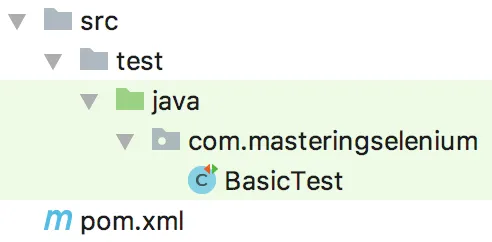
Once you have Maven installed and working, we will start our Selenium project with a basic POM file. We are going to start by creating a basic Maven directory structure and then creating a file called pom.xml in it. Take a look at the following screenshot:
There are two main testing frameworks that you will come across in a Java environment; JUnit and TestNG. I personally find TestNG to be easier to get up and running out of the box, but I find JUnit to be more extensible. TestNG certainly seems to be popular on the Selenium mailing list, with many threads asking questions about it; you don't often see JUnit questions any more.
I'm not going to suggest either one as the right choice, as they are both capable frameworks that you will probably come ac...
Table of contents
- Title Page
- Copyright and Credits
- Contributors
- Packt Upsell
- Preface
- Creating a Fast Feedback Loop
- Producing the Right Feedback When Failing
- Exceptions Are Actually Oracles
- The Waiting Game
- Working with Effective Page Objects
- Utilizing the Advanced User Interactions API
- JavaScript Execution with Selenium
- Keeping It Real
- Hooking Docker into Selenium
- Selenium – the Future
- Appendix A: Contributing to Selenium
- Appendix B: Working with JUnit
- Appendix C: Introduction to Appium
- Other Books You May Enjoy
Trusted by 375,005 students
Access to over 1.5 million titles for a fair monthly price.
Study more efficiently using our study tools.
Frequently asked questions
Yes, you can cancel anytime from the Subscription tab in your account settings on the Perlego website. Your subscription will stay active until the end of your current billing period. Learn how to cancel your subscription
No, books cannot be downloaded as external files, such as PDFs, for use outside of Perlego. However, you can download books within the Perlego app for offline reading on mobile or tablet. Learn how to download books offline
Perlego offers two plans: Essential and Complete
- Essential is ideal for learners and professionals who enjoy exploring a wide range of subjects. Access the Essential Library with 800,000+ trusted titles and best-sellers across business, personal growth, and the humanities. Includes unlimited reading time and Standard Read Aloud voice.
- Complete: Perfect for advanced learners and researchers needing full, unrestricted access. Unlock 1.5M+ books across hundreds of subjects, including academic and specialized titles. The Complete Plan also includes advanced features like Premium Read Aloud and Research Assistant.
We are an online textbook subscription service, where you can get access to an entire online library for less than the price of a single book per month. With over 1.5 million books across 990+ topics, we’ve got you covered! Learn about our mission
Look out for the read-aloud symbol on your next book to see if you can listen to it. The read-aloud tool reads text aloud for you, highlighting the text as it is being read. You can pause it, speed it up and slow it down. Learn more about Read Aloud
Yes! You can use the Perlego app on both iOS and Android devices to read anytime, anywhere — even offline. Perfect for commutes or when you’re on the go.
Please note we cannot support devices running on iOS 13 and Android 7 or earlier. Learn more about using the app
Please note we cannot support devices running on iOS 13 and Android 7 or earlier. Learn more about using the app
Yes, you can access Mastering Selenium WebDriver 3.0 by Mark Collin in PDF and/or ePUB format, as well as other popular books in Computer Science & Open Source Programming. We have over 1.5 million books available in our catalogue for you to explore.