Hands-On Artificial Intelligence with Java for Beginners
eBook - ePub

Hands-On Artificial Intelligence with Java for Beginners

Build intelligent apps using machine learning and deep learning with Deeplearning4j

  1. 144 pages
  2. English
  3. ePUB (mobile friendly)
  4. Available on iOS & Android
eBook - ePub

Hands-On Artificial Intelligence with Java for Beginners

Build intelligent apps using machine learning and deep learning with Deeplearning4j

About this book

Build, train, and deploy intelligent applications using Java libraries

Key Features

  • Leverage the power of Java libraries to build smart applications
  • Build and train deep learning models for implementing artificial intelligence
  • Learn various algorithms to automate complex tasks

Book Description

Artificial intelligence (AI) is increasingly in demand as well as relevant in the modern world, where everything is driven by technology and data. AI can be used for automating systems or processes to carry out complex tasks and functions in order to achieve optimal performance and productivity.

Hands-On Artificial Intelligence with Java for Beginners begins by introducing you to AI concepts and algorithms. You will learn about various Java-based libraries and frameworks that can be used in implementing AI to build smart applications.

In addition to this, the book teaches you how to implement easy to complex AI tasks, such as genetic programming, heuristic searches, reinforcement learning, neural networks, and segmentation, all with a practical approach.

By the end of this book, you will not only have a solid grasp of AI concepts, but you'll also be able to build your own smart applications for multiple domains.

What you will learn

  • Leverage different Java packages and tools such as Weka, RapidMiner, and Deeplearning4j, among others
  • Build machine learning models using supervised and unsupervised machine learning techniques
  • Implement different deep learning algorithms in Deeplearning4j and build applications based on them
  • Study the basics of heuristic searching and genetic programming
  • Differentiate between syntactic and semantic similarity among texts
  • Perform sentiment analysis for effective decision making with LingPipe

Who this book is for

Hands-On Artificial Intelligence with Java for Beginners is for Java developers who want to learn the fundamentals of artificial intelligence and extend their programming knowledge to build smarter applications.

Tools to learn more effectively

Saving Books

Saving Books

Keyword Search

Keyword Search

Annotating Text

Annotating Text

Listen to it instead

Listen to it instead

Exploring Search Algorithms

In this chapter, we'll look at how to perform a search, and we will cover the basic requirements of implementing a search algorithm. We'll then practice by implementing Dijkstra's algorithm, before moving on to heuristics, showing how they can be used in search algorithms to improve the accuracy of search results.
In particular, we'll be focusing on the following topics:
  • An introduction to searching
  • Implementing Dijkstra's search
  • Understanding the notion of heuristics
  • A brief introduction to the A* algorithm
  • Implementing an A* algorithm

An introduction to searching

Let's look at what it means to search. If we want to apply a search to any problem, we will need four pieces of input, which are referred to as the state space, and are as follows:
[S, s, O, G]
The preceding types of input can be described as follows:
  • S: A set of implicitly given states—all of the states that might be explored in a search process.
  • s: The start symbol—the starting point of the search.
  • O: The state transition operators, which indicate how a search should proceed from one node to the next and what transitions are available to the search. This is an exhaustive list. Therefore, the state transition operator keeps track of these exhaustive lists.
  • G: The goal node, pointing to where the search should end.
With the preceding information, we can find the following values:
  • The minimum cost transaction for a goal state
  • A sequence of transitions to a minimum cost goal
  • A minimum cost transaction for a minimum cost goal
Let's consider the following algorithm, which assumes that all operators have a cost:
  1. Initialize: Set OPEN = {s},
CLOSE = {}, Set C(s) = 0
  1. Fail: If OPEN = {}, Terminate with Failure
  2. Select: Select the minimum cost state, n, form OPEN, and Save n in CLOSE
  3. Terminate: If n ∈ G, Terminate with Success
  4. Expand: Generate the successors of n using 0
For each successor, m, insert m in OPEN only if m ∉ [OPEN ∪ CLOSE]
Set C(m) = C(n) + C(n,m)
and insert m in OPEN
if m ∈ [OPEN ∪ CLOSE]
Set C(m) = min{ C(m), C(n) + C(m,n)}
If C(m) has decreased and m ∈ CLOSE move it to OPEN
  1. Loop: Go to Step 2
Each state of the preceding algorithm can be described as follows:
  1. Initialize: We initialize the algorithm and create a data structure called OPEN. We put our start state, s, into this data structure, and create one more data structure, CLOSE, which is empty. All of the states that we'll be exploring will be taken from OPEN and put into CLOSE. We set the cost of the initial start state to 0. This will calculate the cost incurred when traveling from the start state to the current state. The cost of traveling from the start state to the start state is 0; that's why we have set it to 0.
  2. Fail: In this step, if OPEN is empty, we will terminate with a failure. However, our OPEN is not empty, because we have s in our start state. Therefore, we will not terminate with a failure.
  1. Select state: Here, we will select the minimum cost successor, n, and we'll take it from OPEN and save it in CLOSE.
  2. Terminate: In this step, we'll check whether n belongs to the G. If yes, we'll terminate with a success.
  3. Expand: If our n does not belong to G, then we need to expand G by using our state transition operator, as follows:
    • If it is a new node, m, and we have not explored it, it means that it is not available in either OPEN or CLOSE, and we'll simply calculate the cost of the new successor (m) by calculating the cost of its predecessor plus the cost of traveling from n to m, and we'll put the value into OPEN
    • If it is a part of both OPEN and CLOSE, we'll check which one is the minimum cost—the current cost or the previous cost (the actual cost that we had in the previous iteration)—and we'll keep that cost
    • If our m gets decreased and it belongs to CLOSE, then we will bring it back to OPEN
  4. Loop: We will keep on doing this until our OPEN is not empty, or until our m does not belong to G.
Consider the example illustrated in the following diagram:
Initially, we have the following algorithm:
n(S) = 12 | s = 1 | G = {12}
In the preceding algorithm, the following applies:
  • n(S) is the number of states/nodes
  • s is the start node
  • G is the goal node
The arrows are the state transition operators. Let's try running this, in order to check that our algorithm is working.
Iteration 1 of the algorithm is as follows:
Step 1: OPEN = {1}, C(1) = 0 | CLOSE = { }; here C(1) is cost of node 1
Step 2: OPEN ≠ { }; go to Step 3
Step 3: n = 1 | OPEN = { } | CLOSE = {1}
Step 4: Since n ∉ G; Expand n=1
We get m = {2, 5}
{2} ∉ [OPEN ∪ CLOSE] | {5} ∉ [OPEN ∪ CLOSE]
C(2) = 0 + 2 = 2 | C(5) = 0 + 1 = 1 | OPEN = {2,5}
Loop to Step 2
Iteration 2 is as follows:
Step 2: OPEN ≠ { } so Step 3
Step 3: n = 5 since min{C(2),C(5)}...
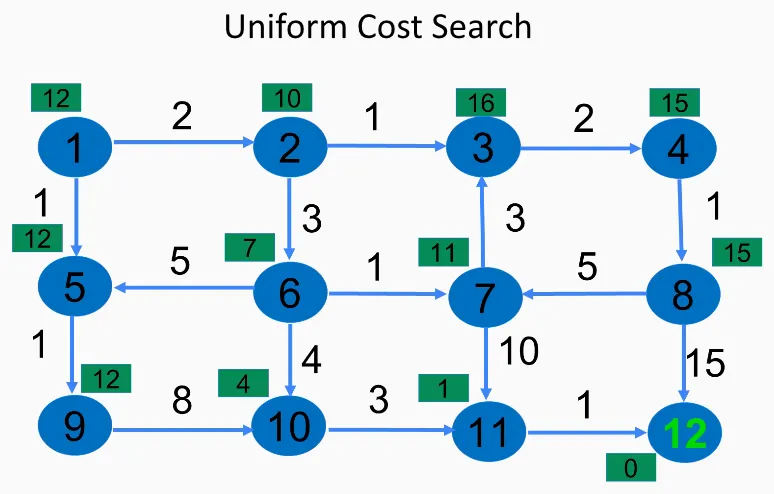
Table of contents

  1. Title Page
  2. Copyright and Credits
  3. Packt Upsell
  4. Contributors
  5. Preface
  6. Introduction to Artificial Intelligence and Java
  7. Exploring Search Algorithms
  8. AI Games and the Rule-Based System
  9. Interfacing with Weka
  10. Handling Attributes
  11. Supervised Learning
  12. Semi-Supervised and Unsupervised Learning
  13. Other Books You May Enjoy

Frequently asked questions

Yes, you can cancel anytime from the Subscription tab in your account settings on the Perlego website. Your subscription will stay active until the end of your current billing period. Learn how to cancel your subscription
No, books cannot be downloaded as external files, such as PDFs, for use outside of Perlego. However, you can download books within the Perlego app for offline reading on mobile or tablet. Learn how to download books offline
Perlego offers two plans: Essential and Complete
  • Essential is ideal for learners and professionals who enjoy exploring a wide range of subjects. Access the Essential Library with 800,000+ trusted titles and best-sellers across business, personal growth, and the humanities. Includes unlimited reading time and Standard Read Aloud voice.
  • Complete: Perfect for advanced learners and researchers needing full, unrestricted access. Unlock 1.4M+ books across hundreds of subjects, including academic and specialized titles. The Complete Plan also includes advanced features like Premium Read Aloud and Research Assistant.
Both plans are available with monthly, semester, or annual billing cycles.
We are an online textbook subscription service, where you can get access to an entire online library for less than the price of a single book per month. With over 1 million books across 990+ topics, we’ve got you covered! Learn about our mission
Look out for the read-aloud symbol on your next book to see if you can listen to it. The read-aloud tool reads text aloud for you, highlighting the text as it is being read. You can pause it, speed it up and slow it down. Learn more about Read Aloud
Yes! You can use the Perlego app on both iOS and Android devices to read anytime, anywhere — even offline. Perfect for commutes or when you’re on the go.
Please note we cannot support devices running on iOS 13 and Android 7 or earlier. Learn more about using the app
Yes, you can access Hands-On Artificial Intelligence with Java for Beginners by Nisheeth Joshi in PDF and/or ePUB format, as well as other popular books in Computer Science & Artificial Intelligence (AI) & Semantics. We have over one million books available in our catalogue for you to explore.