Implementing Azure Solutions
eBook - ePub

Implementing Azure Solutions

Deploy and manage Azure containers and build Azure solutions with ease, 2nd Edition

  1. 556 pages
  2. English
  3. ePUB (mobile friendly)
  4. Available on iOS & Android
eBook - ePub

Implementing Azure Solutions

Deploy and manage Azure containers and build Azure solutions with ease, 2nd Edition

About this book

Get up and running with Azure services and learn how to implement them in your organization

Key Features

  • Deploy Azure Services in a controlled and preconfigured environment
  • Discover best practices and techniques for implementing Azure Solutions
  • Build and deploy an app using Azure App Services

Book Description

Microsoft Azure offers numerous solutions that can shape the future of any business. However, the major challenge that architects and administrators face lies in implementing these solutions.

Implementing Azure Solutions helps you overcome this challenge by enabling you to implement Azure Solutions effectively. The book begins by guiding you in choosing the backend structure for your solutions. You will then work with the Azure toolkit and learn how to use Azure Managed Apps to share your solutions with the Azure service catalog. The book then focuses on various implementation techniques and best practices such as implementing Azure Cloud Services by configuring, deploying, and managing cloud services. As you progress through the chapters, you'll learn how to work with Azure-managed Kubernetes and Azure Container Services.

By the end of the book, you will be able to build robust cloud solutions on Azure.

What you will learn

  • Create and manage a Kubernetes cluster in Azure Kubernetes Service (AKS)
  • Implement site-to-site VPN and ExpressRoute connections in your environment
  • Explore the best practices in building and deploying app services
  • Use Telemetry to monitor your Azure Solutions
  • Design an Azure IoT solution and learn how to operate in different scenarios
  • Implement a Hybrid Azure Design using Azure Stack

Who this book is for

If you're an IT architect, IT professional, or DevOps engineer who plans to implement Azure Solutions for your organization, this book is for you.

Frequently asked questions

Yes, you can cancel anytime from the Subscription tab in your account settings on the Perlego website. Your subscription will stay active until the end of your current billing period. Learn how to cancel your subscription.
No, books cannot be downloaded as external files, such as PDFs, for use outside of Perlego. However, you can download books within the Perlego app for offline reading on mobile or tablet. Learn more here.
Perlego offers two plans: Essential and Complete
  • Essential is ideal for learners and professionals who enjoy exploring a wide range of subjects. Access the Essential Library with 800,000+ trusted titles and best-sellers across business, personal growth, and the humanities. Includes unlimited reading time and Standard Read Aloud voice.
  • Complete: Perfect for advanced learners and researchers needing full, unrestricted access. Unlock 1.4M+ books across hundreds of subjects, including academic and specialized titles. The Complete Plan also includes advanced features like Premium Read Aloud and Research Assistant.
Both plans are available with monthly, semester, or annual billing cycles.
We are an online textbook subscription service, where you can get access to an entire online library for less than the price of a single book per month. With over 1 million books across 1000+ topics, we’ve got you covered! Learn more here.
Look out for the read-aloud symbol on your next book to see if you can listen to it. The read-aloud tool reads text aloud for you, highlighting the text as it is being read. You can pause it, speed it up and slow it down. Learn more here.
Yes! You can use the Perlego app on both iOS or Android devices to read anytime, anywhere — even offline. Perfect for commutes or when you’re on the go.
Please note we cannot support devices running on iOS 13 and Android 7 or earlier. Learn more about using the app.
Yes, you can access Implementing Azure Solutions by Florian Klaffenbach, Markus Klein, Sebastian Hoppe, Oliver Michalski, Jan-Henrik Damaschke in PDF and/or ePUB format, as well as other popular books in Computer Science & Cloud Computing. We have over one million books available in our catalogue for you to explore.

Information

Implementing Azure Networks
Just as you plan the network in your data center or company, you need to do it in Azure also. Networking is essential in Azure and if you do not plan it right you could force outages or bottlenecks for deployed services.
Depending on what you plan with Azure, you should put some effort in planning your network and connections into Azure.
Within this chapter, you will learn the basics about Azure networking, how to implement Azure networking, and how to decide which WAN and connectivity solution you should use.
We are going to explore the following topics:
  • Azure virtual networks
  • Azure virtual network gateways
  • Azure local gateways
  • Azure site-to-site and point-to-site VPN
  • Azure ExpressRoute
  • Azure virtual WAN
  • Azure Firewall
  • Azure DDoS
  • Azure connections and routes
  • Azure DNS
  • Azure application gateway
We will also set up a basic network configuration during this chapter.

Azure networking limits

Microsoft offers a wide range of capabilities when it comes to networking in and to Azure. That makes a network solution very flexible but also complex. You have many options to achieve your goal, but to do so you need to keep some limitations in mind. Behind the following link, you can find those Azure limitations: https://docs.microsoft.com/en-us/azure/azure-subscription-service-limits.

Azure networking components

To start with Azure networking, you need to know and understand the components which are needed to set up an Azure solution.
Let us start from the easiest part to the more difficult ones.

Azure virtual networks (VNet)

An Azure VNet is a logical isolated network for your services connected to your subscription in Azure. You have full control about the IP address blocks, DNS settings, security policies, and route tables within this network. You can also split your VNet into subnet and launch Azure IaaS virtual machines and cloud services within these subnets. By using Azure virtual gateways and WAN solutions, you can also connect your virtual networks to the internet or your on-premises environment.
When you look for Azure VNet in Azure, you basically search for the network and you should see the symbol shown in the following screenshot:
Normally you're setting up a network like you do in your on-premises network. You create a network with an IP range such as 10.0.0.0/16 and split it up into different subnetworks. Every Azure VNet has at least a minimum of two subnets. The first is the gateway subnet, which is basically a router network where every internal network router for the other Azure VNet subnetworks is in. We personally prefer to use the first subnet of the Azure VNet as the gateway subnet but you can choose any subnet you like. The only thing you need to know is that the gateway subnet needs a minimum of /29 CIDR IPs. I normally recommend /24 CIDR. You would never use it but it's logical and you can follow up with a /24 CIDR subnet design. The second one is the network for your services or servers depending on your own design, normally it is /24 CIDR.
As of September 2016, Azure started to support IPv6 to be used in Azure. The deployment and support of IPv6 is still in progress while writing the book.
The following diagram shows you an example for a network configuration:
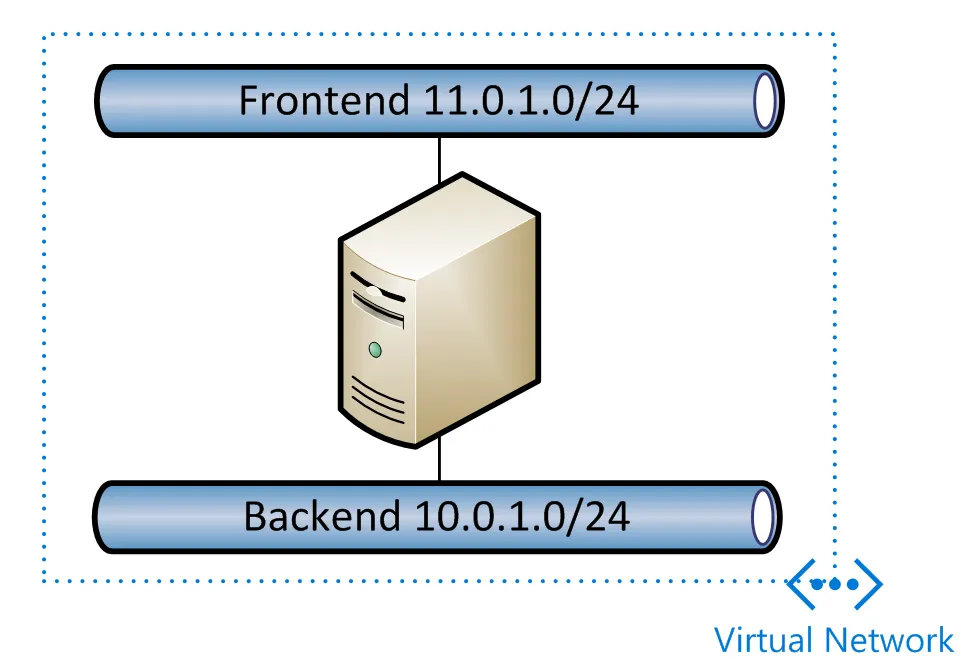
All subnetworks are fully routed to each other. That is not the best situation in most of the cases. One example is when you need a Frontend and a Backend network in Azure, as shown in the following diagram:
Currently there are only two ways to resolve that issue:
  • The first one is to create two subnetworks and put a virtual machine with two network adapters in both networks and route within the virtual machine and prevent default routing with configuration of route filters
  • The other way is to implement custom routes and send packages for the frontend network into the either of your other Azure or on premises networks
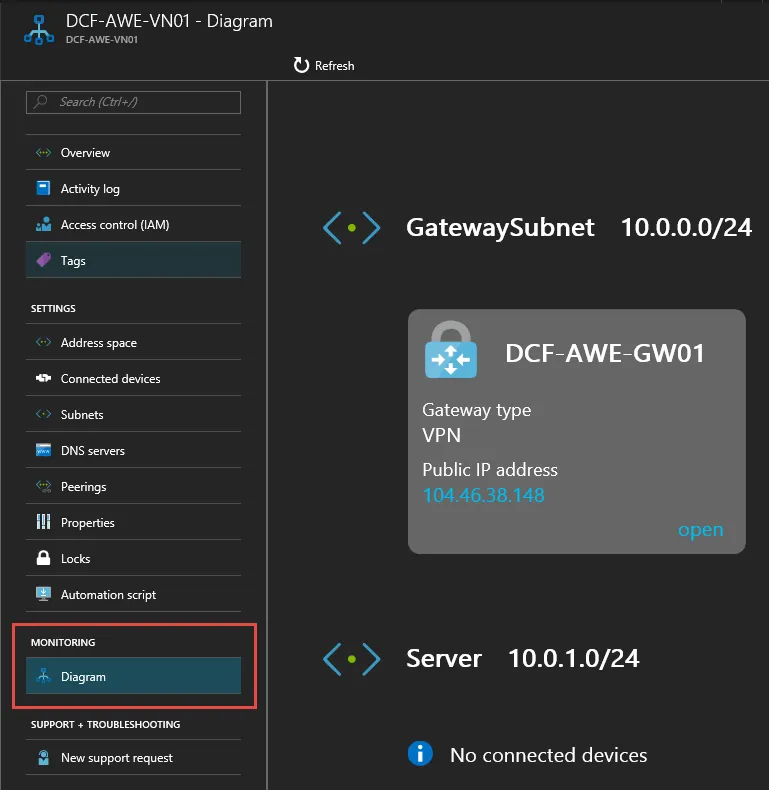
There is a great nice to know within the VNet setting. Under MONITORING, you can see a detailed networking diagram of your Azure network.
The following screenshot shows an example of a Diagram:

VNet peering and global VNet peering

There is also an option to ...
Table of contents

  1. Title Page
  2. Copyright and Credits
  3. Packt Upsell
  4. Contributors
  5. Preface
  6. Getting Started with Azure Implementation
  7. Azure Resource Manager and Tools
  8. Deploying and Synchronizing Azure Active Directory
  9. Azure Managed Applications
  10. Implementing Azure Networks
  11. Implementing Azure Storage
  12. Virtual Machines in Azure
  13. Implementing Azure-Managed Kubernetes and Azure Container Service
  14. Implementing Azure Cloud Services
  15. Implementing Azure Governance
  16. Azure Hybrid Data Center Services
  17. Assessments
  18. Other Books You May Enjoy