Master realistic animations and graphics, particle systems, game AI and physics, sprites and VR development with Unity 2017About This Book• Create professional grade games with realistic animation and graphics, particle systems and game physics with Unity 2017• Unleash the power of C# scripting to create intelligent game AI and professional grade game workflows.• Create immersive VR games using the latest Unity 2017 VR SDK. Who This Book Is ForIf you are a Unity developer who now wants to develop and deploy interesting games by leveraging the new features of Unity 2017, then this is the book for you. Basic knowledge of C# programming is assumed.What You Will Learn• Explore hands-on tasks and real-world scenarios to make a Unity horror adventure game• Create enemy characters that act intelligently and make reasoned decisions• Use data files to save and restore game data in a way that is platform-agnostic• Get started with VR development• Use navigation meshes, occlusion culling, and Profiler tools• Work confidently with GameObjects, rotations, and transformations• Understand specific gameplay features such as AI enemies, inventory systems, and level designIn DetailDo you want to make the leap from being an everyday Unity developer to being a pro game developer? Then look no further! This book is your one-stop solution to creating mesmerizing games with lifelike features and amazing gameplay.This book focuses in some detail on a practical project with Unity, building a first-person game with many features. You'll delve into the architecture of a Unity game, creating expansive worlds, interesting render effects, and other features to make your games special. You will create individual game components, use efficient animation techniques, and implement collision and physics effectively. Specifically, we'll explore optimal techniques for importing game assets, such as meshes and textures; tips and tricks for effective level design; how to animate and script NPCs; how to configure and deploy to mobile devices; how to prepare for VR development; how to work with version control; and more.By the end of this book, you'll have developed sufficient competency in Unity development to produce fun games with confidence.Style and approachThis book takes an easy-to-follow, step-by-step tutorial approach. You will create an advanced level Unity game with an emphasis on leveraging advanced Unity 2017 features while developing the game in its entirety.
- 568 pages
- English
- ePUB (mobile friendly)
- Available on iOS & Android
eBook - ePub
Mastering Unity 2017 Game Development with C# - Second Edition
About this book
Information
Level Design and Structure
This chapter is about designing and building playable levels for Dead Keys. More accurately, Dead Keys consists of multiple levels, and in this chapter, our focus will be on the creation of one of those levels in detail. Only one needs be considered because the level creation process is merely repeated creatively, after creating the first level, to produce all the remaining levels at increasing difficulty levels. By level, I mean a scene in Unity terms--a complete and integrated 3D world where the game evolves according to its internal rules and logic. We'll look, in depth, at using and reusing modular assets, such as environment meshes, to build interesting levels of any size needed; we'll also see lightmapping and lighting overall to enhance realism as well as NavMesh generation for artificial intelligence and Occlusion Culling for rendering optimization, among other issues. By the end of this chapter, we'll have constructed an integrated and atmospheric level, complete with final lighting, which has furnishings and navigation data. However, we'll still be missing agents, that is, the player character and Non-Player Characters (NPCs). These are considered in the later chapters. So, having now imported our assets (covered in the last chapter), we'll start work on creating the first playable level for Dead Keys (not the menu screen), beginning from an empty scene, created by choosing File | New Scene (Ctrl + N) from the application menu.
If you want to follow along step by step, the starting point for this chapter is found in this book's companion files, in the Chapter02/Start folder; this features a starting Unity project.

Getting started with a New Scene
Before building any level inside the editor, it's worthwhile getting very clear, conceptually, about the level to create as a whole, in terms of layout and mechanics. For our level (and all levels), we may identify the following key points:
- The objective for the player is to traverse a maze-like network of dark, industrial corridors to reach an end point. On reaching the end point, the next level is accessed; except, of course, for the final level in which the game is completed.
- The player provides input only through keystrokes on the keyboard, typing in letters that match whatever word appears above the closest attacking zombie. When the entered combination matches the word exactly and in full, the zombie is killed. Otherwise, zombies continue attacking until the player is killed.
- The player does not freely control their movement through the level, as with regular first-person controls (W A S D). Instead, the player experiences a prescripted and prepathed camera that only moves forward, to the next stopping point, when all attacking zombies are dispatched. This matches the camera and gameplay style of House of the Dead, The Typing of the Dead, Lethal Enforcers, and others.
- The level is made from modular environment pieces, allowing many possible combinations and layouts. It should be dark, eerie, and tense.
- Most objects in the scene (such as walls, floors, and props) will be non-movable. The only movable elements are the player, enemies, and a selection of special effects, such as particle systems and image effects.
This level description is, by no means, comprehensive or complete. However, it offers us a platform good enough to get started to build a level that supports our core gameplay. In many cases, artists and designers construct levels from concept art, mood boards, and storyboards; but here, we'll improvise using assets made specifically for this book.
Setting the scene with a skybox
Our game environment should be dark, creepy, and suspenseful. However, every new Unity scene is created with a default, procedural skybox representing a cheery daytime exterior; this needs to be changed. A skybox is ultimately a cube with a flipped normal that surround and encompass the environment. Its faces contain an environment texture which, when mapped correctly, appears seamlessly across the model, creating the look of a vast skyline surrounding the scene. The primary purpose of our skybox should be to set a base and ambient lighting. The most appropriate skybox for our usage, then, is a night skybox or, at least, a dark, stormy (and perhaps slightly alien) skybox. There are many ways to create a skybox in Unity. One method is to create a cube-map texture (six separate textures) inside the image-editing software that maps to the faces of a cube. Another method, available in Unity 5, is a procedural skybox. Using this, Unity generates a skybox from some initial creation parameters that we can set through a material.
Let's use the latter, most customizable method. To do this, open the Material folder in the Project panel and create a new material. Assign it a meaningful name; I've used matNight:
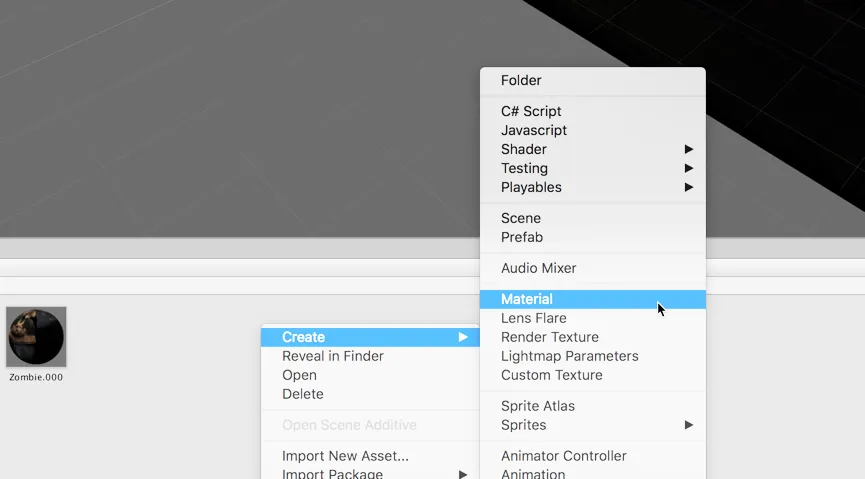
Creating a new material
Naming assets and objects appropriately is important for large projects, whether team-based or not. It's important to identify an object's type and purpose from its name, and to use a naming convention that'll alphabetically group together related assets in a useful way. For example, I prefixed all material assets with mat_ (mat_Skybox, mat_Marble, and mat_Leather). Using this name, all materials are arranged together in the Project panel, and I can determine by the asset name that it's a material and not a texture (_tex), mesh (_mesh), sound effect (_sfx), and so on.
Some may question whether prefixes are needed if folders are used. After all, can't you just name your materials anything you wanted, and simply group them together in the same folder, as opposed to using prefixes? In short, use folders to organize and group textures, but name...
Some may question whether prefixes are needed if folders are used. After all, can't you just name your materials anything you wanted, and simply group them together in the same folder, as opposed to using prefixes? In short, use folders to organize and group textures, but name...
Table of contents
- Title Page
- Copyright
- Credits
- About the Author
- About the Reviewers
- www.PacktPub.com
- Customer Feedback
- Preface
- Preparation and Asset Configuring
- Level Design and Structure
- Player Controls - Movement
- Player Controls - Typing and Health
- Enemies and Artificial Intelligence
- Project Management and Version Control
- Persistent Data - Load and Save Game States
- Performance, Optimization, Mobiles, and More
Trusted by 375,005 students
Access to over 1.5 million titles for a fair monthly price.
Study more efficiently using our study tools.
Frequently asked questions
Yes, you can cancel anytime from the Subscription tab in your account settings on the Perlego website. Your subscription will stay active until the end of your current billing period. Learn how to cancel your subscription
No, books cannot be downloaded as external files, such as PDFs, for use outside of Perlego. However, you can download books within the Perlego app for offline reading on mobile or tablet. Learn how to download books offline
Perlego offers two plans: Essential and Complete
- Essential is ideal for learners and professionals who enjoy exploring a wide range of subjects. Access the Essential Library with 800,000+ trusted titles and best-sellers across business, personal growth, and the humanities. Includes unlimited reading time and Standard Read Aloud voice.
- Complete: Perfect for advanced learners and researchers needing full, unrestricted access. Unlock 1.5M+ books across hundreds of subjects, including academic and specialized titles. The Complete Plan also includes advanced features like Premium Read Aloud and Research Assistant.
We are an online textbook subscription service, where you can get access to an entire online library for less than the price of a single book per month. With over 1.5 million books across 990+ topics, we’ve got you covered! Learn about our mission
Look out for the read-aloud symbol on your next book to see if you can listen to it. The read-aloud tool reads text aloud for you, highlighting the text as it is being read. You can pause it, speed it up and slow it down. Learn more about Read Aloud
Yes! You can use the Perlego app on both iOS and Android devices to read anytime, anywhere — even offline. Perfect for commutes or when you’re on the go.
Please note we cannot support devices running on iOS 13 and Android 7 or earlier. Learn more about using the app
Please note we cannot support devices running on iOS 13 and Android 7 or earlier. Learn more about using the app
Yes, you can access Mastering Unity 2017 Game Development with C# - Second Edition by Alan Thorn in PDF and/or ePUB format, as well as other popular books in Computer Science & Programming Games. We have over 1.5 million books available in our catalogue for you to explore.