Mastering Matplotlib 2.x
eBook - ePub

Mastering Matplotlib 2.x

Effective Data Visualization techniques with Python

  1. 214 pages
  2. English
  3. ePUB (mobile friendly)
  4. Available on iOS & Android
eBook - ePub

Mastering Matplotlib 2.x

Effective Data Visualization techniques with Python

About this book

Understand and build beautiful and advanced plots with Matplotlib and Python

Key Features

  • Practical guide with hands-on examples to design interactive plots
  • Advanced techniques to constructing complex plots
  • Explore 3D plotting and visualization using Jupyter Notebook

Book Description

In this book, you'll get hands-on with customizing your data plots with the help of Matplotlib. You'll start with customizing plots, making a handful of special-purpose plots, and building 3D plots. You'll explore non-trivial layouts, Pylab customization, and more about tile configuration. You'll be able to add text, put lines in plots, and also handle polygons, shapes, and annotations. Non-Cartesian and vector plots are exciting to construct, and you'll explore them further in this book. You'll delve into niche plots and visualize ordinal and tabular data. In this book, you'll be exploring 3D plotting, one of the best features when it comes to 3D data visualization, along with Jupyter Notebook, widgets, and creating movies for enhanced data representation. Geospatial plotting will also be explored. Finally, you'll learn how to create interactive plots with the help of Jupyter.

Learn expert techniques for effective data visualization using Matplotlib 3 and Python with our latest offering -- Matplotlib 3.0 Cookbook

What you will learn

  • Deal with non-trivial and unusual plots
  • Understanding Basemap methods
  • Customize and represent data in 3D
  • Construct Non-Cartesian and vector plots
  • Design interactive plots using Jupyter Notebook
  • Make movies for enhanced data representation

Who this book is for

This book is aimed at individuals who want to explore data visualization techniques. A basic knowledge of Matplotlib and Python is required.

Tools to learn more effectively

Saving Books

Saving Books

Keyword Search

Keyword Search

Annotating Text

Annotating Text

Listen to it instead

Listen to it instead

Information

Drawing on Plots

Till now, we have studied how to use style sheets to customize plot appearances, and how to tweak multi-panel plots to give more complex and appealing layouts for different kinds of plotting applications.
Matplotlib allows you to make plots that really show your own individual style. We will learn how to draw on plots to provide the viewer with visual guides that point them toward the important features of data. We will discuss adding horizontal and vertical lines, along with tweaking a background grid.
Versatile annotating adds arrows and some text to these arrows to the plots in order to customize the appearance of these annotations.
In this chapter, we will look at the following topics:
  • How to put lines in place
  • How to add text on plots
  • How to play with polygons and shapes
  • How to add different kinds of annotations

Putting lines in place

This section describes adding horizontal and vertical lines along with adding and tweaking a background grid.

Adding horizontal and vertical lines

We will begin by importing our required libraries, as shown:
import numpy as np
import matplotlib as mpl
import matplotlib.pyplot as plt
%matplotlib inline
# Set up figure size and DPI for screen demo
plt.rcParams['figure.figsize'] = (6,4)
plt.rcParams['figure.dpi'] = 150
  1. We will create the simple sine plot that we saw in Chapter 1, Heavy Customization, as follows:
# Adding a horizontal and vertical line
nums = np.arange(0,10,0.1)
plt.plot(nums, np.sin(nums))

We will get the following output:
  1. Now, to add an annotation, say, a line that splits the region between stuff above and below 0.5, add a horizontal line using axhline(0.5), as shown here. ax stands for the x axis and gives a value in the y co-ordinate for the horizontal line:
# Adding a horizontal and vertical line
nums = np.arange(0,10,0.1)
plt.plot(nums, np.sin(nums))
plt.axhline(0.5)
We will get the following output:
  1. To color this horizontal line red, insert the following code:
# Adding a horizontal and vertical line
nums = np.arange(0,10,0.1)
plt.plot(nums, np.sin(nums))
plt.axhline(0.5, color='r')
We will get the following output:
  1. To add a vertical line right at the first maximum, input pi/2 and color this red, along with a dashed line:
# Adding a horizontal and vertical line
nums = np.arange(0,10,0.1)
plt.plot(nums, np.sin(nums))
plt.axhline(0.5, color='r')
plt.axvline(np.pi/2., color='r', linestyle='--')
Here we can see axv for the vertical line instead of axhline:

Adding spans that cover whole regions

To color the whole region, say between 0.5 and -0.5, insert the horizontal span as follows:
# Adding a horizontal and vertical span
nums = np.arange(0,10,0.1)
plt.plot(nums, np.sin(nums))
plt.axhspan(-0.5,0.5)
We get the output here as follows:
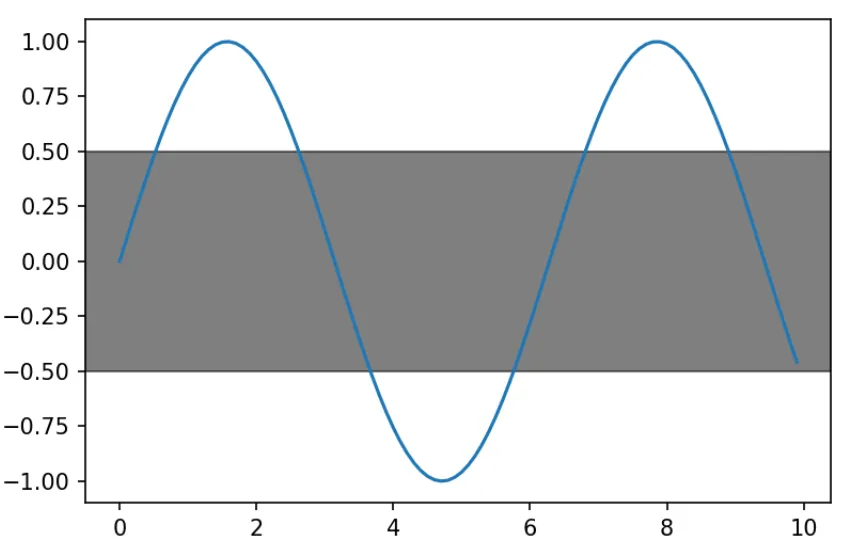
But the shaded region blocks out a lot of our data. Hence, we will make this black and give it an alpha of 0.5, as follows:
# Adding a horizontal and vertical span
nums = np.arange(0,10,0.1)
plt.plot(nums, np.sin(nums))
plt.axhspan(-0.5,0.5, alpha=0.5)
We will get the following output:
Performing the same thing for a vertical span will give you a region between -0.5 and 0.5. Just like any of the other plotting commands that involve areas, we can give this hatches, change the color of it, and add any of the appearance attributes as well, as shown in the following code:
# Adding a horizontal and vertical span
nums = np.arange(0,10,0.1)
plt.plot(nums, np.sin(nums))
plt.axvspan(-0.5,0.5, color='k', alpha=0.5)
The output can be seen as follows:
We can also set how far the vertical line goes across the axis. By default, the vertical line covers up the entire axis, as follows:
# Adding a horizontal and vertical span
nums = np.arange(0,10,0.1)
plt.plot(nums, np.sin(nums))
plt.axhspan(-0.5,0.5, alpha=0.5)
We will get the following output:
Now, if we pass a third keyword argument, xmin, we can give a minimum value, and xmax as the...

Table of contents

  1. Title Page
  2. Copyright and Credits
  3. About Packt
  4. Contributors
  5. Preface
  6. Heavy Customization
  7. Drawing on Plots
  8. Special Purpose Plots
  9. 3D and Geospatial Plots
  10. Interactive Plotting
  11. Other Books You May Enjoy

Frequently asked questions

Yes, you can cancel anytime from the Subscription tab in your account settings on the Perlego website. Your subscription will stay active until the end of your current billing period. Learn how to cancel your subscription
No, books cannot be downloaded as external files, such as PDFs, for use outside of Perlego. However, you can download books within the Perlego app for offline reading on mobile or tablet. Learn how to download books offline
Perlego offers two plans: Essential and Complete
  • Essential is ideal for learners and professionals who enjoy exploring a wide range of subjects. Access the Essential Library with 800,000+ trusted titles and best-sellers across business, personal growth, and the humanities. Includes unlimited reading time and Standard Read Aloud voice.
  • Complete: Perfect for advanced learners and researchers needing full, unrestricted access. Unlock 1.4M+ books across hundreds of subjects, including academic and specialized titles. The Complete Plan also includes advanced features like Premium Read Aloud and Research Assistant.
Both plans are available with monthly, semester, or annual billing cycles.
We are an online textbook subscription service, where you can get access to an entire online library for less than the price of a single book per month. With over 1 million books across 990+ topics, we’ve got you covered! Learn about our mission
Look out for the read-aloud symbol on your next book to see if you can listen to it. The read-aloud tool reads text aloud for you, highlighting the text as it is being read. You can pause it, speed it up and slow it down. Learn more about Read Aloud
Yes! You can use the Perlego app on both iOS and Android devices to read anytime, anywhere — even offline. Perfect for commutes or when you’re on the go.
Please note we cannot support devices running on iOS 13 and Android 7 or earlier. Learn more about using the app
Yes, you can access Mastering Matplotlib 2.x by Benjamin Walter Keller in PDF and/or ePUB format, as well as other popular books in Computer Science & Data Processing. We have over one million books available in our catalogue for you to explore.