Installing and Configuring Windows 10: 70-698 Exam Guide
Learn to deploy, configure, and monitor Windows 10 effectively to prepare for the 70-698 exam
- 490 pages
- English
- ePUB (mobile friendly)
- Available on iOS & Android
Installing and Configuring Windows 10: 70-698 Exam Guide
Learn to deploy, configure, and monitor Windows 10 effectively to prepare for the 70-698 exam
About this book
Get ready for the Windows 10: 70-698 exam and configure Windows to manage data recovery
Key Features
- Implement Windows 10 operational and administrative tasks
- Configure devices, remote management settings, advanced management tools, and device drivers
- Comprehensive guide to help you work efficiently in Windows 10
Book Description
The Installing and Configuring Windows 10: 70-698 Exam Guide is designed to confirm what you already know, while also updating your knowledge of Windows 10. With its easy-to-follow guidance, you will quickly learn the user interface and discover steps to work efficiently in Windows 10 to rule out delays and obstacles.
This book begins by covering various ways of installing Windows 10, followed by instructions on post-installation tasks. You will learn about the deployment of Windows 10 in Enterprise and also see how to configure networking in Windows 10. You'll understand how to leverage Disk Management and Windows PowerShell to configure disks, volumes, and file system options. As you progress through the chapters, you will be able to set up remote management in Windows 10 and learn more about Windows update usage, behavior, and settings. You will also gain insights that will help you monitor and manage data recovery and explore how to configure authentication, authorization, and advanced management tools in Windows 10.
By the end of this book, you will be equipped with enough knowledge to take the 70-698 exam and explore different study methods to improve your chances of passing the exam with ease.
What you will learn
- Discover various ways of installing Windows 10
- Understand how to configure devices and device drivers
- Configure and support IPv4 and IPv6 network settings
- Troubleshoot storage and removable device issues
- Get to grips with data access and usage
- Explore the advanced management tools available in Windows 10
Who this book is for
This book is for IT professionals who perform installation, configuration, general local management and maintenance of Windows 10 core services and are preparing to clear the Windows 10: 70-698 exam
Frequently asked questions
- Essential is ideal for learners and professionals who enjoy exploring a wide range of subjects. Access the Essential Library with 800,000+ trusted titles and best-sellers across business, personal growth, and the humanities. Includes unlimited reading time and Standard Read Aloud voice.
- Complete: Perfect for advanced learners and researchers needing full, unrestricted access. Unlock 1.4M+ books across hundreds of subjects, including academic and specialized titles. The Complete Plan also includes advanced features like Premium Read Aloud and Research Assistant.
Please note we cannot support devices running on iOS 13 and Android 7 or earlier. Learn more about using the app.
Information
Performing Post-Installation Configuration
- Common configurations and customizations
- Configuring accessibility options
- Configuring Cortana
- Configuring Microsoft Edge
- Configuring Internet Explorer
- Configuring Power & sleep settings
- Chapter lab - Turning off Internet Explorer
Technical requirements
- PC with Windows 10 Pro, at least 4 GB of RAM, 500 GB of HDD, and access to the internet.
Common configurations and customizations
Configuring and customizing the Start menu
- Click the Start button.
- Select Settings on the Start menu.
- Select Personalization on the Windows Settings dialog box.
- Select Start on the Personalization setting's navigation menu.
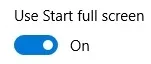
- And then turn on Use Start full screen, as shown in the following screenshot, to enable the Tablet mode:

- Turn off Use Start full screen in order to enable the redesigned Windows 10 Start menu (that is, the Desktop mode).
- Select the top...
Table of contents
- Title Page
- Copyright and Credits
- Dedication
- About Packt
- Contributors
- Preface
- Preparing for Installation
- Installing Windows 10
- Configuring Devices and Device Drivers
- Performing Post-Installation Configuration
- Implement Windows in an Enterprise Environment
- Configuring Networking
- Configuring Storage
- Configuring Data Access and Usage
- Implementing Apps
- Configuring Remote Management
- Configuring Updates
- Monitoring Windows 10
- Configuring Systems and Data Recovery
- Configuring Authorization and Authentication
- Configuring Advanced Management Tools
- Studying and Passing Exam 70-698
- Assessments
- Other Books You May Enjoy