Hands-On GUI Application Development in Go
eBook - ePub

Hands-On GUI Application Development in Go

Build responsive, cross-platform, graphical applications with the Go programming language

  1. 450 pages
  2. English
  3. ePUB (mobile friendly)
  4. Available on iOS & Android
eBook - ePub

Hands-On GUI Application Development in Go

Build responsive, cross-platform, graphical applications with the Go programming language

About this book

Discover Golang's GUI libraries such as Go-GTK (GIMP Toolkit) and Go-Qt and build beautiful, performant, and responsive graphical applications

Key Features

  • Conceptualize and build state-of-art GUI applications with Golang (Go)
  • Tackle the complexity of varying GUI application sizes with a structured and scalable approach
  • Get hands-on experience of GUI development with Shiny, and labs/ui, Fyne, and Walk

Book Description

Go is often compared to C++ when it comes to low-level programming and implementations that require faster processing, such as Graphical User Interfaces (GUIs). In fact, many claim that Go is superior to C++ in terms of its concurrency and ease of use. Most graphical application toolkits, though, are still written using C or C++, and so they don't enjoy the benefits of using a modern programming language such as Go.

This guide to programming GUIs with Go 1.11 explores the various toolkits available, including UI, Walk, Shiny, and Fyne. The book compares the vision behind each project to help you pick the right approach for your project. Each framework is described in detail, outlining how you can build performant applications that users will love. To aid you further in creating applications using these emerging technologies, you'll be able to easily refer to code samples and screenshots featured in the book. In addition to toolkit-specific discussions, you'll cover more complex topics, such as how to structure growing graphical applications, and how cross-platform applications can integrate with each desktop operating system to create a seamless user experience. By delving into techniques and best practices for organizing and scaling Go-based graphical applications, you'll also glimpse Go's impressive concurrency system. In the concluding chapters, you'll discover how to distribute to the main desktop marketplaces and distribution channels.

By the end of this book, you'll be a confident GUI developer who can use the Go language to boost the performance of your applications.

What you will learn

  • Understand the benefits and complexities of building native graphical applications
  • Gain insights into how Go makes cross-platform graphical application development simple
  • Build platform-native GUI applications using andlabs/ui
  • Develop graphical Windows applications using Walk
  • Create multiplatform GUI applications using Shiny, Nuklear, and Fyne
  • Use Go wrappers for GTK and Qt for GUI application development
  • Streamline your requirements to pick the correct toolkit strategy

Who this book is for

This book is designed for Go developers who are interested in building native graphical applications for desktop computers and beyond. Some knowledge of building applications using Go is useful, but not essential. Experience in developing GUIs is not required as the book explores the benefits and challenges they pose. This book will also be beneficial for GUI application developers who are interested in trying Go.
Tools to learn more effectively

Saving Books

Saving Books

Keyword Search

Keyword Search

Annotating Text

Annotating Text

Listen to it instead

Listen to it instead

Section 1: Graphical User Interface Development

For many years, graphical user interfaces (GUIs) have been the standard way for the average computer user to engage with a software product. They provide an intuitive user experience for potentially complex workflows within the familiar context of a desktop environment. Having evolved over more than 40 years, the traditional graphical application is being challenged by the ubiquity of web-based software and the emergence of mobile applications on modern smartphones and handheld computers. Despite these new trends, there are still many reasons why building a native graphical application for desktop (and laptop) computers could be the right strategy for your product.
In this introductory section, we will look at the history of the desktop GUI and how it has developed alongside technological innovation. We will discuss why, despite new alternative approaches, native graphical applications are still a great way to provide an intuitive user experience and a reliable software product. Building anything of quality takes effort, and software is no exception. We will explore the challenges that teams are likely to face when designing and building a native graphical application that aims to support multiple operating systems. Having reviewed the importance of the GUI and the challenges it can pose, we examine the Go programming language and demonstrate that its design fits very well with the creation of modern native graphical applications for multiple platforms.
 
The following chapters will be covered in this section:
  • Chapter 1, The Benefits of Native Graphical Applications 
  • Chapter 2, Graphical User Interface Challenges
  • Chapter 3, Go to the Rescue!

The Benefits of Native Graphical Applications

Since they first appeared in the 1970s, it has been clear that graphical interfaces make it easier to work with software applications. In the early days, they were typically presented through Windows, Icons, Menus and Pointer (WIMP) interfaces. While these varied in design across platforms and over time, the interactions have been relatively consistent.
Recent changes in software development have increased the understanding of user experience, which focuses on creating applications that are intuitive for even the least experienced computer user. This, combined with the mobile-driven move towards a post-WIMP approach to computer interaction, prompts the question: what's next for desktop computer software?
This chapter will cover the following topics:
  • The history of Graphical User Interfaces (GUIs) through desktop, web, and mobile
  • The importance of a well-integrated and responsive application interface
  • User expectations of both online and offline native applications
  • The developer benefits of building native graphical applications

Return of the graphical application

"The best way to predict the future is to invent it."
- Alan Kay, PARC
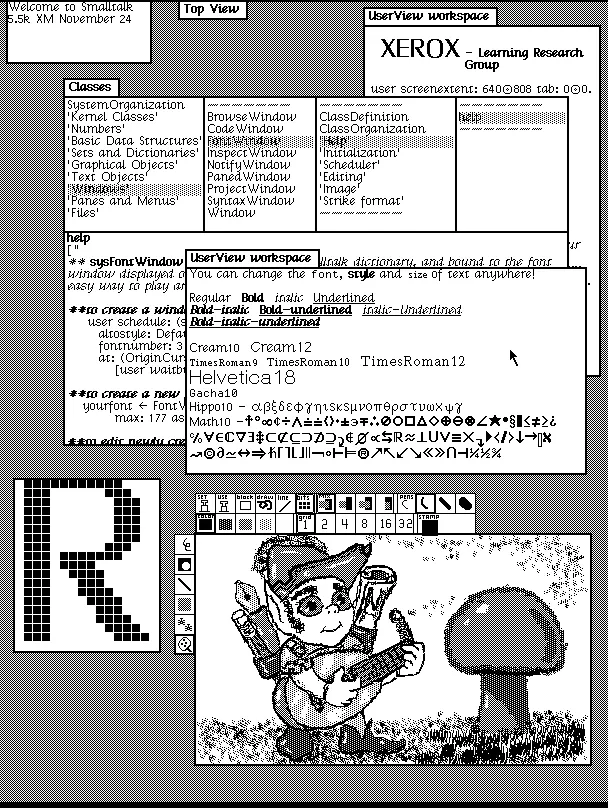
It was 1973 and Palo Alto Research Center (Xerox PARC) had just completed the Alto computer, the first commercial example of a computer GUI. While the screen orientation and lack of colors make it a little peculiar to the modern eye, it's clearly recognizable as a graphical interface, with a mouse and keyboard for interaction. While it took another seven years to be generally available to the public, in 1981, as the Xerox Star, it was clear that this was the beginning of something big:
Dynabook environment desktop (1976; Smalltalk-76 running on Alto). Copyright SUMIM.ST, licensed CC BY-SA 4.0.
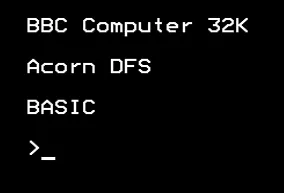
This was a huge leap forward for the usability of computers—a welcome change from the standard interaction of text-mode computer screens. Not only does a graphical interface allow for more advanced functionality, it's also much easier to learn for a novice looking to get started. While the command-line interface remains popular with programmers and other experts, it's fair to say that, without the GUI, personal computers wouldn't have reached the popularity we all know:
A traditional text mode (command-line) interface typical well into 1980's

Personal computers

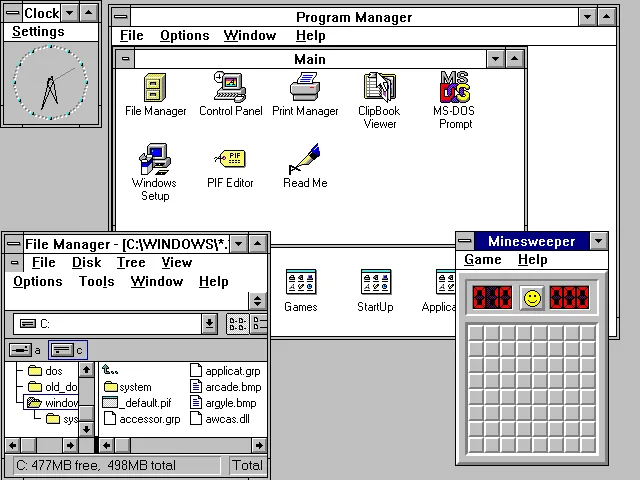
Over the 10 years that followed the Xerox Star public release, many graphical platforms emerged, including Microsoft Windows, Apple Macintosh, X11 (started at MIT for UNIX computers), and DRI's GEM (primarily for Atari ST). Though the background of each of these is different, they shared a common ambition to provide a desktop environment that enabled a computer user to interact with multiple graphical applications at the same time.
This was one of the defining characteristics of the emerging Personal Computer (PC) market and it led to a whole new world of computer software:
Microsoft Windows for Workgroups 3.11. Used with permission from Microsoft.
As PCs became more powerful, advancements in hardware supported more sophisticated software applications. Higher resolution screens allowed the display of more information and removable storage devices (such as floppy disks, CDs, and then USB sticks) enabled transferring larger datasets between applications. What used to commonly be simple interfaces with a few options became more sophisticated and more complicated.
The default graphical interface elements and layouts needed to be extended to keep up. Menus got larger, toolbars were introduced to highlight common tasks, and built-in help systems became necessary to help users achieve their tasks. We also see platforms start to take on their own identity, leading to additional hurdles when learning new software. It was common for an average off-the-shelf software product to come with an instruction manual longer than this book, explaining how to interact with its various features.

From desktop to internet

In the mid-1990s, the World Wide Web (which would come to be our global communications platform) was getting started and the PC market started to see various web browsers arrive. These were initially distributed as software packages (on floppy disks) and then later as part of the desktop environment (pre-installed on new computers). Mosaic, Netscape Navigator, and Internet Explorer arrived in quick succession to give early adopters access to the emerging information channel. In those days, it was largely academic texts and reference materials; you needed to know where to look to find things and, similarly to early computer use, it wasn't particularly intuitive.
What became clear, however, was that this new medium was starting to facilitate the future of communications and information exchange. People began to see that being the main technology within that space would be critical; and so began the browser wars. As web browsers vied for the top spot, the technology became embedded in the desktop platforms as a way to quickly deliver well-presented content. Initially, those bulky user manuals were moved to HTML (the language of web pages) and bundled with the software download, and then more functionality of each application moved online. As an internet connection became commonplace in most homes, we saw the rise of full web-based applications.
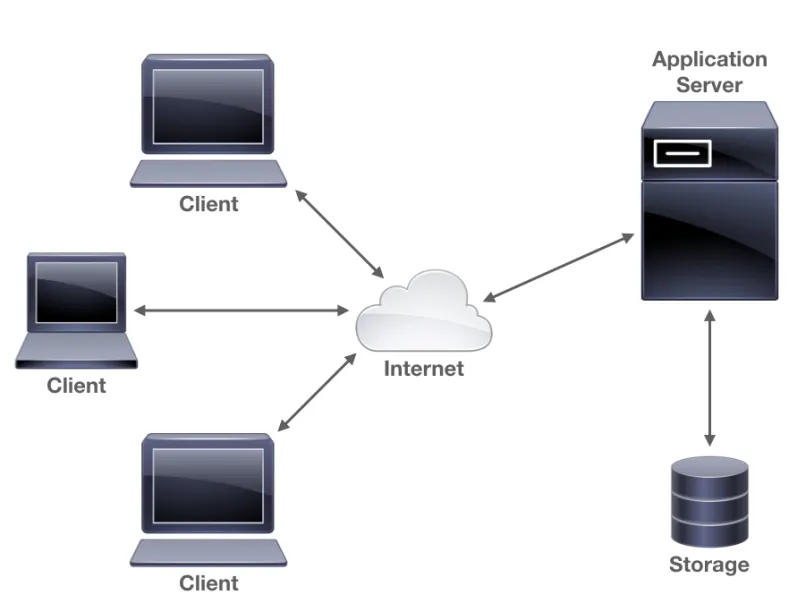
A web application is one that requires no software installation beyond the internet browser already on your computer. They always deliver up-to-date information direct from the source. This is usually customized based on your location, preferences, or even browsing history on the web application or those of partner companies. Additionally, a web application can be improved at any time by the company providing it; often, following experiments where the company sees which version of an application has a better user experience. The following illustration shows a possible architecture for an application delivered over the web.
A simple web application architecture
As the technologies behind web-based applications developed, they became viable alternatives to desktop software. Software companies began to realize that it is a lot easier to deliver your product directly through a website rather than the traditional download model. Not only that, but it also meant that one product would work on almost any computer. Attempts in the past to make a write-once-run-anywhere platform (such as Python and Java) had great success at the time, but after the web technologies reached a certain level of complexity, it became clear that the performance penalties and distribution overheads required by the cross-platform interpreters made web applications far more attractive where possible.

Smart phones, apps, and customer retention

For a long while, it looked like websites were the future for delivering software products, which was until the entry of smart phones. Once mobile phone technology developed to the point that you could access websites in the palm of your hand, the requirements for web-based applications changed once again. Now, developers needed to consider how smaller screens could present meaningful content. How could a touchscreen-based user interface operate where a mouse and keyboard used to be assumed? And how could people engage in a meaningful way when they had only five minutes while waiting for their coffee order?
Delivering a single application, available through desktop browsers and mobile phones, across a plethora of different operating systems and devices, has clear advantages for developers, but there are also challenges. The internet is a very large place and your product can easily get lost in the noise; how do you attract new users and how do you ensure that your existing customers keep coming back? One major response to this was the introduction of native apps (applications designed and built for specific platforms) for mobile devices. The iPhone launched with web-based applications only, but within eight months, Apple delivered the capability for developers to build native applications. These applications provided a more meaningful engagement with users; they were designed for the device they ran on, they could be found easily through a marketplace or app store, and once installed, remained a constant reminder on the device's home screen.
And so we enter a time where our target audience has become accustomed to software designed specifically for their device. A polished user experience is a must-have if companies expect to engage and retain their customers. Waiting for pages to load or dealing with intermittent errors are niggles that users are no longer willing to put up with. This higher bar for software delivery is now a well understood phenomenon, but the improvement in quality for software delivered through mobile devices hasn't yet been reflected on the desktop. Until recently, the browser was still king; long lists of website bookmarks are used in place of expecting applications delivered through a store and installed onto the computer. This, however, is changing and we're going to explore how to deliver a quality user experience through beautiful desktop applications.

Native performance

"Users really respond to speed."
- Marissa Mayer, Google VP
One of the main reasons that businesses often opt for a website-based approach is to avoid having to build many products for the platforms they wish to support. We're seeing a similar approach to mobile application development: as more platforms enter the market, developing native apps becomes an overhead that many businesses can't afford. They opt for the web-based approach or hybrid app, where the user believes they're installing a native app that's really just a website packaged into a download. While this can be good enough for simple applications with basic data processing, it is often not going to meet user expectations. Additionally, the interaction paradigms for a web browser are usually different to that of the system applications around it. If the user expects an application to behave in a certain way, then an embedded web browser could prove to be a confusing experience.
The biggest challenge in delivering a large application through web technologies (through a browser or downloaded application) is achieving good performance. As a browser is designed primarily for information exchange, it isn't well suited to large data processing or complicated graphical representations. When delivered through a web browser, much of this can be performed by a remote server that has the...

Table of contents

  1. Title Page
  2. Copyright and Credits
  3. About Packt
  4. Contributors
  5. Preface
  6. Section 1: Graphical User Interface Development
  7. The Benefits of Native Graphical Applications
  8. Graphical User Interface Challenges
  9. Go to the Rescue!
  10. Section 2: Toolkits Using Existing Widgets
  11. Walk - Building Graphical Windows Applications
  12. andlabs UI - Cross-platform Native UIs
  13. Go-GTK - Multiple Platforms with GTK
  14. Go-Qt - Multiple Platforms with Qt
  15. Section 3: Modern Graphical Toolkits
  16. Shiny - Experimental Go GUI API
  17. nk - Nuklear for Go
  18. Fyne - Material Design-Based GUI
  19. Section 4: Growing and Distributing Your Application
  20. Navigation and Multiple Windows
  21. Concurrency, Networking, and Cloud Services
  22. Best Practices in Go GUI Development
  23. Distributing Your Application
  24. Installation Details
  25. Cross Compiler Setup
  26. Comparison of GUI Toolkits
  27. Connecting GoMail to a Real Email Server
  28. Other Books You May Enjoy

Frequently asked questions

Yes, you can cancel anytime from the Subscription tab in your account settings on the Perlego website. Your subscription will stay active until the end of your current billing period. Learn how to cancel your subscription
No, books cannot be downloaded as external files, such as PDFs, for use outside of Perlego. However, you can download books within the Perlego app for offline reading on mobile or tablet. Learn how to download books offline
Perlego offers two plans: Essential and Complete
  • Essential is ideal for learners and professionals who enjoy exploring a wide range of subjects. Access the Essential Library with 800,000+ trusted titles and best-sellers across business, personal growth, and the humanities. Includes unlimited reading time and Standard Read Aloud voice.
  • Complete: Perfect for advanced learners and researchers needing full, unrestricted access. Unlock 1.4M+ books across hundreds of subjects, including academic and specialized titles. The Complete Plan also includes advanced features like Premium Read Aloud and Research Assistant.
Both plans are available with monthly, semester, or annual billing cycles.
We are an online textbook subscription service, where you can get access to an entire online library for less than the price of a single book per month. With over 1 million books across 990+ topics, we’ve got you covered! Learn about our mission
Look out for the read-aloud symbol on your next book to see if you can listen to it. The read-aloud tool reads text aloud for you, highlighting the text as it is being read. You can pause it, speed it up and slow it down. Learn more about Read Aloud
Yes! You can use the Perlego app on both iOS and Android devices to read anytime, anywhere — even offline. Perfect for commutes or when you’re on the go.
Please note we cannot support devices running on iOS 13 and Android 7 or earlier. Learn more about using the app
Yes, you can access Hands-On GUI Application Development in Go by Andrew Williams in PDF and/or ePUB format, as well as other popular books in Ciencia de la computación & Gráficos computacionales. We have over one million books available in our catalogue for you to explore.