Mastering Windows PowerShell Scripting
eBook - ePub

Mastering Windows PowerShell Scripting

Automate and manage your environment using PowerShell Core 6.0, 3rd Edition

  1. 626 pages
  2. English
  3. ePUB (mobile friendly)
  4. Available on iOS & Android
eBook - ePub

Mastering Windows PowerShell Scripting

Automate and manage your environment using PowerShell Core 6.0, 3rd Edition

About this book

Grasp advanced PowerShell Core 6.0 functionalities to automate your environment

Key Features

  • Keep up with changes introduced in PowerShell Core 6.0
  • Easily maintain appropriate compatibility with older versions
  • Automate complex tasks, manipulate data, and secure your environment with PowerShell Core 6.0

Book Description

PowerShell scripts offer a handy way to automate various chores, however working effectively with these scripts can be a difficult task.This comprehensive guide starts with the fundamentals before moving on to advanced-level topics to help you become a PowerShell Core 6.0 expert. The first module, PowerShell Core 6.0 Fundamentals, begins with the new features of PowerShell Core 6.0, installing it on Linux, and working with parameters, objects and.NET classes from within PowerShell Core 6.0. As you make your way through the chapters, you'll see how to efficiently manage large amounts of data and interact with other services using PowerShell Core 6.0. You'll be able to make the most of PowerShell Core 6.0's powerful automation feature, where you will have different methods available to parse data and manipulate regular expressions and Windows Management Instrumentation (WMI). After having explored automation, you will enter the extending PowerShell Core 6.0 module, covering asynchronous processing and desired state configuration. In the last module, you will learn to extend PowerShell Core 6.0 using advanced scripts and filters, and also debug issues along with working on error handling techniques.By the end of this book, you will be an expert in scripting with PowerShell Core 6.0.

What you will learn

  • Optimize code through the use of functions, switches, and looping structures
  • Work with objects and operators to test and manipulate data
  • Parse and manipulate different data types
  • Create scripts and functions using PowerShell
  • Use jobs, events, and popular public modules which assist with implementing multithreading
  • Write.NET classes with ease within the PowerShell
  • Create and implement regular expressions in PowerShell scripts
  • Make use of advanced techniques to define and restrict the behavior of parameters

Who this book is for

If you are a system administrator who wants to become an expert in controlling and automating your Windows environment, then Mastering Windows PowerShell Scripting is for you. It is also ideal for those new to the PowerShell language.

]]>
Trusted by 375,005 students

Access to over 1 million titles for a fair monthly price.

Study more efficiently using our study tools.

Section 1: Exploring PowerShell Fundamentals

In this section, we will explore the basics of the PowerShell language.
The following chapters are included in this section:
  • Chapter 1, Introduction to PowerShell
  • Chapter 2, Modules and Snap-ins
  • Chapter 3, Working with Objects in PowerShell
  • Chapter 4, Operators

Introduction to PowerShell

PowerShell has reached a point where it has split into Windows PowerShell and PowerShell Core. Windows PowerShell accounts for versions up to, and including, PowerShell 5.1. Windows PowerShell is based on the .NET full framework. PowerShell Core accounts for version 6 and over and is based on the .NET core framework.
The future of PowerShell is in PowerShell Core; it opens up cross-platform scripting with PowerShell, that is, support for Linux and macOS.
As well as the change to .NET, there are an increasing number of differences between Windows PowerShell and PowerShell Core that must be accounted for.
The differences between Windows PowerShell and PowerShell Core will be highlighted throughout this book.
This book is split into a number of sections. Much of this book is intended to act as a reference. We will cover the following topics in this book:
  • Exploring PowerShell fundamentals
  • Working with data
  • Automating with PowerShell
  • Extending PowerShell
In the first section of this book, while exploring the PowerShell fundamentals, we will look at the use of language and cover as many building blocks as possible.
In this chapter, we will briefly look at a number of short, diverse topics:
  • What is PowerShell?
  • PowerShell editors
  • Getting help
  • Command naming
  • Command discovery
  • Parameters and parameter sets
  • Introduction to providers
  • Introduction to splatting

Technical requirements

This chapter makes use of the following on the Windows platform:
  • Windows PowerShell 5
  • PowerShell Core 6.1

What is PowerShell?

PowerShell is a mixture of a command line, a functional programming language, and an object-oriented programming language. PowerShell is based on Microsoft .NET, which gives it a level of open flexibility that was not available in Microsoft's scripting languages (such as VBScript or batch) before this.
PowerShell is an explorer's scripting language. With built-in help, command discovery, and with access to much of the .NET framework, it is possible to dig down through the layers.
This book is based on PowerShell Core 6.1 with references to PowerShell 5.1; some of the features that are discussed in this book may not be available in the earlier versions of PowerShell.
PowerShell Core may be installed side by side with Windows PowerShell. Preview versions of PowerShell Core can often be installed side by side with full releases of PowerShell Core.

PowerShell editors

While it is possible to write for PowerShell using the notepad application alone, it is rarely desirable. Using an editor that was designed to work with PowerShell can save a lot of time.
Specialized PowerShell editors such as Visual Studio Code (VS Code), PowerShell Studio, and PowerShell ISE offer automatic completion (IntelliSense), which reduces the amount of cross-referencing required while writing code. Finding a comfortable editor early on is a good way to ease into PowerShell; memorizing commands and parameters is not necessary.
PowerShell ISE is not planned to be released to support PowerShell 6 at this time. VS Code is the most commonly recommended editor for PowerShell. VS Code is a free open source editor that was published by Microsoft VS Code and may be downloaded from http://code.visualstudio.com.
The PowerShell extension should be installed, and other extensions may be found on the marketplace: https://marketplace.visualstudio.com/VSCode.
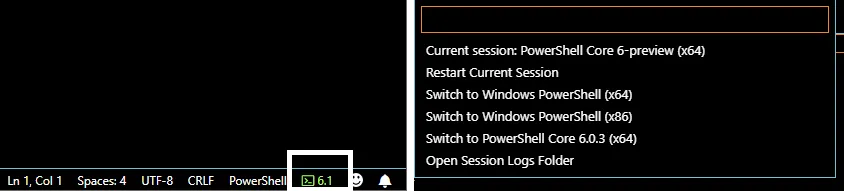
VS Code provides support for PowerShell Core; the following screenshot shows how to change the version of PowerShell that's used when editing a script:

Getting help

Gaining confidence using the built-in help system is an important part of working with PowerShell. In PowerShell, help is extensive; authors can easily write their own help content when working with functions, scripts, and script modules.
A number of commands are available to interact with the help system, as follows:
  • Get-Help
  • Save-Help
  • Update-Help
Before exploring these commands, the concept of Updatable help should be discussed, as help may not be present on a system after installation.

Updatable help

Updatable help was introduced with PowerShell 3. It gives authors the option to store the most recent versions of their help documentation outside of PowerShell on web servers.
Which modules support updatable help?

A list of modules that support updatable help may be viewed by running the following command: Get-Module -ListAvailable | Where-Object HelpInfoURI -like *.
Help for the core components of PowerShell is no longer a part of the Windows Management Framework package and must be downloaded before it can be viewed. The first time Get-Help is run, you will be prompted to update help.
If the previous prompt is accepted, PowerShell will attempt to download content for any module that supports updatable help.
Computers with no internet access or computers behind a restrictive proxy server may not be able to download the help content directly. The Save-Help command, which will be discussed later in this section, may be used to work around this problem. If PowerShell is unable to download help, it can only show a small amount of information about a command; for example, without downloading help, the content for the Out-Null command is minimal, as shown here:
PS> Get-Help Out-Null

NAME
Out-Null

SYNTAX
Out-Null [-InputObject <psobject>] [<CommonParameters>]


ALIASES
None


REMARKS
Get-Help cannot find the Help files for this cmdlet on this computer.
It is displaying only partial help.
-- To download and i...

Table of contents

  1. Title Page
  2. Copyright and Credits
  3. About Packt
  4. Contributors
  5. Preface
  6. Section 1: Exploring PowerShell Fundamentals
  7. Introduction to PowerShell
  8. Modules and Snap-ins
  9. Working with Objects in PowerShell
  10. Operators
  11. Section 2: Working with Data
  12. Variables, Arrays, and Hashtables
  13. Branching and Looping
  14. Working with .NET
  15. Strings, Numbers, and Dates
  16. Regular Expressions
  17. Files, Folders, and the Registry
  18. Windows Management Instrumentation
  19. HTML, XML, and JSON
  20. Web Requests and Web Services
  21. Section 3: Automating with PowerShell
  22. Remoting and Remote Management
  23. Asynchronous Processing
  24. Section 4: Extending PowerShell
  25. Scripts, Functions, and Filters
  26. Parameters, Validation, and Dynamic Parameters
  27. Classes and Enumerations
  28. Building Modules
  29. Testing
  30. Error Handling
  31. Other Books You May Enjoy

Frequently asked questions

Yes, you can cancel anytime from the Subscription tab in your account settings on the Perlego website. Your subscription will stay active until the end of your current billing period. Learn how to cancel your subscription
No, books cannot be downloaded as external files, such as PDFs, for use outside of Perlego. However, you can download books within the Perlego app for offline reading on mobile or tablet. Learn how to download books offline
Perlego offers two plans: Essential and Complete
  • Essential is ideal for learners and professionals who enjoy exploring a wide range of subjects. Access the Essential Library with 800,000+ trusted titles and best-sellers across business, personal growth, and the humanities. Includes unlimited reading time and Standard Read Aloud voice.
  • Complete: Perfect for advanced learners and researchers needing full, unrestricted access. Unlock 1.4M+ books across hundreds of subjects, including academic and specialized titles. The Complete Plan also includes advanced features like Premium Read Aloud and Research Assistant.
Both plans are available with monthly, semester, or annual billing cycles.
We are an online textbook subscription service, where you can get access to an entire online library for less than the price of a single book per month. With over 1 million books across 990+ topics, we’ve got you covered! Learn about our mission
Look out for the read-aloud symbol on your next book to see if you can listen to it. The read-aloud tool reads text aloud for you, highlighting the text as it is being read. You can pause it, speed it up and slow it down. Learn more about Read Aloud
Yes! You can use the Perlego app on both iOS and Android devices to read anytime, anywhere — even offline. Perfect for commutes or when you’re on the go.
Please note we cannot support devices running on iOS 13 and Android 7 or earlier. Learn more about using the app
Yes, you can access Mastering Windows PowerShell Scripting by Chris Dent in PDF and/or ePUB format, as well as other popular books in Computer Science & Bioinformatics. We have over one million books available in our catalogue for you to explore.