React Material-UI Cookbook
eBook - ePub

React Material-UI Cookbook

Build captivating user experiences using React and Material-UI

  1. 534 pages
  2. English
  3. ePUB (mobile friendly)
  4. Available on iOS & Android
eBook - ePub

React Material-UI Cookbook

Build captivating user experiences using React and Material-UI

About this book

Develop modern-day applications by implementing Material Design principles in React using Material-UI

Key Features

  • Use React components to build intuitive UI elements
  • Explore a variety of styles and themes in the Material-UI framework using React components
  • Learn practical React recipes and best practices for building modern web applications

Book Description

Material-UI is a component library for rendering UI elements, using modern best practices from React and Material Design. This book will show you how you can create impressive and captivating modern-day web apps by implementing Material Design considerations. The book is designed to help you use a variety of Material-UI components to enhance UI functionality, along with guiding you through React best practices, and using state, context, and other new React 16.8 features.

You will start with layout and navigation, exploring the Grid component and understanding how it's used to build layouts for your Material-UI apps. Using Material-UI components, you'll then explore the technique of effectively presenting information. In later sections, you will also learn about the different components for user interactions such as the text input component and buttons. Finally, the book will get you up to speed with customizing the look and feel of your app, right from creating a Material-UI theme through to styling icons and text.

By the end of this book, you will have developed the skills you need to improve the look and feel of your applications using Material-UI components.

What you will learn

  • Build the overall structure and navigation for your Material-UI app
  • Present simple and complex information in a variety of ways
  • Develop interactive and intuitive controls
  • Group content into sections using tabs and expansion panels
  • Create a general page layout with Material-UI grids
  • Use lists for complex data, and cards for detailed information

Who this book is for

This book is for React developers who want to implement Material Design principles in their applications. You will also find this book helpful if you are a developer who wants to build a UI using React components without having to build your own UX framework.
Trusted by 375,005 students

Access to over 1 million titles for a fair monthly price.

Study more efficiently using our study tools.

Information

Year
2019
Print ISBN
9781789615227
eBook ISBN
9781789610222

App Bars - The Top Level of Every Page

In this chapter, you'll learn about the following recipes:
  • Fixed position
  • Hide on scroll
  • Toolbar abstraction
  • With navigation

Introduction

App Bars are the anchor point of any Material-UI application. They provide context and are usually always visible as the user navigates around the application.

Fixed position

You probably want your AppBar component to stay visible at all times. By using fixed positioning, AppBar components remain visible even as the user scrolls down the page.

How to do it...

You can use the fixed value of the position property. Here's how you do it:
import React from 'react';

import { withStyles } from '@material-ui/core/styles';
import AppBar from '@material-ui/core/AppBar';
import Toolbar from '@material-ui/core/Toolbar';
import Typography from '@material-ui/core/Typography';
import Button from '@material-ui/core/Button';
import IconButton from '@material-ui/core/IconButton';
import MenuIcon from '@material-ui/icons/Menu';

const styles = theme => ({
root: {
flexGrow: 1
},
flex: {
flex: 1
},
menuButton: {
marginLeft: -12,
marginRight: 20
}
});

const FixedPosition = withStyles(styles)(({ classes }) => (
<div className={classes.root}>
<AppBar position="fixed">
<Toolbar>
<IconButton
className={classes.menuButton}
color="inherit"
aria-label="Menu"
>
<MenuIcon />
</IconButton>
<Typography
variant="title"
color="inherit"
className={classes.flex}
>
Title
</Typography>
<Button color="inherit">Login</Button>
</Toolbar>
</AppBar>
<ul>
{new Array(500).fill(null).map((v, i) => (
<li key={i}>{i}</li>
))}
</ul>
</div>
));

export default FixedPosition;
Here's what the resulting AppBar component looks like:

How it works...

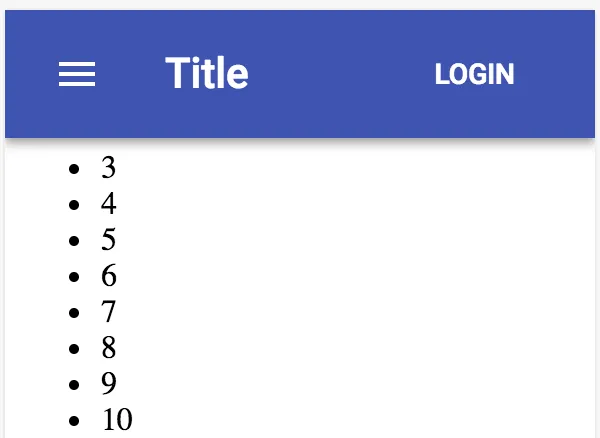
If you scroll down, you'll see how the AppBar component stays fixed, and the content scrolls behind it. Here's what it looks like if you scroll to the bottom of the page in this example:
The position property defaults to fixed. However, explicitly setting this property can help readers better understand your code.

There's more...

When the screen in this example first loads, some of...

Table of contents

  1. Title Page
  2. Copyright and Credits
  3. Dedication
  4. About Packt
  5. Contributors
  6. Preface
  7. Grids - Placing Components on the Page
  8. App Bars - The Top Level of Every Page
  9. Drawers - A Place for Navigation Controls
  10. Tabs - Grouping Content into Tab Sections
  11. Expansion Panels - Group Content into Panel Sections
  12. Lists - Display Simple Collection Data
  13. Tables - Display Complex Collection Data
  14. Cards - Display Detailed Information
  15. Snackbars - Temporary Messages
  16. Buttons - Initiating Actions
  17. Text - Collecting Text Input
  18. Autocomplete and Chips - Text Input Suggestions for Multiple Items
  19. Selection - Make Selections from Choices
  20. Pickers - Selecting Dates and Times
  21. Dialogs - Modal Screens for User Interactions
  22. Menus - Display Actions That Pop Out
  23. Typography - Control Font Look and Feel
  24. Icons - Enhance Icons to Match Your Look and Feel
  25. Themes - Centralize the Look and Feel of Your App
  26. Styles - Applying Styles to Components
  27. Other Books You May Enjoy

Frequently asked questions

Yes, you can cancel anytime from the Subscription tab in your account settings on the Perlego website. Your subscription will stay active until the end of your current billing period. Learn how to cancel your subscription
No, books cannot be downloaded as external files, such as PDFs, for use outside of Perlego. However, you can download books within the Perlego app for offline reading on mobile or tablet. Learn how to download books offline
Perlego offers two plans: Essential and Complete
  • Essential is ideal for learners and professionals who enjoy exploring a wide range of subjects. Access the Essential Library with 800,000+ trusted titles and best-sellers across business, personal growth, and the humanities. Includes unlimited reading time and Standard Read Aloud voice.
  • Complete: Perfect for advanced learners and researchers needing full, unrestricted access. Unlock 1.4M+ books across hundreds of subjects, including academic and specialized titles. The Complete Plan also includes advanced features like Premium Read Aloud and Research Assistant.
Both plans are available with monthly, semester, or annual billing cycles.
We are an online textbook subscription service, where you can get access to an entire online library for less than the price of a single book per month. With over 1 million books across 990+ topics, we’ve got you covered! Learn about our mission
Look out for the read-aloud symbol on your next book to see if you can listen to it. The read-aloud tool reads text aloud for you, highlighting the text as it is being read. You can pause it, speed it up and slow it down. Learn more about Read Aloud
Yes! You can use the Perlego app on both iOS and Android devices to read anytime, anywhere — even offline. Perfect for commutes or when you’re on the go.
Please note we cannot support devices running on iOS 13 and Android 7 or earlier. Learn more about using the app
Yes, you can access React Material-UI Cookbook by Adam Boduch in PDF and/or ePUB format, as well as other popular books in Design & Programming in JavaScript. We have over one million books available in our catalogue for you to explore.