Unreal Engine 4.x Scripting with C++ Cookbook
eBook - ePub

Unreal Engine 4.x Scripting with C++ Cookbook

Develop quality game components and solve scripting problems with the power of C++ and UE4, 2nd Edition

  1. 708 pages
  2. English
  3. ePUB (mobile friendly)
  4. Available on iOS & Android
eBook - ePub

Unreal Engine 4.x Scripting with C++ Cookbook

Develop quality game components and solve scripting problems with the power of C++ and UE4, 2nd Edition

About this book

Write efficient, reusable scripts to build custom characters, game environments, and control enemy AI

Key Features

  • Build captivating multiplayer games using Unreal Engine and C++
  • Incorporate existing C++ libraries into your game to add extra functionality such as hardware integration
  • Practical solutions for memory management, error handling, inputs, and collision for your game codebase

Book Description

Unreal Engine 4 (UE4) is a popular and award-winning game engine that powers some of the most popular games. A truly powerful tool for game development, there has never been a better time to use it for both commercial and independent projects. With more than 100 recipes, this book shows how to unleash the power of C++ while developing games with Unreal Engine.

This book takes you on a journey to jumpstart your C++ and UE4 development skills. You will start off by setting up UE4 for C++ development and learn how to work with Visual Studio, a popular code editor. You will learn how to create C++ classes and structs the Unreal way. This will be followed by exploring memory management, smart pointers, and debugging your code. You will then learn how to make your own Actors and Components through code and how to handle input and collision events. You will also get exposure to many elements of game development including creating user interfaces, artificial intelligence, and writing code with networked play in mind. You will also learn how to add on to the Unreal Editor itself.

With a range of task-oriented recipes, this book provides actionable information about writing code for games with UE4 using C++. By the end of the book, you will be empowered to become a top-notch developer with UE4 using C++ as your scripting language!

What you will learn

  • Create C++ classes and structs that integrate well with UE4 and the Blueprints editor
  • Discover how to work with various APIs that Unreal Engine already contains
  • Utilize advanced concepts such as events, delegates, and interfaces in your UE4 projects
  • Build user interfaces using Canvas and UMG through C++
  • Extend the Unreal Editor by creating custom windows and editors
  • Implement AI tasks and services using C++, Blackboard, and Behavior Trees
  • Write C++ code with networking in mind and replicate properties and functions

Who this book is for

If you are really passionate game developer looking for solutions to common scripting problems, then this is the book for you. Understanding of the fundamentals of game design and C++ is expected to get the most from this book.
Trusted by 375,005 students

Access to over 1.5 million titles for a fair monthly price.

Study more efficiently using our study tools.

Information

Year
2019
Edition
2
eBook ISBN
9781789803372

Communication Between Classes and Interfaces: Part I

The following recipes will be covered in this chapter:
  • Creating a UInterface
  • Implementing a UInterface on an object
  • Checking if a class implements a UInterface
  • Casting to a UInterface implemented in native code
  • Calling native UInterface functions from C++
  • Inheriting UInterfaces from one another
  • Overriding UInterface functions in C++
  • Implementing a simple interaction system with UInterfaces

Introduction

This chapter shows you how to write your own UInterfaces, and demonstrates how to take advantage of them within C++ to minimize class coupling and help keep your code clean.
In your game projects, you will sometimes require a series of potentially disparate objects to share a common functionality, but it would be inappropriate to use inheritance because there is no is-a relationship between the different objects in question. Languages such as C++ tend to use multiple inheritance to solve this issue.
However, in Unreal, if you wanted functions from both parent classes to be accessible to Blueprint, you would need to make both of them UCLASS. This is a problem for two reasons. Inheriting from UClass twice in the same object would break the concept that UObject should form a neatly traversable hierarchy. It also means that there are two instances of the UClass methods on the object, and they would have to be explicitly differentiated between within the code. The Unreal codebase solves this issue by borrowing a concept from C#: that of an explicit Interface type.
The reason for using this approach, instead of composition, is that Components are only available on Actors, not on UObjects in general. Interfaces can be applied to any UObject. Furthermore, it means that we are no longer modeling an is-a relationship between the object and the component; instead, it would only be able to represent has-a relationships.

Technical requirements

This chapter requires the use of Unreal Engine 4 and uses Visual Studio 2017 as the IDE. Instructions on how to install both pieces of software and the requirements for them can be found in Chapter 1, UE4 Development Tools, of this book.

Creating a UInterface

UInterfaces are pairs of classes that work together to enable classes to exhibit polymorphic behavior among multiple class hierarchies. This recipe shows you the basic steps involved in creating a UInterface purely in code.

How to do it...

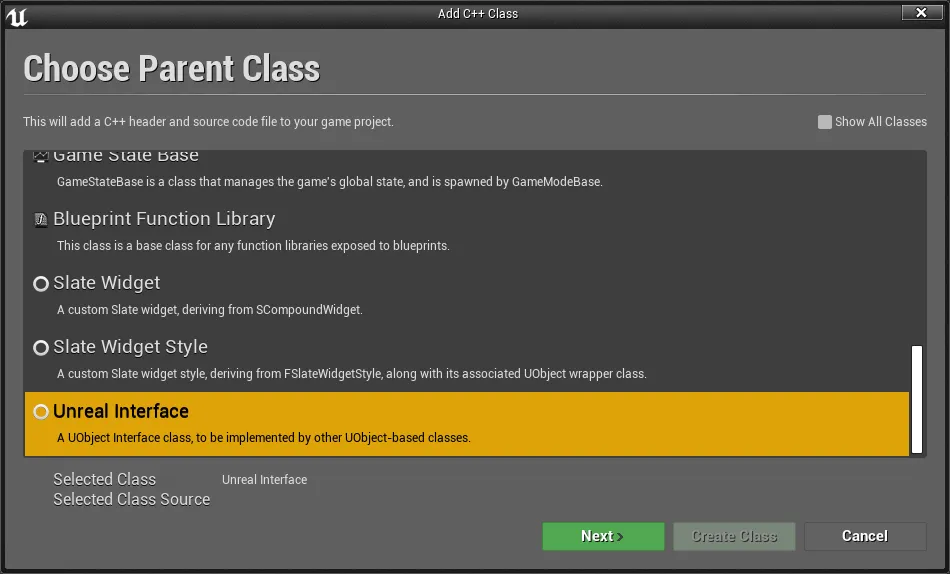
  1. From the Content Browser, go to Add New | New C++ Class. From the menu that pops up, scroll down all the way until you see the Unreal Interface selection and select it. Afterward, click on the Next button:
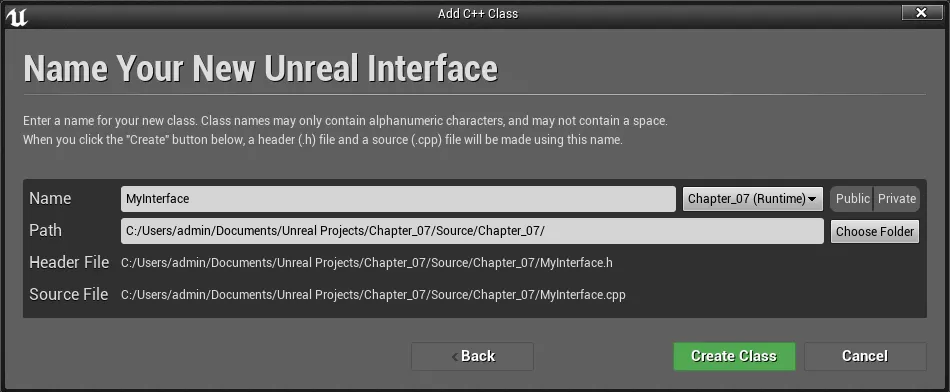
  1. From there, verify that the Name of the class is MyInterface and then click on the Create Class button:
  1. Add the following code to the header file:
#pragma once

#include "CoreMinimal.h"
#include "UObject/Interface.h"
#include "MyInterface.generated.h"

// This class does not need to be modified.
UINTERFACE(MinimalAPI)
class UMyInterface : public UInterface
{
GENERATED_BODY()
};

class CHAPTER_07_API IMyInterface
{
GENERATED_BODY()

// Add interface functions to this class. This is the class that
//will be inherited to implement this interface.

public:
virtual FString GetTestName();
};
  1. Implement the class with this code in the .cpp file:
#include "MyInterface.h"

// Add default functionality here for any IMyInterface functions that are not pure virtual.
FString IMyInterface::GetTestName()
{
unimplemented();
return FString();
}
  1. Compile your project to verify that the code was written without errors.

How it works...

UInterfaces are implemented as pairs of classes that are declared in the interface's header.
As always, because we are leveraging Unreal's reflection system, we need to include our generated header file. Refer to the Handling events implemented via virtual functions recipe in Chapter 5, Handling Events and Delegates, for more information.
As with classes that inherit from UObject, which uses UCLASS, we need to use the UINTERFACE macro to declare our new UInterface. Passing in the class specifier of MinimalAPI causes only the class's type information to be exported for use by other modules.
For more information on this and other class specifiers, check out: https://docs.unrealengine.com/en-US/Programming/UnrealArchitecture/Reference/Classes/Specifiers.
The class is tagged as UE4COOKBOOK_API to help with exporting library symbols.
The base class for the UObject portion of the interface is UInterface.
Just like UCLASS types, we require a macro to be placed inside the body of our class so that the auto-generated code is inserted into it. That macro is GENERATED_BODY() for UInterfaces. The macro must be placed at the very start of the class body.
The second class is also tagged as UE4COOKBOOK_API, and is named in a specific way.
Note that the UInterface derived class and the standard class have the same name but a different prefix. The ...

Table of contents

  1. Title Page
  2. Copyright and Credits
  3. Contributors
  4. www.PacktPub.com
  5. Preface
  6. UE4 Development Tools
  7. Creating Classes
  8. Memory Management, Smart Pointers, and Debugging
  9. Actors and Components
  10. Handling Events and Delegates
  11. Input and Collision
  12. Communication Between Classes and Interfaces: Part I
  13. Communication Between Classes and Interfaces: Part II
  14. Integrating C++ and the Unreal Editor: Part I
  15. Integrating C++ and the Unreal Editor: Part II
  16. Working with UE4 APIs
  17. Multiplayer Networking in UE4
  18. AI for Controlling NPCs
  19. User Interfaces - UI and UMG
  20. Other Books You May Enjoy

Frequently asked questions

Yes, you can cancel anytime from the Subscription tab in your account settings on the Perlego website. Your subscription will stay active until the end of your current billing period. Learn how to cancel your subscription
No, books cannot be downloaded as external files, such as PDFs, for use outside of Perlego. However, you can download books within the Perlego app for offline reading on mobile or tablet. Learn how to download books offline
Perlego offers two plans: Essential and Complete
  • Essential is ideal for learners and professionals who enjoy exploring a wide range of subjects. Access the Essential Library with 800,000+ trusted titles and best-sellers across business, personal growth, and the humanities. Includes unlimited reading time and Standard Read Aloud voice.
  • Complete: Perfect for advanced learners and researchers needing full, unrestricted access. Unlock 1.5M+ books across hundreds of subjects, including academic and specialized titles. The Complete Plan also includes advanced features like Premium Read Aloud and Research Assistant.
Both plans are available with monthly, semester, or annual billing cycles.
We are an online textbook subscription service, where you can get access to an entire online library for less than the price of a single book per month. With over 1.5 million books across 990+ topics, we’ve got you covered! Learn about our mission
Look out for the read-aloud symbol on your next book to see if you can listen to it. The read-aloud tool reads text aloud for you, highlighting the text as it is being read. You can pause it, speed it up and slow it down. Learn more about Read Aloud
Yes! You can use the Perlego app on both iOS and Android devices to read anytime, anywhere — even offline. Perfect for commutes or when you’re on the go.
Please note we cannot support devices running on iOS 13 and Android 7 or earlier. Learn more about using the app
Yes, you can access Unreal Engine 4.x Scripting with C++ Cookbook by John P. Doran, William Sherif, Stephen Whittle in PDF and/or ePUB format, as well as other popular books in Informatik & Programmierung von Spielen. We have over 1.5 million books available in our catalogue for you to explore.