Hands-On AWS Penetration Testing with Kali Linux
eBook - ePub

Hands-On AWS Penetration Testing with Kali Linux

Set up a virtual lab and pentest major AWS services, including EC2, S3, Lambda, and CloudFormation

  1. 508 pages
  2. English
  3. ePUB (mobile friendly)
  4. Available on iOS & Android
eBook - ePub

Hands-On AWS Penetration Testing with Kali Linux

Set up a virtual lab and pentest major AWS services, including EC2, S3, Lambda, and CloudFormation

About this book

Identify tools and techniques to secure and perform a penetration test on an AWS infrastructure using Kali Linux

Key Features

  • Efficiently perform penetration testing techniques on your public cloud instances
  • Learn not only to cover loopholes but also to automate security monitoring and alerting within your cloud-based deployment pipelines
  • A step-by-step guide that will help you leverage the most widely used security platform to secure your AWS Cloud environment

Book Description

The cloud is taking over the IT industry. Any organization housing a large amount of data or a large infrastructure has started moving cloud-ward — and AWS rules the roost when it comes to cloud service providers, with its closest competitor having less than half of its market share. This highlights the importance of security on the cloud, especially on AWS. While a lot has been said (and written) about how cloud environments can be secured, performing external security assessments in the form of pentests on AWS is still seen as a dark art.

This book aims to help pentesters as well as seasoned system administrators with a hands-on approach to pentesting the various cloud services provided by Amazon through AWS using Kali Linux. To make things easier for novice pentesters, the book focuses on building a practice lab and refining penetration testing with Kali Linux on the cloud. This is helpful not only for beginners but also for pentesters who want to set up a pentesting environment in their private cloud, using Kali Linux to perform a white-box assessment of their own cloud resources. Besides this, there is a lot of in-depth coverage of the large variety of AWS services that are often overlooked during a pentest — from serverless infrastructure to automated deployment pipelines.

By the end of this book, you will be able to identify possible vulnerable areas efficiently and secure your AWS cloud environment.

What you will learn

  • Familiarize yourself with and pentest the most common external-facing AWS services
  • Audit your own infrastructure and identify flaws, weaknesses, and loopholes
  • Demonstrate the process of lateral and vertical movement through a partially compromised AWS account
  • Maintain stealth and persistence within a compromised AWS account
  • Master a hands-on approach to pentesting
  • Discover a number of automated tools to ease the process of continuously assessing and improving the security stance of an AWS infrastructure

Who this book is for

If you are a security analyst or a penetration tester and are interested in exploiting Cloud environments to reveal vulnerable areas and secure them, then this book is for you.

A basic understanding of penetration testing, cloud computing, and its security concepts is mandatory.

Frequently asked questions

Yes, you can cancel anytime from the Subscription tab in your account settings on the Perlego website. Your subscription will stay active until the end of your current billing period. Learn how to cancel your subscription.
No, books cannot be downloaded as external files, such as PDFs, for use outside of Perlego. However, you can download books within the Perlego app for offline reading on mobile or tablet. Learn more here.
Perlego offers two plans: Essential and Complete
  • Essential is ideal for learners and professionals who enjoy exploring a wide range of subjects. Access the Essential Library with 800,000+ trusted titles and best-sellers across business, personal growth, and the humanities. Includes unlimited reading time and Standard Read Aloud voice.
  • Complete: Perfect for advanced learners and researchers needing full, unrestricted access. Unlock 1.4M+ books across hundreds of subjects, including academic and specialized titles. The Complete Plan also includes advanced features like Premium Read Aloud and Research Assistant.
Both plans are available with monthly, semester, or annual billing cycles.
We are an online textbook subscription service, where you can get access to an entire online library for less than the price of a single book per month. With over 1 million books across 1000+ topics, we’ve got you covered! Learn more here.
Look out for the read-aloud symbol on your next book to see if you can listen to it. The read-aloud tool reads text aloud for you, highlighting the text as it is being read. You can pause it, speed it up and slow it down. Learn more here.
Yes! You can use the Perlego app on both iOS or Android devices to read anytime, anywhere — even offline. Perfect for commutes or when you’re on the go.
Please note we cannot support devices running on iOS 13 and Android 7 or earlier. Learn more about using the app.
Yes, you can access Hands-On AWS Penetration Testing with Kali Linux by Karl Gilbert, Benjamin Caudill in PDF and/or ePUB format, as well as other popular books in Computer Science & Cloud Computing. We have over one million books available in our catalogue for you to explore.

Information

Section 1: Kali Linux on AWS

This section is a beginner-oriented introduction to how an individual without access to a ready-made AWS environment can set up a lab to practice their pentesting skills, as well as the ways in which they may practice their skills. It also walks the reader through the process of setting up a Kali pentestbox on AWS that can be easily accessed on the go, using nothing more than a web browser.
The following chapters will be covered in this section:
  • Chapter 1, Setting Up a Pentesting Lab on AWS
  • Chapter 2, Setting Up a Kali Pentestbox on the Cloud
  • Chapter 3, Exploitation on the Cloud using Kali Linux

Setting Up a Pentesting Lab on AWS

This chapter aims to help penetration testers who don't have direct access to targets for penetration testing set up a vulnerable lab environment within AWS. This lab will allow testers to practice various exploitation techniques using Metasploit and rudimentary scanning and vulnerability assessment using multiple tools within Kali. This chapter focuses on setting up a vulnerable Linux VM and a generic Windows VM on AWS, putting them on the same network.
In this chapter, we will cover the following topics:
  • Setting up a personal pentesting lab for hacking on the cloud
  • Configuring and securing the virtual lab to prevent unintended access

Technical requirements

In this chapter, we are going to use the following tools:
  • Damn Vulnerable Web Application
  • Very Secure File Transfer Protocol Daemon (vsftpd) version 2.3.4

Setting up a vulnerable Ubuntu instance

As the first of the two vulnerable machines that we will be creating, the vulnerable instance of Ubuntu will contain a single vulnerable FTP service, as well as some other services.

Provisioning an Ubuntu EC2 instance

The very first step in setting up our vulnerable lab in the cloud will be to provision an instance that will be running a vulnerable operating system. For this purpose, we can use an Ubuntu LTS version. This can be accessed from the AWS Marketplace for quick deployment.
We will use Ubuntu 16.04 for this purpose:
Once we click on the Continue to Subscribe button, we are prompted to configure the instance that we are going to launch. Since this is a pretty standard image, we will proceed with the default settings except for Region and VPC settings.
For Region, you can use the AWS Region that is closest to yourself. However, keep in mind that all the other instances you create on AWS need to be hosted in the same region or they cannot be a part of the same network.
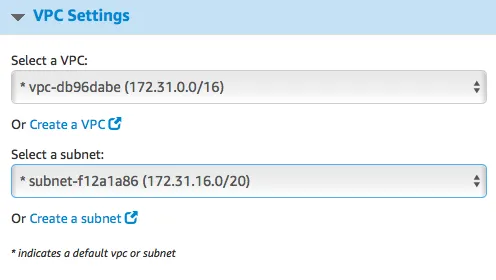
For VPC, make sure you note down the VPC and the subnet IDs that you are using to set up this instance. We will need to reuse them for all the other hosts in the lab. In this case, I will be using the following:
It should be noted that the VPC IDs and the subnet IDs will be unique for everyone. Once done, we can proceed to deploy the EC2 instance by clicking on the Launch with the 1-Click button.
Once done, the next step is to SSH into the newly created VM using the following command:
ssh -i <pem file> <IP address of the instance>
Once connected, run the following command:
sudo apt-get update && sudo apt-get dist-upgrade
These commands will update the repository listing and all the packages installed on the instance, so we don't have to deal with any old packages.

Installing a vulnerable service on Ubuntu

For this Ubuntu host, we will be installing a vulnerable version of an FTP server, vsftpd. Version 2.3.4 of this FTP software was found to be backdoored. In this chapter, we will be installing this backdoored version and then will attempt to identify it using a pentesting box we will set up in the next chapter, and finally we will exploit it.
To make things easier, the backdoored version of vsftpd 2.3.4 is archived on GitHub. We shall be using that code base to install the vulnerable software. To start with, we need to clone the git repository:
git clone https://github.com/nikdubois/vsftpd-2.3.4-infected.git
Next, we need to install packages for setting up a primary build environment. To do this, we run the following:
sudo apt-get install build-essential
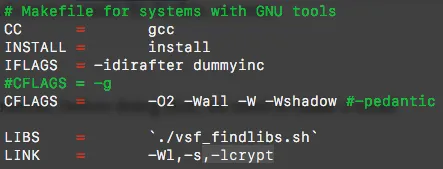
Now, we cd into the vsftpd folder to build it from source. However, before doing that, we need to make a small change to the Makefile. The -lcrypt value needs to be added as a linker flag:

Once done, save the file and just run make.
If all goes well, we should see a vsftpd binary in the same folder:
Next, we need to set up some prerequisites before installing vsftpd. Namely, we need to add a user called nobody and a folder called empty. To do that, run the following commands:
useradd nobody
mkdir /usr/share/empty
Once done, we can run the installation by exec...

Table of contents

  1. Title Page
  2. Copyright and Credits
  3. About Packt
  4. Contributors
  5. Preface
  6. Section 1: Kali Linux on AWS
  7. Setting Up a Pentesting Lab on AWS
  8. Setting Up a Kali PentestBox on the Cloud
  9. Exploitation on the Cloud using Kali Linux
  10. Section 2: Pentesting AWS Elastic Compute Cloud Configuring and Securing
  11. Setting Up Your First EC2 Instances
  12. Penetration Testing of EC2 Instances using Kali Linux
  13. Elastic Block Stores and Snapshots - Retrieving Deleted Data
  14. Section 3: Pentesting AWS Simple Storage Service Configuring and Securing
  15. Reconnaissance - Identifying Vulnerable S3 Buckets
  16. Exploiting Permissive S3 Buckets for Fun and Profit
  17. Section 4: AWS Identity Access Management Configuring and Securing
  18. Identity Access Management on AWS
  19. Privilege Escalation of AWS Accounts Using Stolen Keys, Boto3, and Pacu
  20. Using Boto3 and Pacu to Maintain AWS Persistence
  21. Section 5: Penetration Testing on Other AWS Services
  22. Security and Pentesting of AWS Lambda
  23. Pentesting and Securing AWS RDS
  24. Targeting Other Services
  25. Section 6: Attacking AWS Logging and Security Services
  26. Pentesting CloudTrail
  27. GuardDuty
  28. Section 7: Leveraging AWS Pentesting Tools for Real-World Attacks
  29. Using Scout Suite for AWS Security Auditing
  30. Using Pacu for AWS Pentesting
  31. Putting it All Together - Real - World AWS Pentesting
  32. Other Books You May Enjoy