eBook - ePub
More Excel Outside the Box
Unbelievable Excel Techniques from Excel MVP Bob Umlas
- 192 pages
- English
- ePUB (mobile friendly)
- Available on iOS & Android
eBook - ePub
About this book
A follow-up to
Excel Outside the Box,
More Excel Outside the Box is designed with the Excel guru in mind, introducing advanced, creative solutions and hacks for the software's most challenging problems. Through a series of more than 30 techniques, tables, formulas, and charts, this guide details processes that may be used in any Excel application and across all disciplines. Creative approaches for building formulas within formulas, pivot tables, conditional formatting, and mastering array formulas are just some of the numerous challenges explained. Other higher-level solutions discussed include using VBA macro code to override cell calculations, solve for sums from a text string, and trimming and cleaning all cells on a worksheet. This is the all-encompassing resource for advanced users of Excel wanting to learn more techniques to broaden and empower their knowledge of the program.
Information
Topic
InformatikSubtopic
Desktop-AnwendungenDid You Know…? (a potpourri of miscellaneous ideas)
Going to the Previous Cursor Position in VBA
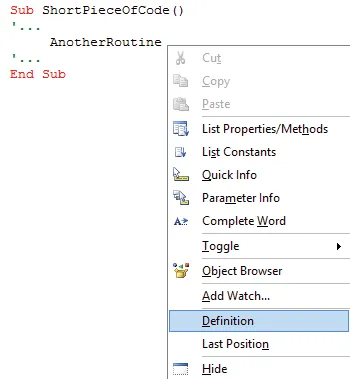
Did you know that VBA enables you to go to the previous cursor position? For example, here’s a short piece of code in which one of the statements references another routine. Without even running the code, you can right-click next to or inside the text AnotherRoutine and see where it’s defined:
Here’s the procedure (which is in a different module):
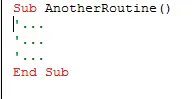
Notice that the cursor is blinking in the line directly under Sub. How do you get back to where you were? Notice the Last Position command in the figure above, right under Definition. If you issue that command now:
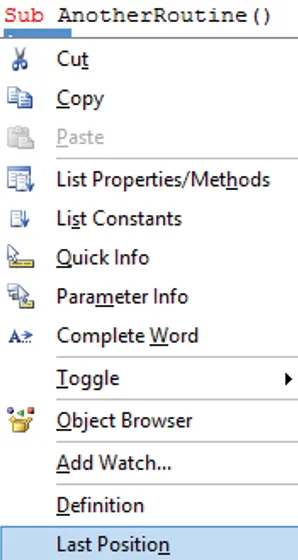
You wind up back in the place where you issued the Definition command. If the cursor has been in many places, you can issue Last Position repeatedly to trace the path of the various places you’ve visited.
Going Directly to a VBA Procedure
You can get to a VBA procedure directly, while not in the VBE, from Excel’s Go To or Name box. F...
Table of contents
- Introduction
- Using a Conditional Formatting On/Off Switch
- Using Data Validation to Prohibit Entry of Digits
- Making a Change in One Column Based on Criteria in Another (Without VBA)
- Changing Row Height When a Key Field Changes
- Using a Nontrivial Conditional Formatting Formula
- Rearranging Data (Revisiting a Technique from Excel Outside the Box)
- Truncating Text and Showing an Ellipsis (…) After 47 Characters
- Copying Cells Without the Blank Rows
- Alternating Conditional Formatting
- Using Relative Names
- Merging Across
- Using Wildcards in Replace Formula
- Finding Prime Numbers
- Easily Clearing an Array-Entered Block of Cells
- Determining Whether a Cell Contains a Word from a List of Words
- Using Variable Ranges for Unique Counts
- Extracting Numbers from Text
- Partially Matching Words with a User-Defined Function
- Setting Up Many Check Boxes on a Worksheet
- Narrowing Down What Caused a Crash
- Filling a List Box with Months
- Filtering by Data in a Text Box
- Creating a Summary Chart with a Single Click
- Copying Modules or User Forms from One Project to Another
- Using the Locals Window in VBA
- Creating a Gantt Chart from Many Sources (on Steroids!)
- Protecting Tables of Data
- Did You Know…? (a potpourri of miscellaneous ideas)
- About the Author, Bob Umlas
Trusted by 375,005 students
Access to over 1.5 million titles for a fair monthly price.
Study more efficiently using our study tools.
Frequently asked questions
Yes, you can cancel anytime from the Subscription tab in your account settings on the Perlego website. Your subscription will stay active until the end of your current billing period. Learn how to cancel your subscription
No, books cannot be downloaded as external files, such as PDFs, for use outside of Perlego. However, you can download books within the Perlego app for offline reading on mobile or tablet. Learn how to download books offline
Perlego offers two plans: Essential and Complete
- Essential is ideal for learners and professionals who enjoy exploring a wide range of subjects. Access the Essential Library with 800,000+ trusted titles and best-sellers across business, personal growth, and the humanities. Includes unlimited reading time and Standard Read Aloud voice.
- Complete: Perfect for advanced learners and researchers needing full, unrestricted access. Unlock 1.5M+ books across hundreds of subjects, including academic and specialized titles. The Complete Plan also includes advanced features like Premium Read Aloud and Research Assistant.
We are an online textbook subscription service, where you can get access to an entire online library for less than the price of a single book per month. With over 1.5 million books across 990+ topics, we’ve got you covered! Learn about our mission
Look out for the read-aloud symbol on your next book to see if you can listen to it. The read-aloud tool reads text aloud for you, highlighting the text as it is being read. You can pause it, speed it up and slow it down. Learn more about Read Aloud
Yes! You can use the Perlego app on both iOS and Android devices to read anytime, anywhere — even offline. Perfect for commutes or when you’re on the go.
Please note we cannot support devices running on iOS 13 and Android 7 or earlier. Learn more about using the app
Please note we cannot support devices running on iOS 13 and Android 7 or earlier. Learn more about using the app
Yes, you can access More Excel Outside the Box by Bob Umlas in PDF and/or ePUB format, as well as other popular books in Informatik & Desktop-Anwendungen. We have over 1.5 million books available in our catalogue for you to explore.