Arduino and Scilab based Projects provides information ranging from the basics to advanced knowledge of Arduino and its interfacing with input/output devices (display devices, actuators, sensors), communication modules (RF modem, Zigbee) and Scilab. It also provides embedded system based on Arduino with simulation, programming and interfacing with Scilab, Arduino interfacing with Scilab with and without Arduino 1.1 packages. Chapters are arranged in an easy-to-understand sequence that enhances the learning experience for readers. Descriptions of real time project prototypes with programming and simulation of Arduino and Scilab.

- English
- ePUB (mobile friendly)
- Available on iOS & Android
eBook - ePub
Arduino and Scilab based Projects
About this book
Information
Publisher
Bentham Science PublishersPrint ISBN
9789811410918
Topic
Computer ScienceeBook ISBN
9789811410925
Subtopic
ProgrammingIndex
Computer ScienceSECTION B: Arduino_1.1 Package with Scilab
Scilab Arduino_1.1 Package (using toolbox_ arduino_v3.ino)
Rajesh Singh, Anita Gehlot, Bhupendra Singh
Abstract
This chapter describes the steps to get started with the Scilab XCOS package for the Arduino. One of the popular methods to control the Arduino with Scilab is with the help of the Arduino_1.1 package. In this method there is no need to write a program to receive commands from Scilab, instead a predefined package is installed in the Arduino and then with the help of XCOS scilab GUI is created. XCOS is a package from Scilab which is used for modelling and simulation of the system. It is an open source Simulink and helpful to create Simulink models. XCOS is a graphical editor to design a hybrid systems model. Models can be designed, loaded, saved, compiled and simulated.
Keywords: Arduino_1.1 package, Scilab.
5.1. Steps to Install Package in Arduino
- Step-1: Download and install Scilab.
- Step-2: Download the Arduino toolbox from toolbox_arduino_v3.ino and connect the Arduino board to the PC/laptop through the serial port.
- Step-3: Open the Arduino IDE and upload the sketch toolbox_arduino_v3.ino to the Arduino.
- Step-4: Download the Arduino_1.1 package and paste it in the ‘contrib’ folder with path C:\Program Files (x86)\scilab-5.5.2.
- Step-5: Go to the ‘contrib’ folder and then to the Arduino_1.1 folder and run ‘loader.sce’ file, to install Arduino in Scilab XCOS.
- Step-6: Open XCOS by clicking on the icon in the Scilab window, as shown in Fig. (5.1).
- Step-7: Click on XCOS to open a palette window with the Arduino folder, as shown in Fig. (5.2). In the Arduino folder, there are different building blocks to design the GUI.
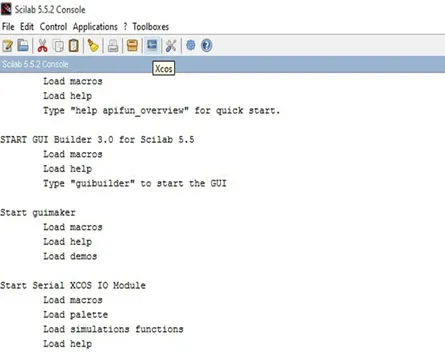
Snapshot of window to open ‘XCOS’.
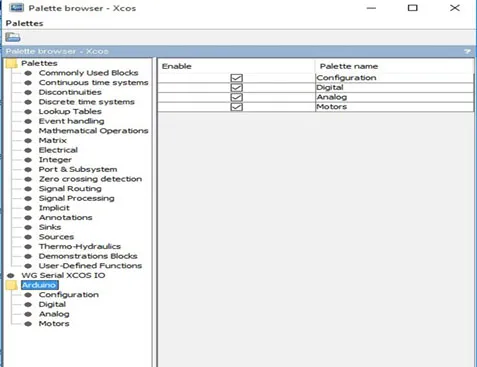
Snapshot of palette window in XCOS.
5.2. Blocks of Scilab XCOS
This section discusses the basic building blocks used to design a GUI (Graphical User Interface). The GUI can be designed by adding the building blocks to the untitled space and then assigning the values as per the requirement of the project.
Building Blocks of XCOS
- Arduino_Setup – Double click on it, then assign a comport number to this block which is identified on connecting the Arduino to the PC/laptop, as shown in Fig. (5.3).
- Time_Sample – Double click on it, and set the sample time of the Arduino, as shown in (Fig. 5.4).
- Digital_Read – Double click on it, then data from any digi...
Table of contents
- Welcome
- Table of Contents
- Title
- BENTHAM SCIENCE PUBLISHERS LTD.
- PREFACE
- SECTION A: Arduino and its Interfacing
- Introduction to Arduino and Arduino IDE and toolbox_arduino_v3
- Arduino Interfacing with Sensors
- Arduino and Serial Communication
- Introduction to Scilab and GUI without Toolbox
- SECTION B: Arduino_1.1 Package with Scilab
- Scilab Arduino_1.1 Package (using toolbox_ arduino_v3.ino)
- Servo Motor Control with Arduino_1.1 Package
- Motion Detection System with Arduino_1.1 Package
- Two Axis Solar Tracker with Arduino_1.1 Package
- Environment Parameter Monitoring System with Arduino_1.1 Package
- Environment Parameter Monitoring Robot with Arduino_1.1 Package
- PID Controller for Heater with Arduino_1.1 Package
- SECTION C: Scilab GUI without Arduino_1.1 package
- Wireless Building Automation System
- Wireless Robot Control with Scilab GUI
- BIBLIOGRAPHY
Trusted by 375,005 students
Access to over 1.5 million titles for a fair monthly price.
Study more efficiently using our study tools.
Frequently asked questions
Yes, you can cancel anytime from the Subscription tab in your account settings on the Perlego website. Your subscription will stay active until the end of your current billing period. Learn how to cancel your subscription
No, books cannot be downloaded as external files, such as PDFs, for use outside of Perlego. However, you can download books within the Perlego app for offline reading on mobile or tablet. Learn how to download books offline
Perlego offers two plans: Essential and Complete
- Essential is ideal for learners and professionals who enjoy exploring a wide range of subjects. Access the Essential Library with 800,000+ trusted titles and best-sellers across business, personal growth, and the humanities. Includes unlimited reading time and Standard Read Aloud voice.
- Complete: Perfect for advanced learners and researchers needing full, unrestricted access. Unlock 1.5M+ books across hundreds of subjects, including academic and specialized titles. The Complete Plan also includes advanced features like Premium Read Aloud and Research Assistant.
We are an online textbook subscription service, where you can get access to an entire online library for less than the price of a single book per month. With over 1.5 million books across 990+ topics, we’ve got you covered! Learn about our mission
Look out for the read-aloud symbol on your next book to see if you can listen to it. The read-aloud tool reads text aloud for you, highlighting the text as it is being read. You can pause it, speed it up and slow it down. Learn more about Read Aloud
Yes! You can use the Perlego app on both iOS and Android devices to read anytime, anywhere — even offline. Perfect for commutes or when you’re on the go.
Please note we cannot support devices running on iOS 13 and Android 7 or earlier. Learn more about using the app
Please note we cannot support devices running on iOS 13 and Android 7 or earlier. Learn more about using the app
Yes, you can access Arduino and Scilab based Projects by Rajesh Singh, Anita Gehlot, Bhupendra Singh in PDF and/or ePUB format, as well as other popular books in Computer Science & Programming. We have over 1.5 million books available in our catalogue for you to explore.