The complete step-by-step guide to mastering the basics of Aspen Plus software
Used for a wide variety of important scientific tasks, Aspen Plus software is a modeling tool used for conceptual design, optimization, and performance monitoring of chemical processes. After more than twenty years, it remains one of the most popular and powerful chemical engineering programs used both industrially and academically.
Teach Yourself the Basics of Aspen Plus, Second Edition continues to deliver important fundamentals on using Aspen Plus software. The new edition focuses on the newest version of Aspen Plus and covers the newest functionalities. Lecture-style chapters set the tone for maximizing the learning experience by presenting material in a manner that emulates an actual workshop classroom environment. Important points are emphasized through encouragement of hands-on learning techniques that direct learners toward achievement in creating effective designs fluidly and with confidence. Teach Yourself the Basics of Aspen Plus, Second Edition includes:
Examples embedded within the text to focus the reader on specific aspects of the material being covered
Workshops at the end of each chapter that provide opportunities to test the reader's knowledge in that chapter's subject matter
Functionalities covered in the newest version of Aspen including the solution of a flowsheet by an equation oriented, EO approach, and the solution of problems which involve electrolyte equilibria
Aspen Plus executable format as well as .txt format files containing details of the examples and the workshops as well as their solutions are provided as a download
Designed with both students and professionals in mind, Teach Yourself the Basics of Aspen Plus, Second Edition is like having a personal professor 24/7. Its revolutionary format is an exciting way to learn how to operate this highly sophisticated software—and a surefire way for readers to get the results they expect.
Aspen Plus is based on techniques for developing flowsheets that were used by chemical engineers many years ago. Computer programs were just beginning to be used, were of the stand-alone variety, and were typically used for designing single units. Solution of the material and energy balances for even the simplest flowsheet without recycle required an engineer to design each unit one-at-a-time and, manually, introduce the solution values of a previously designed unit into the input of the next unit in the flowsheet. When it became necessary to deal with a recycle, the calculations began with a guess of the recycle values and calculations ended when the values produced by the last unit in the loop matched the guesses. This involved much repetitive work and was not guaranteed to converge. This procedure evolved through the construction of rating models of units, as opposed to design models, which could be tied together by software in a way that emulated the above procedure and employed robust mathematical methods to converge the recycle elements of the process. This type of system is termed a sequential modular simulator. An excellent example of such software was Monsanto Corporation's Flowtran (1974), which eventually became the kernel upon which Aspen Plus was built.
Subsequently, Aspen Plus, though still basically a sequential modular simulator, has grown considerably and has many advanced functionalities with links to specialized software such as, detailed heat exchanger design, dynamic simulation, batch process modeling, cost estimation, and others. It also has a facility for using an equation-based approach in some of its models that permits convenient use of design specifications in process modeling and solving problems with tight specifications.
The Aspen Engineering Suite, which incorporates Aspen Plus, can be installed in a variety of ways using network servers or on a stand-alone personal computer. Installation is the responsibility of either the user, with tools provided by Aspen Technology, or the information technology department that services the user. This is done only once and modified, typically annually, with future releases. Whether the user's installation is by network downloads or by CDs it is necessary that the user select desired modules, at a minimum, Aspen Plus and its required add-ons, and associated documentation. All other modules are not necessary.
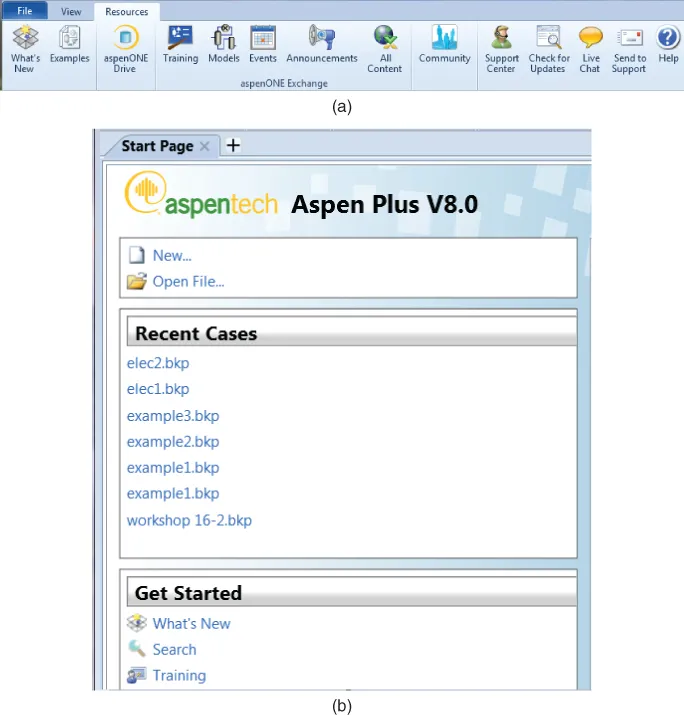
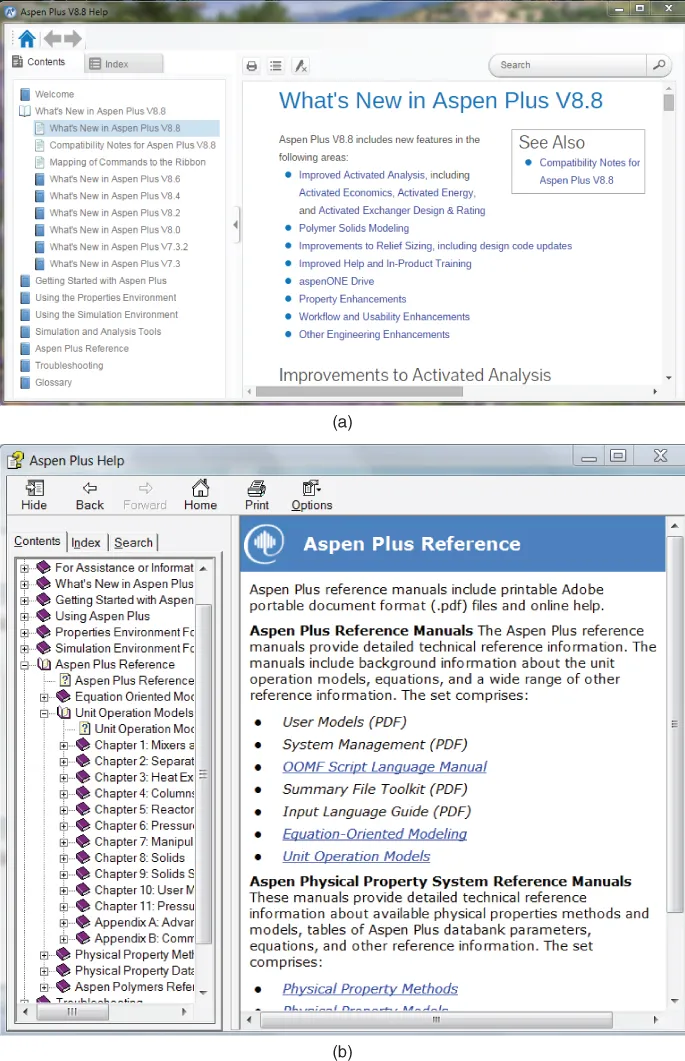
There has been a significant change in the way Aspen Plus software has been organized and accessed by users. All property-related activities, such as property models, regression of experimental data as well as component selection and new component additions, and more, have been incorporated into an environment designated Properties. Similarly, all process simulation activities are organized in the Simulation environment. For Aspen Plus release 8.8 access to What's New is shown in Figure 1.1a and various documentation links are shown in Figure 1.2a, including the Aspen Plus Reference. If using earlier 8.x releases, documentation can be found in the link, What's New from the Aspen Plus Start Page. For release 8.0–8.6, Figure 1.1b shows the Start Page and Figure 1.2b shows the link to the complete Aspen Plus Reference manual shown in Figure 1.2b.
Figure 1.1 (a) Aspen Plus Start Page release 8.8. (b) Aspen Plus Start Page release 8.x.
Figure 1.2 (a) Aspen Plus Reference Manual Release 8.8. (b) Aspen Plus Reference Manual Release 8.x.
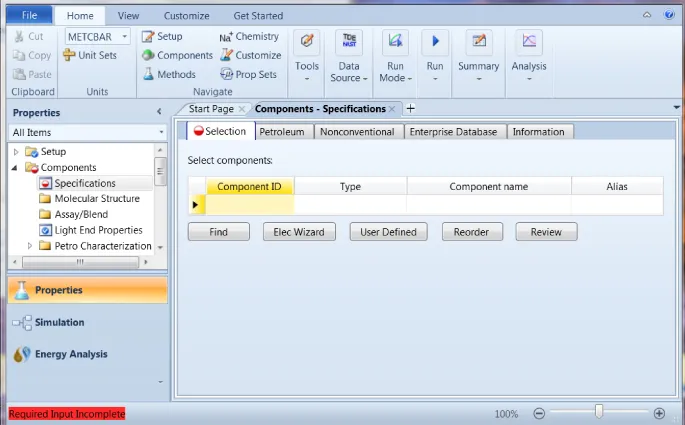
Access to all Aspen Plus facilities is implemented through the use of a dynamic “ribbon,” an example of which is illustrated in Figure 1.3, which appears after a file is opened. Here, the choice of environments is shown in the lower-left corner of the display and the ribbon which has appropriate functions for the “Home” part of the horizontal menu. The contents of the ribbon correspond to the Home selection. Any other selection such as File brings up different functions in the ribbon appropriate for that selection.
Figure 1.3 The ribbon.
Note the list of functions under the Properties title under the left side of the ribbon. These are selections that are available to the user at virtually any time while in the Properties environment or as needed.
The environment Energy Analysis will not be addressed in this book.
1.2 Starting Aspen Plus
When the Aspen Plus User Interface icon on the desktop is clicked or, alternately, the sequence All Programs/Aspen Tech/Process Modeling V8.x/Aspen Plus/Aspen Plus User Interface is selected from the Windows Start menu, the Aspen Plus Startup display, which incorporates the segment shown in Figure 1.1a or Figure 1.1b, appears after selecting File.
If the option New is selected, the user may choose from a list of preconfigured property templates, shown in Figure 1.4, and after a selection is made a display for selecting components, Figure 1.5 is shown. Note the lower-left corner of the display shows ...
Table of contents
Cover
Title Page
Copyright
Dedication
Table of Contents
Preface to the Second Edition
Preface to the First Edition
Acknowledgments
About the Companion Website
Chapter One: Introduction to Aspen Plus
Chapter Two: Properties
Chapter Three: The Simple Blocks
Chapter Four: Processes with Recycle
Chapter Five: Flowsheeting and Model Analysis Tools
Chapter Seventeen: Beyond The Basics of Aspen Plus
Index
End User License Agreement
Trusted by 375,005 students
Access to over 1.5 million titles for a fair monthly price.
Study more efficiently using our study tools.
Frequently asked questions
Yes, you can cancel anytime from the Subscription tab in your account settings on the Perlego website. Your subscription will stay active until the end of your current billing period. Learn how to cancel your subscription
No, books cannot be downloaded as external files, such as PDFs, for use outside of Perlego. However, you can download books within the Perlego app for offline reading on mobile or tablet. Learn how to download books offline
We are an online textbook subscription service, where you can get access to an entire online library for less than the price of a single book per month. With over 1.5 million books across 990+ topics, we’ve got you covered! Learn about our mission
Look out for the read-aloud symbol on your next book to see if you can listen to it. The read-aloud tool reads text aloud for you, highlighting the text as it is being read. You can pause it, speed it up and slow it down. Learn more about Read Aloud
Yes! You can use the Perlego app on both iOS and Android devices to read anytime, anywhere — even offline. Perfect for commutes or when you’re on the go. Please note we cannot support devices running on iOS 13 and Android 7 or earlier. Learn more about using the app
Yes, you can access Teach Yourself the Basics of Aspen Plus by Ralph Schefflan in PDF and/or ePUB format, as well as other popular books in Technology & Engineering & Chemical & Biochemical Engineering. We have over 1.5 million books available in our catalogue for you to explore.