Professional Visual Studio 2017
eBook - ePub

Professional Visual Studio 2017

  1. English
  2. ePUB (mobile friendly)
  3. Available on iOS & Android
eBook - ePub

Professional Visual Studio 2017

About this book

Skip the basics and delve right into Visual Studio 2017 advanced features and tools

Professional Visual Studio 2017 is the industry-favorite guide to getting the most out of Microsoft's primary programming technology. From touring the new UI to exploiting advanced functionality, this book is designed to help professional developers become more productive. A unique IDE-centric approach provides a clear path through the typical workflow while exploring the nooks and crannies that can make your job easier. Visual Studio 2017 includes a host of features aimed at improving developer productivity and UI, and this book covers them all with clear explanation, new figures, and expert insight. Whether you're new to VS or just upgrading, this all-inclusive guide is an essential resource to keep within arm's reach.

Visual Studio 2017 fixes the crucial issues that kept professionals from adopting VS 2015, and includes new features and tools that streamline the developer's job. This book provides the straightforward answers you need so you can get up to speed quickly and get back to work.

  • Master the core functionality of Visual Studio 2017
  • Dig into the tools that make writing code easier
  • Tailor the environment to your workflow, not the other way around
  • Work your way through configuration, debugging, building, deployment, customizing, and more

Microsoft is changing their release cadence—it's only been about two years since the last release—so developers need to quickly get a handle on new tools and features if they hope to remain productive. The 2017 release is designed specifically to help you get more done, in less time, with greater accuracy and attention to detail. If you're ready to get acquainted, Professional Visual Studio 2017 is your ideal guide.
Frequently asked questions

Yes, you can cancel anytime from the Subscription tab in your account settings on the Perlego website. Your subscription will stay active until the end of your current billing period. Learn how to cancel your subscription.
At the moment all of our mobile-responsive ePub books are available to download via the app. Most of our PDFs are also available to download and we're working on making the final remaining ones downloadable now. Learn more here.
Perlego offers two plans: Essential and Complete
  • Essential is ideal for learners and professionals who enjoy exploring a wide range of subjects. Access the Essential Library with 800,000+ trusted titles and best-sellers across business, personal growth, and the humanities. Includes unlimited reading time and Standard Read Aloud voice.
  • Complete: Perfect for advanced learners and researchers needing full, unrestricted access. Unlock 1.4M+ books across hundreds of subjects, including academic and specialized titles. The Complete Plan also includes advanced features like Premium Read Aloud and Research Assistant.
Both plans are available with monthly, semester, or annual billing cycles.
We are an online textbook subscription service, where you can get access to an entire online library for less than the price of a single book per month. With over 1 million books across 1000+ topics, we’ve got you covered! Learn more here.
Look out for the read-aloud symbol on your next book to see if you can listen to it. The read-aloud tool reads text aloud for you, highlighting the text as it is being read. You can pause it, speed it up and slow it down. Learn more here.
Yes! You can use the Perlego app on both iOS or Android devices to read anytime, anywhere — even offline. Perfect for commutes or when you’re on the go.
Please note we cannot support devices running on iOS 13 and Android 7 or earlier. Learn more about using the app.
Yes, you can access Professional Visual Studio 2017 by Bruce Johnson in PDF and/or ePUB format, as well as other popular books in Computer Science & Programming in C. We have over one million books available in our catalogue for you to explore.

Information

Publisher
Wrox
Year
2017
Print ISBN
9781119404583
eBook ISBN
9781119404590

PART I
Integrated Development Environment

  • CHAPTER 1: A Quick Tour
  • CHAPTER 2: The Solution Explorer, Toolbox, and Properties
  • CHAPTER 3: Options and Customizations
  • CHAPTER 4: The Visual Studio Workspace
  • CHAPTER 5: Find and Replace and Help

1
A Quick Tour

WHAT’S IN THIS CHAPTER?

  • What’s in This Chapter?
  • Installing and getting started with Visual Studio 2017
  • Creating and running your first application
  • Debugging and deploying an application
Ever since software has been developed, there has been a need for tools to help write, compile, debug, and deploy applications. Microsoft Visual Studio 2017 is the next iteration in the continual evolution of a best-of-breed integrated development environment (IDE).
This chapter introduces the Visual Studio 2017 user experience and shows you how to work with the various menus, toolbars, and windows. It serves as a quick tour of the IDE, and as such it doesn’t go into detail about what settings can be changed or how to go about customizing the layout because these topics are explored in the following chapters.

GETTING STARTED

Recent versions of Visual Studio have seen incremental improvements in the installation experience. However, Visual Studio 2017 has pretty much completely revamped the installation options and workflow. It has been designed to not only get you up and running quickly, but also to easily select only those options you need to have installed. This section walks you through the installation process and getting started with the IDE.

Installing Visual Studio 2017

The installer for Visual Studio 2017 is what Microsoft calls a “low-impact installer.” The idea arose as Microsoft compared the footprint used by Visual Studio 2015 with the kinds of experiences that users were not only requesting, but also using. As surprising as it might seem, not every developer needs to have Visual Studio support for Windows Forms, ASP.NET, WPF, Universal Apps, and C++ out of the box.
Visual Studio 2015 and earlier versions were optimized so that pressing F5 to run a program would work out of the box. It wasn’t expected that you would need to install any other components in order to get the large majority of .NET applications running. While this was a definite plus regarding ease of use, it made for a large (some might say bloated) footprint for Visual Studio.
In Visual Studio 2017, the installation process takes a different point of view. Instead of automatically installing “everything,” you get to pick and choose the different components that you want to install. Yes, you had a little bit of that in the past, but now the number of options that you have is greatly increased. However, more options doesn’t necessarily mean a better installation experience. In fact, it’s probably the opposite, as you try to figure out which of a hundred different options you need to install to work on your project. To address that challenge, the Visual Studio 2017 installer uses the concept of workloads.
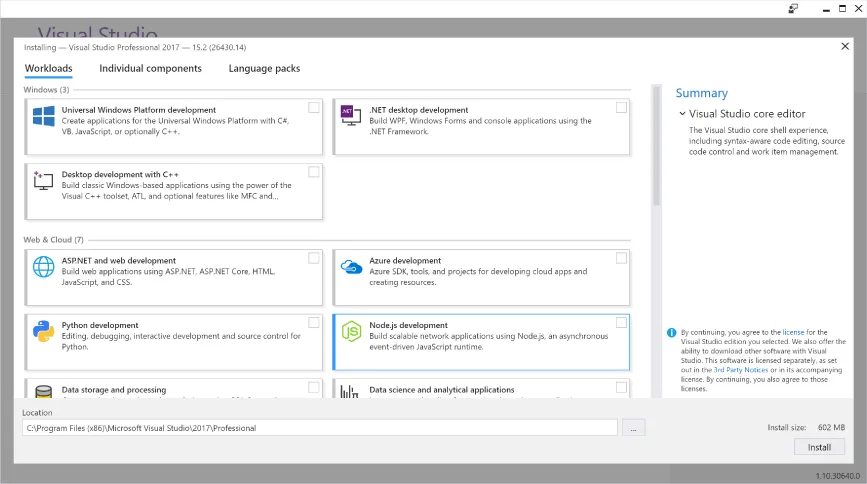
When you launch the Visual Studio 2017 installation process (an application of only a couple of megabytes in size), you’ll see the dialog in Figure 1-1 appear relatively quickly. Naturally, this is after you have read (in great detail, of course) and accepted the licensing information and privacy statements.
Snapshot of Visual Studio 2017 installastion dialog box.
FIGURE 1-1
This is the main hub for the installer and the location where the desired components are specified. There are two modes for identifying the components. In Figure 1-1, you are looking at the workloads. The workloads have been divided into five different categories. To include a workload in the installation, simply click on it, showing a blue checkbox in the top right corner. You can add any number of the workloads as part of the installation. The available workloads are:
  • Universal Windows Platform development: Used if you are creating applications for the Universal Windows Platform, regardless of your language of choice.
  • .NET desktop development: Allows you to create applications, using either WPF or Windows Forms. This is also where you find the Console application template.
  • Desktop development with C++: Used to build classic Windows-based applications. This option is appropriate if you expect to be using Visual C++, the Active Template Library (ATL), or Microsoft Foundation Classes (MFC).
  • ASP.NET and web development: Adds the components used to build web applications, including ASP.NET, ASP.NET Core, and plain old HTML/Javascript/CSS.
  • Azure development: Includes the Azure SDK, tools, and project templates that allow you to create Azure-based cloud applications.
  • Python development: Includes support for cookiecutter, Python 3, and tools that are used to interact with Azure. And, optionally, you can include other distributions of Python, such as Anaconda.
  • Node.js development: One of the new tools supported by Visual Studio 2017, this workload includes the components that allow you to create network applications using the Node.js platform.
  • Data storage and processing: Some recent additions to the Azure platform include Azure Data Lake, Hadoop, and Azure ML...

Table of contents

  1. COVER
  2. TITLE PAGE
  3. TABLE OF CONTENTS
  4. INTRODUCTION
  5. PART I: Integrated Development Environment
  6. PART II: Getting Started
  7. PART III: Digging Deeper
  8. PART IV: Desktop Applications
  9. PART V: Web Applications
  10. PART VI: Mobile Applications
  11. PART VII: Cloud Services
  12. PART VIII: Data
  13. PART IX: Debugging
  14. PART X: Build And Deployment
  15. PART XI: Visual Studio Editions
  16. END USER LICENSE AGREEMENT