Outlook 2019 For Dummies
eBook - ePub

Outlook 2019 For Dummies

  1. English
  2. ePUB (mobile friendly)
  3. Available on iOS & Android
eBook - ePub

Outlook 2019 For Dummies

About this book

Get up to speed with the world's best email application — Outlook 2019

Of the millions of people who use Outlook, most only use about two percent of its features. Don't stay in the dark! Outlook2019 For Dummies shows you how to take advantage of often-overlooked tips and tricks to make it work even better for you.

Inside, you'll find information on navigating the user interface; utilizing the To-Do bar; filtering junk email; smart scheduling; RSS support; using electronic business cards; accessing data with two-way sync and offline and cloud based access, and much more!

  • Make the most of Outlook's anti-phishing capabilities
  • Share your calendar
  • Integrate tasks with other Microsoft applications and services
  • Manage email folders

If you're upgrading to the latest version —or have never used this popular email tool — this book makes it easier than ever to get Outlook working for you.

Frequently asked questions

Yes, you can cancel anytime from the Subscription tab in your account settings on the Perlego website. Your subscription will stay active until the end of your current billing period. Learn how to cancel your subscription.
No, books cannot be downloaded as external files, such as PDFs, for use outside of Perlego. However, you can download books within the Perlego app for offline reading on mobile or tablet. Learn more here.
Perlego offers two plans: Essential and Complete
  • Essential is ideal for learners and professionals who enjoy exploring a wide range of subjects. Access the Essential Library with 800,000+ trusted titles and best-sellers across business, personal growth, and the humanities. Includes unlimited reading time and Standard Read Aloud voice.
  • Complete: Perfect for advanced learners and researchers needing full, unrestricted access. Unlock 1.4M+ books across hundreds of subjects, including academic and specialized titles. The Complete Plan also includes advanced features like Premium Read Aloud and Research Assistant.
Both plans are available with monthly, semester, or annual billing cycles.
We are an online textbook subscription service, where you can get access to an entire online library for less than the price of a single book per month. With over 1 million books across 1000+ topics, we’ve got you covered! Learn more here.
Look out for the read-aloud symbol on your next book to see if you can listen to it. The read-aloud tool reads text aloud for you, highlighting the text as it is being read. You can pause it, speed it up and slow it down. Learn more here.
Yes! You can use the Perlego app on both iOS or Android devices to read anytime, anywhere — even offline. Perfect for commutes or when you’re on the go.
Please note we cannot support devices running on iOS 13 and Android 7 or earlier. Learn more about using the app.
Yes, you can access Outlook 2019 For Dummies by Faithe Wempen,Bill Dyszel in PDF and/or ePUB format, as well as other popular books in Computer Science & Desktop Applications. We have over one million books available in our catalogue for you to explore.

Information

Part 1

Getting Started with Outlook 2019

IN THIS PART …
Learn how to use Outlook to read and send email, send attachments, and create appointments and tasks as well as how to use the calendar feature to help you meet important deadlines.
Explore the various parts of Outlook, including views, menus, and folders, as well as the search feature.
Discover how to create contacts and calendar appointments as well as how to use dragging, how to create and modify tasks, and how to further enhance your productivity.
Chapter 1

Outlook Features You Really Need to Know

IN THIS CHAPTER
check
Reading and creating email
check
Sending files by email
check
Checking your calendar
check
Entering appointments and contacts
check
Managing tasks
check
Keeping notes
I’m kicking off this book with Outlook’s Greatest Hits — the things you’ll want to do with Outlook every single day. The list sounds simple enough: sending email, making appointments, and so on. But most people only use about 5 percent of Outlook’s power. Even if you move up to using 10 percent of Outlook’s features, you’ll be amazed at how this little program can streamline your life and spiff up your communications. People get pretty excited about Outlook, even if they take advantage of only a tiny fraction of what the package can do. But there’s more here than meets the eye; Outlook does ordinary things extraordinarily well. I know you want to do the same, so read on.

Explaining Why So Many People Use Outlook

Millions of people use Outlook because millions of people use Outlook. That’s not redundant — Outlook is the standard tool for communicating, collaborating, and organizing for hundreds of millions of people around the world. When so many people use the same tool for organizing the things they do individually, it becomes vastly easier for everyone to organize the things they do together by using that tool. That’s the case with Outlook. It’s a powerful tool even if you work all alone, but that power gets magnified when you use it to collaborate with others.

Doing Anything in Outlook the Easy Way

Well, okay, maybe you can’t use Outlook to decipher hieroglyphics, but if you know a little about basic email techniques, you can do a lot in Outlook, such as click a button to do something, to view something, or to complete something.
Using Outlook is so easy, I can sum it up in just a few simple sentences to cover the most common tasks:
  • Open an item and read it: Double-click the item. It opens in a new window.
  • Create a new item: Click a folder icon in the Folder pane, click the New button on the Ribbon at the top of the screen, and fill out the form that appears. When you’re done, click the Send button — or, for anything other than an email message, click the Save & Close button.
  • Delete an item: Click the item once to select it and then click the Delete button on the Ribbon at the top of the screen. The Delete button has a black X. You can also press the Delete key on your keyboard.
  • Move an item: Use your mouse to drag the item to where you want it.
Does that seem too simple? No problem. If you have an itch to complicate things, you could try to use Outlook while hopping on a pogo stick or flying a jet plane. But why? These four tricks can take you a long way.
Outlook can also do some sophisticated tricks, such as automatically sorting your email or creating form letters, but you’ll need to understand a few details to take advantage of those tricks. The other 300-plus pages of this book cover the finer points of Outlook. If you only wanted the basics, I could’ve sent you a postcard.
remember
The figures you see in this book and the instructions you read assume you’re using Outlook the way it comes out of the Office 2019 box from Microsoft (or as a download from Office 365) — with all the standard options installed. If you don’t like the way the program looks (or how things are named) when you install Outlook, you can change many of the things you see. If you change too much, however, some instructions and examples I give you won’t make sense because then the parts of the program that I talk about may have names you gave them rather than the ones Microsoft originally assigned. The Microsoft people went to great lengths to make Outlook’s features easy to find. I suggest leaving the general arrangement alone until you’re comfortable using Outlook.

Using Email: Basic Delivery Techniques

Email is Outlook’s most popular feature. I’ve run across people who didn’t know Outlook could do anything but exchange email messages. It’s a good thing that Outlook makes it so easy to read your email, although it’s too bad so many people stop there.

Reading email

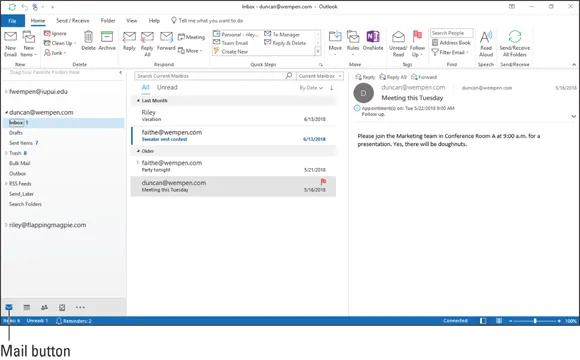
When you start Outlook, you normally see a screen with three columns. The leftmost column is the Folder pane, which lets you switch between different modules in Outlook to perform different tasks. The second column from the left is your list of messages; the right column (called the Reading pane) contains the text of one of those messages. If the message is short enough, you may see its entire text in the Reading pane, as shown in Figure 1-1. If the message is longer, you’ll have to open it, or scroll down in the Reading pane, to see the whole thing.
image
FIGURE 1-1: A received message in the Inbox.
To see an entire message, follow these steps:
  1. Click the Mail button in the Navigation bar to make sure you are in the Mail module.
    You don’t need this step if you can already see your messages.
  2. Double-click the title of a message...

Table of contents

  1. Cover
  2. Table of Contents
  3. Introduction
  4. Part 1: Getting Started with Outlook 2019
  5. Part 2: Taming the Email Beast
  6. Part 3: Managing Contacts, Dates, Tasks, and More
  7. Part 4: Beyond the Basics: Tips and Tricks You Won’t Want to Miss
  8. Part 5: Outlook at Work
  9. Part 6: The Part of Tens
  10. Index
  11. About the Authors
  12. Advertisement Page
  13. Connect with Dummies
  14. End User License Agreement