Front-end Development with ASP.NET Core, Angular, and Bootstrap
eBook - ePub

Front-end Development with ASP.NET Core, Angular, and Bootstrap

  1. English
  2. ePUB (mobile friendly)
  3. Available on iOS & Android
eBook - ePub

Front-end Development with ASP.NET Core, Angular, and Bootstrap

About this book

Stay ahead of the web evolution with elegant combination front-end development

Front-End Development with ASP.NET Core, Angular, and Bootstrap is the professional's guide to fast, responsive web development. Utilizing the most popular combination of web technologies for Microsoft developers, this guide provides the latest best practices and ASP.NET MVP guidance to get you up to speed quickly. The newest ASP.NET - now called ASP.NET Core - is leaner, easier to use, and less bound to the operating system and IDE.colle, giving you the perfect opportunity to leverage third-party frameworks and libraries that provide functionalities not native to ASP.NET Core and Visual Studio. This book shows you how to integrate ASP.NET Core with Angular, Bootstrap, and similar frameworks, with a bit of jQuery Mobile, Nuget, continuous deployment, Bower dependencies, and Gulp/Grunt build systems, including development beyond Windows on Mac and Linux. With clear, concise instruction and expert insight, this guide is an invaluable resource for meeting the demands of modern web development.

  • Combine ASP.NET Core with different tools, frameworks, and libraries
  • Utilize third-party libraries with non-native functionalities
  • Adopt the most up-to-date best practices for front-end development
  • Develop flexible, responsive design sites

The world of web development is evolving faster than ever before, and the trend is toward small, focused frameworks with modular capabilities. Microsoft has noticed, and upgraded ASP.NET Core to align with the latest industry expectations. Front-End Development with ASP.NET Core, Angular, and Bootstrap helps you elegantly integrate these technologies to develop the sites that the industry demands.
Tools to learn more effectively

Saving Books

Saving Books

Keyword Search

Keyword Search

Annotating Text

Annotating Text

Listen to it instead

Listen to it instead

Information

Publisher
Wrox
Year
2018
Print ISBN
9781119181316
eBook ISBN
9781119181408

1
What’s New in ASP.NET Core MVC

WHAT’S IN THIS CHAPTER?

  • History of the .NET web stack
  • Explanation of all the pieces of this new .NET Core puzzle
  • Introduction to the ASP.NET Core and the new concepts it brings
  • Some of the new notable features of ASP.NET Core MVC
The year 2016 is a historical milestone for Microsoft’s .NET web stack, as it is the year in which Microsoft released .NET Core, a complete open‐source and cross‐platform framework for building applications and services. It includes ASP.NET Core and a reworked MVC framework.
This first chapter is a brief introduction to ASP.NET Core. It can be used either as a refresher if you already have experience with this new framework or as a teaser and summary if you haven’t seen anything yet.

WROX.COM CODE DOWNLOADS FOR THIS CHAPTER

The wrox.com code downloads for this chapter are found at www.wrox.com Search for the book’s ISBN (978‐1‐119‐18131‐6), and you will find the code in the chapter 1 download and individually named according to the names throughout the chapter.

GETTING THE NAMES RIGHT

Before delving into the new framework, it is important to get all the names and version numbers right, as for the untrained eye it can otherwise seem just a big mess.

ASP.NET Core

ASP.NET Core was released in 2016. It is a full rewrite of ASP.NET, completely open‐source, cross‐platform, and developed without the burden of backward compatibility. Notable features are a new execution environment, a new project and dependency management system, and a new web framework called ASP.NET Core MVC that unifies the programming model of both ASP.NET MVC and WebAPI. The rest of this chapter is mainly focused on all the features of ASP.NET Core.

.NET Core

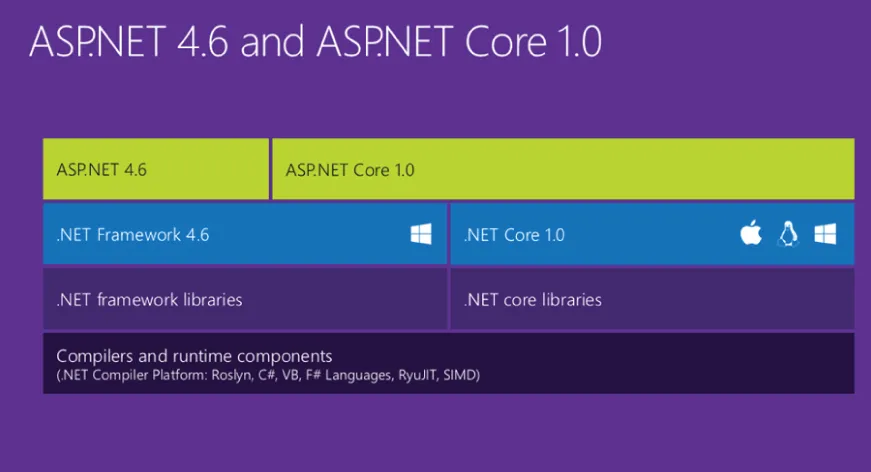
ASP.NET Core can run on the standard .NET framework (from version 4.5 onward), but in order to be cross‐platform it needed the CLR to be cross‐platform as well. That’s why .NET Core was released. .NET Core is a small, cloud‐optimized, and modular implementation of .NET, consisting of the CoreCLR runtime and .NET Core libraries. The peculiarity is that this runtime is made of many components that can be installed separately depending on the necessary features, can be updated individually, and are bin‐deployable so that different applications can run on different versions without affecting each other. And, of course, it can run on OSX and Linux.
.NET Core also provides a command‐line interface (referred to as .NET CLI) that is used by both tools and end users to interact with the .NET Core SDK.

Visual Studio Code

Visual Studio Code is the cross‐platform text editor developed by Microsoft for building ASP.NET Core applications (and many other frameworks and languages) without the full‐fledged Visual Studio. It can also be used on OSX and Linux.

Visual Studio 2017

Visual Studio 2017 introduces a completely renewed installation procedure based on “workloads” to better tailor it to users’ needs. One of these workloads, the ASP.NET one, includes integration with the most popular front‐end tools and frameworks. This book covers them further in the upcoming chapters.

Versions Covered in this Book

I hope that now the version and naming madness is a bit clearer. This book covers Visual Studio 2017, ASP.NET Core (and ASP.NET Core MVC), and .NET Core, but it will not cover anything that is related to the full framework. At the end of the book, Visual Studio Code is also covered.
Figure 1‐1 shows how all these components relate to each other.
Illustration of the new .NET stack.
FIGURE 1-1: Diagram of the new .NET stack

A BRIEF HISTORY OF THE MICROSOFT .NET WEB STACK

Before diving into the new features of ASP.NET Core and ASP.NET Core MVC, I think it is important to look back at the evolution of the .NET web stack and the reasons why we arrived at ASP.NET Core and .NET Core.

ASP.NET Web Forms

In 2001, Microsoft released the .NET framework and its first web framework: ASP.NET Web Forms. It was developed for two types of users:
  • Developers who had experience with classic ASP and were already building dynamic web sites mixing HTML and server‐side code in Jscript. They were also used to interacting with the underlying HTTP connection and web ...

Table of contents

  1. COVER
  2. TITLE PAGE
  3. TABLE OF CONTENTS
  4. FOREWORD
  5. INTRODUCTION
  6. 1 What’s New in ASP.NET Core MVC
  7. 2 The Front‐End Developer Toolset
  8. 3 Angular in a Nutshell
  9. 4 Bootstrap in a Nutshell
  10. 5 Managing Dependencies with NuGet and Bower
  11. 6 Building Your Application with Gulp and webpack
  12. 7 Deploying ASP.NET Core
  13. 8 Developing Outside of Windows
  14. 9 Putting It All Together
  15. END USER LICENSE AGREEMENT

Frequently asked questions

Yes, you can cancel anytime from the Subscription tab in your account settings on the Perlego website. Your subscription will stay active until the end of your current billing period. Learn how to cancel your subscription
No, books cannot be downloaded as external files, such as PDFs, for use outside of Perlego. However, you can download books within the Perlego app for offline reading on mobile or tablet. Learn how to download books offline
Perlego offers two plans: Essential and Complete
  • Essential is ideal for learners and professionals who enjoy exploring a wide range of subjects. Access the Essential Library with 800,000+ trusted titles and best-sellers across business, personal growth, and the humanities. Includes unlimited reading time and Standard Read Aloud voice.
  • Complete: Perfect for advanced learners and researchers needing full, unrestricted access. Unlock 1.4M+ books across hundreds of subjects, including academic and specialized titles. The Complete Plan also includes advanced features like Premium Read Aloud and Research Assistant.
Both plans are available with monthly, semester, or annual billing cycles.
We are an online textbook subscription service, where you can get access to an entire online library for less than the price of a single book per month. With over 1 million books across 990+ topics, we’ve got you covered! Learn about our mission
Look out for the read-aloud symbol on your next book to see if you can listen to it. The read-aloud tool reads text aloud for you, highlighting the text as it is being read. You can pause it, speed it up and slow it down. Learn more about Read Aloud
Yes! You can use the Perlego app on both iOS and Android devices to read anytime, anywhere — even offline. Perfect for commutes or when you’re on the go.
Please note we cannot support devices running on iOS 13 and Android 7 or earlier. Learn more about using the app
Yes, you can access Front-end Development with ASP.NET Core, Angular, and Bootstrap by Simone Chiaretta in PDF and/or ePUB format, as well as other popular books in Computer Science & Web Programming. We have over one million books available in our catalogue for you to explore.