These four volumes present innovative thematic applications implemented using the open source software QGIS. These are applications that use remote sensing over continental surfaces. The volumes detail applications of remote sensing over continental surfaces, with a first one discussing applications for agriculture. A second one presents applications for forest, a third presents applications for the continental hydrology, and finally the last volume details applications for environment and risk issues.
- English
- ePUB (mobile friendly)
- Available on iOS & Android
eBook - ePub
QGIS and Generic Tools
About this book
Information
1
Introduction to QGIS
1.1. History
QGIS (formerly known as Quantum GIS) is a free, open-source, cross-platform and scalable GIS tool with plugin development in Python and C++ languages. This is one of the official projects of the Open Source Geospatial Foundation (OSGeo, www.osgeo.org), whose mission is to help and promote the collaborative development of open-source geomatics software.
Today QGIS is a geographic information processing software suite that is popular with many users (www.qgis.org). Friendly and ergonomic, it makes it possible to collect, store, process, analyze, manage and present all types of spatial and geographic data similarly to the most highly priced software.
Initiated by Gary Sherman in 2002, QGIS was originally intended to be a data visualization tool for Geographic Resources Analysis Support System (GRASS) and PostGIS (Geographic Database Management System). It became a project of the OSGeo Foundation in 2007. The first major version 1.0 was released in 2009, version 2.0 in 2013 and version 3.0 is expected by the end of 2017. Supported by a community of developers structured into project committees, QGIS maintains a steady pace of integration of new features, resulting in a new minor release every 4 months (the most recent version is 2.18, version 3.0 is expected for 8 December 2017). In addition, the constant enrichment of the plugin library allows users to continuously benefit from new functionalities for customized uses and treatments.
The development of QGIS has been made with the contributions of a community of developers, translators and anomaly reporters who generally work on a voluntary basis but in some cases are professionals of an institution wishing to contribute to the project. A project steering committee ensures cohesion, the orientations of the project and the federation of the community.
Development is assured by a multitude of contributors, each competent in their field, forming a global QGIS community. There were 112 in the world in May 2016 at the time of the 15th international meeting of developers of QGIS in Girona. The management of contributions, exchanges with users and the diffusion of up-to-date news on the project can take place thanks to QGIS community spaces: websites, wikis, forums, mailing lists and the blog portal of the Frenchspeaking user group: http://osgeo.asso.fr/content/project/qgis-user-fr.
Technically, QGIS integrates the Geospatial Data Abstraction Library (GDAL), which allows it to read and process a large number of geographic images (free and proprietary). QGIS also supports a variety of vector data formats (PostgreSQL-PostGIS, Shapefiles, GPX, GeoJSON, SQLite, KML, MapInfo, Autocad DXF, ESRI Personal Geodatabase, Oracle Spatial, Erdas, ENVI, MBTiles, etc.). Other processing libraries such as Sextante are also integrated into QGIS.
Distributed under the GNU/GPL (General Public License) version 2, QGIS allows free access to a powerful, inexpensive GIS program that can be used on most platforms: GNU/Linux, Unix, Mac OS X and Windows.
1.2. QGIS graphical user interface
The QGIS graphical user interface (GUI) is presented below with, as illustrative data, the ROUTE 120® database available in open licensing on the site of the French National Geographic Institute (IGN): http://professionnels.ign.fr/route120.
1.2.1. Standard interface
As a standard, the interface presents (Figure 1.1):
- – the Map View;
- – the Browser, Layers and Overview Panel in the left panel;
- – toolbars containing tools grouped by functionality around the map;
- – the Status Bar with cursor coordinates, the coordinate system, scale, etc., at the bottom of the screen.
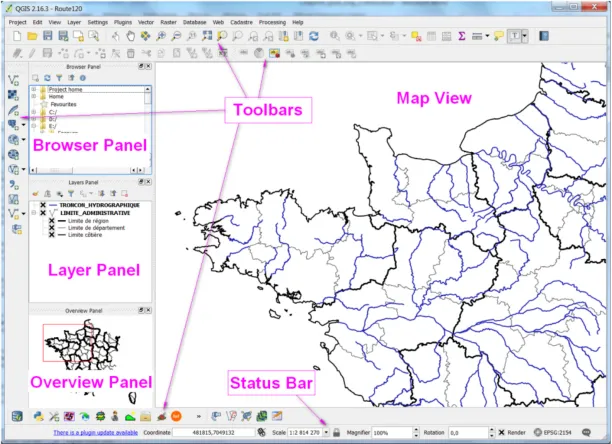
Figure 1.1. Standard QGIS GUI (v2.16) with ROUTE 120® database
1.2.2. Settings
The pre-setup of QGIS is done using the basic options of the software accessible via the Settings menu> Options (Figure 1.2).
The various tabs allow you to configure:
- – “General”: the default options;
- – “CRS”: the definition of the coordinate system;
- – “Networks”: network and proxy settings for Internet access.
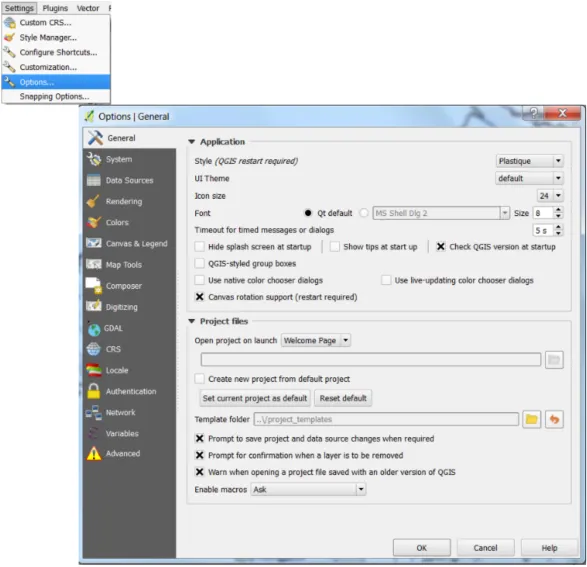
Figure 1.2. Settings: “Options” menu
1.2.3. Add layer
Adding layers is done using the “Manage Layers” toolbar buttons depending on the layer type (Figure 1.3).
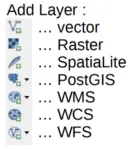
Figure 1.3. “Manage Layers” toolbar
1.2.4. QGIS project
The QGIS working environment is saved in a project materialized by a file with the extension .qgs.
The information contained are as follows:
- – open layers with links to access them;
- – thematic analyses;
- – the requests made;
- – the semiology (style) of the layers;
- – the projection used;
- – zoom;
- – completed layouts (maps);
- – etc.
Since data are not contained in the project (Figure 1.4), care must be taken to preserve the access paths to the project when moving or transferring files.
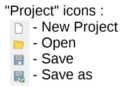
Figure 1.4. Toolbar “project”
1.2.5. Navigation
The “Map Navigation” toolbar allows you to move and adjust the zoom of the screen (Figure 1.5).
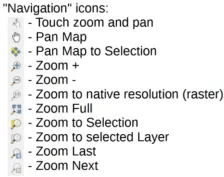
Figure 1.5. “Map Navigation” toolbar
1.2.6. Attributes of entities
The “Attributes” toolbar allows you to select the entities, access and query the attribute data (Figure 1.6).
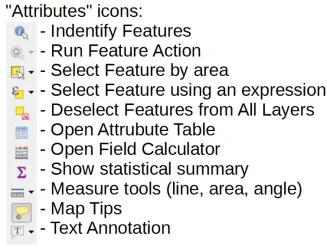
Figure 1.6. “Attributes” toolbar
1.3. The processing module, the toolkit for spatial analysis
1.3.1. History and interest of the treatment module
Since the earliest versions, QGIS software has provided spatial processing and analysis functions. But until version 1.8, these functions were only accessible via the drop-down menus and buttons of the main interface of the software. This only allowed the functions to be used in a graphic mode. It was therefore impossible to repeat one or more operations without laboriously reworking them with the interface.
In addition, since the QGIS software was designed in a modular architecture, many functions were available via additional extensions that users install according to their own needs. The disadvantage was that the various processing functions were dispersed in the menus of the different extensions. For the user, it was not always very intuitive in the interface to find the various useful tools, a chain of treatments requiring the use of very different menus.
These reasons prompted QGIS developers to offer a toolkit that allows the processing functions of the software and its extensions to be integrated into a common interface. It was at the time of the release of version 2.0 of QGIS in September 2013 that this Processing Toolbox appeared. This is actually the integration and enhancement of a toolkit called Sextante that was previously available as an extension.
From the start, the developers of this module conceived it as the most open and the most configurable possible. Not only did it have to centralize the processing functions p...
Table of contents
- Cover
- Table of Contents
- Title
- Copyright
- Introduction
- 1 Introduction to QGIS
- 2 Introduction to GDAL Tools in QGIS
- 3 GRASS GIS Software with QGIS
- 4 The Use of SAGA GIS Modules in QGIS
- 5 Orfeo ToolBox Applications
- 6 Online Publication of a Land Cover Map Using LizMap
- 7 GeoHealth and QuickOSM, Two QGIS Plugins for Health Applications
- List of Authors
- Index
- Scientific Committee
- End User License Agreement
Trusted by 375,005 students
Access to over 1.5 million titles for a fair monthly price.
Study more efficiently using our study tools.
Frequently asked questions
Yes, you can cancel anytime from the Subscription tab in your account settings on the Perlego website. Your subscription will stay active until the end of your current billing period. Learn how to cancel your subscription
No, books cannot be downloaded as external files, such as PDFs, for use outside of Perlego. However, you can download books within the Perlego app for offline reading on mobile or tablet. Learn how to download books offline
Perlego offers two plans: Essential and Complete
- Essential is ideal for learners and professionals who enjoy exploring a wide range of subjects. Access the Essential Library with 800,000+ trusted titles and best-sellers across business, personal growth, and the humanities. Includes unlimited reading time and Standard Read Aloud voice.
- Complete: Perfect for advanced learners and researchers needing full, unrestricted access. Unlock 1.5M+ books across hundreds of subjects, including academic and specialized titles. The Complete Plan also includes advanced features like Premium Read Aloud and Research Assistant.
We are an online textbook subscription service, where you can get access to an entire online library for less than the price of a single book per month. With over 1.5 million books across 990+ topics, we’ve got you covered! Learn about our mission
Look out for the read-aloud symbol on your next book to see if you can listen to it. The read-aloud tool reads text aloud for you, highlighting the text as it is being read. You can pause it, speed it up and slow it down. Learn more about Read Aloud
Yes! You can use the Perlego app on both iOS and Android devices to read anytime, anywhere — even offline. Perfect for commutes or when you’re on the go.
Please note we cannot support devices running on iOS 13 and Android 7 or earlier. Learn more about using the app
Please note we cannot support devices running on iOS 13 and Android 7 or earlier. Learn more about using the app
Yes, you can access QGIS and Generic Tools by Nicolas Baghdadi,Clément Mallet,Mehrez Zribi in PDF and/or ePUB format, as well as other popular books in Biological Sciences & Environmental Science. We have over 1.5 million books available in our catalogue for you to explore.