- English
- ePUB (mobile friendly)
- Available on iOS & Android
About this book
NOTE: The correct URL to access the Sybex interactive online test bank and study tools is www.wiley.com/go/sybextestprep. The book's back cover, Introduction, and last page in the bookprovided the wrong URL. We apologize for any confusion and inconvenience this may have caused you.
Comprehensive interactive exam preparation plus expert insight from the field
CompTIA Server+ Study Guide Exam SK0-004 is your ideal study companion for the SK0-004 exam. With 100% coverage of all exam objectives, this guide walks you through system hardware, software, storage, best practices, disaster recovery, and troubleshooting, with additional coverage of relevant topics including virtualization, big data, cloud storage, security, and scalability. Get an 'in the trenches' view of how server and data storage administration works in a real-world IT environment. From the basics through advanced topics, you'll learn how to deliver world-class solutions in today's evolving organizations by getting under the hood of technologies that enable performance, resiliency, availability, recoverability, and simplicity. Gain access to the Sybex interactive online learning environment, which features electronic flashcards, a searchable glossary, test bank, and bonus practice exams to reinforce what you have learned.
Using and understanding in-house storage devices and the cloud has become an urgent skill for any IT professional. This is your comprehensive, expert driven study guide for taking the CompTIA Server+ exam SK0-004
- Study 100% of exam objectives and more
- Understand storage design, implementation, and administration
- Utilize bonus practice exams and study tools
- Gain a real-world perspective of data storage technology
CompTIA Server+ Study Guide Exam SK0-004 is your ticket to exam day confidence.

Frequently asked questions
- Essential is ideal for learners and professionals who enjoy exploring a wide range of subjects. Access the Essential Library with 800,000+ trusted titles and best-sellers across business, personal growth, and the humanities. Includes unlimited reading time and Standard Read Aloud voice.
- Complete: Perfect for advanced learners and researchers needing full, unrestricted access. Unlock 1.4M+ books across hundreds of subjects, including academic and specialized titles. The Complete Plan also includes advanced features like Premium Read Aloud and Research Assistant.
Please note we cannot support devices running on iOS 13 and Android 7 or earlier. Learn more about using the app.
Information
Chapter 1
Server Hardware
- ✓ 1.1 Explain the purpose and function of server form factors
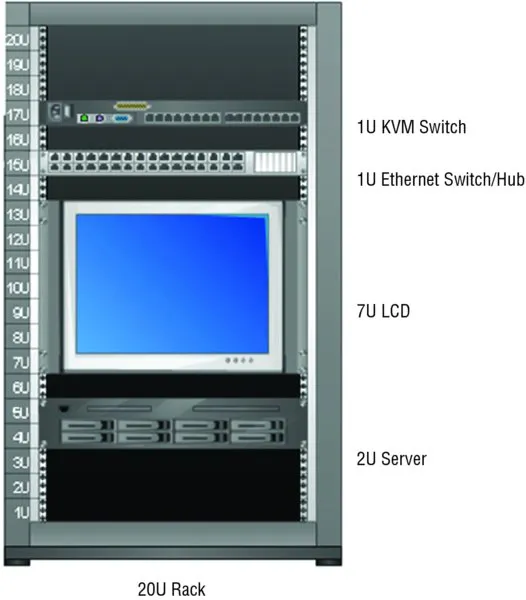
- Rack mount (dimensions [1U, 2U, 4U], cable management arms, rail kits)
- Tower
- Blade technology (blade enclosure [backplane/midplane, power supply sockets, network modules/switches, management modules], blade server)
- ✓ 1.2 Given a scenario, install, configure and maintain server components
- CPU (Multiprocessor vs. multicore, socket type, cache levels: L1, L2, L3, speeds [core, bus, multiplier], CPU stepping, architecture [x86, x64, ARM])
- RAM (ECC vs. non-ECC, DDR2, DDR3, number of pins, static vs. dynamic, module placement, CAS latency, timing, memory pairing)
- Bus types, bus channels and expansion slots (height differences and bit rate differences, PCI, PCIe, PCI-X)
- NICs
- Hard drives
- Riser cards
- RAID controllers
- BIOS/UEFI (CMOS battery)
- Firmware
- USB interface/port
- Hotswap vs. non-hotswap components
- ✓ 1.3 Compare and contrast power and cooling components
- Power (voltage [110V vs. 220V vs. -48V, 208V vs. 440V/460V/480V], wattage, consumption, redundancy, 1-phase vs. 3-phase power, plug types [NEMA, Edison, twist lock])
- Cooling (airflow, thermal dissipation, baffles/shrouds, fans, liquid cooling)

Server Form Factors
Rack Mount

Dimensions
Table of contents
- Cover
- Title page
- Copyright
- Dedication
- Acknowledgments
- About the Author
- Introduction
- Assessment Test
- Answers to Assessment Test
- Chapter 1 Server Hardware
- Chapter 2 Installing and Configuring Servers
- Chapter 3 Server Maintenance
- Chapter 4 Storage Technologies
- Chapter 5 Identifying Capacity and Fault Tolerance Requirements
- Chapter 6 Securing the Server
- Chapter 7 Securing Server Data and Network Access
- Chapter 8 Networking
- Chapter 9 Disaster Recovery
- Chapter 10 Troubleshooting Hardware and Software Issues
- Chapter 11 Troubleshooting Connectivity Issues
- Chapter 12 Troubleshooting Storage Issues
- Appendix Answers to Review Questions
- Advert
- EULA